Our Top Picks
 Logitech Creators Blue Yeti USB Microphone for PC1 Count (Pack of 1)4.92 x 4.72 x 11.61 inches3.51 poundsCheck on Amazon
 RØDE NT-USB Mini Studio-Quality USB Condenser Microphone4.257.3 x 2.4 x 2 inches1.3 poundsCheck on Amazon
The best usb microphones under $200 are cardioid condenser models with a mute button and headphone monitoring, and the Audio-Technica AT2020USB-X is the top pick because its listing names 24-bit/96 kHz sampling, USB-C output, a mute button and a headphone jack. This guide compares six desk microphones from listing specifications so you can match pickup patterns and controls to your room.
Quick Comparison
| Model | Key specs (per listing) | Best for |
|---|---|---|
| Audio-Technica AT2020USB-X | Cardioid condenser, 24-bit/96 kHz, USB-C, mute, headphone jack | Podcasts and voice recording |
| Sennheiser Profile USB | Cardioid condenser, table stand, 1.2 m USB-C cable, mute, gain, mix, volume | Home office and calls |
| Logitech Blue Yeti | Condenser, 4 pickup patterns, Blue VO!CE effects | Flexible recording |
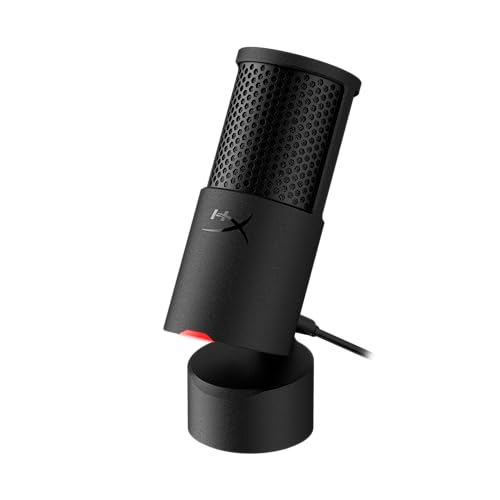
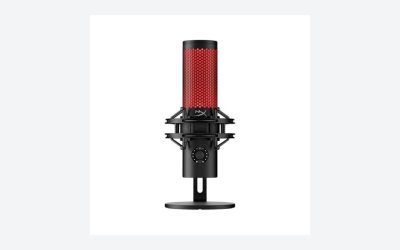
| HyperX QuadCast S | RGB, anti-vibration shock mount, 4 polar patterns, pop filter | Streaming and gaming |
| RODE NT-USB Mini | USB-C, magnetic stand, built-in pop filter, zero-latency monitoring | Small desks |
| HyperX DuoCast | Cardioid and omnidirectional, low-profile shock mount, pop filter | Compact streaming desks |
1. Audio-Technica AT2020USB-X
Spec line: Cardioid condenser USB microphone, 24-bit/96 kHz sampling rate, USB-C output, mute button, headphone jack.

Audio-Technica AT2020USB-X Cardioid Condenser USB Microphone | 24-bit/96 kHz sampling rate, USB-C output, mute button, headphone jack, podcasting, streaming, recording
Chosen because it specifies 24-bit/96 kHz sampling rate and USB-C output.
View on AmazonThe AT2020USB-X leads the list because its listing gives the most concrete specifications: a cardioid condenser capsule, 24-bit/96 kHz sampling, a USB-C connection, a mute button and a headphone jack for monitoring. It covers podcasts, streams and voice recording with one cable and no interface.
The trade-off is that it offers one pickup pattern. Unlike the Blue Yeti it cannot switch to omnidirectional for a group around the table, so it suits a single speaker at a desk. It also has no built-in lighting or software effects, which some streamers prefer and others miss. The listing does not state a stand or pop filter, so check the maker page for what is included.
- Pros: 24-bit/96 kHz and USB-C per listing
- Pros: Mute button and headphone jack
- Pros: Cardioid pattern focuses on one speaker
- Cons: Single pickup pattern
- Cons: Stand and pop filter not listed
2. Sennheiser Profile USB
Spec line: USB cardioid condenser microphone with table stand, 1.2 m USB-C cable, mute button, built-in headphone jack, gain, mix and volume controls.

SENNHEISER Professional Profile - USB Cardioid Condenser Microphone & Table Stand, 1.2 m USB-C Cable - Mute Button, Built-in Headphone Jack, Gain, Mix & Volume Control, for PC & Mac,Black
Chosen because it specifies USB Cardioid Condenser Microphone & Table Stand and 1.2 m USB-C Cable.
View on AmazonThe Profile is aimed at people who want controls on the mic itself. The listing names a table stand and a 1.2 m USB-C cable, plus mute, gain, mix and volume controls and a headphone jack. Mix control lets you balance your own voice against the computer audio in your headphones, which helps on calls and recordings.
The cardioid pattern favors a speaker in front and reduces sound from the rear, which suits a home office with a monitor behind the microphone. Like the AT2020USB-X it is single-pattern, so group recording around one mic is not its strength. A stand is included per listing, though a boom arm would free up desk space.
- Pros: Stand and USB-C cable listed
- Pros: Gain, mix and volume controls on the mic
- Pros: Mute button and headphone jack
- Cons: Single cardioid pattern
- Cons: Sampling specs not stated in listing
3. Logitech Blue Yeti
Spec line: USB condenser microphone, four pickup patterns, Blue VO!CE effects, plug and play, for PC and Mac.
Logitech Creators Blue Yeti USB Microphone for PC, Mac, Gaming, Recording, Streaming, Podcasting, Studio and Computer Condenser Mic with Blue VO!CE effects, 4 Pickup Patterns, Plug and Play - Blackout
Chosen because it specifies Mac and Gaming.
View on AmazonThe Yeti remains a flexible pick because the listing names four pickup patterns. That means one microphone can handle a solo voice, an interview across a table, a stereo source or a group conversation. Blue VO!CE effects are software tools for shaping the voice on a Logitech platform.
Flexibility has a cost. It is a large microphone and needs its own desk space, and the multiple patterns make it easy to leave on a setting that picks up more room than you want. In a noisy room, cardioid mode and close placement are the safest settings. The listing is for the Blackout color and does not state sampling figures, so check the maker page if bit depth matters to you.
- Pros: Four pickup patterns per listing
- Pros: Plug and play for PC and Mac
- Pros: Software effects for streamers
- Cons: Large body on a small desk
- Cons: Can pick up room noise in the wrong pattern
4. HyperX QuadCast S
Spec line: RGB USB condenser microphone, anti-vibration shock mount, four polar patterns, pop filter, gain control.

HyperX QuadCast S – RGB USB Condenser Microphone for PC, PS4, PS5 and Mac, Anti-Vibration Shock Mount, 4 Polar Patterns, Pop Filter, Gain Control, Gaming, Streaming, Podcasts, Twitch, YouTube, Discord
Chosen because it specifies RGB USB Condenser Microphone for PC and PS4.
View on AmazonThe QuadCast S combines four polar patterns with an anti-vibration shock mount and a pop filter, which the listing describes as included. The RGB lighting makes it a visible part of a streaming setup, and compatibility lists PC, PS4, PS5 and Mac.
The shock mount reduces desk bumps and keyboard thumps, which is a practical benefit for gamers who type and click while recording. The microphone is larger than some alternatives, and the lighting may not suit a quiet home office. If you need a plain, small desk mic, the next two picks fit better.
- Pros: Anti-vibration shock mount and pop filter listed
- Pros: Four polar patterns
- Pros: PC, PS4, PS5 and Mac compatibility
- Cons: RGB styling is not for every desk
- Cons: Bulkier than compact USB mics
5. RODE NT-USB Mini
Spec line: USB-C condenser microphone, magnetic desk stand, built-in pop filter, zero-latency monitoring.
RØDE NT-USB Mini Studio-Quality USB Condenser Microphone | Magnetic desk stand, built-in pop filter, zero-latency monitoring, studio condenser sound over simple USB-C plug and play
Chosen because it specifies Magnetic desk stand and built-in pop filter.
View on AmazonThe NT-USB Mini is the compact pick. The listing mentions a magnetic desk stand, a built-in pop filter, zero-latency monitoring and USB-C plug-and-play, which keeps the footprint small and the setup simple. That suits a desk where the monitor, keyboard and speakers already compete for space.
Zero-latency monitoring lets you hear yourself without delay in your headphones, which helps when you speak or sing along to a track. The listing states a single USB-C connection and does not mention a mute button or pickup pattern options, so it is best for one speaker and straightforward recording.
- Pros: Compact with magnetic stand
- Pros: Built-in pop filter
- Pros: Zero-latency monitoring
- Cons: No mute button listed
- Cons: Pickup pattern options not stated
6. HyperX DuoCast
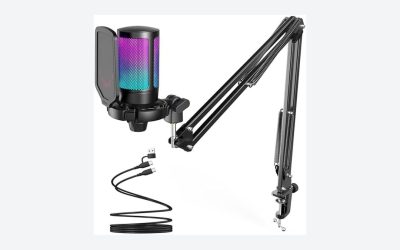
Spec line: RGB USB condenser microphone, cardioid and omnidirectional patterns, low-profile shock mount, pop filter, gain control.

HyperX DuoCast – RGB USB Condenser Microphone for PC, PS5, PS4, Mac, Low-profile Shock Mount, Cardioid, Omnidirectional, Pop Filter, Gain Control, Gaming, Streaming, Podcasts, Twitch, YouTube, Discord
Chosen because it specifies RGB USB Condenser Microphone for PC and PS5.
View on AmazonThe DuoCast offers two patterns, cardioid and omnidirectional, with a low-profile shock mount and a pop filter named in the listing. Fewer patterns than the QuadCast S means fewer choices to manage, and the low-profile mount keeps the microphone closer to the desk.
Omnidirectional mode picks up sound from all around, which helps when two people share a microphone, but it will also pick up more room reflections. For solo use, stay in cardioid. The RGB lighting is again a style choice, and the listing mentions compatibility with PC, PS5, PS4 and Mac.
- Pros: Cardioid and omnidirectional patterns
- Pros: Low-profile shock mount and pop filter
- Pros: Gain control
- Cons: Two patterns only
- Cons: Lighting may not suit office use
How to Choose USB Microphones Under $200
Choose a pickup pattern that fits your space
Cardioid pickup is the best default for one speaker because it favors the front of the microphone. Choose multiple patterns, like the Yeti and QuadCast S, only if you record interviews or group conversations. Omnidirectional mode is a feature to turn on for a reason, not a setting to leave on.
USB microphones for home office
For calls and recordings from a spare room, prefer a cardioid mic with a mute button and headphone jack, like the Sennheiser Profile or the AT2020USB-X. A built-in pop filter or mount helps in quiet offices where plosive sounds stand out.
USB microphones for small spaces
Choose compact desk mics, such as the RODE NT-USB Mini, if the desk is shallow. Avoid larger stand-mounted designs unless you also use a boom arm. Small rooms reflect sound, so keep the microphone close to your mouth, around a hand-width away, and speak across it rather than directly into the capsule.
USB microphones for gaming and streaming
Streamers benefit from an anti-vibration shock mount, which both HyperX models list. Gamers who use headphones should look for headphone monitoring so voice chat does not echo. Every microphone here is listed at or under $200, so the practical choice is features and size.
Which Pick Fits Which Setup
Pick the AT2020USB-X if you want a straightforward cardioid mic with documented sampling specs. Pick the Sennheiser Profile if you want on-mic gain, mix and volume. Pick the Yeti for flexibility, the QuadCast S for a streaming desk, the NT-USB Mini for compact setups, and the DuoCast for two patterns and a smaller mount. In every case, record a short trial clip in your own room and listen on headphones before you commit to a long recording session. If two models seem equal, favor the one with a mute button within reach and a headphone jack, because those two controls save the most time during real sessions. Also compare what ships in the box, since a stand, pop filter or cable that is missing from one listing can add to your total once you buy it separately.
Placement and Room Tips That Matter More Than Specs
Most USB microphones in this range can sound clean in a quiet room, and most can sound poor in an echoey one. Placement does more than a spec sheet. Keep the capsule about a hand-width from your mouth, point it slightly off-axis to reduce plosives, and keep it away from hard, bare walls. A rug, curtains or a bookshelf behind you absorbs reflections that no setting can remove.
Next, mind the desk. Keyboards and mouse clicks travel through the desk into a stand-mounted microphone, so a shock mount or a boom arm makes a real difference. If you are choosing between two similar models, pick the one that lists a shock mount, or budget for an arm. Finally, set the gain so your loudest words stay clear of distortion; the on-mic gain controls on the Sennheiser and HyperX listings make that adjustment simple.
Connection and Compatibility Notes
All six microphones connect by USB, but the connector end differs by model. The listings name USB-C for the AT2020USB-X, the Sennheiser Profile and the NT-USB Mini, while others do not state the connector in the text we compared. Check that your computer or console has the matching port, or that a cable or adapter is included. Software effects, such as Blue VO!CE on the Yeti, are optional extras that need the maker software and are not required for basic recording.
FAQ
Is a USB microphone good enough for podcasting?
Yes. Modern USB condenser microphones connect directly to a computer and include the converter, so no audio interface is needed for a solo or interview show.
What does cardioid mean?
Cardioid describes a heart-shaped pickup pattern that favors sound from the front and reduces sound from the sides and rear, which helps in rooms with background noise.
Do I need a pop filter?
A pop filter reduces plosive sounds from letters like p and b. Some of these mics list one built in or included; others may need one added.
Can I use a USB microphone on a console?
Some listings, like the HyperX models, name PS4 and PS5 compatibility. Check the maker page for your exact console before ordering.
How were these picks chosen?
They were compared from listing specifications, looking at pickup patterns, connections, controls and included hardware. Anything not stated is marked as not listed.
Last updated: November 2026
FAQ
Is a USB microphone good enough for podcasting?
What does cardioid mean?
Do I need a pop filter?
Can I use a USB microphone on a console?
How were these picks chosen?
More from Amazon
Programs that pair well with the guide above. Offers and eligibility are set by Amazon and may change.
Free shipping on eligible items, Prime Video and more. Eligible new members can start with a free trial.
Start a Prime free trialAd-free music streaming. Eligible new subscribers can start with a free trial.
Try Music Unlimited freeA Prime membership for ages 18-24 with a trial period. Eligibility is set by Amazon.
See Prime for Young AdultsAudiobooks and podcasts to listen to on the go. Eligible new members can start with a free trial.
Try Audible freeAs an Amazon Associate we earn from qualifying purchases.