Our Top Picks
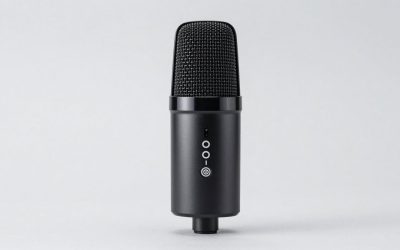
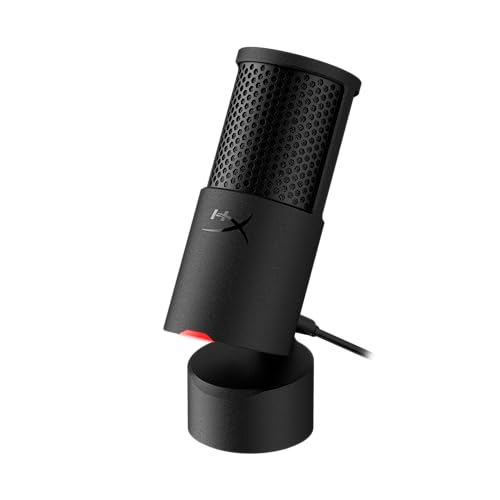 HyperX SoloCast 2 USB Condenser Gaming MicrophoneSoloCast 253 x 1.52 x 1.7 inches0.7 poundsCheck on Amazon
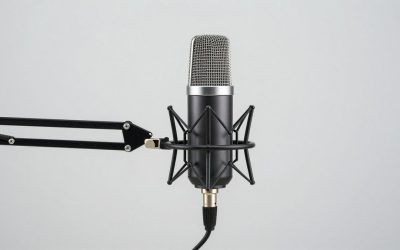
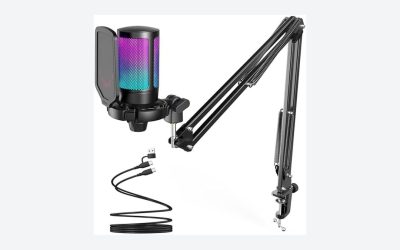
 FIFINE AmpliGame AM8 USB/XLR Dynamic Microphone for Gaming3.35 x 4.96 x 9.65 inches1.7 poundsCheck on Amazon
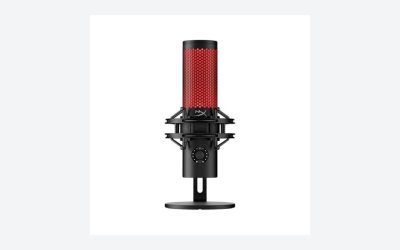
 Logitech Creators Blue Yeti USB Microphone for PC1 Count (Pack of 1)4.92 x 4.72 x 11.61 inches3.51 poundsCheck on Amazon
The best gaming microphones under $100 start with the HyperX SoloCast 2 for a plug-and-play USB-C condenser, while the FIFINE AmpliGame AM8 is the pick if you may want an XLR upgrade later. The Razer Seiren V3 Mini suits tight desks, the FIFINE A6T bundles an arm, and the Blue Yeti covers the widest range of uses.
Quick Comparison
| Model | Key specs (per listing) | Best for |
|---|---|---|
| HyperX SoloCast 2 | USB condenser, cardioid, 24-bit/96kHz, USB-C, tap-to-mute | Plug-and-play voice chat |
| FIFINE AmpliGame AM8 | Dynamic, USB/XLR, RGB, mute button, headphone jack, desktop stand | Noisy rooms and upgrade path |
| Razer Seiren V3 Mini | USB condenser, supercardioid, tap-to-mute with LED, shock absorber, ultra compact | Small spaces |
| FIFINE AmpliGame A6T | USB condenser kit, boom arm, pop filter, shock mount, gain control, mute, RGB indicator | One-box streaming setup |
| Logitech Blue Yeti | USB condenser, 4 pickup patterns, Blue VO!CE effects, plug and play | Streaming, podcasts, group chat |
All five mics below are compared from listing specifications, not from our own recordings, so use the spec lines to match features to your setup. The same picks also answer the home office, small space, and streaming questions covered in the guide and FAQ further down.
HyperX SoloCast 2: Simplest USB-C Condenser for Voice Chat
Listing specs: USB condenser microphone, 24-bit / 96kHz, cardioid pattern, USB-C connection, tap-to-mute, PC compatible.
HyperX SoloCast 2 USB Condenser Gaming Microphone | 24-bit | 96kHz | Cardioid | USB-C | Tap-to-Mute | PC Compatible
Chosen because it specifies 24-bit and 96kHz.
View on AmazonThe SoloCast 2 is the least complicated mic here. It connects over USB-C, uses a single cardioid pattern, and the tap-to-mute control means you can silence yourself without hunting for a software hotkey. For Discord calls, party chat, and casual streaming, that short feature list is a strength: there is almost nothing to configure.
The trade-off is flexibility. The listing shows one pickup pattern and no XLR output, so you cannot grow it into a mixer-based setup, and it does not list a boom arm or pop filter. Plan on a separate stand or arm if your desk is crowded. A cardioid condenser also hears room noise in front of it, so keyboard clatter is something to manage with placement rather than with settings.
Who should skip it: anyone who already knows they want a mixer-based setup, since the SoloCast 2 stays USB only. Who should buy it: players who want the shortest path from box to working voice chat on a PC.
Pros
- USB-C connection with 24-bit/96kHz capture listed
- Tap-to-mute is physical and quick
- Single pattern keeps setup simple
Cons
- No XLR output listed, so no upgrade path
- Condenser pickup can hear keyboard and fan noise
FIFINE AmpliGame AM8: Dynamic Mic With USB and XLR
Listing specs: Dynamic microphone, USB and XLR outputs, RGB light, mute button, headphones jack, desktop stand included.
FIFINE AmpliGame AM8 USB/XLR Dynamic Microphone for Gaming Streaming | Podcast Mic with RGB Light, Mute Button, Headphones Jack, Desktop Stand, for Vocal Recording Singing YouTube
Chosen because it specifies Podcast Mic with RGB Light and Mute Button.
View on AmazonThe AM8 is a dynamic microphone, which matters in a gaming room. Dynamic capsules generally pick up less distant sound than condensers, so fan hum and a clicky keyboard tend to sit further back in the mix. The listing shows both USB and XLR outputs, which means it works straight from a PC today and can move to an audio interface later.
It also lists a headphone jack for zero-latency monitoring and a mute button, both useful when you stream. The cost of a dynamic design is that you need to speak close to the mic, and the RGB lighting is a matter of taste. Gain and distance take a little practice compared with a condenser you can speak at from a hand span away.
Setup tip: speak across a fist-width distance from the grille and keep gain moderate. If you later add an interface, the XLR output lets you keep this mic rather than replacing it, which protects the money you already spent.
Pros
- USB and XLR outputs on one mic
- Headphone jack for monitoring your own voice
- Dynamic design suits untreated rooms
Cons
- Needs close speaking distance
- RGB light is not for everyone
Razer Seiren V3 Mini: Best for Small Desks
Listing specs: USB microphone, supercardioid condenser, tap-to-mute sensor with LED indicator, shock absorber, ultra compact, works with OBS, Discord, Zoom, Teams.

Razer Seiren V3 Mini USB Microphone, Supercardioid Condenser Mic, Black | Tap-to-Mute Sensor with LED Indicator, Shock Absorber, Ultra Compact, Works with OBS, Discord, Zoom, Teams
Chosen because it specifies Supercardioid Condenser Mic and Black.
View on AmazonIf your desk is crowded, the Seiren V3 Mini is the compact choice. The listing calls it ultra compact and describes a supercardioid condenser pattern, which is narrower than standard cardioid, so it aims to focus on what is directly in front of it. That is helpful in a small space where walls and a nearby PC fan are close.
The tap-to-mute sensor with an LED indicator shows at a glance whether you are live, and the shock absorber is listed to reduce desk thumps. As with any supercardioid mic, position matters: move off-axis and your voice will thin out. It also pairs with a basic boom arm if the compact footprint is still too big for your layout.
Best use: a one-screen desk, a dorm, or a shelf-style gaming corner. If you move between gaming and video meetings, the listed compatibility with Discord, Zoom, and Teams keeps one mic doing both jobs.
Pros
- Very compact footprint
- Narrow supercardioid pattern for focus
- LED shows mute status clearly
Cons
- Sensitive to off-axis positioning
- No XLR output listed
FIFINE AmpliGame A6T: Bundle With Arm and Pop Filter
Listing specs: USB gaming microphone kit, condenser mic, mute button, RGB indicator, boom arm, gain control, pop filter, shock mount.

FIFINE AmpliGame A6T USB Gaming Microphone Kit, Condenser Mic for Streaming | Mute Button, RGB Indicator, Boom Arm, Gain Control, Pop Filter, Shock Mount, for PC PS4/5 Discord Twitch Podcasts YouTube
Chosen because it specifies Condenser Mic for Streaming and Mute Button.
View on AmazonThe A6T is the all-in-one option. The listing shows a boom arm, pop filter, and shock mount in the kit, which would otherwise be three separate purchases. Mounting the mic on an arm frees desk space and puts the capsule closer to your mouth, which is the single biggest improvement most beginners can make.
The mic is a USB condenser with a gain control and mute button, so it is easy to set up but, like the SoloCast, it listens widely. The included accessories are convenient rather than premium; if you later want a sturdier arm, the clamp and mic are standard sizes to swap. Check the clamp opening against your desk thickness before buying.
A kit like this suits first-time streamers who do not want to research arms and filters separately. Veterans may replace the arm later, but the mic itself covers the basics of gain, mute, and plosive control.
Pros
- Boom arm, pop filter, and shock mount included
- Gain control and mute button on the mic
- Frees desk space once mounted
Cons
- Condenser pickup is room-sensitive
- Bundled arm may feel basic to some users
Logitech Creators Blue Yeti: Most Versatile Pick
Listing specs: USB condenser microphone, 4 pickup patterns, Blue VO!CE effects, plug and play, for PC and Mac, listed for gaming, recording, streaming, podcasting.
Logitech Creators Blue Yeti USB Microphone for PC, Mac, Gaming, Recording, Streaming, Podcasting, Studio and Computer Condenser Mic with Blue VO!CE effects, 4 Pickup Patterns, Plug and Play - Blackout
Chosen because it specifies Mac and Gaming.
View on AmazonThe Blue Yeti is the most flexible mic on this list because it lists four pickup patterns. Cardioid suits solo streaming, while the other patterns cover interviews or two people at one desk. If your use goes beyond gaming, say podcasts or recorded calls, that range is the reason to choose it over the compact options.
It is larger than the others and sits on its own stand, so it takes real desk room. The listing also mentions Blue VO!CE effects, which are software voice processing options if you want to shape your sound without extra plugins. Like all condensers, it hears the room, so aim it carefully and keep it off the keyboard side.
Think of it as the upgrade pick at the top of this price range: you pay for flexibility rather than a smaller size. If you only ever talk solo, the smaller compact options cover the same everyday use with less desk clutter.
Pros
- Four pickup patterns listed
- Blue VO!CE effects for voice shaping
- Plug-and-play on PC and Mac
Cons
- Large footprint on a small desk
- Condenser can pick up keyboard noise
How to Choose Gaming Microphones Under $100
Gaming microphones for gaming sessions
For long ranked sessions, a quick mute control and a mic that ignores your keyboard matter more than headline specs. A dynamic mic with XLR or a USB condenser with tap-to-mute both fit, as long as you set gain so teammates hear you without background clicks.
Gaming microphones for home office
If the same mic covers video calls, look for compatibility with Zoom and Teams in the listing and a clean mute indicator. Compact USB models avoid extra cables, and a pop filter softens plosive sounds in meetings.
Gaming microphones for small spaces
Short walls reflect sound back into a sensitive condenser. In a small room, favor a narrow pattern or a dynamic mic, mount it on an arm, and keep it close so the room has less chance to color your voice.
Pickup pattern and room noise
Cardioid and supercardioid condensers focus on the front, but they are sensitive. If you game next to a loud PC, a dynamic mic like the AM8 typically rejects more background than a condenser, as long as you stay within a few inches of it. If your room is quiet, a condenser captures more detail.
Connection: USB-C, USB, or XLR
USB mics work with no extra gear. Choose a model with XLR as well if you might add an audio interface later, because that is the only way to keep the mic when your setup grows. USB-C is worth checking against your PC ports so you do not need an adapter.
Desk space and mounting
A boom arm frees desk room and lowers keyboard noise transfer. Kits that include an arm save a separate purchase, while compact mics suit small spaces if you plan to use a stand. Measure your desk edge for the clamp, usually a few centimeters of thickness.
Budget ceiling: staying under $100
Staying under $100 means you can choose a quality USB mic and add a pop filter or arm separately. Prioritize the mic capsule and a quick mute control first, then accessories. Anything near the top of the range should add a real feature such as XLR or multiple patterns.
FAQ
Do I need XLR on a gaming microphone?
Not at first. USB mics connect directly to a PC or console. XLR matters only if you plan to use an audio interface or mixer later and want to keep the same mic.
Are condenser or dynamic microphones better for gaming?
Dynamic mics usually reject more room noise, while condensers capture more detail. For a noisy room, a dynamic mic is the safer start; for a quiet room, a condenser works well.
Which of these gaming microphones works for a home office?
The Seiren V3 Mini and SoloCast 2 are compact USB options with tap-to-mute, which suits video calls. The Yeti handles group calls through its multiple patterns.
What suits small spaces best?
The Razer Seiren V3 Mini is listed as ultra compact and the SoloCast 2 is a small USB-C mic. Pair either with a clamp arm to reclaim desk room.
Do these work on consoles?
Some listings mention PC, PS4/5, or Mac, but not all of them. Check the maker page for your console before buying, especially for USB-C versus USB-A connections.
Last updated: November 2026
FAQ
Do I need XLR on a gaming microphone?
Are condenser or dynamic microphones better for gaming?
Which of these gaming microphones works for a home office?
What suits small spaces best?
Do these work on consoles?
More from Amazon
Programs that pair well with the guide above. Offers and eligibility are set by Amazon and may change.
Free shipping on eligible items, Prime Video and more. Eligible new members can start with a free trial.
Start a Prime free trialAd-free music streaming. Eligible new subscribers can start with a free trial.
Try Music Unlimited freeA Prime membership for ages 18-24 with a trial period. Eligibility is set by Amazon.
See Prime for Young AdultsAudiobooks and podcasts to listen to on the go. Eligible new members can start with a free trial.
Try Audible freeAs an Amazon Associate we earn from qualifying purchases.