Shopping for a gaming PC under $1,500 in 2026 is trickier than it looks. Prices swing week to week, DDR5 memory costs have stayed stubbornly high, and a listing that claims “RTX 5070 gaming rig” can hide a weak power supply, half-speed SSD, or a CPU that bottlenecks the graphics card at 1440p. Meanwhile, budget prebuilts still ship with parts that were mid-range three generations ago, priced as though they weren’t.
This guide cuts through that. Below are six prebuilt desktops that genuinely deliver at or under the $1,500 mark, spanning everything from entry-level 1080p machines to 1440p high-refresh systems built around the RTX 5070 and 5070 Ti. We break down what specs actually matter at this budget, review the standout picks, and answer the questions buyers ask most often.
Our top picks
 KOTIN Prebuilt Gaming PC RTX 5070 12GB
- POWERED BY RTX 5070 12GB + RYZEN 7…
- 32GB (16x2) DDR5 MEMORY & 1TB NVMe SSD…
- IN 11.3-INCH Smart DISPLAY - An integrated smart…
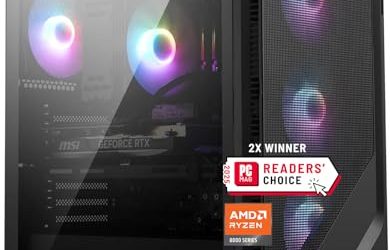
 msi Codex Z2 Gaming Desktop: AMD R7-8700F
- Driven by the AMD Ryzen 7 8700F with…
- The NVIDIA GeForce RTX 5070 is powered by…
- Simplistic Design: Enjoy the latest generation of Windows…
 STGAubron Gaming PC Desktop
- This Gaming PC Desktop is well-suited for a…
- This high-performance Gaming Computer Desktop is capable of…
- PC Gaming System: This gaming computer desktop is…
| Product | Key specs | |
|---|---|---|
| KOTIN Prebuilt Gaming PC RTX 5070 12GB | POWERED BY RTX 5070 12GB + RYZEN 7… 32GB (16x2) DDR5 MEMORY & 1TB NVMe SSD… IN 11.3-INCH Smart DISPLAY - An integrated smart… | Check price |
| msi Codex Z2 Gaming Desktop: AMD R7-8700F | Driven by the AMD Ryzen 7 8700F with… The NVIDIA GeForce RTX 5070 is powered by… Simplistic Design: Enjoy the latest generation of Windows… | Check price |
| STGAubron Gaming PC Desktop | This Gaming PC Desktop is well-suited for a… This high-performance Gaming Computer Desktop is capable of… PC Gaming System: This gaming computer desktop is… | Check price |
 Alienware Aurora Gaming Desktop Alienware Aurora Gaming Desktop | Legend perfected: Modern design with a matte basalt… Game changing graphics: Step into the future of… Marathon gaming unlocked: This high-performance technology ensures clean… | Check price |
 CyberPowerPC Gaming PC CyberPowerPC Gaming PC | System: AMD Ryzen 5 5500 3.6GHz 6 Cores… Graphics: AMD Radeon RX 6500 XT 4GB Graphics… Connectivity: 4 x USB-A 3.2 | 4 x… | Check price |
 Dell Gaming Tower Desktop PC Dell Gaming Tower Desktop PC | Processor: Intel Core i5-7500 7th Gen Memory: 16GB DDR4 RAM Storage: 256GB SSD | Check price |
 YAWYORE Gaming PC YAWYORE Gaming PC | CPU: AMD Ryzen7 5700X (up to 4.6GHz) 8-Core… Main board: MSI B550M-A PRO motherboard provides reliable… GPU: Geforce RTX 5060 8GB GDDR7 Graphics Cards… | Check price |
As an Amazon Associate we earn from qualifying purchases at no extra cost to you.
⚡ Save on Your Next PC — Amazon Prime
Prime members get fast free shipping on the systems above, plus early access to Prime Day & Black Friday PC deals. New members get a 30-day free trial.
Watch: Best Gaming PC Under $1500 — Video Review
How to Choose Gaming PC Under $1500
- Prioritize the GPU: Your graphics card determines roughly 70% of gaming performance. At this budget, an RTX 5070 (12GB) is the sweet spot for 1440p high settings, while an RTX 5070 Ti buys you headroom for ray tracing and future titles. Anything with 4GB or 8GB of older VRAM — like an RX 6500 XT or RX 580 — should cost well under $700, not $1,000.
- Match the CPU to the resolution: A Ryzen 7 9700X or Intel Core Ultra 7 265F will comfortably feed an RTX 5070 at 1440p with no meaningful bottleneck. Don’t overspend on a flagship CPU you won’t use; at this price, GPU dollars beat CPU dollars every time.
- 32GB DDR5 is the new baseline: 16GB still works for most games in 2026, but modern open-world titles, streaming overlays, and background apps eat into it quickly. If two systems are close in price, take the one with 32GB — upgrading later costs more than it should right now.
- Check storage capacity and type: Insist on NVMe, not SATA. A 512GB drive fills up after four or five modern installs, so 1TB is the practical minimum and 2TB is worth paying a modest premium for. Confirm there’s a free M.2 slot for later expansion.
- Look past the spec sheet at the chassis and PSU: Cheap prebuilts save money on the parts you can’t see — proprietary motherboards, undersized power supplies, and cases with poor airflow. A system with a standard ATX layout and a quality 650W+ unit is far easier and cheaper to upgrade in two years.
The Best Picks Reviewed
KOTIN RTX 5070 / Ryzen 7 9700X Prebuilt
This is the strongest raw value on the list, pairing an RTX 5070 with the excellent Ryzen 7 9700X, 32GB of DDR5, and a 1TB SSD — a combination that delivers well over 100fps at 1440p in most current titles. It’s a boutique build rather than a big-brand system, so support is more limited, but the component choices are exactly what an enthusiast would pick themselves.
MSI Codex Z2 (R7-8700F, RTX 5070)
MSI’s Codex Z2 matches the KOTIN’s GPU and memory while doubling storage to 2TB NVMe, which makes it the better pick if you keep a large library installed. The R7-8700F is slightly behind the 9700X in productivity work but effectively identical in games, and you get MSI’s warranty support and a genuinely well-ventilated chassis.
Lenovo Legion Tower 5i (Core Ultra 7 265F, RTX 5070 Ti)
The only system here with an RTX 5070 Ti, the Legion Tower 5i is the best choice if you’re gaming at 1440p with ray tracing on or eyeing a 4K panel down the road. Lenovo uses standard ATX components throughout, so upgrades are painless, and the bundled three months of PC Game Pass is a genuine bonus rather than filler.
Alienware Aurora (RTX 5070, Core Ultra 7 265F)
The Aurora brings the best build quality, cooling, and warranty support of any machine on this list, with performance essentially matching the other RTX 5070 systems. You pay a premium for the brand and the chassis, and configurations vary — check that the model you’re buying includes at least 16GB of RAM and a 1TB drive before committing.
STGAubron Core i7 / RX 580 Desktop
This is an entry-level machine, not a 1440p contender: the RX 580 is a capable 1080p card for esports and older titles, but it will struggle with 2025–26 releases at high settings. It only makes sense as a first PC or a budget backup at a genuinely low price — treat it as a stepping stone, not a long-term build.
Frequently Asked Questions
Is $1,500 enough for a 1440p gaming PC in 2026?
Comfortably, yes. An RTX 5070 paired with a modern eight-core CPU handles 1440p high settings at high frame rates in virtually every current title, and DLSS 4 extends that further in demanding games.
Should I buy prebuilt or build my own?
Building your own still saves money and gives you full control over parts, but the gap has narrowed. If you don’t want to troubleshoot BIOS updates or handle RMAs yourself, a prebuilt with a single warranty covering the whole system is a reasonable trade.
RTX 5070 or RTX 5070 Ti — is the upgrade worth it?
The 5070 Ti offers roughly 20–25% more performance and additional VRAM, which matters most for ray tracing and 4K. If the price difference is under $200 and it keeps you within budget, it’s the better long-term buy.
Can I upgrade these systems later?
Mostly, yes — the Lenovo, MSI, and KOTIN builds use standard ATX parts, making GPU, RAM, and storage swaps straightforward. Always verify the power supply wattage before installing a more demanding graphics card.
Final Thoughts
For most buyers, the KOTIN RTX 5070 build offers the best pure performance-per-dollar at this budget, while the MSI Codex Z2 is the smarter pick if the extra 2TB of storage and stronger warranty support matter to you. If you can stretch to the top of the range, the Lenovo Legion Tower 5i and its RTX 5070 Ti is the most future-proof machine here — and the easiest to upgrade when the time comes.