Key takeaways
- Compare the best Glorious gaming mouse options by shape, size, weight and grip, from the symmetrical Model O 2 to the ergonomic Model I 2 range.
As an Amazon Associate we earn from qualifying purchases
Choosing the best glorious gaming mouse is less about chasing the highest number on a spec sheet and more about matching a shape to your hand. Glorious built its reputation on lightweight mice, and its current lineup looks similar at a glance: most models share the same BAMF 2.0 optical sensor, similar battery claims, and a focus on low weight. Underneath that shared foundation, the differences are real. One mouse is symmetrical and built for claw and fingertip grips, another is ergonomic and built to fill a palm, and another adds extra thumb buttons for games that reward more binds. Picking the wrong shape can make even a capable mouse feel awkward, while picking the right shape makes the sensor and switches disappear into the background.
This guide walks through five Glorious mice by the factors that separate them: symmetrical versus ergonomic shapes, full-size versus mini sizing, wired and wireless flexibility, weight, and sensor and switch specifications as published by the manufacturer, plus how each design suits different grip styles and hand sizes. All five are Glorious gaming mice, so the comparison stays focused on fit and intended use.
How the Glorious Lineup Is Organised
Glorious organises its mice mainly by letter, and the letter tells you the shape family. The Model O family is the symmetrical line, described by the manufacturer as right-handed symmetrical, with a centred hump and no thumb rest. The Model D family is ergonomic: right-handed and sculpted, with a higher, more supportive profile that follows the curve of a right hand. The Model I family is also ergonomic, but it goes further, adding a pronounced thumb rest and more side buttons, making it the most feature-heavy shape in this guide.
The current generation covered here is largely the 2 series, built around the Glorious BAMF 2.0 optical sensor. According to manufacturer specifications, that sensor reaches up to 26,000 DPI, tracks at up to 650 IPS, and handles up to 50G of acceleration across these models. That shared sensor is useful context: buyers do not need to choose a Glorious mouse primarily for raw tracking ceiling, because the headline sensor figures are consistent across most of the lineup. The real decision is shape, size, buttons, and weight.
The PRO line changes the switch focus. Where the standard wireless models use Glorious switches rated for 80 million clicks and a maximum polling rate of 1,000Hz, the Model O 2 PRO uses Glorious optical switches rated for 100 million clicks, according to the manufacturer product guide. Connectivity is the other dividing line. Most models here offer three ways to connect: 2.4 GHz wireless for gaming, Bluetooth 5.2 LE for longer battery life and everyday use, and a wired mode that also allows play while charging. The PRO model is centred on 2.4 GHz wireless and wired use rather than Bluetooth versatility.
Shape First: Symmetrical vs Ergonomic
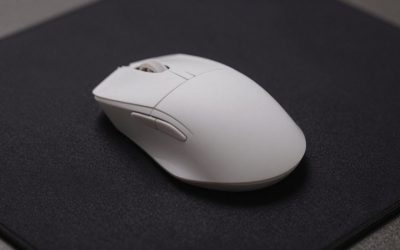
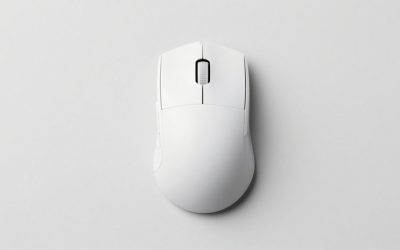
A symmetrical mouse keeps its highest point near the centre and avoids locking the hand into one sculpted position. That neutrality tends to suit claw and fingertip grips, where the fingers do much of the steering and the palm makes limited contact. It also tends to feel agile for frequent lifting and repositioning. The Model O 2 Wireless, Model O 2 Mini Wireless, and Model O 2 PRO all follow this philosophy, differing in size and weight rather than in basic shape language.
An ergonomic mouse does the opposite. It raises and curves the shell to support the palm and thumb, which tends to suit palm and relaxed claw grips, longer sessions, and players who prefer the mouse to fill the hand. The Model D 2 Wireless is the cleaner ergonomic option, with six buttons and a familiar layout. The Model I 2 Wireless is the fuller ergonomic option, with a thumb rest, nine programmable buttons, and a larger footprint. Neither approach is inherently better: a palm gripper who buys a small symmetrical mouse may feel unsupported, while a fingertip player who buys a large ergonomic mouse may feel the shell is steering them.
Hand size narrows the choice further. The manufacturer describes the Model O 2 Mini as about six percent smaller than the Model O 2 and designed for small to medium hands. The full-size Model O 2 and Model D 2 suit medium to large hands more naturally, while the Model I 2 is aimed at medium to large hands that also want the thumb rest and extra buttons. Measuring your hand and being honest about your grip is more valuable than any single specification below.
1. Glorious Model O 2 Wireless — The Balanced Symmetrical Default
The Model O 2 Wireless is the most straightforward starting point in the range. According to manufacturer specifications, it weighs 68 grams, uses a right-handed symmetrical shape, and offers six programmable buttons. It connects over 2.4 GHz wireless, Bluetooth 5.2 LE, or wired, and battery life is listed at up to 110 hours over 2.4 GHz and up to 210 hours over Bluetooth, with those figures based on use with RGB off where the manufacturer notes that condition. Its BAMF 2.0 sensor is listed at up to 26,000 DPI, 650 IPS, and 50G, with a 1,000Hz maximum polling rate, Glorious switches rated for 80 million clicks, and 100 percent PTFE G-Skates.
Its appeal is balance. At 68 grams it is light without being the lightest mouse here, and its full-size symmetrical shell gives medium and larger hands room for palm, claw, and fingertip variations. Players who switch grips by game, or who share a setup between gaming and everyday work, benefit from the Bluetooth mode and its long listed battery life. Its limits follow from that balance: it has only two side buttons, so players who want more thumb binds should look at the Model I 2, and it keeps the standard switch and polling specification, so players specifically seeking the PRO feature set should keep reading. As a single default for a symmetrical Glorious mouse, though, it covers the widest range of hands and habits.
2. Glorious Model D 2 Wireless — Ergonomic Support Without Extra Complexity
The Model D 2 Wireless places the same core technology in a right-handed ergonomic shell. The manufacturer lists it at 66 grams, with six programmable buttons, the BAMF 2.0 26K optical sensor at up to 26,000 DPI, 650 IPS, and 50G, and switches rated for 80 million clicks. Connectivity matches the Model O 2 pattern — 2.4 GHz, Bluetooth 5.2 LE, and wired — with battery life listed at up to 110 hours over 2.4 GHz and up to 210 hours over Bluetooth.
The shape is the story. An ergonomic shell supports the palm more fully and gives the thumb a more defined resting position than a symmetrical shell. For palm grip players, that support can reduce the need to pinch the sides of the mouse during long sessions. For relaxed claw players, the higher, sculpted profile fills the space under the hand without forcing the open posture a fingertip grip requires. Medium to large right hands are the natural audience, and left-handed players should note that this is a right-handed design with side buttons positioned for a right thumb.
Compared with the Model O 2 Wireless, the Model D 2 is slightly lighter on the manufacturer scale despite its more supportive shape, which shows why weight alone does not define how a mouse feels: an ergonomic mouse can feel more planted because more of the shell contacts the hand. Compared with the Model I 2, it keeps things simpler, with two side buttons rather than four and no thumb rest assembly. Choose it if your grip starts with palm contact or symmetrical mice leave your hand feeling unsupported. Skip it if you play primarily with a fingertip grip or need more than two side buttons.
3. Glorious Model I 2 Wireless — The Button-Heavy Ergonomic Option
The Model I 2 Wireless is the most distinct mouse in this guide. It is a right-handed ergonomic mouse listed at 75 grams, making it the heaviest option here, but that weight comes with the largest feature set: nine programmable buttons, including four side buttons, two of which are swappable magnetic buttons that can be exchanged for alternate shapes included with the mouse. It also includes a sculpted thumb rest, a feature the other mice here do not match in the same way.
The core specification remains familiar: a BAMF 2.0 sensor at up to 26,000 DPI, 650 IPS, 50G, and 1,000Hz polling, switches rated for 80 million clicks, and 2.4 GHz, Bluetooth 5.2 LE, and wired connectivity, with battery life listed at up to 110 hours over 2.4 GHz and up to 210 hours over Bluetooth with RGB off. The Model I 2 does not ask buyers to give up the standard sensor or wireless flexibility to gain its extra buttons and larger body.
That layout changes which players it suits. Shooter players who only need two side buttons may find four unnecessary, and a fuller thumb area takes deliberate bind planning. Players in massively multiplayer games, MOBAs, and strategy games have more reason to value the extra inputs, especially with a second programmable layer accessed through the Action Button described by Glorious. The swappable magnetic buttons also let players change the feel of part of the thumb cluster or cover a position they do not want to press accidentally.
Size is the main check. The Model I 2 is a larger mouse, suited to medium to large hands and to palm and claw grips that can reach and distinguish its side buttons comfortably. Smaller hands may find the cluster harder to manage, and fingertip players may find the weight and thumb rest work against the light, minimal contact they prefer. For the right hand and game library, it is the most versatile Glorious option here, and its extra weight is best understood as the cost of its size and button hardware.
4. Glorious Model O 2 Mini Wireless — The Small-Hand Symmetrical Option
The Model O 2 Mini Wireless answers a specific problem: the standard symmetrical shell is too large for some hands. Glorious describes it as a mini size, about six percent smaller than the Model O 2, designed for small to medium hands. The manufacturer lists it at 57 grams, with a right-handed symmetrical shape, six programmable buttons, and grip styles listed as claw and fingertip.
Its performance specification does not shrink with the shell. It uses the BAMF 2.0 sensor at up to 26,000 DPI, 650 IPS, and 50G, with a 1,000Hz maximum polling rate and switches rated for 80 million clicks. It offers the same three connectivity paths — 2.4 GHz, Bluetooth 5.2 LE, and wired — and the same headline battery figures of up to 110 hours over 2.4 GHz and up to 210 hours over Bluetooth, plus 100 percent PTFE G-Skates and RGB lighting in the manufacturer feature list.
That combination matters because smaller players often have to accept older or simpler hardware in a compact shell. Here the trade-off is mainly physical, not electronic. A small hand on a full-size mouse can end up reaching for the main buttons and gripping wider than is comfortable. A properly sized mini shell restores control: the fingers land closer to their natural positions, lifts require less effort at 57 grams, and claw and fingertip movements stay centred on the sensor rather than on managing excess shell. Choose the Mini if your hand is small to medium or full-size mice force your fingers to stretch. Choose the standard Model O 2 instead if your hand is medium to large and you use a palm grip, because the Mini provides less shell for a palm to rest on.
5. Glorious Model O 2 PRO — The Performance-Focused Symmetrical Option
The Model O 2 PRO, in its 1K polling edition, is the specialist symmetrical model. The manufacturer product guide lists it at 57 grams, with a right-handed symmetrical shape, six buttons, the BAMF 2.0 sensor at up to 26,000 DPI, 650 IPS, and 50G, and a maximum polling rate of 1,000Hz for this edition. Its defining change is the switch type: Glorious optical switches rated for 100 million clicks, a higher manufacturer rating than the 80 million click switches in the standard models above.
That focus is aimed at players who care about click specification and prefer a streamlined feature set. At 57 grams it matches the Mini on weight while keeping a full-size symmetrical shell suited to medium to large hands. Battery expectations differ from the standard models, so buyers should read the specific edition carefully: Glorious materials for the PRO line list shorter battery life than the standard models, tied to its performance focus. Players who value Bluetooth and the longest listed battery life will usually be better served by the standard Model O 2 Wireless. Players who play mainly over 2.4 GHz and want optical switches in a light full-size symmetrical shell are the PRO audience.
A note on editions matters here. The PRO family also includes a separate 4K/8K edition with higher polling capability and its own weight and battery figures in manufacturer materials. Buyers should confirm exactly which edition a listing describes before comparing it with the 1K edition in this section, because polling rate, weight, and battery life are edition-specific.
Side-by-Side: The Differences That Decide It
Across all five mice, the shared ground is wide: the BAMF 2.0 sensor family, up to 26,000 DPI, 650 IPS, 50G, PTFE feet, and Glorious CORE software support for remapping and sensor settings appear throughout the lineup in manufacturer materials. That is why the deciding factors are clear. Shape comes first: symmetrical for the Model O 2 Wireless, Model O 2 Mini Wireless, and Model O 2 PRO; ergonomic for the Model D 2 Wireless and Model I 2 Wireless. Size comes second: mini for the Model O 2 Mini, large and button-heavy for the Model I 2, full-size for the rest. Buttons come third: six on every model except the nine-button Model I 2. Switches come fourth: optical and rated for 100 million clicks on the PRO, and rated for 80 million clicks on the standard models.
Weight tells a useful story when paired with shape. The range runs from 57 grams for the Mini and the PRO, through 66 grams for the Model D 2 and 68 grams for the Model O 2, up to 75 grams for the Model I 2. The lightest models prioritise quick movement and smaller or performance-focused designs, while the heaviest carries a larger shell, a thumb rest, and more button hardware. Connectivity is the easiest factor to settle: if Bluetooth matters for a laptop or a second computer, choose one of the four standard wireless models rather than assuming the PRO line offers the same everyday flexibility.
How to Choose by Grip and Hand Size
For fingertip grip, start with the Model O 2 Mini Wireless if your hand is small to medium, and the Model O 2 PRO or Model O 2 Wireless if your hand is medium to large. The symmetrical shells and lower weights support frequent micro-adjustments, and the Mini prevents smaller hands from fighting an oversized shell.
For claw grip, the choice widens. Small to medium hands can use the Mini, medium to large hands can use either full-size symmetrical model, and palm-leaning claw players who want more support can consider the Model D 2 Wireless. The key question is how much palm contact you want behind the fingers: less contact points to the O family, more contact points to the D family.
For palm grip, start with the ergonomic models. The Model D 2 Wireless is the simpler recommendation, with six buttons and a sculpted shell. The Model I 2 Wireless is the recommendation when palm grip is paired with a need for more binds, a thumb rest, and a larger hand that can use its cluster comfortably. For games, match buttons to demands: two side buttons are enough for many shooter and action layouts, while four side buttons and a second layer are genuinely useful only when a game gives you enough abilities or items to fill them.
Final Verdict
The best glorious gaming mouse is the one whose shape disappears under your hand. For most buyers who want a symmetrical mouse, the Model O 2 Wireless is the balanced default: full-size, flexible in its connections, and built around the shared BAMF 2.0 specification. For ergonomic comfort without extra complexity, the Model D 2 Wireless is the natural pick. For more buttons, a thumb rest, and a larger ergonomic build, the Model I 2 Wireless stands apart. For small to medium hands, the Model O 2 Mini Wireless solves the sizing problem without giving up the core sensor or wireless features. And for players who prioritise optical switches and a lighter full-size symmetrical shell, the Model O 2 PRO is the focused performance choice.
Start with your grip, confirm your hand size, and only then look at switches, polling, and battery figures. Once the shape is right, the rest simply confirms which version fits the way you play.
More from Amazon
Programs that pair well with the guide above. Offers and eligibility are set by Amazon and may change.
Free shipping on eligible items, Prime Video and more. Eligible new members can start with a free trial.
Start a Prime free trialAd-free music streaming. Eligible new subscribers can start with a free trial.
Try Music Unlimited freeA Prime membership for ages 18-24 with a trial period. Eligibility is set by Amazon.
See Prime for Young AdultsAudiobooks and podcasts to listen to on the go. Eligible new members can start with a free trial.
Try Audible freeAs an Amazon Associate we earn from qualifying purchases.