Key takeaways
- Find the best G502 alternative for your grip and games, from lighter wired picks to wireless models that keep the extra buttons and tilt wheel you rely on.
As an Amazon Associate we earn from qualifying purchases
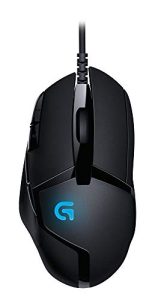
The Logitech G502 is hard to replace because it is not built around a single selling point. Owners tend to rely on a combination: a sculpted right-handed shape with a thumb rest, more buttons than a typical esports mouse, a scroll wheel that can switch between precise steps and fast free spinning, and enough weight to feel planted during slower, deliberate movements. When any one of those things starts to work against you, a simple lightweight mouse with six buttons rarely feels like a real substitute.
That is why the best G502 alternative depends on what you want to keep and what you want to change. Some players want the same button-rich layout and tilt wheel, but without a cable. Others want the shape and extra controls, only in a noticeably lighter mouse. Others are ready for a different shape altogether, perhaps a broader palm grip, a narrower body for claw grip, or a side panel arranged in a new way. This guide groups the choices by that reason to switch, then compares each mouse directly with the G502 reference on buttons, shape, weight, scroll wheel, connection and sensor.
The G502 reference point
For a fair comparison, it helps to be clear about the mouse most readers are coming from. The widely used G502 HERO is a wired, right-handed mouse listed by Logitech at 121 grams without its optional tuning weights, with dimensions of about 132 mm long, 75 mm wide and 40 mm high. It has 11 programmable buttons, a dual-mode hyper-fast scroll wheel, and the HERO sensor with a range of 100 to 25,600 DPI, tracking above 400 IPS and above 40 G according to Logitech specifications. Owners could also add up to five 3.6 gram weights to adjust balance and total weight.
Those numbers explain the common complaints: at 121 grams the G502 HERO is heavy by modern standards, it is wired in HERO form, and its shape favours right-handed palm and relaxed claw grips. Its button count, including controls beside the left click and a DPI shift thumb control, remains a genuine strength.
Keep those trade-offs in mind as you read the picks below. None of them copies the G502 in every respect. Each one preserves a different part of the formula while changing the part that most often pushes owners to switch.
If you want the closest match, but wireless: Razer Basilisk V3 Pro
The Razer Basilisk V3 Pro is the most direct rival in spirit. Razer positions the Basilisk line around the same idea as the G502: an ergonomic right-handed mouse with a thumb rest, many programmable controls and a feature-rich scroll wheel, rather than a stripped-back esports shell.
Razer lists the Basilisk V3 Pro at 112 grams excluding the cable, with dimensions of 130 mm long, 75.4 mm wide and 42.5 mm high. Compared with the G502 HERO reference, that is slightly lighter, very similar in length and width, and a little taller. A palm grip user moving across should therefore find the general footprint familiar, while a claw grip user should note the extra height at the rear before assuming the fit will be identical.
The button count is the headline similarity. Razer lists 11 programmable buttons, matching the G502 HERO total, including thumb controls and a multi-function trigger that can serve a similar purpose to a DPI clutch. Through Razer software, Hypershift can assign a secondary function to controls, which is useful if your reason for keeping a button-rich mouse is access to abilities, push-to-talk, melee, reload and inventory commands without reaching across the keyboard.
The scroll wheel is also the closest point of comparison. Razer’s HyperScroll Tilt Wheel offers left and right tilt inputs and electronically actuated scrolling modes, including tactile cycling and free-spin scrolling. If the G502 wheel is central to how you browse long pages, cycle weapons or move through timelines and documents between games, this is the alternative that gives up the least in that area. A standard notched wheel on a lighter mouse can feel like a downgrade even when its sensor is excellent, so this feature deserves more weight in the decision than it often receives.
For connection, the Basilisk V3 Pro moves beyond the wired G502 HERO with Razer HyperSpeed Wireless, Bluetooth and a wired USB Type-C connection. Razer lists battery life of up to 110 hours on HyperSpeed Wireless at constant motion at 1000 Hz, although real use will vary with settings and lighting. Its Focus Pro 30K optical sensor is listed at up to 30,000 DPI, 750 IPS and 70 G, and its optical switches are rated by Razer for 90 million clicks. On paper, the sensor ceiling is higher than the G502 HERO specification, but most players will notice connection freedom, weight and shape long before any difference at the top of the DPI range.
Choose the Basilisk V3 Pro if your complaint about the G502 is mainly the cable, the software ecosystem or a wish for a similar wheel in a wireless mouse. Do not choose it if your main complaint is weight alone, because at 112 grams it is only modestly lighter than the 121 gram G502 HERO reference.
If you want to stay with Logitech, but lighter and wireless: Logitech G502 X Plus
The Logitech G502 X Plus comes from Logitech’s separate G502 X line, not the original G502 HERO discussed above as the reference point. It keeps the recognisable right-handed, thumb-rest design language, but in a reworked shell with newer switches and wireless technology. For owners who like Logitech software and the general G502 layout, it is the lowest-friction change.
Logitech lists the G502 X Plus at 106 grams, with dimensions of 131.4 mm long, 79.2 mm wide and 41.1 mm high. That makes it 15 grams lighter than the G502 HERO reference, while remaining a large mouse. The listed width is broader, so fingertip grip players and players with smaller hands should pay particular attention to that measurement. For palm and claw grip players who found the original shape comfortable, the continuity is a benefit. For players switching because the original felt too bulky, this model may not change enough.
Where the G502 X Plus moves ahead is in controls. Logitech lists 13 programmable controls, two more than the 11 programmable buttons on the G502 HERO. The layout includes a removable and reversible DPI shift button on the thumb side, which can also be replaced with a cover if you prefer not to use it.
Its scroll wheel is a redesigned dual-mode wheel that switches between hyper-fast free spin and precise ratcheting. Players who value the G502 wheel for fast scrolling should note the difference in this X line design when comparing it with tilt-wheel models such as the Basilisk V3 Pro, because dual-mode scrolling and side tilt are not the same feature. If tilt inputs are essential to your bindings, check that requirement first. If free-spin and ratchet modes are what you actually use, the X Plus preserves the part that matters.
The G502 X Plus uses Logitech LIGHTSPEED wireless and can also be used through its USB-C connection. Logitech lists battery life of up to 130 hours with lighting off and about 37 hours with default lighting in constant motion use. Its HERO 25K sensor covers 100 to 25,600 DPI in its launch specification, with LIGHTFORCE hybrid optical-mechanical switches for the main clicks. Compared with the G502 HERO, the sensor range will feel familiar, while the switch type, wireless connection and lower weight are the meaningful changes.
Choose the G502 X Plus if you want to keep the Logitech approach, gain wireless freedom and extra controls, and lose some weight without abandoning the broad G502 shape. Avoid it if your goal is a truly light mouse or a narrower shell, because 106 grams and that wide body still place it firmly in the feature-rich category rather than the ultralight category.
If you want lighter, wired and different: SteelSeries Rival 5
The SteelSeries Rival 5 is the clearest answer for G502 owners whose first complaint is weight, and who do not mind staying wired to get it. SteelSeries lists the Rival 5 at 85 grams. That is 36 grams lighter than the G502 HERO reference, a difference you can understand without any specialist knowledge: repeated flicks, stops and lifts require moving substantially less mass, while the mouse still offers more buttons than a basic six-button esports design.
The Rival 5 is a right-handed wired mouse measuring 128.8 mm long, with a height of about 42 mm according to SteelSeries specifications. Its shape is more streamlined than the G502, without the same prominent sculpted thumb-rest approach. SteelSeries describes the design for palm and claw style use, but the change in side shape is important. A palm grip player who rests heavily on the G502 thumb shelf may miss that support. A claw grip player who found the G502 rear and thumb area restrictive may prefer the Rival 5 arrangement.
It has nine programmable buttons, two fewer than the G502 HERO total, but the layout is the interesting part. Five of those controls are on the side panel, including a two-way toggle style control near the top of the side buttons. That gives MMO, MOBA and battle royale players quick access to several commands in one thumb area, arranged differently from the G502. If you want more buttons in total, this is not an upgrade. If you want your most-used side commands grouped tightly together, it may suit you better than a layout spread around the wheel and left click.
The scroll wheel is a more conventional clickable wheel, so this is the biggest feature loss compared with the G502. There is no equivalent emphasis on free-spin and tilt functionality in the Rival 5 specification.
SteelSeries lists the TrueMove Air sensor at up to 18,000 CPI, 400 IPS and 40 G, with Golden Micro IP54 switches rated for 80 million clicks. The sensor ceiling is lower than the G502 HERO specification on paper, but its tracking speed and acceleration figures are in the same practical territory for ordinary gaming sensitivities. The Rival 5 keeps a wired USB connection, so there is no battery to charge and no receiver to manage, at the cost of cable drag that a good cable routing setup can reduce but not remove.
Choose the Rival 5 if lighter and wired is exactly the change you want, and if a five-button side panel sounds more useful than wheel tilt. It is the strongest contrast in this guide: less G502 in shape and wheel, more gain in agility.
If you want a different shape and a broader palm fit: Corsair Dark Core RGB Pro
The Corsair Dark Core RGB Pro is for the G502 owner who is not trying to go lighter at all. Corsair lists it at 133 grams without cable and accessories, which is heavier than the 121 gram G502 HERO reference. That sounds like a step backwards until you consider why someone might choose it: a contoured, palm-oriented shape, interchangeable side grips, wireless connection options and a different distribution of controls.
Corsair lists eight programmable buttons, three fewer than the G502 HERO. Two buttons sit beside the left click for DPI adjustment by default, there are two main side buttons, and a profile control sits on top. Through Corsair iCUE, buttons can be remapped and macros assigned, but the total count is lower, so this is not the pick for a player whose entire reason for using a G502 is maximum inputs. It is a pick for a player who uses a moderate set of commands and cares more about hand position, grip texture and a broad body under the palm.
The shape is the main argument. Corsair supplies interchangeable side grips, allowing the right side of the mouse to be changed between a standard side and a version with a finger rest style extension. That gives this mouse a different answer to comfort from the fixed G502 shell. A palm grip player with a larger hand may appreciate the support. A claw or fingertip player is less likely to benefit, because the size and weight work against quick fingertip adjustments.
Its scroll wheel does not attempt to replicate the G502 dual-mode and tilt experience. It is a standard gaming wheel in a mouse whose strengths lie elsewhere. If wheel features are non-negotiable, this is the wrong alternative. If you rarely use free spin or tilt and mainly want wireless freedom with a substantial palm shape, the trade becomes reasonable.
Corsair lists a PixArt PAW3392 optical sensor customised for wireless use, with up to 18,000 DPI adjustable in one DPI steps, Omron switches rated for 50 million clicks for the main buttons, and three connection modes: Slipstream wireless, Bluetooth and wired USB. Battery figures depend strongly on connection and lighting, with Corsair listing up to 50 hours over Bluetooth without lighting in its specifications. Compared with the G502 HERO, you gain connection choice and grip options, and you give up buttons, wheel features and any claim to lower weight.
Choose the Dark Core RGB Pro if a different shape is the point of switching, especially a fuller palm fit with a changeable side grip. Skip it if you are trying to reduce fatigue from a heavy mouse, because its listed weight moves in the opposite direction.
How to choose by reason to switch
Start with the complaint, not the brand. If the cable is the problem and everything else about the G502 works, the Basilisk V3 Pro keeps the tilt wheel idea, the thumb rest and an 11-button layout while adding wireless, Bluetooth and wired options. The G502 X Plus also solves the cable problem, adds two more programmable controls over the HERO reference and cuts weight to 106 grams, while staying inside Logitech’s ecosystem and shape language.
If weight is the problem, be honest about how much change you need. Moving from 121 grams to 112 or 106 grams is noticeable in a specification table, but it is not the same kind of change as moving to the 85 gram Rival 5. Players who make large, fast swipes in shooters are more likely to value that larger reduction. Players who play at higher sensitivity with small movements may prefer to keep more features and accept a modest reduction.
If shape is the problem, identify which part of the shape fails you. A mouse that feels too narrow, too short or insufficiently supportive for palm grip points in a different direction from a mouse that feels too bulky for claw grip. The Dark Core RGB Pro is the broader, heavier, palm-focused departure. The Rival 5 is the leaner departure. The Basilisk V3 Pro and G502 X Plus are continuity choices, with dimensions close enough to the reference that they should not be treated as a fix for a fundamental shape mismatch.
If buttons are the problem, count the commands you actually bind, then look at placement. The G502 X Plus leads this group on listed programmable controls with 13. The Basilisk V3 Pro matches the G502 HERO at 11 and adds a secondary layer through Hypershift in software. The Rival 5 has nine, but concentrates five on the side. The Dark Core RGB Pro has eight, which is enough for many shooter and general gaming layouts but not for a player building a large MMO command set on the mouse alone. None of these is a full side-grid MMO mouse, and that is deliberate: they preserve the hybrid shooter and multi-genre role that made the G502 popular.
Conclusion
The best G502 alternative is not a single mouse for every owner. The Razer Basilisk V3 Pro is the closest all-round replacement for someone who wants to keep the tilt wheel, thumb rest and 11 programmable buttons while going wireless. The Logitech G502 X Plus is the natural step for someone who wants Logitech’s newer wireless X line, 13 programmable controls and a lighter version of a familiar idea. The SteelSeries Rival 5 is the lighter, wired reset, trading wheel features for 85 gram agility and a concentrated side panel. The Corsair Dark Core RGB Pro is the different-shape option, trading button count and weight for a broad palm fit, interchangeable side grips and three connection modes.
Decide which part of the G502 you are trying to preserve first. Then choose the mouse that changes the one thing you actually want changed, instead of replacing a button-rich, feature-heavy mouse with a design built for a completely different job.
More from Amazon
Programs that pair well with the guide above. Offers and eligibility are set by Amazon and may change.
Free shipping on eligible items, Prime Video and more. Eligible new members can start with a free trial.
Start a Prime free trialAd-free music streaming. Eligible new subscribers can start with a free trial.
Try Music Unlimited freeA Prime membership for ages 18-24 with a trial period. Eligibility is set by Amazon.
See Prime for Young AdultsAudiobooks and podcasts to listen to on the go. Eligible new members can start with a free trial.
Try Audible freeAs an Amazon Associate we earn from qualifying purchases.