Key takeaways
- Footprint: A full-size board typically measures 440–460 mm wide; a TKL lands around 355–365 mm. That reclaimed space translates directly into mouse travel, which matters most at low DPI.
- Numpad access: Full-size gives you instant ten-key input. TKL forces you onto the number row or a separate USB numpad — fine for occasional use, painful for daily data entry.
- Ergonomics: With a TKL your mouse hand sits closer to your body’s centerline, reducing shoulder abduction. Sustained over long sessions, this is the most underrated health argument for going tenkeyless.
- Portability: TKL boards are lighter and shorter, and many — including the Logitech G PRO TKL with its detachable Micro USB cable — are explicitly designed to survive being thrown in a backpack for LAN events.
- Switch technology: The newest magnetic Hall effect switches with rapid trigger and adjustable actuation are launching predominantly in compact layouts. The Aula WIN60 HE, Aula MINI60 HE PRO, and Aula F75 HE all offer 8,000 Hz polling and sub-millimetre actuation tuning; equivalent full-size boards are rarer and pricier.
- Cost per feature: Full-size boards charge you for keys you may never press. Compact boards spend the same budget on switches, polling rate, and build quality instead.
The full-size versus tenkeyless debate used to be a matter of taste. In 2026 it’s closer to a matter of technique. Competitive shooters have pushed average mouse sensitivities lower, esports pros routinely play at sub-800 DPI with wide arm sweeps, and the ten keys sitting to the right of your Enter key are the single biggest obstacle between your mouse and the space it needs. That’s why tenkeyless (TKL) boards — and increasingly 75% and 60% layouts — dominate tournament tables, while full-size keyboards have quietly retreated to desks where spreadsheets matter as much as scoreboards.
Neither layout is objectively better. A full-size board gives you a dedicated number pad, a full navigation cluster, and usually a more generous chassis for media keys and volume wheels. A TKL board trades all of that for roughly 15–20% less desk width, lighter weight for LAN trips, and a more natural shoulder angle. The right answer depends on what you actually do between matches — and, in 2026, on whether you want the magnetic Hall effect switches and 8,000 Hz polling rates that manufacturers are launching almost exclusively in compact form factors.
Our top picks
 SteelSeries Apex 3 TKL RGB Gaming Keyboard
- The compact tenkeyless design is the most popular…
- Our whisper quiet gaming switches with anti-ghosting technology…
- Designed with IP32 Water & Dust Resistant for…
 Logitech G PRO Mechanical TKL Tenkeyless Gaming
- Built with and for esports athletes for competition-level…
- Durable GX Blue Click switches deliver an audible…
- Ultra-portable compact ten keyless design frees up table…
 Aula WIN60 HE
- High-Performance Hall Effect Magnetic Switch Keyboard: The AULA…
- Optimized for FPS Games: Designed for FPS titles…
- Rapid Trigger Gaming Keyboard: Featuring an ultra-low RT…
| Product | Key specs | |
|---|---|---|
| SteelSeries Apex 3 TKL RGB Gaming Keyboard | The compact tenkeyless design is the most popular… Our whisper quiet gaming switches with anti-ghosting technology… Designed with IP32 Water & Dust Resistant for… | Check price |
| Logitech G PRO Mechanical TKL Tenkeyless Gaming | Built with and for esports athletes for competition-level… Durable GX Blue Click switches deliver an audible… Ultra-portable compact ten keyless design frees up table… | Check price |
| Aula WIN60 HE | High-Performance Hall Effect Magnetic Switch Keyboard: The AULA… Optimized for FPS Games: Designed for FPS titles… Rapid Trigger Gaming Keyboard: Featuring an ultra-low RT… | Check price |
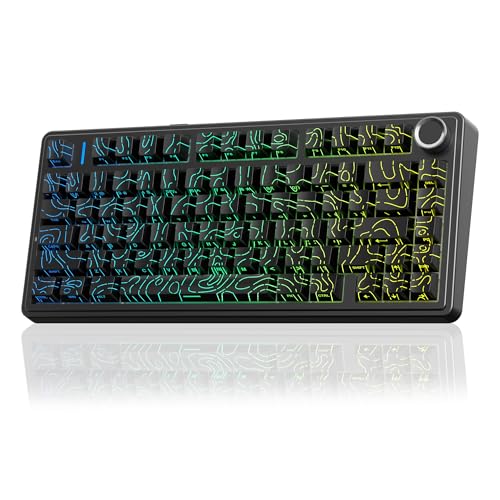 Aula F75 HE Wireless Gaming Keyboard Hall Aula F75 HE Wireless Gaming Keyboard Hall | Tri-Mode Wireless Gaming Keyboard with 4000mAh Battery: The… 75% Layout with Knob, Hot-Swappable & RGB:Featuring a… Hall Effect Keyboard with Rapid Trigger, SOCD &… | Check price |
 Aula MINI60 HE PRO Wireless Gaming Keyboard Aula MINI60 HE PRO Wireless Gaming Keyboard | Tri-Mode Wireless Gaming Keyboard: The AULA MINI60 HE… Magnetic Switch Gaming Keyboard: This hall effect magnetic… 8000Hz Magnetic Performance: Equipped with an ultra-high 8000Hz… | Check price |
 Womier 75% Wireless Mechanical Keyboard with Color Womier 75% Wireless Mechanical Keyboard with Color | 【11° Ergonomic Vibrant Color Multimedia Screen Creamy Keyboard】75%… 【 Theme Style Wrist Rest and Mouse Pad… 【Triple Mode & High Compatibility】 This pc gaming… | Check price |
 Corsair K55 CORE TKL RGB Gaming Keyboard Corsair K55 CORE TKL RGB Gaming Keyboard | More Room to Make Big Plays: A compact,… Eight Zone RGB Backlighting: Create personalized lighting as… 300ml Spill Resistance: K55 CORE TKL is built… | Check price |
As an Amazon Associate we earn from qualifying purchases at no extra cost to you.
⚡ Save on Your Next PC — Amazon Prime
Prime members get fast free shipping on the systems above, plus early access to Prime Day & Black Friday PC deals. New members get a 30-day free trial.
Watch: Full-Size vs TKL Keyboard: 2026 Comparison — Video Review
Quick Verdict
Buy a full-size keyboard if you split your time between gaming and work that involves numbers — accounting, CAD, data entry, streaming with hotkey macros mapped to the numpad — and your desk is at least 120 cm wide. Buy a TKL or smaller if competitive FPS, low-sensitivity aiming, or portability is your priority. For most 2026 buyers, TKL is the safer default: boards like the Logitech G PRO TKL and SteelSeries Apex 3 TKL deliver tournament-ready ergonomics without the learning curve of a 60%, while options like the Aula F75 HE compress a 75% layout that keeps arrow keys and a function row intact.
Key Differences
- Footprint: A full-size board typically measures 440–460 mm wide; a TKL lands around 355–365 mm. That reclaimed space translates directly into mouse travel, which matters most at low DPI.
- Numpad access: Full-size gives you instant ten-key input. TKL forces you onto the number row or a separate USB numpad — fine for occasional use, painful for daily data entry.
- Ergonomics: With a TKL your mouse hand sits closer to your body’s centerline, reducing shoulder abduction. Sustained over long sessions, this is the most underrated health argument for going tenkeyless.
- Portability: TKL boards are lighter and shorter, and many — including the Logitech G PRO TKL with its detachable Micro USB cable — are explicitly designed to survive being thrown in a backpack for LAN events.
- Switch technology: The newest magnetic Hall effect switches with rapid trigger and adjustable actuation are launching predominantly in compact layouts. The Aula WIN60 HE, Aula MINI60 HE PRO, and Aula F75 HE all offer 8,000 Hz polling and sub-millimetre actuation tuning; equivalent full-size boards are rarer and pricier.
- Cost per feature: Full-size boards charge you for keys you may never press. Compact boards spend the same budget on switches, polling rate, and build quality instead.
Full-Size Keyboards: The Case for Keeping the Numpad
A full-size layout remains the most versatile keyboard you can own. If you edit video with timeline shortcuts, model in Blender or Fusion 360, run accounting software, or bind stream deck macros to numpad keys, removing that cluster costs you real productivity every single day. Full-size chassis also tend to include volume wheels, dedicated media keys, and wrist rests as standard — small quality-of-life wins that compact boards often drop.
The trade-off is spatial. On a 100 cm desk with a monitor arm and a mug, a full-size board leaves roughly a mouse pad’s width of usable space. If you play at 400–800 DPI, you will clip the edge of your pad mid-flick. Angling the board helps, but at that point you’re compensating for a layout you don’t need. Full-size makes sense when your desk is deep and wide, when you game casually rather than competitively, or when the numpad genuinely earns its keep.
TKL and Compact Keyboards: Why Tenkeyless Took Over
TKL is the sweet spot for the majority of players because it removes only the keys most gamers never touch. You keep arrows, Home/End, Delete, and a full function row — the shortcuts that actually matter in-game and in Windows. The SteelSeries Apex 3 TKL is a solid entry point with IP32 water and dust resistance, whisper-quiet switches, and 8-zone RGB, while the Logitech G PRO TKL targets the competitive crowd with clicky mechanical switches and Lightsync lighting in a genuinely travel-ready shell.
If you’re willing to go smaller, 75% and 60% layouts push the advantage further. The Womier SK80 PRO packs a colour multimedia screen, gasket mount, and tri-mode wireless into a 75% board with a wrist rest, making it a strong all-rounder for Mac and Windows. Purists chasing raw performance should look at the Aula WIN60 HE or the wireless Aula MINI60 HE PRO, both of which use hot-swappable magnetic switches with rapid trigger — a meaningful edge in counter-strafing and movement-heavy shooters.
Which Should You Buy?
- For competitive FPS at low DPI: Pick TKL or smaller. Start with the Logitech G PRO TKL, or go magnetic with the Aula F75 HE for rapid trigger.
- For gaming plus spreadsheets or CAD: Pick full-size, or pair a TKL with a standalone USB numpad for the best of both.
- For LAN events and travel: Pick TKL or 60%. The Aula MINI60 HE PRO’s tri-mode wireless makes it the easiest to pack.
- For a small or shallow desk: Pick 75%. The Womier SK80 PRO keeps arrows and a function row while saving significant width.
- For a tight budget or a shared family PC: Pick the SteelSeries Apex 3 TKL — quiet, spill-resistant, and forgiving.
Frequently Asked Questions
Does TKL actually improve aim?
Indirectly, yes. It doesn’t make your hand steadier, but it gives you 8–10 cm more horizontal mouse room, which prevents pad-edge collisions at low sensitivity. Players above 1,600 DPI will notice far less difference.
Can I add a numpad to a TKL keyboard?
Absolutely. Standalone USB and Bluetooth numpads are inexpensive and can sit on your left side, which many CAD and finance users actually prefer to the traditional right-hand position.
Is 60% too small for gaming?
Not for FPS, where WASD and a handful of modifiers cover most inputs. It’s harder for MMOs, sims, and strategy titles that rely on function keys and arrows. If you’re unsure, 75% is the safer compromise.
Do Hall effect switches matter in 2026?
They do if you play competitively. Adjustable actuation and rapid trigger let you reset a key the instant you lift, which sharpens counter-strafing and directional changes. For casual play, a good mechanical switch is still perfectly adequate.
Final Verdict
Choose full-size only if the number pad earns its desk space; otherwise, TKL is the better buy for almost every gamer in 2026, offering superior ergonomics, portability, and access to the latest magnetic switch technology — with 75% and 60% layouts waiting when you’re ready to go smaller still.