Key takeaways
- Resolution: 3440×1440 (UWQHD) is the ultrawide standard and the sweet spot for balancing sharpness with achievable frame rates on most GPUs.
- Refresh rate: 144Hz is a great baseline; step up to 180Hz or the 240Hz of the Alienware AW3425DW for the smoothest competitive motion.
- Panel technology: QD-OLED like the Alienware delivers perfect blacks and stunning color, while VA panels such as the SANSUI offer strong contrast for less.
- Curvature: A 1500R or 1800R curve wraps the wide image around you; steeper curves increase immersion at typical desk distances.
- GPU headroom: Driving 3440×1440 at high refresh needs a capable graphics card, so match the monitor to your GPU to avoid disappointment.
What's inside
Once you game on an ultrawide, a regular 16:9 monitor starts to feel like looking through a mail slot. The extra horizontal real estate of a 21:9 panel pulls you into racing sims, wraps you inside open-world RPGs, and gives competitive players a wider field of view. In 2026, ultrawides have also gotten fast, with high-refresh and QD-OLED options that were unthinkable a few years ago.
This roundup covers the best ultrawide gaming monitors across budgets, from value 34-inch WQHD panels to premium QD-OLED showpieces. We weighed resolution, refresh rate, panel technology, and price so you can find the immersive display that fits your rig and your wallet.
As an Amazon Associate we earn from qualifying purchases at no extra cost to you.


⚡ Save on Your Next PC — Amazon Prime
Prime members get fast free shipping on the systems above, plus early access to Prime Day & Black Friday PC deals. New members get a 30-day free trial.
Watch: Best Ultrawide Gaming Monitor — Video Review
How to Choose
- Resolution: 3440×1440 (UWQHD) is the ultrawide standard and the sweet spot for balancing sharpness with achievable frame rates on most GPUs.
- Refresh rate: 144Hz is a great baseline; step up to 180Hz or the 240Hz of the Alienware AW3425DW for the smoothest competitive motion.
- Panel technology: QD-OLED like the Alienware delivers perfect blacks and stunning color, while VA panels such as the SANSUI offer strong contrast for less.
- Curvature: A 1500R or 1800R curve wraps the wide image around you; steeper curves increase immersion at typical desk distances.
- GPU headroom: Driving 3440×1440 at high refresh needs a capable graphics card, so match the monitor to your GPU to avoid disappointment.
The Best Picks Reviewed
Alienware AW3425DW 240Hz QD-OLED
This 34-inch WQHD QD-OLED is the premium standout. Its 0.03ms response, 240Hz refresh, and perfect OLED blacks make both competitive and cinematic games look breathtaking. If you want the best ultrawide experience and can afford it, this is the one to beat.
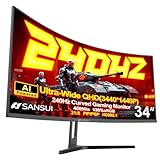
SANSUI 34 Inch Curved 240Hz UWQHD
For gamers who want high refresh without the OLED price, this 34-inch 3440×1440 VA panel hits 240Hz with strong contrast. It delivers immersive, fast gameplay at a fraction of the cost of premium displays, making it our value performance pick.
Alienware AW3425DWM 180Hz
The DWM version offers a 34-inch WQHD experience at 180Hz with a 1500R curve and FreeSync Premium, sitting between value and premium. It is a well-rounded choice for immersive single-player and competitive play alike.
Sceptre 34-Inch Curved WQHD
The budget champion, this 34-inch 3440×1440 panel runs up to 180Hz with dual DisplayPort and 99% sRGB coverage. It brings genuine ultrawide gaming to a modest price, ideal for a first step into the format.
Samsung Odyssey G7 (G75F) WUHD
For those wanting an even bigger canvas, the 40-inch Odyssey G7 pushes a wider WUHD resolution with a steep curve and high refresh. It is a fantastic pick for sim racing and productivity, though it demands a strong GPU.
Frequently Asked Questions
Is an ultrawide good for competitive gaming?
Yes, the wider field of view helps in many games, though a few esports titles cap the aspect ratio. High-refresh ultrawides keep motion sharp for fast play.
What GPU do I need for a 3440×1440 ultrawide?
Driving UWQHD at high refresh needs a capable modern GPU. Mid-to-high-end cards handle most games well, especially with upscaling enabled.
Is QD-OLED worth the premium?
For image quality, absolutely. Perfect blacks, vivid color, and instant response are a real step up, though a good VA ultrawide offers most of the immersion for far less.
What curve radius is best?
A 1500R curve is a popular sweet spot for 34-inch ultrawides, wrapping the image comfortably at desk distance without distorting straight lines too much.
Final Thoughts
Ultrawide gaming is more accessible than ever. The Alienware AW3425DW QD-OLED is our top pick for outright quality, the SANSUI 34 240Hz is the value performance choice, and the Sceptre 34 gets you into the format for the least money. Pick the panel that matches your GPU and budget, and enjoy the immersion a wide screen brings.