Key takeaways
- Peak cooling: large AIOs edge out air on the hottest chips; top air coolers match small AIOs.
- Noise: good air coolers are very quiet; AIOs add pump noise but can move more heat at lower fan speeds.
- Reliability: air coolers have no pump to fail and last indefinitely; AIOs have a finite pump lifespan.
- Installation and maintenance: air is simpler to install; AIOs need radiator mounting and eventual replacement.
- Aesthetics: AIOs offer a cleaner look around the socket and RGB options; big air coolers are bulky.
- Cost: air coolers cost less for equivalent performance in most cases.
Cooling is where many builders overthink their gaming PC. Air coolers and all-in-one liquid coolers both keep modern CPUs in check, and the real differences, performance headroom, noise, aesthetics, and reliability, are smaller than forum debates suggest. Choosing between them is about matching the cooler to your CPU’s heat output and your priorities for looks and maintenance.
This comparison lays out how air and water cooling actually differ in 2026, when each makes sense, and which type suits your build. Whether you run a modest mid-range chip or a power-hungry flagship, here is how to decide.
Our top picks
 ARCTIC Liquid Freezer III Pro 360 A-RGB
- CONTACT FRAME FOR INTEL LGA1851 | LGA1700: Optimized…
- ARCTIC's P12 PRO FAN: More power at any…
- Shifting the cold plate center towards the CPU…
 BXQINLENX 24-Piece Silver Chrome G1/4" Fittings Kit
- G1/4" Universal Compatibility: Precision-engineered threads ensure seamless compatibility…
- Durable Electroplated Finish: Silver chrome plating provides corrosion…
- Hand-Tighten Design: User-friendly, tool-free installation—simply screw fittings by…
 Thermalright Aqua Elite 240 V3 Water Cooling
- 【Better Cooling】 The cooler adopts the fourth generation…
- 【Unique Pump Head】 The octagonal shaped cold pump…
- 【Excellent LED Lighting Effect】Fan and water-cooling header ARGB…
| Product | Key specs | |
|---|---|---|
| ARCTIC Liquid Freezer III Pro 360 A-RGB | CONTACT FRAME FOR INTEL LGA1851 | LGA1700: Optimized… ARCTIC's P12 PRO FAN: More power at any… Shifting the cold plate center towards the CPU… | Check price |
| BXQINLENX 24-Piece Silver Chrome G1/4" Fittings Kit | G1/4" Universal Compatibility: Precision-engineered threads ensure seamless compatibility… Durable Electroplated Finish: Silver chrome plating provides corrosion… Hand-Tighten Design: User-friendly, tool-free installation—simply screw fittings by… | Check price |
| Thermalright Aqua Elite 240 V3 Water Cooling | 【Better Cooling】 The cooler adopts the fourth generation… 【Unique Pump Head】 The octagonal shaped cold pump… 【Excellent LED Lighting Effect】Fan and water-cooling header ARGB… | Check price |
 DIYhz Water Cooling Computer Radiator | ★ Product Name: Water Cooling Radiator ★ Fan Installation Size: 120 x 120 ★ Efficiently pulling heat away from cycling coolant… | Check price |
 MUSETEX ATX PC Case 7 PWM ARGB | 【MUSETEX presents the K2 gaming pc case】both a… 【Tower Case Powerful Space Layout】The internal structure of… 【Upgrade High Speed IO Panel】1 x Type-C, 2… | Check price |
 Thermalright Peerless Assassin 120 SE CPU Cooler | [Brand Overview] Thermalright is a Taiwan brand with… [Product specification] Thermalright PA120 SE 【2 PWM Fans】TL-C12C | Check price |
 DIYhz Water Cooling Computer Radiator | ★ Product Name: Water Cooling Radiator ★ Fan Installation Size: 120x120(This product does not… ★ Efficiently pulling heat away from cycling coolant… | Check price |
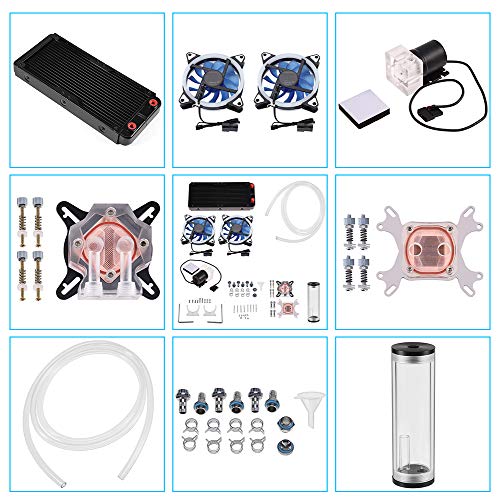 DIY 240mm Water Cooling Kit | 【Professional Water Cooling Kit】This liquid CPU cooler kit… 【High Performance】The CPU/GPU block is constructed with a… 【Super Water Circulation Cooling System】240mm Heat Sink: Provide… | Check price |
As an Amazon Associate we earn from qualifying purchases at no extra cost to you.
⚡ Save on Your Next PC — Amazon Prime
Prime members get fast free shipping on the systems above, plus early access to Prime Day & Black Friday PC deals. New members get a 30-day free trial.
Watch: Air vs Water Cooling for Gaming PCs — Video Review
Quick Verdict
For most gamers, a quality dual-tower air cooler is all you need, it is cheaper, reliable, and quiet, and it handles mainstream and even many high-end CPUs. A 240mm or larger AIO liquid cooler pulls ahead for the hottest overclocked or high-core-count chips and offers a cleaner look. Choose air for value and simplicity, liquid for peak thermal headroom and aesthetics.
Key Differences
- Peak cooling: large AIOs edge out air on the hottest chips; top air coolers match small AIOs.
- Noise: good air coolers are very quiet; AIOs add pump noise but can move more heat at lower fan speeds.
- Reliability: air coolers have no pump to fail and last indefinitely; AIOs have a finite pump lifespan.
- Installation and maintenance: air is simpler to install; AIOs need radiator mounting and eventual replacement.
- Aesthetics: AIOs offer a cleaner look around the socket and RGB options; big air coolers are bulky.
- Cost: air coolers cost less for equivalent performance in most cases.
Air Cooling
Air coolers use heat pipes and a fin stack with one or two fans. A strong dual-tower model like the Thermalright Peerless Assassin keeps most CPUs comfortably cool while running quietly, and there is no pump to wear out or liquid to leak. Installation is straightforward, and the cooler simply works for the life of the PC.
The downsides are size and looks. High-end air coolers are large and can crowd tall RAM or block the top PCIe slot, and some builders find them less attractive than a tidy radiator. But for value, reliability, and quiet operation, air cooling is the sensible default for the majority of gaming builds.
Water Cooling (AIO)
An all-in-one liquid cooler moves heat from the CPU to a radiator via a sealed loop, letting you mount a large radiator away from the socket. A 240mm, 280mm, or 360mm AIO such as an ARCTIC Liquid Freezer or Thermalright Aqua Elite handles the hottest chips with room to spare and keeps the area around the CPU uncluttered for a cleaner build.
The tradeoffs are a pump that will eventually wear out, a slightly higher price for equivalent cooling, and the small long-term risk inherent to any liquid loop. For overclockers, high-thread-count CPUs, or builders who want the aesthetic, a good AIO is well worth it.
Which Should You Buy?
- Choose air cooling for mid-range CPUs and value-focused builds that prioritize reliability.
- Choose a 240mm+ AIO for high-end or overclocked chips that run hot.
- Pick an AIO if you want a clean look around the socket and do not mind eventual pump replacement.
- Confirm case clearance, tall air coolers and long radiators both have fitment limits.
- Whatever you choose, quality fans and good case airflow matter as much as the cooler type.
Frequently Asked Questions
Is liquid cooling always better than air?
No. A top air cooler beats a small AIO. Liquid only clearly wins at 240mm and larger radiators, mainly for high-wattage chips.
Do AIO coolers leak?
Modern sealed AIOs rarely leak, but the risk is not zero, and the pump has a finite lifespan. Air coolers avoid both concerns entirely.
Which is quieter?
Both can be quiet. Air coolers make only fan noise; AIOs add faint pump noise but can run fans slower for the same cooling, so results are close.
Do I need liquid cooling for gaming?
Rarely. Gaming loads are lighter than sustained rendering, so a good air cooler handles nearly all gaming CPUs. Liquid is optional headroom, not a requirement.
Final Verdict
Air and water cooling are both excellent; the choice is about your CPU and priorities. A quality air cooler is the reliable, quiet, value pick for most gamers, while a 240mm-plus AIO delivers extra headroom and a cleaner look for hot flagship chips. Match the cooler to your processor’s heat and your taste, and either will keep you gaming cool.
FAQ
Is liquid cooling always better than air?
Do AIO coolers leak?
Which is quieter?
Do I need liquid cooling for gaming?
More from Amazon
Programs that pair well with the guide above. Offers and eligibility are set by Amazon and may change.
Free shipping on eligible items, Prime Video and more. Eligible new members can start with a free trial.
Start a Prime free trialAd-free music streaming. Eligible new subscribers can start with a free trial.
Try Music Unlimited freeA Prime membership for ages 18-24 with a trial period. Eligibility is set by Amazon.
See Prime for Young AdultsAudiobooks and podcasts to listen to on the go. Eligible new members can start with a free trial.
Try Audible freeAs an Amazon Associate we earn from qualifying purchases.