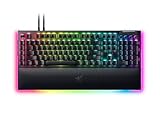
Key takeaways
- Pro: Excellent aluminum-topped build with almost no flex.
- Pro: Satisfying, tactile Green switches with strong N-key rollover.
- Pro: Command dial, media keys, and magnetic wrist rest add real everyday value.
- Pro: Bright dual underglow RGB that looks great in a dark room.
What's inside
The Razer BlackWidow V4 has become the default recommendation whenever someone asks for a full-size mechanical gaming keyboard that feels premium without crossing into custom-build territory. Our review unit is the standard BlackWidow V4 with Razer Green clicky switches, priced around $170, and it arrived as the flagship of a surprisingly large family that now spans the budget V4 X, the enthusiast V4 Pro, and compact 75% and TKL wireless variants.
After several weeks of daily use across competitive shooters, MMOs, and a lot of long-form typing, this V4 earns its spot, but the value story depends heavily on which switch and which sibling you choose. Here is how the standard BlackWidow V4 holds up in 2026 and where its relatives make more sense.
As an Amazon Associate we earn from qualifying purchases at no extra cost to you.




⚡ Save on Your Next PC — Amazon Prime
Prime members get fast free shipping on the systems above, plus early access to Prime Day & Black Friday PC deals. New members get a 30-day free trial.
Watch: Razer BlackWidow V4 Review — Video Review
Design & Build
The BlackWidow V4 uses a doubleshot ABS keycap set on a sturdy aluminum-topped chassis, and the difference in rigidity over cheaper boards is immediately obvious. There is almost no flex when you press down on the center, the plush wrist rest attaches magnetically, and two underglow RGB strips wrap the base for the kind of lighting that actually reflects on your desk. Dedicated media controls and a command dial sit top-right, which is a genuine productivity win when you are not gaming. At full size it takes up real desk space, so if you play at low sensitivity, look hard at the TKL or 75% versions for more mouse room.
Performance
Razer Green switches are clicky and tactile with a 50g actuation force, and they are loud in the best way, giving a crisp, satisfying bump on every keypress. For fast double-taps and counter-strafing they hold up well, though pure speed players may still prefer the linear Yellow switches found on the V4 X. Polling is rock-solid over USB, N-key rollover means no missed inputs during frantic MMO rotations, and Synapse lets you record macros to the dedicated keys, which is exactly what you want for ability-heavy games. Latency is a non-issue on the wired flagship.
Pros & Cons
- Pro: Excellent aluminum-topped build with almost no flex.
- Pro: Satisfying, tactile Green switches with strong N-key rollover.
- Pro: Command dial, media keys, and magnetic wrist rest add real everyday value.
- Pro: Bright dual underglow RGB that looks great in a dark room.
- Con: ABS keycaps can develop shine over time versus PBT.
- Con: Green switches are loud, a poor fit for shared spaces or an open mic.
- Con: Full-size footprint eats desk space for low-sens players.
Alternatives to Consider
If the price feels steep, the Razer BlackWidow V4 X at around $90 drops the dial and underglow but keeps the core feel with linear Yellow switches, making it the value pick. Enthusiasts who want the best typing experience should look at the Razer BlackWidow V4 Pro, which adds a command dial cluster and a premium plush rest. For a smaller desk, the Razer BlackWidow V4 75% with Orange tactile switches offers a hot-swap-friendly, gasket-mounted feel in a compact layout.
Frequently Asked Questions
Are Razer Green switches good for gaming?
They are solid all-rounders. The tactile click gives clear feedback that helps with deliberate inputs and typing, but competitive players chasing the fastest possible actuation often prefer the linear Yellow switches on the V4 X or the analog options higher up the range.
Is the BlackWidow V4 hot-swappable?
The standard full-size V4 is not hot-swappable, so you are committed to the switches you buy. If swapping switches matters to you, the 75% version in the family is the one designed with that flexibility in mind.
Does it have PBT keycaps?
No, the standard V4 ships with doubleshot ABS keycaps. They are durable and legends will not fade, but ABS can develop a slight shine with heavy long-term use, whereas PBT resists that better.
Wired or wireless, which V4 should I get?
The flagship V4 reviewed here is wired, which guarantees the lowest latency and no battery worries. If you want a cleaner desk, the V4 TKL and V4 Low Profile come in wireless versions that trade a little immediacy for cable-free convenience.
Verdict
The Razer BlackWidow V4 is a confident, well-built full-size keyboard that justifies its flagship price with genuine premium touches, from the aluminum top plate to the command dial and dual underglow. It is not the board for silent offices or tiny desks, and the ABS caps are a small compromise, but for a gamer who wants a loud, tactile, do-everything keyboard that will last years, it is an easy recommendation. Budget-focused buyers should grab the V4 X, while small-desk players will love the 75%.