Our Top Picks
 Corsair M75 Wired RGB Lightweight FPS Gaming MouseWired – Light5.04 x 2.56 x 0.1 inches0.2 poundsCheck on Amazon
Left-handed gamers get a short menu: a few truly mirrored mice, a larger group of symmetrical designs that work for either hand, and many mice that merely look symmetrical. This list covers nine listings across all three groups, plus two labeled runner-ups whose titles do not say they fit left hands. Players who want a mirrored thumb layout should start with the Razer Naga or the Pulsar X3 LHD. Those who prefer a shared shape can start with the Logitech G PRO 2 or G903. Always confirm handedness on the listing before buying.
Quick picks
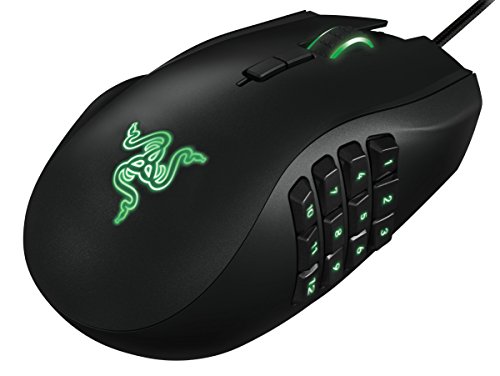
Razer RZ01-01050100-R3M1 Naga Left-Handed - Ergonomic MMO Gaming Mouse with 12 Programmable Thumb Buttons - 8,200 Adjustible DPI
One of the home product options compared in this guide.
View on Amazon
Acer Dual-Mode 2.4GHz Wireless & Wired Computer Gaming Mouse for PC, Laptop | Left & Right Handed Mouse with 24,000 DPI, 8 Programmable Buttons, Rechargable Gaming Mice, Long Battery Life, RGB Gamer
One of the home product options compared in this guide.
View on Amazon
Logitech G PRO 2 Lightspeed Ambidextrous Wireless Gaming Mouse - Black | Symmetrical design, <4 customizable magnetic side buttons, USB-C charging, PowerPlay Wireless Charging Supported, For PC/Mac
One of the home product options compared in this guide.
View on Amazon
Pulsar Gaming Gears X3 LHD Crazylight Gaming Mouse, Mini, Jet Black | Ultra Lightweight 1.51 oz (43g), Ergonomic, Inward Side, Back-Moderate Hump, Palm/Relaxed Claw Grip, XS-1, 32K DPI, 8K
One of the home product options compared in this guide.
View on Amazon
Logitech G903 Lightspeed Wireless Gaming Mouse - Black | 140+ Hour Rechargeable Battery, LIGHTSYNC RGB, Powerplay Compatible, Ambidextrous Design, 107G+10G Optional Weight
One of the home product options compared in this guide.
View on AmazonCorsair M75 Wired RGB Lightweight FPS Gaming Mouse – Black | 26,000 DPI, Swappable Side Buttons, PC
One of the home product options compared in this guide.
View on Amazon
ELECOM EX-G Left Handed Thumb Control Trackball Mouse Wireless M-XT4DRBK-G | 2.4 GHz USB Wireless, Ergonomic, Thumb Control, Tracking Roller Ball, 6 Programmable Buttons, Tilt Scroll
One of the home product options compared in this guide.
View on Amazon
Logitech Left Handed Lift Vertical Ergonomic Wireless Mouse - Graphite | Connect via Bluetooth or included Logi Bolt USB-A receiver, quiet clicks, 4 of 6 buttons customizable, Windows Mac compatible
One of the home product options compared in this guide.
View on Amazon
Logitech G305 Lightspeed Wireless Gaming Mouse - Black | 12,000 DPI, Lightweight, 6 Programmable Buttons, 250h Battery, On-Board Memory, Compatible with PC and Mac
One of the home product options compared in this guide.
View on Amazon- Razer Naga Left-Handed – best for MMO thumb buttons
- Pulsar X3 LHD – best for a tiny, mirrored mouse
- Logitech G PRO 2 – best for a symmetrical wireless shape
- Logitech G903 – best for a long-battery ambidextrous claim
- Acer Dual-Mode – best for a cheap two-hand claim
- Logitech Lift Left Handed – best for a vertical posture
- ELECOM EX-G – best for thumb-ball control
- Runner-ups: Corsair M75 and Logitech G305
Comparison table
| Model | Handedness per title | Key specs as stated | Best for |
|---|---|---|---|
| Razer Naga Left-Handed | Left-handed | 12 thumb buttons, 8,200 DPI | MMO and RPG |
| Pulsar X3 LHD | Left-handed design | 43 g, mini, XS-1, 32K DPI, 8K | FPS, small hands |
| Logitech G PRO 2 | Ambidextrous | Wireless, magnetic side buttons, USB-C | Esports play |
| Logitech G903 | Ambidextrous | Wireless, 107 g, optional 10 g weight | Wireless all-rounder |
| Acer Dual-Mode | Left and right (seller claim) | 24,000 DPI, 8 buttons, 2.4GHz or wired | Tight budgets |
| Logitech Lift Left Handed | Left-handed | Vertical, Bluetooth or Logi Bolt | Comfort first |
| ELECOM EX-G | Left-handed | Trackball, 6 buttons, 2.4 GHz | Low-movement use |
| Corsair M75 (runner-up) | Not stated | Wired, 26,000 DPI, swappable buttons | Check the listing |
| Logitech G305 (runner-up) | Not stated | Wireless, 12,000 DPI, 6 buttons | Check the listing |
The mice, one by one
Razer Naga Left-Handed (RZ01-01050100-R3M1)
This is the most specific answer in the list. The title calls it an ergonomic MMO mouse for the left hand, with 12 programmable thumb buttons and up to 8,200 DPI (the title spells the word as “Adjustible”). A thumb grid is a genuine reason to choose a mirrored shape, since a symmetrical mouse cannot offer a left-side number pad. DPI is a seller figure and matters less than button layout for this type. The title does not state weight or wiring, so check the listing. Most players who buy this kind of mouse do so for the thumb grid, so look at how the buttons are arranged and whether your thumb can reach all twelve without shifting your grip. Software profiles per game are usually the point of an MMO mouse, so confirm app support on your operating system.
- Pros: Truly left-handed; 12 thumb buttons for MMO keybinds
- Cons: Heavier, larger style typical of MMO mice (check the listing); less suited to twitch shooters
Who it’s for: MMO and RPG players on the left hand. Who should skip it: Competitive FPS players wanting a very light mouse.
Pulsar Gaming Gears X3 LHD Crazylight Mini
Pulsar’s listing is packed with detail: a mini mouse at 1.51 oz (43 g), left-hand design with an inward side and a moderate back hump, aimed at palm or relaxed claw grip, with XS-1, 32K DPI and 8K in the title. The XS-1 and 8K likely refer to the sensor and polling rate, but the title does not spell this out, so check the listing before relying on it. The mini size suits smaller hands, and “LHD” is an unambiguous handedness label. A mouse this small can reward a fingertip or claw grip, but only if your hand is on the smaller side, so measure before you buy. It is also the most explicit listing in the group about hump position and grip, which helps you picture the fit.
- Pros: Left-hand shape stated; very light at 43 g; grip type named
- Cons: Mini size can feel cramped on large hands; abbreviations need verifying
Who it’s for: Left-handed FPS players with small to medium hands. Who should skip it: People with large hands or a full palm grip.
Logitech G PRO 2 Lightspeed
The G PRO 2 is listed as an ambidextrous wireless gaming mouse with a symmetrical design, USB-C charging, PowerPlay wireless charging support and PC and Mac compatibility. The title includes “<4 customizable magnetic side buttons,” which reads like a typo, so check the listing for the actual button count. A symmetrical shape lets left-handers use the same mouse as right-handers, but its side buttons should be checked for left-side placement. Because PowerPlay support is mentioned, it can be charged on a compatible mat, which needs separate hardware. Without that mat you would charge by cable. Since the title mentions PC and Mac support, check the manufacturer software for your system before ordering.
- Pros: Symmetrical shape; wireless; PowerPlay charging supported
- Cons: Button count wording is garbled; symmetrical is not the same as mirrored
Who it’s for: Left-handers who want a wireless esports-style mouse. Who should skip it: MMO players who need a thumb grid.
Logitech G903 Lightspeed
The G903 is an older wireless design that remains in stores. Its title lists an ambidextrous design, a 140+ hour rechargeable battery claim, LIGHTSYNC RGB, PowerPlay compatibility and a 107G+10G optional weight. That weight text suggests the mouse is heavy by today’s standards, but it is ambiguous, so check the listing. A battery figure of that size is a seller claim and depends on lighting and settings. Ambidextrous here means the shell is built to be used in either hand, so check the photos to see which side carries the extra buttons and whether the removable weights fit the way you grip. Its PowerPlay compatibility is a plus if you already own the mat.
- Pros: Ambidextrous per title; long battery claim; PowerPlay compatible
- Cons: Weight wording unclear and likely on the heavier side; RGB use may shorten battery life
Who it’s for: Players who value battery over weight. Who should skip it: Players who want a featherweight mouse.
Acer Dual-Mode Wireless and Wired Gaming Mouse
Acer’s listing claims it is a left and right handed mouse with 24,000 DPI, 8 programmable buttons, rechargeable battery and RGB, switching between 2.4GHz wireless and wired. The handedness line is a claim made by the seller, so look at photos to confirm the shape is symmetrical and where the side buttons sit. DPI numbers at this level are marketing rather than something most players use. It is the budget option in the group. Acer is better known for PCs and monitors than for gaming peripherals, so buyer reviews on build quality and software are worth reading more closely than usual. Check the charging port type, the receiver storage and whether the mouse remembers its settings.
- Pros: Wireless and wired modes; 8 programmable buttons; low entry cost
- Cons: Handedness is a seller claim; DPI figure is more marketing than benefit
Who it’s for: Left-handers on a tight budget. Who should skip it: Players who need proven shape or sensor details.
Logitech Left Handed Lift Vertical Ergonomic Mouse
Not a gaming mouse in the usual sense, but one of the few explicitly left-handed vertical designs. The listing names Bluetooth or the included Logi Bolt USB-A receiver, quiet clicks, four of six buttons customizable and Windows and Mac support. A vertical shape tilts the hand toward a handshake position, which some find easier on the wrist. It trades precision for posture, so it suits strategy games, office work and relaxed play, not fast aiming. The quiet clicks mentioned in the title are handy in shared rooms. Because only four of six buttons are customizable, check that the ones you need can be remapped, and note that it connects by Bluetooth or the included Logi Bolt receiver.
- Pros: Left-handed vertical design; Bluetooth or Logi Bolt; quiet clicks
- Cons: Not aimed at fast aiming; limited buttons
Who it’s for: Left-handers prioritising comfort. Who should skip it: Shooter players needing fast flicks.
ELECOM EX-G Left Handed Thumb Trackball
This is a different type of device, a thumb-controlled trackball with a rolling ball under the thumb, 2.4 GHz USB wireless, 6 programmable buttons and tilt scroll. It is left-handed per title. The mouse stays stationary, which helps in cramped spaces, but the learning curve is steep and most shooter players will find it slow. It is listed here because it is one of the few real left-handed pointing devices. A trackball can reduce arm travel, which some people prefer for wrist comfort, though that benefit varies from person to person. Because tilt scroll and six buttons are listed, it handles everyday work fine, and the 2.4 GHz receiver needs a free USB port. Check the listing for compatibility with your system.
- Pros: Left-handed; stays still on the desk; wireless
- Cons: Trackball, not a mouse; weak fit for fast aiming
Who it’s for: Left-handers with limited desk space or strain concerns. Who should skip it: Competitive FPS players.
Runner-up: Corsair M75 Wired RGB (not confirmed left-handed)
The M75 title says wired, RGB, lightweight, FPS-oriented, 26,000 DPI and swappable side buttons. It never states handedness, so it is listed only because the swappable side buttons may suit the left side and many players ask about it. Verify the shape and button layout from photos and the manufacturer page. We cannot confirm it fits a left hand from the title. If you already own one, test it before buying anything else, and if the shape is right-hand biased, the swappable buttons will not fix it. The wired connection means no battery to manage, which some left-handers like when trying a new shape.
- Pros: Wired; swappable side buttons per title
- Cons: Handedness not stated; cannot recommend for left hands from the title alone
Who it’s for: Buyers who confirm the shape suits them. Who should skip it: Anyone needing a stated left-handed fit.
Runner-up: Logitech G305 Lightspeed (not confirmed left-handed)
The G305 listing says wireless, 12,000 DPI, lightweight, 6 programmable buttons, 250 hour battery claim and on-board memory. As with the Corsair, the title says nothing about handedness. It appears here because it is a popular, inexpensive wireless mouse that left-handed players often ask about, and as a reference point for the pricier symmetrical Logitech models above. Check photos for button placement before treating it as left-friendly. The 250 hour battery figure is a seller claim, and the on-board memory means your settings can travel with the mouse. If it does fit your hand, it is a low-risk way to try a light wireless mouse.
- Pros: Wireless with on-board memory; light per title
- Cons: Handedness not stated; side buttons likely on one side only (check the listing)
Who it’s for: Buyers testing a cheap wireless shape. Who should skip it: Anyone who needs a confirmed left-hand layout.
How we picked these
We sorted the listings into three groups based on the title text: explicitly left-handed, ambidextrous, and not stated. Mice that did not claim to fit the left hand are labeled as runner-ups. Specs come only from each title. Nobody on the team used or measured these units, and sensor, weight and battery numbers are seller claims. We have not ranked the products against each other, because shape suits hands differently, and we keep the runner-ups clearly separate from the picks. Prices change, so none are quoted, and any claim about battery life, weight or sensor quality should be checked against the manufacturer page.
What to look for in a left-handed gaming mouse
Decode the handedness label
Three labels appear in listings. “Left-handed” should mean a mirrored shape with the thumb rest and side buttons on the left. “Ambidextrous” or “symmetrical” means the body is the same on both sides, which fits either hand but may not put buttons where a left thumb lands. “Left and right handed” is a looser claim, and a mouse with no handedness text at all is almost always shaped for the right hand. Match the label to the shape in the photos, not only the title.
| Label in listing | What to expect | Check before buying |
|---|---|---|
| Left-handed / LHD | Mirrored shape and buttons | Button count, weight |
| Ambidextrous / symmetrical | Same body both sides | Side buttons on left thumb side |
| Left and right handed | Looser claim | Photos and reviews |
| Nothing stated | Probably right-hand shape | Treat as unproven |
Grip, hand size and weight
Palm grip likes a taller body that fills the hand, claw grip likes a mid hump, and fingertip grip suits small, light mice. A mini mouse around 43 g can feel twitchy on large hands, while a 100 g-plus design with weights feels stable but tiring in long sessions. Measure your hand from wrist crease to middle fingertip and compare it against the manufacturer’s size guidance.
Buttons and layout
Count how many buttons your games use. MMO players want a thumb grid, FPS players want two reliable side buttons, and strategy players often want a macro key. Make sure the software lets you remap buttons if the layout is symmetrical, so you can disable the buttons your ring finger keeps hitting. Also think about the scroll wheel: tilt wheels and extra thumb buttons add functions but can be hit by accident, and a lighter mouse is easier to flick but easier to nudge. Write down the three actions you use most before you compare button counts.
A quick shape test for left hands
Before you buy, hold your left hand in a relaxed mouse grip over a flat surface and look at where the thumb naturally rests. A true left-handed mouse puts the side buttons there. An ambidextrous mouse has a rest on both sides or a plain body. If you see a thumb rest only on the right edge in the photos, expect the mouse to push your hand sideways. When photos are unclear, read buyer questions about left-handed use, and check the return window.
Wired or wireless
Wired mice have no battery and no charging step. Wireless 2.4GHz mice remove cable drag and are common in esports. Bluetooth is convenient for office but can add lag. Check whether the listing names a receiver and whether you have a free USB port close to the mouse. Wireless mice also need a charging plan, whether by cable or a compatible mat.
Switches, durability and software
Click feel and lifespan are rarely in a title, so read the manufacturer page for switch type and rated clicks. Swappable side buttons, as on the Corsair listing, can help if you change hands later. Check whether settings are stored in on-board memory or only in an app, because on-board profiles travel with the mouse to a tournament PC or a friend’s desk.
Sensor and DPI claims
Very high DPI numbers, such as 24,000 or 32K, are largely marketing. Most players use a few hundred to a few thousand DPI. Sensor quality matters more than the headline figure, so treat DPI as a minor tie-breaker rather than a reason to buy. Polling rate, listed as 8K on the Pulsar title, also matters less than comfort for most players, and very high polling can use more battery on wireless mice.
Mistakes buyers make
- Trusting the word ambidextrous alone. A symmetrical body can still have side buttons on one side only. Check photos.
- Buying a right-handed hero mouse. If the title says nothing about handedness, assume it is shaped for the right hand.
- Chasing DPI. A 32K figure does not make aiming easier.
- Ignoring hand size. A mini mouse on a large hand causes cramping, and a large mouse on a small hand causes slipping. Measure first, and compare against the manufacturer sizing notes.
- Forgetting software. Remapping and profiles live in the maker’s app, so check platform support on the listing, particularly if you use Mac. If you also want a pad or a new gaming mouse for a specific title, see our guide to the best gaming mouse for FragPunk.
Verdict
For a mirrored shape, the Razer Naga suits MMO players and the Pulsar X3 LHD suits small-handed shooter fans. For a shared symmetrical shape, the Logitech G PRO 2 and G903 are the clearest picks. The Acer is the budget experiment, the Lift is the comfort pick, and the ELECOM is for trackball fans. Treat the Corsair and G305 as unproven until the shape is confirmed, and keep the return window in mind for any mouse you cannot hold first. If your setup also needs a controller, see gaming controllers for PC.
Related guides
- Gaming Chairs For Tall People Over 6 Foot 3
- How To Install A Motherboard In A Pc Case
- Does Motherboard Audio Quality Matter
Frequently asked questions
Is an ambidextrous mouse as good as a true left-handed mouse?
It depends on the mouse and your grip. A symmetrical shape fits either hand, but it has no thumb rest shaped for the left side and often puts the side buttons on one side only. A true left-handed mouse mirrors the shape and button layout. Read the listing carefully, because some symmetrical mice have side buttons only on one side.
Can you use a right-handed gaming mouse with your left hand?
You can, but comfort varies. Many right-handed shapes have a hump and thumb rest that press into the wrong part of a left hand, and the side buttons end up under the pinky instead of the thumb. If you want to keep your current mouse, look for a symmetrical shape and buttons you can remap in software.
What grip suits a small, lightweight left-handed mouse?
Light, mini mice tend to suit palm, relaxed claw or fingertip grips on smaller hands. Larger hands often prefer a taller shape that fills the palm. The Pulsar listing names palm and relaxed claw grips, while a vertical mouse changes the posture altogether. Hand length and width matter more than any marketing label.
Are left-handed trackballs good for gaming?
A thumb-operated trackball suits cursor-heavy work and can be gentle on the hand, but fast aiming in shooters is a different skill and most players find it harder. Treat the ELECOM listing as a comfort or office choice rather than a first pick for competitive games, and check button count against what your games need.
Do you need wireless for a left-handed gaming mouse?
No. Wired mice avoid battery charging and are often lighter on the wallet, while modern 2.4GHz wireless mice are widely used in gaming. The listings here include both. Choose wired if you never want to think about charging, and wireless if cable drag on your desk bothers you.