Our Top Picks
 Razer BlackShark V2 X Wired Gaming Headset with3.5 mm7.6 x 6.76 x 3.86 inches0.5 poundsCheck on Amazon
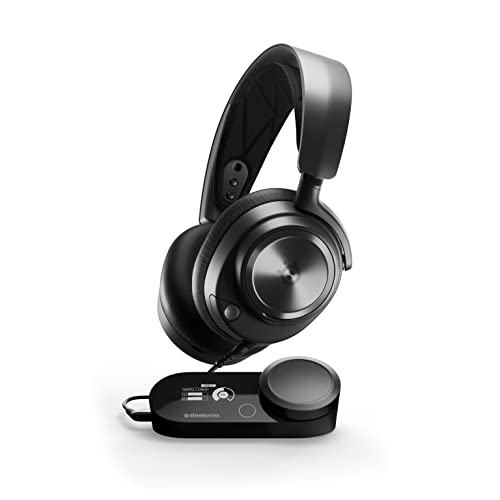 SteelSeries Arctis Nova Pro Multi-System Gaming HeadsetWired7.58 x 7.37 x 3.44 inchesCheck on Amazon
The best streaming headset with a GameDAC mixer in this group is the SteelSeries Arctis Nova Pro with GameDAC Gen 2, which pairs a hi-res headset with a base station that has a dedicated DAC and amp, a display, and quick game and chat balance. A GameDAC is that desktop control box: it sits between your PC or console and the headset, handling conversion, amplification, and mix controls so you can adjust levels while live without leaving the game. Five of the six picks here are SteelSeries Arctis Pro or Nova Pro models; the Razer BlackShark V2 X is a plain analog headset included as a runner-up for comparison.
Quick List
- SteelSeries Arctis Pro + GameDAC – best for PC and PlayStation streamers who want the original wired DAC setup
- Razer BlackShark V2 X – best as a simple analog runner-up without a DAC box
- SteelSeries Arctis Nova Pro (multi-system) – best all-round pick for streamers using PC and consoles
- SteelSeries Arctis Nova Pro (black) – best for PC and console streamers who want spatial audio and the Gen 2 DAC
- SteelSeries Arctis Nova Pro X – best for Xbox streamers
- SteelSeries Arctis Pro + GameDAC (Renewed) – best for a refurbished entry into the GameDAC family
Which One Is Right for You?
Start with your platform, then decide whether you want the newer Gen 2 DAC or the original hardware. The table below links common setups to a pick.

SteelSeries Arctis Pro + GameDAC Wired Gaming Headset - Black | Certified Hi-Res Audio - Dedicated DAC and Amp - for PS5/PS4 and PC
Chosen because it specifies Certified Hi-Res Audio and Dedicated DAC and Amp.
View on AmazonRazer BlackShark V2 X Wired Gaming Headset with Mic for PC and PS5, Black | TriForce Titanium 50 mm Drivers, HyperClear Cardioid Mic, 240 g Lightweight, Noise-Isolating Earcups, 3.5 mm, PS4, Switch
Chosen because it specifies 50mm Drivers and Memory Foam Cushion.
View on AmazonSteelSeries Arctis Nova Pro Multi-System Gaming Headset - Premium Drivers - Hi-Res Spatial Audio - GameDAC Gen 2 - ESS Quad-DAC - ClearCast Mic - PC, PS5, PS4, Switch (Renewed)
Chosen because it specifies Premium Drivers and Hi-Res Spatial Audio.
View on AmazonSteelSeries Arctis Nova Pro Multi-System Gaming Headset - Black | Premium Hi-Fi Drivers, Hi-Res Audio - 360° Spatial Audio - GameDAC Gen 2 - Stealth Retractable Mic - PC, PS5, PS4, Switch
Chosen because it specifies Black and Premium Hi-Fi Drivers.
View on Amazon
SteelSeries Arctis Nova Pro X Gaming Headset | For Xbox - Signature Arctis Sound
Chosen because it specifies For Xbox and Signature Arctis Sound.
View on Amazon
SteelSeries Arctis Pro + GameDAC Gaming Headset - Certified Hi-Res Audio System for PS4 and PC (Renewed)
Chosen because it specifies Certified Hi-Res Audio System for PS4 and PC (Renewed).
View on Amazon| If you… | Choose |
|---|---|
| Stream from PC and want one headset that also works with consoles | SteelSeries Arctis Nova Pro (multi-system) |
| Want the newer GameDAC Gen 2 and spatial audio on PC or PlayStation | SteelSeries Arctis Nova Pro (black) |
| Play and stream on Xbox | SteelSeries Arctis Nova Pro X |
| Want the original GameDAC design for PC and PS5 or PS4 | SteelSeries Arctis Pro + GameDAC |
| Are comfortable buying refurbished gear to try the GameDAC format | SteelSeries Arctis Pro + GameDAC (Renewed) |
| Only need a simple analog headset with a 3.5 mm plug and no mixer box | Razer BlackShark V2 X |
One caution: a GameDAC is a headset mixer, not a full streaming mixer. It balances game and chat in your ears and gives you a line out, but it does not replace a dedicated audio interface if you need separate stream mixes for music, alerts, and guests. Treat it as the simplest way to get clean headset audio and quick control while you stream.
All 6 Picks in Detail
1. SteelSeries Arctis Pro + GameDAC – Best for the original wired DAC setup
As an Amazon Associate we earn from qualifying purchases at no extra cost to you.

This is the first-generation GameDAC bundle, and it remains a straightforward choice for PC and PlayStation streamers. The listing calls it a wired gaming headset with certified hi-res audio and a dedicated DAC and amp, for PS5, PS4, and PC. The base station gives you a display, input switching, and dials for quick mix control, so you can adjust your sound while you stream. It suits streamers who want clean, wired audio with hardware control.
- Type: wired gaming headset with GameDAC base station
- Audio: certified hi-res audio, per the listing
- Hardware: dedicated DAC and amp
- Platforms: PS5, PS4, and PC, per the listing
- Color: black
The Arctis Pro setup splits into two parts: the headset itself and the base station with its small display and dials. That base unit is what makes it a mixer. You can switch inputs, change presets, and balance game and chat levels without opening software, which is helpful on a live stream when you need quick control. Because the listing mentions PS5, PS4, and PC, the headset is an option for streamers who switch between a console and a PC, though you should confirm Xbox is not listed for this version.
Setup tip: plug the base station into a USB port on the back of the PC, not through a hub, and set the headset as both the playback and recording device before you open your streaming software.
Pros
- Dedicated DAC and amp in a desktop base station
- Hardware controls for fast changes during a stream
- Hi-res audio certification, per the listing
Cons
- Older design than the Gen 2 models
- Platform list does not mention Xbox
Compared with the Nova Pro models, it is the older generation, and the Nova Pro is the better pick if you want the Gen 2 DAC.
2. Razer BlackShark V2 X – Best for a simple analog runner-up

This headset does not include a GameDAC mixer, so it does not match the main facet of this guide. We list it as a runner-up for readers who want a plain analog headset. The listing names 7.1 surround sound, 50 millimeter drivers, memory foam cushions, and a 3.5 millimeter audio jack, with compatibility for PC, PS4, PS5, and Switch. It suits someone who wants a simple plug-in headset for streaming without a base station.
- Type: wired gaming headset, 3.5 mm audio jack
- Drivers: 50 mm, per the listing
- Surround: 7.1, per the listing
- Cushions: memory foam
- Platforms: PC, PS4, PS5, and Switch, per the listing
The BlackShark V2 X connects via a 3.5 mm plug, so it needs no DAC box and no USB power. That makes it flexible, since you can plug it into a controller, a PC front panel, or an external audio interface. For streaming, it relies on the mic built into the headset, so audio quality depends on your input chain. If you want mixer-style controls, you would need an external interface, which is outside this guide. We place it as a runner-up because it does not include a GameDAC.
Setup tip: if your PC has separate headphone and mic jacks, check whether the headset uses a single combined plug, and use a splitter or adapter if the jack layout does not match.
Pros
- Simple plug-in setup without extra hardware
- 50 mm drivers listed
- Compatible with several platforms
Cons
- No GameDAC or mixer base station
- Mixer controls require external gear
Next to the Arctis Pro and Nova Pro models, it is a simpler tool, and those models are better if you want built-in DAC and mix control.
3. SteelSeries Arctis Nova Pro (Multi-System) – Best for all-round streaming across platforms
This is our top overall pick. The listing names premium drivers, hi-res spatial audio, GameDAC Gen 2, an ESS Quad-DAC, and a ClearCast microphone, and it is described as multi-system. It fits a streamer who wants a modern wired headset with a base station that handles DAC, amp, and mixing. If you move between PC and consoles, the multi-system label is a plus.
- Type: wired gaming headset with GameDAC Gen 2
- DAC: ESS Quad-DAC, per the listing
- Audio: premium drivers, hi-res spatial audio
- Mic: ClearCast microphone, per the listing
- Platforms: multi-system; confirm exact list
The Nova Pro family uses the GameDAC Gen 2, which SteelSeries markets with an ESS Quad-DAC. Published specifications for the wired Nova Pro cite two USB-C ports on the base station for audio and power, plus line input and output on 3.5 mm jacks, and no optical port. That makes it practical for a setup with a PC and a console connected at once, so you can switch between them from the menu. Check that your consoles accept USB audio before you buy.
Setup tip: connect the PC to one USB-C port and a console to the other, then use the base station menu to switch between them, so you do not unplug cables mid-stream.
Pros
- Gen 2 DAC and amp in a base station
- Spatial audio and hi-res support
- Works across PC and consoles
Cons
- Larger and more complex setup than a plain headset
- Needs a USB connection and desk space for the base station
Compared with the black Nova Pro listing, it appears to be the same family, and compared with the Arctis Pro it adds the Gen 2 DAC.
4. SteelSeries Arctis Nova Pro (Black) – Best for spatial audio with the Gen 2 DAC
The black Nova Pro listing describes premium hi-fi drivers, hi-res audio, 360 degree spatial audio, and GameDAC Gen 2. It is aimed at the same audience as the multi-system listing, so the choice between the two comes down to platform support and included accessories. It suits streamers who want rich audio and a mixer base station on PC.
- Type: wired gaming headset with GameDAC Gen 2
- Audio: premium hi-fi drivers, hi-res audio
- Spatial: 360 degree spatial audio, per the listing
- Color: black
- Platforms: confirm on listing
The black listing names premium hi-fi drivers, hi-res audio, and 360 degree spatial audio with the GameDAC Gen 2. Because the multi-system listing uses similar wording, the two pages may represent variants of the same product. Read both product pages for differences in platform support and included cables, and choose the one that matches your console. The headset is designed for long sessions, with a headband and ear cushions designed for comfort over many hours.
Setup tip: read the box contents on the product page, since cable length and included adapters matter if your PC sits under the desk and the base station sits on top.
Pros
- Spatial audio and hi-res support
- Gen 2 base station with mix controls
- Same family as the multi-system pick
Cons
- Overlaps with the multi-system listing
- Needs desk space and USB connections
It is nearly identical on paper to the multi-system listing, so check platform notes to choose between them.
5. SteelSeries Arctis Nova Pro X – Best for Xbox streamers
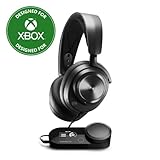
The Nova Pro X is the Xbox-focused version of the Nova Pro. The listing names the signature Arctis Sound, and it is aimed at Xbox owners who also want a hi-fi wired headset with a DAC base station. It suits streamers who play primarily on Xbox and want a plug-and-play connection with game and chat controls.
- Type: wired gaming headset with GameDAC
- Platform: Xbox, per the listing
- Sound: signature Arctis Sound
- Base station: GameDAC; generation to confirm
- Other platforms: confirm on listing
The Xbox version of the Nova Pro focuses on compatibility with Xbox consoles, with a dedicated connection for chat and game audio. Retail descriptions say it also works with PC, PlayStation, and Nintendo Switch, but because compatibility details vary by version, confirm on the product page that the Xbox version supports your other devices. For Xbox streamers, a dedicated model avoids workarounds, though a multi-system model can serve you if you play across platforms.
Setup tip: Xbox consoles handle chat audio through their own settings, so adjust the chat mix in the console menu as well as on the base station.
Pros
- Built for Xbox
- Same family as the Nova Pro with a DAC base station
Cons
- Platform focus may limit use elsewhere
- Listing detail is brief
It is the Xbox counterpart to the multi-system Nova Pro, and the multi-system model is the better pick for mixed setups.
6. SteelSeries Arctis Pro + GameDAC (Renewed) – Best for a refurbished entry to the GameDAC family

This is the same Arctis Pro with GameDAC, listed as renewed and described as a hi-res audio system for PS4 and PC. It suits streamers who want the original base station design in a refurbished unit. Condition and warranty depend on the seller, so read the renewed program terms and confirm what is included.
- Type: wired gaming headset with GameDAC base station
- Condition: renewed
- Audio: certified hi-res audio, per the listing
- Platforms: PS4 and PC, per the listing
- Warranty: confirm on listing
Renewed means the unit has been refurbished and resold, so condition, included accessories, and warranty depend on the seller. The product is the original Arctis Pro with GameDAC, a design that remains popular because the base station is easy to use. If you choose this route, check what is included in the box, try every control when it arrives, and keep the return window in mind.
Setup tip: update any available firmware for the base station as soon as it is connected, because refurbished units may ship with older software.
Pros
- Same original GameDAC design as the new Arctis Pro
- Refurbished route to the GameDAC format
Cons
- Condition and warranty vary
- Platform list is shorter than the new listing
It mirrors the new Arctis Pro listing, so choose it only if you are comfortable with refurbished hardware.
Specs Compared
Details come from the listing names; where a value is not stated, the table says to confirm it on the listing.
| Product | DAC / amp | Connection | Platforms | Notes |
|---|---|---|---|---|
| Arctis Pro + GameDAC | Dedicated DAC and amp | Wired base station | PS5, PS4, PC | Certified hi-res audio |
| Razer BlackShark V2 X | None (analog) | 3.5 mm jack | PC, PS4, PS5, Switch | 7.1 surround, 50 mm drivers |
| Arctis Nova Pro (multi-system) | GameDAC Gen 2, ESS Quad-DAC | Wired base station | Multi-system; confirm list | ClearCast mic |
| Arctis Nova Pro (black) | GameDAC Gen 2 | Wired base station | Confirm on listing | 360 degree spatial audio |
| Arctis Nova Pro X | GameDAC; confirm generation | Wired base station | Xbox | Signature Arctis Sound |
| Arctis Pro + GameDAC (Renewed) | Dedicated DAC and amp | Wired base station | PS4, PC | Renewed condition |
How We Chose These
We compared the six listings by DAC and amp hardware, connection type, platform support, and how clearly each listing states its features. Models with a GameDAC base station ranked higher because that is the facet this guide covers, and the Razer was kept as a runner-up. We used manufacturer descriptions and published specification pages, not personal sessions. Where a listing was vague about platform support or generation, the guide says to check the product page.
What to Look For
What a GameDAC actually does
A GameDAC is an external digital-to-analog converter and headphone amplifier. It takes a digital signal over USB, converts it to analog with a dedicated chip, and drives the headset. Published specs for the Gen 2 unit cite an ESS Sabre chip with 24-bit and 96 kHz support and a signal-to-noise ratio around 111 dB, while the first-generation unit used an older Sabre chip. A base station adds a display and dials, so you can change presets and balance game and chat levels without opening an app.
Mixer features that help streamers
For streaming, the useful features are a chat and game balance dial, a line out, and a way to monitor your own mic. Most GameDAC units give you those basics. They do not give you separate stream and monitor mixes with many channels, which require a dedicated audio interface. Decide whether you need that level of control before you buy. If you only need your own headset audio to be clear and easy to adjust, a GameDAC is enough.
Platforms and ports
Check your system before ordering. The Gen 2 units have two USB-C ports for connecting two systems and no optical port, while the original GameDAC supports optical input. Xbox users should look for the Xbox version, because platform support depends on the model. Leave room on your desk for the base station, and plan the cable route so the headset cable reaches comfortably.
Mic, comfort, and sound signature
A streamer wears the headset for hours, so comfort matters as much as sound. Look for adjustable headbands, soft ear cushions, and low clamping force. The mic should be clear and easy to mute. As a rule of thumb, if you stream for three hours or more at a time, choose a model with a self-adjusting headband and breathable cushions, and check whether the mic can be retracted when not needed.
Setting levels for a live stream
Set the headset volume first, then adjust the mic. A common approach is to keep the game quieter than your voice so you can hear callouts and chat, and to leave the chat side high enough that viewers or teammates are never lost. Speak at a normal volume, watch the meter in your streaming software, and aim for peaks in the upper-middle of the range without touching the red zone. If your voice sounds boomy, move the mic a little farther from your mouth or off to the side to reduce breath noise. Save a preset on the base station once it sounds right, so you can return to it after trying other settings.
Sample-rate and wiring basics
Many USB DAC base stations work at a fixed sample rate such as 96 kHz, so set your operating system’s output to match to avoid extra resampling. Use the supplied cables where possible, keep USB cables away from power bricks, and avoid low-quality hubs, which can add hiss or dropouts. If you stream from a console, check whether it accepts USB audio devices, since some consoles need a specific port or adapter.
New, multi-system, or renewed
A new unit comes with the manufacturer warranty, while renewed units depend on the seller. If you choose renewed, confirm what is in the box, check the return window, and check the base station buttons and display when it arrives. For multi-system listings, confirm which consoles are supported and whether any adapters are required.
Questions
What is a GameDAC?
A GameDAC is a desktop base station that converts digital audio to analog, amplifies it, and gives you hardware controls like presets and balance dials for your headset.
Is a GameDAC the same as a streaming mixer?
No. It balances game and chat in your headset, but a full streaming mixer or audio interface handles multiple channels and separate stream mixes.
What is the difference between Gen 1 and Gen 2?
Published specs say Gen 2 uses a newer ESS Sabre chip and has two USB-C ports with no optical input, while the original unit used an older chip and offered optical input.
Does the Nova Pro X work on PC?
Retail descriptions say the Nova Pro family works across several platforms, but confirm on the product page that the Xbox version supports your other devices.
Are renewed headsets worth considering?
They can be, if the seller offers a clear return window and warranty. Check the condition, the included accessories, and test every control on arrival.
Do I need a separate microphone for streaming?
Many streamers use the built-in headset mic, which is fine for chat and casual streams. A separate microphone gives more control over sound but needs an audio interface or USB mic.
Update History
- October 21, 2026 – Initial publication; product set drawn from current catalog listings.
- Check the product page for current specifications and availability before buying.
Sources
- Manufacturer product and specification pages for SteelSeries and Razer
- Retailer listing titles and specification fields
- Published hardware review specifications for the GameDAC Gen 2
FAQ
Which One Is Right for You?
What is a GameDAC?
Is a GameDAC the same as a streaming mixer?
What is the difference between Gen 1 and Gen 2?
Does the Nova Pro X work on PC?
Are renewed headsets worth considering?
Do I need a separate microphone for streaming?
More from Amazon
Programs that pair well with the guide above. Offers and eligibility are set by Amazon and may change.
Free shipping on eligible items, Prime Video and more. Eligible new members can start with a free trial.
Start a Prime free trialAd-free music streaming. Eligible new subscribers can start with a free trial.
Try Music Unlimited freeA Prime membership for ages 18-24 with a trial period. Eligibility is set by Amazon.
See Prime for Young AdultsAudiobooks and podcasts to listen to on the go. Eligible new members can start with a free trial.
Try Audible freeAs an Amazon Associate we earn from qualifying purchases.