Key takeaways
- Does motherboard audio quality matter? Learn how onboard codecs, shielding and amps work, plus a 5-point checklist for deciding if you need a USB DAC.
For most people, motherboard audio quality matters far less than the headphones or speakers plugged into it. A modern onboard codec delivers clean, accurate sound for gaming, calls and music on typical headphones, and the differences between mid-range and premium boards are small. It becomes a real factor when you drive hard-to-power headphones, hear electrical noise, or need balanced connections for studio monitors. This guide explains how onboard audio works, what spec-sheet claims really tell you, and how to decide whether a separate USB DAC is worth adding.
What onboard audio actually contains
Onboard audio is a small chain of parts on the motherboard. A digital audio codec, most commonly a Realtek chip, receives digital data from the system. It converts that data to an analog signal using a digital-to-analog converter (DAC), then passes it on to the line-out jack, usually with a headphone amplifier on better boards. For recording, the same codec handles the opposite job with an analog-to-digital converter (ADC) for the microphone and line-in jacks.
The weak point of any integrated solution is not usually the converter chip itself but its surroundings. Inside a PC, the audio circuit sits close to the processor, graphics card slot and voltage regulators, all of which produce electrical noise. Much of what separates one board’s audio from another’s is how well that noise is kept out of the analog path.
Some newer boards connect their codec over USB internally rather than through the older High Definition Audio link. The practical result is similar from the listener’s side, but the design is another sign that makers treat audio as a feature worth differentiating, even at moderate prices.
Codecs, shielding and what spec sheets claim
Board makers advertise audio with a few repeating terms. You will see the codec model, a signal-to-noise ratio figure in decibels for outputs and inputs, support for high sample rates and bit depths, and notes about hardware design. Higher signal-to-noise numbers suggest a quieter output, but they are manufacturer-published figures taken under controlled conditions, not a promise of what you will hear inside your own case.
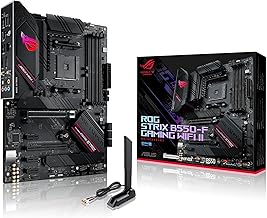
The hardware design notes are often more informative than the codec name:
- Separated audio zone: the audio traces sit on their own section of the board, often marked with a visible line, to keep other signals from crossing them.
- Shield cover: a metal cover over the codec helps block electromagnetic interference.
- Dedicated capacitors: audio-grade capacitors are meant to smooth the signal path; their benefit is hard to confirm by ear.
- Headphone amplifier: a built-in amp can drive higher-impedance headphones more comfortably than a bare codec output. Check the stated impedance range in the manual.
- Rear-panel connectors: gold-plated jacks and optical digital output appear on some boards, and they do little for ordinary stereo listening.
Treat these as hints about build care rather than guarantees of sound. A board without any of them can sound perfectly fine, and a board with all of them can still pick up noise from a poorly seated cable.
What you can realistically hear
Output quality is dominated by the last link in the chain: the headphones or speakers. Swapping a basic pair for a good pair changes the sound far more than swapping onboard audio for an external DAC. Frequency balance, comfort, and how the drivers handle detail are properties of the transducer, not the board.
Controlled listening comparisons between competent converters generally find differences that are small or inaudible for typical listeners at normal volumes, particularly with sensitive headphones. That is why many audio enthusiasts argue the biggest practical gains come from fixing problems, such as noise, insufficient volume or distortion at high levels, instead of chasing a nicer converter. If your current sound has none of those problems, a new DAC is unlikely to feel like an upgrade.
It is also worth separating audio quality from audio features. Surround virtualization, equalizer profiles and microphone noise suppression come from drivers and software, and a basic board can offer them as well as an expensive one.
Onboard audio versus the alternatives
The table below compares the main ways to get sound out of a gaming PC. It reflects general design differences, not individual products.
| Option | Isolation from PC noise | Headphone drive power | Best suited to |
|---|---|---|---|
| Onboard audio (rear jack) | Depends on board design | Fine for easy-to-drive headphones; varies with amp | Everyday gaming, video, music |
| Onboard audio (front panel) | Lowest, long case cable | Same as board output | Convenience only |
| USB DAC / headphone amp | High, conversion outside the case | Often higher, check the stated range | Noise problems, demanding headphones |
| USB headset | High, converter in the headset | Matched to the headset | Simple setups and voice chat |
| Internal sound card | Varies, still inside the case | Varies by model | Specific features or legacy setups |
When a USB DAC or amp is worth adding
A separate device earns its place in a few specific situations. The first is high-impedance or low-sensitivity headphones, which can sound quiet or thin when driven from a weak output. The second is persistent noise that survives simple fixes. The third is studio use, where balanced outputs or multiple inputs matter for monitors and microphones. A fourth is convenience: one box moves between a desktop, a laptop and a console without reconnecting everything.
It is not a good purchase if the reason is only that a review or forum post called onboard audio “bad”. If you cannot name a problem you are trying to solve, spending on a DAC is guesswork. For streamers and creators, the audio chain also includes the microphone and interface, which is covered in the streaming PC build guide, where the capture side matters as much as playback.
How to clear up noise before spending money
Work through these steps in order. Shut down the PC and unplug it before touching any cables inside the case, and follow normal anti-static precautions.
- Move the plug from the front-panel jack to the rear jack on the motherboard.
- Turn the Windows volume to a moderate level and use the speaker or headphone volume for the rest; a very low software volume with a maxed-out speaker raises hiss.
- Disable unused inputs such as line-in and the microphone boost in the sound settings.
- Check the audio cable for damage, and push it in firmly without forcing it.
- Plug the speakers into a different outlet or the same power strip as the PC to reduce ground-loop hum.
- Check whether the noise changes under graphics load or with mouse movement; if it does, interference from the graphics card is likely.
- Update the audio driver from the board maker’s support page.
- If the noise remains, try a USB DAC or USB headset as a diagnostic step, since it bypasses the motherboard’s analog circuit.
A five-point checklist for deciding
Run through this worked example before buying anything. Suppose you have a mid-range board, a pair of 32-ohm gaming headphones and desktop speakers.
- Volume: can you reach a comfortable level with room to spare? If yes, power is not a problem.
- Noise: is there audible hiss with nothing playing? If not, the circuit is clean enough.
- Interference: does the sound crackle when the GPU is busy? If yes, try the steps above first.
- Connections: do you need XLR, balanced or multiple inputs? If yes, a dedicated interface makes sense.
- Headphones: are they high-impedance? Check the maker’s rating; above roughly 100 ohms, an external amp deserves consideration.
In this example, the answers point to staying with onboard audio. Only two or more “yes” answers on the problem items suggest an external device.
Myths that cost people money
“Gold-plated everything means better sound” is common marketing language, but plating mainly resists corrosion. “Higher sample rates always sound better” ignores that most music is released at standard rates and the extra headroom is rarely audible. “Onboard audio is always noisy” was truer on older boards; many current ones are quiet at normal listening levels. And “a DAC will make cheap headphones sound expensive” overstates what a converter can do: the headphones still shape most of what you hear.
Related guides
- Gaming Chairs For Tall People Over 6 Foot 3
- How To Install A Motherboard In A Pc Case
- Motherboards For Ryzen 9 7950X3D
Frequently asked questions
Is a higher-end motherboard audio codec worth paying extra for?
Usually not on its own. Pricier boards tend to bundle a better codec, dedicated audio capacitors and a separated circuit zone, but those extras are rarely why people buy the board. If you use ordinary headphones or desktop speakers, a mid-range board sounds close to a premium one. Pay for audio features only if you drive demanding headphones or hear noise on a cheaper board.
Why do PC speakers buzz or hiss?
Electrical interference is the usual cause. The graphics card, a ground loop between the PC and other mains-powered gear, or a poorly shielded front-panel cable can all leak noise into an analog signal. If the sound changes when you move the mouse or scroll a page, interference is likely. Try the rear jack, a different outlet, or a USB DAC that moves conversion outside the case.
Can a USB DAC fix bad onboard audio?
It can fix noise and power problems, because conversion happens in a separate box away from the motherboard and graphics card. It cannot fix poor speakers, an unsuitable headphone, or a bad recording. A DAC with a headphone amplifier also helps when your headphones are hard to drive, which onboard outputs sometimes struggle with at higher impedance.
Does motherboard audio affect gaming performance?
Not in any way you would notice. Onboard audio relies on a small amount of CPU time for drivers and effects, which is negligible on current processors. Audio quality affects what you hear, not your frame rate. Positional cues in games depend far more on your headphones, the game’s audio engine and settings than on the codec on the board.
Is front-panel audio worse than the rear jacks?
Often, yes. Front-panel audio runs through a long case cable that passes close to other components, and it picks up more noise than the rear jacks that connect directly to the board. Cheap case jacks can also be loosely wired. If you hear hiss on the front jack only, switch to the rear one or use a USB device.
Written by the Editorial team using published specifications, manufacturer documentation and general technical knowledge. Always check your own board manual for the exact audio features and jack behavior.