Our Top Picks
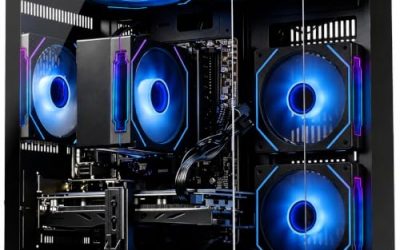
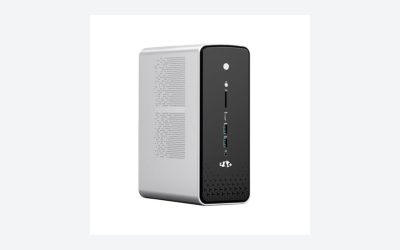
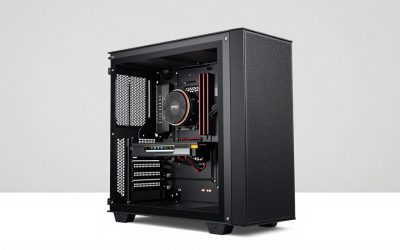
 iBUYPOWER Slate MESH Gaming PC Desktop Computer Intel20.1 x 8.66 x 19.4 inches36 poundsCheck on Amazon
The best gaming pcs under $1600 are prebuilt towers with an RTX 5060 Ti or RTX 4070 and a modern 8-core processor, and the CyberPowerPC Gamer Master with a Ryzen 7 8700F and RTX 5060 Ti is the top pick because its listing names 16GB DDR5, a 1TB PCIe 4.0 SSD and Windows 11 Home. This guide compares six prebuilts from listing specifications only.
Quick Comparison
| Model | Key specs (per listing) | Best for |
|---|---|---|
| CyberPowerPC Gamer Master | Ryzen 7 8700F, RTX 5060 Ti 8GB, 16GB DDR5, 1TB PCIe 4.0 SSD | Balanced all-round build |
| KOTIN Gaming PC | Ryzen 7 8700F, RTX 5060 Ti 8GB, 16GB DDR5, 1TB SSD, 650W Gold PSU, WiFi 6 | 1080p and 1440p streaming |
| MXZ Ryzen 7 7700 | Ryzen 7 7700, RTX 4070, 16GB DDR5, 1TB NVMe, B650, Windows 11 Pro | Graphics-led build |
| iBUYPOWER Slate MESH | Core i7-14700F, RTX 4060 8GB, 32GB DDR5, 1TB SSD, keyboard and mouse | Memory and bundled peripherals |
| LXZ Prebuilt | Ryzen 7 8700F, RTX 5060, 16GB DDR5, 1TB SSD, 650W PSU | Port count and fans |
| Skytech Azure 3 | Ryzen 7 5700, RTX 5060 Ti 8GB, 16GB, DDR4 3200, 1TB NVMe, 650W Gold PSU | Older platform, newer GPU |
1. CyberPowerPC Gamer Master
Spec line: AMD Ryzen 7 8700F, GeForce RTX 5060 Ti 8GB, 16GB DDR5, 1TB PCIe 4.0 SSD, WiFi Ready, Windows 11 Home.

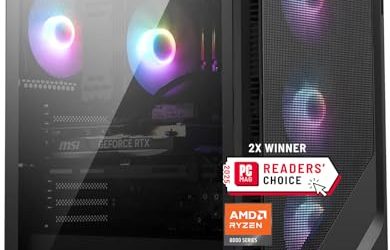
CyberPowerPC Gaming PC, AMD Ryzen 7 8700F, GeForce RTX 5060 Ti 8GB | Gamer Master, 16GB DDR5, 1TB PCIe 4.0 SSD, WiFi Ready & Windows 11 Home (GMA2900A3)
Chosen because it specifies AMD Ryzen 7 8700F and GeForce RTX 5060 Ti 8GB.
View on AmazonThe Gamer Master earns the top spot because the listing covers every core component in a balanced way: an 8-core class Ryzen 7 8700F, an RTX 5060 Ti with 8GB of video memory, 16GB of DDR5 and a 1TB PCIe 4.0 SSD. It also mentions WiFi readiness and Windows 11 Home, so the machine is ready to play after setup.
The weak point is the video memory. 8GB is fine for 1080p and many 1440p games, but very demanding titles with high-resolution textures can run into limits. Power supply wattage and case details are not in the listing text, so check the maker page if you plan to upgrade.
- Pros: Ryzen 7 8700F with RTX 5060 Ti
- Pros: 16GB DDR5 and a 1TB PCIe 4.0 SSD
- Pros: Windows 11 Home included
- Cons: 8GB video memory
- Cons: PSU details not listed
2. KOTIN Gaming PC
Spec line: Ryzen 7 8700F, RTX 5060 Ti 8GB, 16GB DDR5, 1TB SSD, WiFi 6, 650W Gold PSU, ARGB cooling, Windows 11 Home.

KOTIN Gaming PC Desktop, Ryzen 7 8700F, RTX 5060 Ti 8GB, 16GB DDR5, 1TB SSD | Prebuilt Gaming Tower with WiFi 6, Windows 11 Home, DLSS 4, ARGB Cooling, 650W Gold PSU for 1080p/1440p PC Gaming & Streaming
Chosen because it specifies Ryzen 7 8700F and RTX 5060 Ti 8GB.
View on AmazonThe KOTIN build mirrors the CyberPowerPC core hardware and adds details that the listing spells out: a 650W Gold power supply, WiFi 6, DLSS 4 support and ARGB cooling. It also says it targets 1080p and 1440p gaming and streaming, which matches the performance class of the RTX 5060 Ti.
The brand is less established than the major prebuilt makers, so look at warranty and support terms on the maker page before you buy. A Gold-labeled supply is a good sign for efficiency, but you should still confirm the exact PSU details. The case is a standard prebuilt tower, so upgrades are possible but depend on layout.
- Pros: 650W Gold PSU and WiFi 6 listed
- Pros: Same core as the top pick
- Pros: ARGB cooling and DLSS 4 support
- Cons: Less familiar brand
- Cons: Warranty terms not in the listing
3. MXZ Gaming PC (Ryzen 7 7700, RTX 4070)
Spec line: AMD Ryzen 7 7700, GeForce RTX 4070, 16GB DDR5, 1TB NVMe, B650 motherboard, 6 RGB fans, Windows 11 Pro.

MXZ Gaming PC ,AMD Ryzen 7 7700 , GeForce RTX 4070 ,16GB DDR5, NVME 1T,B650 | 6RGB Fans,Windows 11 Pro Ready to use, Gamer Desktop Computer(R7 7700| RTX 4070)
Chosen because it specifies AMD Ryzen 7 7700 and GeForce RTX 4070.
View on AmazonThe MXZ tower is the graphics-led option, with an RTX 4070 paired with a Ryzen 7 7700 on a B650 motherboard. The listing also mentions six RGB fans and Windows 11 Pro, which suits users who want work features.
The RTX 4070 is a previous-generation graphics card, but the listing names it alongside a modern AM5 platform, which keeps CPU upgrades possible. Memory is 16GB, so consider adding more if you stream. As with other smaller brands, check warranty and service details on the maker page.
- Pros: RTX 4070 graphics
- Pros: B650 motherboard and DDR5
- Pros: Windows 11 Pro listed
- Cons: Previous-generation GPU
- Cons: 16GB memory only
4. iBUYPOWER Slate MESH
Spec line: Intel Core i7-14700F, GeForce RTX 4060 8GB, 32GB DDR5 RGB 5200MHz, 1TB SSD, Windows 11 Home, gamer keyboard and mouse.
iBUYPOWER Slate MESH Gaming PC Desktop Computer Intel Core i7 14700F CPU, NVIDIA GeForce RTX 4060 8GB GPU, 32GB DDR5 RGB 5200MHz RAM, 1TB SSD, Windows 11 Home, Gamer Keyboard and Mouse -SMI7N4601
Chosen because it specifies NVIDIA GeForce RTX 4060 8GB GPU and 32GB DDR5 RGB 5200MHz RAM.
View on AmazonThe Slate MESH stands out for memory and extras. The listing names 32GB of DDR5 at 5200MHz and a Core i7-14700F processor, plus a gamer keyboard and mouse in the box. That is the most complete out-of-the-box package here for someone who does not yet own peripherals.
The trade-off is graphics. The RTX 4060 with 8GB is the lowest GPU tier in this group, so frame rates at 1440p will be lower than the 5060 Ti or 4070 models. The bundled keyboard and mouse are convenient, though many players upgrade them later. Check the maker page for power supply and case details.
- Pros: 32GB DDR5 5200MHz
- Pros: Core i7-14700F processor
- Pros: Keyboard and mouse included
- Cons: RTX 4060 is the weakest GPU here
- Cons: PSU details not listed
5. LXZ Prebuilt Gaming PC
Spec line: Ryzen 7 8700F, GeForce RTX 5060, 16GB DDR5, 1TB SSD, 6 RGB fans, 650W PSU, 7 USB 2.0 and 3 USB 3.0 ports.

LXZ Prebuilt Gaming PC Ryzen 7 8700F RTX 5060 16GB DDR5 1TB SSD | Gaming Desktop 6 RGB fans, 650W PSU, 7x USB 2.0 + 3x USB 3.0
Chosen because it specifies Gaming Desktop 6 RGB fans and 650W PSU.
View on AmazonThe LXZ prebuilt uses the same Ryzen 7 8700F as the top two, but with an RTX 5060 instead of the Ti variant. The listing details six RGB fans, a 650W power supply and a long port list of seven USB 2.0 and three USB 3.0.
The port count is useful for a desk with many peripherals, though only three are USB 3.0, so fast external drives will want those. The RTX 5060 sits one step below the 5060 Ti in the same family, so it is the more basic graphics option. As with other smaller brands, check warranty terms on the maker page.
- Pros: Ryzen 7 8700F with DDR5
- Pros: 650W PSU and 6 RGB fans listed
- Pros: Ten USB ports listed
- Cons: RTX 5060 below the Ti variant
- Cons: Only three USB 3.0 ports
6. Skytech Azure 3
Spec line: Ryzen 7 5700, GeForce RTX 5060 Ti 8GB, 16GB RAM, 1TB NVMe SSD, DDR4 3200, 650W Gold PSU, Wi-Fi 5, Windows 11.

Skytech Gaming PC Desktop, Ryzen 7 5700, RTX 5060 Ti 8GB, 16GB RAM, 1TB SSD | Windows 11, NVMe SSD, DDR4 3200, 650W GOLD PSU, Wi-Fi 5, Azure 3 Series
Chosen because it specifies Ryzen 7 5700 and RTX 5060 Ti 8GB.
View on AmazonThe Azure 3 pairs a current RTX 5060 Ti with an older Ryzen 7 5700 platform that uses DDR4 3200 memory and Wi-Fi 5. The listing also names a 650W Gold PSU and an NVMe SSD, so the core is capable even though the platform is older.
The older platform limits upgrade paths, since the motherboard uses DDR4 and a previous-generation socket. It is a reasonable pick if you want a strong graphics card and do not plan to change the CPU. The RTX 5060 Ti carries the same 8GB memory note as the top pick.
- Pros: RTX 5060 Ti graphics
- Pros: 650W Gold PSU listed
- Pros: NVMe 1TB SSD
- Cons: Older Ryzen 7 5700 and DDR4 platform
- Cons: Wi-Fi 5 only
How to Choose Gaming PCs Under $1600
Start with the graphics card
The GPU decides frame rates, so rank by graphics first and processor second. In this group, the RTX 5060 Ti and RTX 4070 are the strongest named. Video memory matters too: 8GB is workable for 1080p and many 1440p games but can limit newer high-detail titles.
Gaming PCs for streaming
Streaming adds CPU and memory load. Choose a PC with an 8-core class processor and consider 32GB of RAM, like the iBUYPOWER listing, or plan to add memory later. The KOTIN listing specifically mentions streaming and a 650W Gold supply.
Gaming PCs for 1440p
For 1440p, aim for an RTX 5060 Ti or RTX 4070 and a monitor that matches. Lower graphics tiers can still play 1440p with reduced settings. All six systems here are listed at or under $1600, so spend your attention on component balance.
Gaming PCs for students
Students on a dorm desk should consider size, noise and ports. A tower with many USB ports like the LXZ model helps with peripherals, and bundled keyboard and mouse, like the iBUYPOWER, save an extra purchase.
Which Pick Fits Which Buyer
Pick the CyberPowerPC for a balanced core, the KOTIN if you want the PSU and WiFi 6 details spelled out, the MXZ for graphics-led gaming with Windows 11 Pro, the iBUYPOWER for memory and bundled peripherals, the LXZ for ports, and the Skytech if you want the RTX 5060 Ti on an older platform. Always read the maker page for warranty, PSU and case details, because prebuilt listings often leave those out. If two systems look equal on paper, prefer the one with clearer warranty terms and a recognizable support channel, since a prebuilt buyer relies on the seller for repairs. Finally, remember that RGB fans and lighting are cosmetic; weigh airflow and the power supply label more heavily than the number of colorful fans.
Memory, Storage and Power Supply Basics
Prebuilt listings tend to highlight the processor and GPU and gloss over the parts that decide long-term satisfaction. Memory is the simplest one: 16GB is enough for most current games, and 32GB, as on the iBUYPOWER listing, gives room for streaming and browser tabs. Storage is usually a 1TB SSD, which fills quickly with modern game installs, so check whether a second drive slot is available. The power supply matters for upgrades; the KOTIN, LXZ and Skytech listings name 650W units, which is a useful starting point but leaves limited headroom for a much larger graphics card later.
Another quiet difference is the platform. The AM5-class boards on the 8700F and 7700 systems use DDR5 and have a longer upgrade runway, while the Ryzen 7 5700 system uses DDR4 and an older socket. If you expect to keep the machine for five years and upgrade the processor once, that detail may matter more than a small graphics gap today.
Setup Checklist After Delivery
When the PC arrives, run Windows updates, install the latest graphics driver from the maker site, and check that the memory runs at its advertised speed in the BIOS. Remove any trial software you do not want, confirm the warranty registration steps, and keep the original packaging for the first weeks in case you need to return it. A short stress run of your favorite game will also confirm that fans ramp up properly and temperatures stay steady.
FAQ
Is 8GB of video memory enough?
For 1080p and many 1440p games, yes. Newer titles with very high-resolution textures can push past it, so lower texture settings if needed.
Is a prebuilt gaming PC better than building one?
A prebuilt saves time and includes a warranty, while a custom build allows part choices. Compare the component list and warranty before you decide.
Can I upgrade these PCs later?
Usually, yes. Memory, storage and graphics are common upgrades, but check the power supply wattage and case size on the maker page first.
Do these include Windows?
Most listings name Windows 11 Home or Pro. Check the listing for your exact model before you rely on it.
How were these PCs chosen?
They were compared from listing specifications, looking at graphics, processor, memory, storage and power supply. Details not stated are marked as not listed.
Last updated: November 2026
FAQ
Is 8GB of video memory enough?
Is a prebuilt gaming PC better than building one?
Can I upgrade these PCs later?
Do these include Windows?
How were these PCs chosen?
More from Amazon
Programs that pair well with the guide above. Offers and eligibility are set by Amazon and may change.
Free shipping on eligible items, Prime Video and more. Eligible new members can start with a free trial.
Start a Prime free trialAd-free music streaming. Eligible new subscribers can start with a free trial.
Try Music Unlimited freeA Prime membership for ages 18-24 with a trial period. Eligibility is set by Amazon.
See Prime for Young AdultsAudiobooks and podcasts to listen to on the go. Eligible new members can start with a free trial.
Try Audible freeAs an Amazon Associate we earn from qualifying purchases.