Our Top Picks
 Focusrite Scarlett 2i2 4th Gen USB-C Audio Interface7.09 x 3.9 x 1.79 inches1.3 poundsCheck on Amazon
 Focusrite Scarlett Solo 4th Gen USB-C Audio Interface1.79 x 5.63 x 3.78 inches0.9 poundsCheck on Amazon
 Arturia MiniFuse USB Audio & MIDI InterfaceMiniFuse 23.9 x 7.9 x 1.6 inches1.1 poundsCheck on Amazon
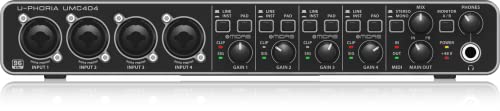 Behringer U-PHORIA UMC404HD 4x4 USB Audio InterfacePack of 11.1 x 9.7 x 6.5 inches2.6 poundsCheck on Amazon
The best audio interfaces under $300 are USB-C models with one or two XLR mic preamps, 24-bit/192kHz conversion and direct monitoring. The Focusrite Scarlett 2i2 4th Gen is the top pick here, since its listing gives two mic preamps, two Hi-Z inputs, Auto Gain and 120dB dynamic range.
These six interfaces are compared from listing specifications, so every figure comes from the product text. Anything not stated, such as driver support details, latency numbers or build quality, is marked “not listed” or sent to the maker page. Each model is listed at or under the $300 ceiling, and all sit well above the entry level, so you get cleaner preamps, more inputs or streaming-friendly extras for the money.
Quick Comparison
| Model | Inputs (per listing) | Key specs | Best for |
|---|---|---|---|
| Focusrite Scarlett 2i2 4th Gen | 2 mic preamps, 2 Hi-Z | USB-C, 24-bit/192kHz, 120dB dynamic range, Auto Gain, Clip Safe, Air Modes | All-round home studio and streaming |
| Focusrite Scarlett Solo 4th Gen | 1 XLR preamp, 1 Hi-Z | USB-C, 24-bit/192kHz, 120dB, Air Modes, PC/Mac/iPad | One mic or one instrument |
| Arturia MiniFuse 2 | Audio and MIDI interface | Ableton Live Lite, 5-year warranty | Voice, guitar and synths with MIDI |
| PreSonus Quantum ES 2 | MAX-HD preamps, Fender-designed input | USB-C, Fender Studio Pro software | Guitarists and music production |
| Elgato Wave XLR MK.2 | XLR input, 80dB gain | DSP mixer, voice effects, touch mute, Stream Deck | Streamers using one XLR mic |
| Behringer U-PHORIA UMC404HD | 4 Midas mic preamps | 4×4 USB, 24-bit/192kHz | More inputs for the money |
1. Focusrite Scarlett 2i2 4th Gen
Specs (per listing): USB-C audio interface, 2 mic preamps, 2 Hi-Z instrument inputs, 24-bit/192kHz, 120dB dynamic range, Auto Gain, Clip Safe, Air Modes.
Focusrite Scarlett 2i2 4th Gen USB-C Audio Interface | 2 Mic Preamps, 2 Hi-Z Instrument Inputs, 24-Bit/192kHz, 120dB Dynamic Range, Auto Gain, Clip Safe, Air Modes
Chosen because it specifies 2 Mic Preamps and 2 Hi-Z Instrument Inputs.
View on AmazonThe 2i2 is the safest all-round choice at this ceiling. Two preamps let you record a mic and an instrument, or two voices, at once, and Auto Gain and Clip Safe are listed as features that set levels and help prevent distorted peaks. That is valuable for beginners who do not want to ride a gain knob. The Air modes add a voicing option that some users like on vocals. The trade-offs are that it is the highest-priced model in this group, and it has two inputs where the Behringer listing offers four. Output count, latency figures and bundled software are not listed on the page we compared. For a first interface that you expect to keep for years, the 2i2 is the model most buyers will not outgrow quickly, which is why it leads this list.
- Pros: Two preamps and two Hi-Z inputs
- Pros: Auto Gain and Clip Safe
- Pros: 120dB dynamic range, USB-C
- Cons: Only two inputs
- Cons: Highest-priced model in this list
2. Focusrite Scarlett Solo 4th Gen
Specs (per listing): USB-C audio interface, 1 XLR mic preamp, 1 Hi-Z instrument input, 24-bit/192kHz, 120dB dynamic range, Air Modes, PC/Mac/iPad compatible.
Focusrite Scarlett Solo 4th Gen USB-C Audio Interface | 1 XLR Mic Preamp, 1 Hi-Z Instrument Input, 24-Bit/192kHz, 120dB Dynamic Range, Air Modes, PC/Mac/iPad Compatible
Chosen because it specifies 1 XLR Mic Preamp and 1 Hi-Z Instrument Input.
View on AmazonThe Solo has the same converter headline as the 2i2 in a smaller package. It suits solo podcasters, streamers and singer-songwriters who record one source at a time. The listing explicitly names iPad compatibility, which is useful if you record on a tablet. The limitation is plain: one preamp means you cannot record two microphones at once, so a guest or a second guitar needs a different interface. It also does not list Auto Gain or Clip Safe in the text we compared, which the 2i2 listing does. If you only ever use one input, saving over the 2i2 is reasonable. It is also easy to place on a crowded desk, since a single-input unit usually takes less room than a two-input one, though exact dimensions are not listed.
- Pros: Compact, one XLR and one Hi-Z input
- Pros: iPad compatibility listed
- Pros: 120dB dynamic range, Air Modes
- Cons: Only one mic preamp
- Cons: Auto Gain not listed
3. Arturia MiniFuse 2
Specs (per listing): USB audio and MIDI interface, records voice, guitar and synths, Ableton Live Lite, 5-year warranty.
Arturia MiniFuse USB Audio & MIDI Interface, MiniFuse 2 | Record voice guitar and synths, best-in-class sound specs, pair with any microphone, Ableton Live Lite, 5-year warranty
Chosen because it specifies MiniFuse 2 and Record voice guitar and synths.
View on AmazonThe MiniFuse 2 is the pick if MIDI matters. The listing calls it an audio and MIDI interface, so you can connect a keyboard or a synth without buying a second device. A 5-year warranty is also unusually long for this price band, and Ableton Live Lite is listed in the bundle. The weak point is that the listing text gives few concrete numbers, with no bit depth or sample rate stated, so you should confirm them on the maker page. It is a good match for hybrid home setups with a mic, a guitar and a small keyboard. If you never plan to use MIDI, the extra capability is wasted, and a Focusrite may be the simpler path.
- Pros: Audio and MIDI in one unit
- Pros: 5-year warranty listed
- Pros: Ableton Live Lite included
- Cons: Sample rate and bit depth not in the listing
- Cons: Fewer streaming features than the Elgato
4. PreSonus Quantum ES 2
Specs (per listing): USB-C audio interface, MAX-HD preamps, Fender-designed instrument input, Fender Studio Pro software.

PreSonus Quantum ES 2 USB-C Audio Interface with Fender Studio Pro Software | USB-C interface with MAX-HD preamps and Fender-designed input for recording, guitarists and music production
Chosen because it specifies guitarists and music production.
View on AmazonThe Quantum ES 2 is aimed at guitarists and music producers. The listing highlights a Fender-designed input for instruments and bundled Fender Studio Pro software, which gives you a recording program from day one. MAX-HD preamps are the other selling point. The downside is the same as with the Arturia: few numeric specs appear, such as sample rate or dynamic range, so compare them on the maker page. It is less obviously a streamer’s tool, since the listing does not mention loopback or a mixer, but it is a strong fit for recording guitar and vocals. If you already know the Fender or PreSonus software ecosystem, the included application makes this an easy place to start.
- Pros: MAX-HD preamps
- Pros: Fender-designed instrument input
- Pros: Fender Studio Pro software included
- Cons: Few numeric specs listed
- Cons: No streaming features mentioned
5. Elgato Wave XLR MK.2
Specs (per listing): USB audio interface and DSP mixer, 80dB gain, onboard voice effects, LED level feedback, touch mute, ultra-low-latency monitoring, works with Stream Deck.

Elgato Wave XLR MK.2 USB Audio Interface and DSP Mixer | 80dB gain, Onboard voice effects, LED level feedback, Touch mute, Ultra-low-latency monitoring, Works with Stream Deck
Chosen because it specifies 80dB gain and Onboard voice effects.
View on AmazonThis is the streamer’s interface in the group. The listing describes a DSP mixer, onboard voice effects and Stream Deck compatibility, which means you can shape and mute your voice from a familiar control surface. Touch mute and LED level feedback are practical for live use. It is built around a single XLR input, so it will not record two mics, and instrument inputs are not mentioned. The 80dB of gain is adequate for many dynamic microphones, but low-output dynamics may need more, so check the maker page for the mic you plan to use. Because the unit doubles as a mixer, it replaces a separate desk mixer for many one-person streaming rigs, which keeps the cable count down.
- Pros: DSP mixer and onboard voice effects
- Pros: Touch mute and LED level feedback
- Pros: Stream Deck integration
- Cons: One XLR input
- Cons: Instrument input not listed
6. Behringer U-PHORIA UMC404HD
Specs (per listing): 4×4 USB audio interface, 24-bit/192kHz, 4 Midas mic preamps.
Behringer U-PHORIA UMC404HD 4x4 USB Audio Interface, 24-Bit/192kHz, with 4 Midas Mic Preamps
Chosen because it specifies 24-Bit/192kHz and with 4 Midas Mic Preamps.
View on AmazonThe UMC404HD gives you the most inputs in this group: four Midas mic preamps and a 4×4 layout, which suits a small band, a podcast with several guests or a drum mic setup. The listing gives 24-bit/192kHz conversion. The trade-offs are a larger desktop footprint and a less polished software bundle than the Focusrite listings, none of which is mentioned in the text we compared. USB-C is not mentioned in its listing, and it lacks the streaming tools of the Elgato. Pick it when input count matters more than extras. Home podcasters who expect to add a co-host later will appreciate having spare preamps from the start rather than upgrading again.
- Pros: Four Midas mic preamps
- Pros: 4×4 USB with 24-bit/192kHz
- Pros: Fits multi-mic setups
- Cons: USB-C not listed
- Cons: Larger than the two-input models
How to Choose Under $300
Count the inputs you actually need
One mic or one instrument is a Solo-class job. Two sources, such as a mic and a guitar, call for a 2i2-class interface. Three or more sources, such as a podcast with guests, need the four-preamp UMC404HD or a bigger unit.
Look for 24-bit/192kHz and a clear dynamic range
The Focusrite listings state 120dB dynamic range and 24-bit/192kHz. Treat those figures as a baseline when comparing others, and ask the maker for any that a listing omits.
Check the connector and your computer
USB-C is listed on the Focusrite, PreSonus and others here. Confirm your computer has the right port, or buy a cable adapter, and check the driver support for your operating system on the maker page.
Plan for phantom power and monitoring
Condenser microphones need 48V phantom power, while most dynamic microphones do not. Direct monitoring lets you hear yourself with no delay, which matters when you record vocals or stream. Phantom power switches and monitoring controls are not detailed in several listings, so confirm both on the maker page before you buy.
Consider software and extras
Bundled software, such as Ableton Live Lite or Fender Studio Pro, saves money. Streamers should weigh the Elgato mixer features.
Audio interfaces for home office
For calls and voice work, a Solo or Elgato unit is enough. Auto Gain on the 2i2 helps if you share a desk and move between setups. A single XLR input is enough for most remote-work voice setups, and the money saved can go toward a better microphone or a boom arm, which usually improves call quality more than a bigger interface would.
Audio interfaces for small spaces
The Scarlett Solo, Elgato and Arturia are compact. Dimensions are not listed, so check the maker page if desk room is tight. In a shared room, also remember that a quiet interface still needs headphone monitoring, so look for a headphone output and a volume knob you can reach easily.
Audio interfaces for gaming
For gaming and streaming, the Elgato Wave XLR MK.2 is the closest match, thanks to its mixer, mute control and Stream Deck support. If you only want to hear game audio and your own voice at a sensible balance, a simple two-input unit with direct monitoring also works well.
FAQ
Do I need an audio interface for an XLR microphone?
Yes. XLR mics need preamps and often phantom power, which an interface provides. A USB mic does not.
Is 24-bit/192kHz necessary?
For most spoken word and music recording, 24-bit/48kHz is already plenty. Higher sample rates mainly matter for specialist work.
What does Hi-Z mean?
Hi-Z inputs accept electric guitar and bass directly. Without Hi-Z, a guitar needs a separate DI box.
Can I use these with an iPad?
The Scarlett Solo lists iPad compatibility. For the others, it is not stated, so check the maker page.
Which interface is best for streaming?
The Elgato Wave XLR MK.2 lists a DSP mixer, touch mute and Stream Deck support, which makes it the most streaming-focused here.
Last updated: November 2026
FAQ
Do I need an audio interface for an XLR microphone?
Is 24-bit/192kHz necessary?
What does Hi-Z mean?
Can I use these with an iPad?
Which interface is best for streaming?
More from Amazon
Programs that pair well with the guide above. Offers and eligibility are set by Amazon and may change.
Free shipping on eligible items, Prime Video and more. Eligible new members can start with a free trial.
Start a Prime free trialAd-free music streaming. Eligible new subscribers can start with a free trial.
Try Music Unlimited freeA Prime membership for ages 18-24 with a trial period. Eligibility is set by Amazon.
See Prime for Young AdultsAudiobooks and podcasts to listen to on the go. Eligible new members can start with a free trial.
Try Audible freeAs an Amazon Associate we earn from qualifying purchases.