Our Top Picks
Check five things first when choosing a VR headset for PC gaming: how it connects to your PC, its per-eye resolution and refresh rate, its tracking method, comfort and lens adjustment, and whether your graphics card can feed it. A standalone headset such as the Meta Quest 3 suits players who want one device for both wireless PC streaming and games that run on the headset itself, while a tethered, base-station headset such as the Valve Index suits players who want a dedicated PC-only setup with external tracking.
At a glance: three headset styles that fit PC gaming
| Headset | Best for | Key stated specs | Limits |
|---|---|---|---|
| Meta Quest 3 | Players who want standalone play and PC streaming from one headset | Two 2064 by 2208 LCD panels, 90 to 120 Hz, Snapdragon XR2 Gen 2, four infrared tracking cameras plus a depth sensor, USB-C for PC connection | PC play depends on a cable or wireless streaming, so compression and network quality matter |
| Valve Index | Dedicated tethered PC VR with external tracking | 1440 by 1600 per eye, 80, 90, 120 or 144 Hz, about 108 degree field of view, DisplayPort 1.2 plus USB 3.0, Lighthouse 2.0 base stations | Older design, needs base stations mounted in the room, and a wired headset |
| Valve Steam Frame | Players in Valve’s Steam ecosystem who want a streaming-first headset | Reported at 2160 by 2160 per eye, 72 to 144 Hz, about 110 degree field of view, four monochrome tracking cameras, eye tracking for foveated streaming, Wi-Fi 6E adapter included | Reviews are reported as mixed on game compatibility and on its high price tier |
The specs above come from the makers’ listings as summarized in public reference pages and outlet reports. Product lines change quickly, so use the maker’s own product page for the final figures before you buy. The headsets above are examples of the three styles, not a complete list. Premium enthusiast headsets from smaller makers also exist, and you should read the maker’s specification page for any model you consider.

Oculus Rift S PC-Powered VR Gaming Headset
Picked as a relevant option in this category.
View on Amazon
Meta Quest 3S 256GB | VR Headset — GOLF+ Included — Tee Off in VR | VR Gaming, High-Definition Resolution, Lightweight Design, Enhanced Haptics, Action Button, 8GB RAM, VR Headset
Chosen because it specifies VR Headset — GOLF+ Included — Tee Off in VR and VR Gaming.
View on Amazon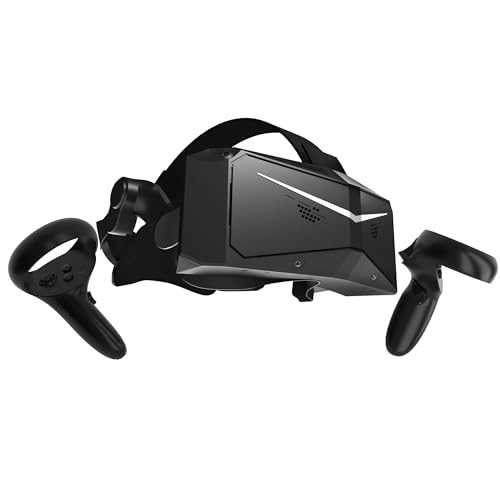
Pimax Crystal Light VR Headset for PC, 2880x2880 per Eye, 8K QLED Display with Local-Dimming, Inside-Out Tracking, PC VR Headset for Flight Sims, iRacing & Gaming (Full Payment Version)
Chosen because it specifies 2880x2880 per Eye and 8K QLED Display with Local-Dimming.
View on Amazon
Logitech G PRO Gaming Headset for Oculus Quest 2 - Oculus Ready - Custom-Length Cable - PRO-G Precision Gaming Audio Driver - Steel and Aluminum Build - Low-Latency 3.5 mm Aux Connection
Chosen because it specifies Oculus Ready and Custom-Length Cable.
View on Amazon1. Connection: tethered, cable-assisted or wireless
This is the first decision because it shapes everything else.
- Tethered: A cable carries video straight from the graphics card. The Valve Index uses DisplayPort 1.2 and USB 3.0. This path avoids video compression, though you manage a cable.
- Standalone with PC link: The Meta Quest 3 lists USB-C for streaming from a PC. The PC renders the game and sends compressed video to the headset. A good cable or a strong Wi-Fi setup is the difference between a clean image and artifacts.
- Streaming-first: The Steam Frame is reported to include a dedicated Wi-Fi adapter for low-latency PC streaming and to use eye tracking to guide how the stream is encoded.
If you plan to stream wirelessly, a router with a dedicated, uncongested connection to the PC helps. The wired PC connection to the router matters as much as the headset’s wireless link.
2. Resolution, refresh rate and field of view
Look for resolution per eye rather than a combined number. Higher resolution per eye gives sharper text and distant objects but needs a stronger graphics card. Refresh rate matters for comfort: higher rates generally feel smoother and reduce discomfort for many players. Field of view describes how wide the image feels. The Valve Index is listed at about 108 degrees, while reference pages list the Steam Frame at about 110 degrees. Wider is more immersive, but lens quality and clarity across the field matter as much as the number.
3. Tracking type
| Tracking | How it works | Strength | Trade-off |
|---|---|---|---|
| Inside-out (cameras on the headset) | Cameras map the room and follow controllers | No room setup, easy to move or travel with | Controllers can lose tracking when out of camera view, such as behind your back |
| Base-station (Lighthouse) | External stations sweep the room with laser signals that sensors on headset and controllers detect | Reliable tracking across the room, favored by some for fast motion | Stations must be mounted and powered; setup is fixed |
A fuller explanation is in the dedicated guide on tracking types, but the short rule is this: pick inside-out for simplicity and flexibility, and base stations if you have a dedicated play space and want robust tracking.
4. Comfort, weight and lens adjustment
Comfort decides how long you will actually play. Check the listed weight, the strap design, and whether the headset supports glasses. Look for physical interpupillary distance adjustment. The Valve Index lists an adjustable range of 58 to 70 millimeters with a physical slider. The Steam Frame is reported at 440 grams total with a 185 gram core module, which shows how weight can be moved onto a separate part of the design. Reviewers frequently compare weight balance as much as total weight, so look for that comment in written reviews.
5. Your PC and the real requirements
A headset needs a graphics card and CPU that can render two views at a high refresh rate. Check the maker’s listed minimum and recommended PC specs on the product page. If your GPU is modest, choose a lower resolution mode or a headset with foveated rendering, which reduces rendering load where you are not looking. Also check that your PC has the connection the headset needs, such as a DisplayPort output or a free USB 3.0 port.
6. Software ecosystem and game access
- Check which store and runtime the headset uses for PC VR, and whether it works with OpenXR titles.
- Standalone headsets also run their own game libraries, which adds value if you do not always want to use the PC.
- For the Steam Frame, reports describe a SteamOS-based system with Windows games run through a compatibility layer, and Ars Technica is reported to have pointed to spotty compatibility for demanding titles on the headset itself, so check which mode you would use.
7. Audio and controllers
Built-in speakers are convenient, but some players use their own headphones. Check the controller layout, battery type, and whether controllers support finger tracking, if that matters for the games you play.
Decision table: pick this if …
| Pick this if … | Then choose |
|---|---|
| You want one headset for standalone games and PC games, mid-range budget | A standalone headset with PC link such as the Meta Quest 3 |
| You have a dedicated room and want external tracking and a wired connection | A base-station headset such as the Valve Index, if you can still find it in stock |
| You already use Steam heavily and have a strong Wi-Fi setup | The Steam Frame, after reading the compatibility notes |
| You have a mid-range graphics card | A headset with lower rendering load modes, or foveated rendering |
| You need the lightest, most comfortable fit for long sessions | Compare listed weight, balance and strap design, read written reviews on comfort |
| You play seated cockpit games only | A cheaper entry-level model is usually enough; tracking range matters less |
Budget tiers without price numbers
- Budget tier: Entry-level standalone headsets with PC link, accepting lower resolution and basic controllers.
- Mid-range tier: Headsets such as the Quest 3, balancing resolution, comfort and PC link.
- Premium tier: Higher-end tethered or streaming-first headsets with eye tracking or high-resolution panels, which demand a strong graphics card.
Common mistakes
- Buying on resolution alone: Lens clarity, field of view and refresh rate shape the experience as much as panel numbers.
- Ignoring the PC side: A strong headset with a weak GPU gives low frame rates and discomfort.
- Underestimating Wi-Fi: Wireless streaming works best with a modern router and a wired connection from the router to the PC.
- Skipping the play space: Check how much room you have and whether you can mount base stations if you choose them.
- Forgetting glasses: If you wear glasses, check the maker’s glasses guidance and the lens adjustment.
Alternatives to consider
- Meta Quest 3S: A lower-tier option in the same family; compare its stated specs on the maker’s page before deciding.
- Used or previous-generation tethered headsets: Can suit tight budgets, but check support status and whether replacement parts are available.
- High-end enthusiast headsets from smaller makers: For players who want very high resolution and have a powerful PC, read the maker’s specifications and reviewers’ comfort notes.
Frequently Asked Questions
Do I need a powerful PC for VR?
For PC VR, yes, a capable graphics card helps because the PC renders two views at a high refresh rate. Check the headset maker’s recommended specs. Standalone games on a headset like the Quest 3 run on the headset itself, so they do not need your PC.
Is wireless PC VR as good as a cable?
It can be close when the network is strong, but the image is compressed and latency depends on Wi-Fi quality. A cable avoids those variables, which is why some players still prefer a tether.
Do I need base stations?
Only if you choose a Lighthouse headset such as the Valve Index. Inside-out headsets track with cameras on the headset and need no room setup.
What refresh rate should I look for?
Higher is generally smoother and more comfortable, and many headsets support more than one mode. Choose a rate your graphics card can hold steadily rather than the highest on the box.
Can I use VR with glasses?
Many headsets work with glasses, and some offer adjustments or lens inserts. Check the maker’s guidance on glasses spacing before buying.
Is a standalone headset worth it for PC gaming?
It can be, because you get standalone games as well as PC streaming from one device. The trade-off is that PC games rely on compressed video, so check your network and cable options.
FAQ
Do I need a powerful PC for VR?
Is wireless PC VR as good as a cable?
Do I need base stations?
What refresh rate should I look for?
Can I use VR with glasses?
Is a standalone headset worth it for PC gaming?
More from Amazon
Programs that pair well with the guide above. Offers and eligibility are set by Amazon and may change.
Free shipping on eligible items, Prime Video and more. Eligible new members can start with a free trial.
Start a Prime free trialAd-free music streaming. Eligible new subscribers can start with a free trial.
Try Music Unlimited freeA Prime membership for ages 18-24 with a trial period. Eligibility is set by Amazon.
See Prime for Young AdultsAudiobooks and podcasts to listen to on the go. Eligible new members can start with a free trial.
Try Audible freeAs an Amazon Associate we earn from qualifying purchases.