Our Top Picks
There is no single best site to buy a gaming PC; the right choice is the seller whose parts list is fully disclosed, whose return and warranty terms are clear, and whose configuration matches your games. For a ready-made system, that usually means a maker’s own online store or a reputable builder; for the lowest cost per performance, it can mean buying parts and building the PC yourself.
Judge the site, not just the PC
When two listings show the same graphics card and processor, the difference lies in the details around them. Use the checklist below to compare sites on equal terms.
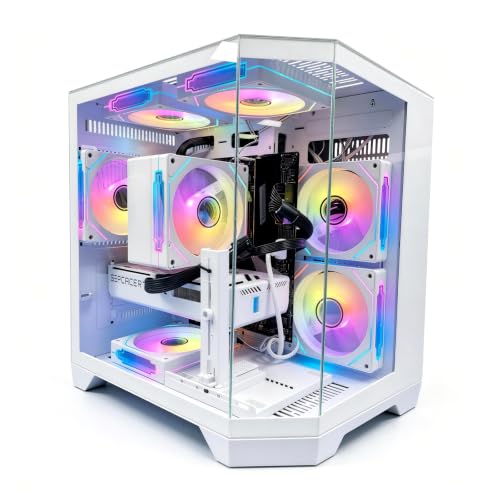
LXZ Prebuilt Gaming PC Ryzen 7 8700F RTX 5060 16GB DDR5 1TB SSD | Gaming Desktop 6 RGB fans, 650W PSU, 7x USB 2.0 + 3x USB 3.0
Chosen because it specifies Gaming Desktop 6 RGB fans and 650W PSU.
View on Amazon
Skytech Gaming PC Desktop, Intel i5 14400F, RTX 5060, 16GB RAM, 1TB SSD | Windows 11, NVMe SSD, DDR5 6000, 750W GOLD PSU, Wi-Fi 5, Archangel 5 Series
Chosen because it specifies Intel i5 14400F and RTX 5060.
View on Amazon
CyberPowerPC Gaming PC, AMD Ryzen 7 8700F, GeForce RTX 5060 Ti 8GB | Gamer Master, 16GB DDR5, 1TB PCIe 4.0 SSD, WiFi Ready & Windows 11 Home (GMA2900A3)
Chosen because it specifies AMD Ryzen 7 8700F and GeForce RTX 5060 Ti 8GB.
View on Amazon
Gaming PC Desktop Computer Ryzen 7 4700LE RTX 5060 8GB GDDR7 | 16GB RAM 1TB NVMe SSD Liquid Cooled 650W PSU Computer
Chosen because it specifies 16GB RAM 1TB NVMe SSD Liquid Cooled 650W PSU Computer.
View on Amazon| Criterion | What a good site shows | What a weak site shows |
|---|---|---|
| Parts transparency | Exact CPU, GPU model, RAM modules, SSD size, PSU brand and wattage | “Gaming PSU”, “high-speed RAM”, no model names |
| Warranty | Stated term for parts and labor, who services it | Vague text, or the third-party seller disclaims responsibility |
| Returns | Clear window, restocking policy, shipping terms | No return page, final-sale language |
| Support | Phone, chat or ticket system with stated hours | A contact form only |
| Upgrade path | Standard ATX parts, free slots, accessible PSU | Proprietary parts, no motherboard model |
| Reputation | Reviewer coverage and long operating history | New names with little coverage |
Where gaming PCs are sold: examples by approach
| Approach | Example makers | Best for | Limits |
|---|---|---|---|
| Maker’s own online store | Alienware, HP Omen, Lenovo Legion, Acer Predator, MSI, ASUS ROG | Warranty clarity, frequent promotions | Proprietary parts on some lines |
| Configure-to-order builder sites | CyberPowerPC, iBUYPOWER, Skytech Gaming, Maingear, Origin PC, Falcon Northwest | Picking your own CPU, GPU, case and cooler | Configurator options can hide lower-grade parts; read the details |
| Component-brand desktops | Corsair, NZXT | Tidy builds with matching parts | Cost above value builds |
| Large electronics and computer-parts stores | Chains and online storefronts that carry many brands | Easy comparison, local pickup, simple returns | Stock rotates; some systems are store-exclusive configurations |
| Build it yourself from parts | Parts storefronts and PC-building communities | Best value and control | Needs time, tools and troubleshooting |
Match the configuration to your games
Before comparing sites, decide the hardware class. A competitive shooter at 1080p or 1440p benefits from a fast CPU and a high-refresh monitor; a story-driven game at 4K leans on the graphics card; an MMO like World of Warcraft leans on single-core CPU speed and cache.
| Tier | Hardware class | Good for |
|---|---|---|
| Budget | Ryzen 5 or Core i5 class, RTX 5050 to RTX 5060 or RX 9060 XT class GPU, 16 GB RAM, 1 TB NVMe | 1080p, esports, older and mid-demanding games |
| Mid-range | Ryzen 7 or Core Ultra 7 class, RTX 5070 or RX 9070 class GPU, 32 GB RAM, 1 to 2 TB NVMe | 1440p high refresh, most modern games |
| Premium | Ryzen 7 X3D or Ryzen 9, RTX 5080 class or above, 32 to 64 GB RAM, 2 TB NVMe | 4K, ultrawide, streaming and creative work |
Compatibility and fit notes
- Graphics card length and case: large cards need roomy cases; check the maker’s stated clearance if you plan to swap the GPU later.
- Power supply connectors: newer high-end cards use the 12V-2×6 power connector; confirm the PSU provides it or ships with the needed adapter.
- Cooling: compact cases limit cooler size and airflow. Look at the cooler type and fan layout.
- Ports: check the front and rear connections you need, including USB-C, Wi-Fi and Ethernet.
- Operating system: some systems ship without Windows; check the listing.
- Monitor outputs: make sure the graphics card’s DisplayPort and HDMI outputs suit your monitors.
Pick X if…
| If you… | Pick |
|---|---|
| want a simple one-company warranty | A big brand’s own store |
| want to choose each major part | A configure-to-order builder |
| want to compare several brands side by side | A large electronics or computer-parts store |
| want the best performance for the budget and can build | A parts purchase and a DIY build |
| need local help | A local PC shop or store with in-person service |
Warning signs on any site
- Listing titles that name a premium GPU but a body text that lists a different or older model.
- A graphics card listed without its memory size.
- Prices that look far below competitors with no explanation for the parts.
- No physical address, company name or terms page.
- Reviews that are all posted on the same day, or no outside coverage at all.
- Used or refurbished systems presented as new.
Alternatives
- Refurbished from the maker: can lower cost and keeps a warranty.
- Local system builders: can assemble to your list and allow in-person pickup.
- Gaming laptops: for portability, with less upgrade room.
- Mini PCs and compact desktops: small and quiet, with some trade-offs in graphics power and cooling.
Reading reviews and reviewer coverage
Customer feedback on a seller’s own site tends to be positive, so weigh it alongside independent coverage. Look for outlets that publish parts breakdowns of the system, note the power supply and motherboard used, and discuss thermals and noise. Reviews that name specific faults, such as a loose cable or a mismatched memory configuration, and then describe how the seller responded, tell you more than general praise. Also search for the seller’s name together with words like warranty or return to see how disputes are handled in public forums.
Payment, shipping and paperwork
- Payment: use a payment method that offers dispute protection, and avoid sellers that ask for transfers outside the site.
- Shipping: large cases can arrive damaged. Look at whether the seller ships with internal supports for the graphics card and who covers transit damage.
- Taxes and fees: look at the final checkout page for taxes, shipping and any handling fees, since they vary by region.
- Records: keep the order confirmation, serial numbers and warranty terms in one folder.
- Registration: register the system and major components with their makers where the terms allow.
New, refurbished and open-box systems
Refurbished systems from the maker can be a good route into the mid-range tier, as long as the listing states the warranty and the parts list. Open-box listings from stores vary in condition and policies, so confirm the return window and what the seller inspected. Avoid used systems from unknown sellers with no warranty, since graphics cards used for long periods can have hidden faults.
What to do if the PC arrives with problems
- Photograph the box, case and any visible damage right away.
- Open the side panel and look for a loose graphics card, unplugged power connectors or fans out of place.
- Reseat cables and connectors if the seller’s support suggests it, and keep notes of each step.
- Contact support with your order number and serial numbers, and ask for the process in writing.
- If the issue is not resolved, use the return window and your payment method’s dispute process.
Timing your purchase
Makers and stores run promotions around large shopping events, and new graphics card or processor launches often bring refreshed configurations from builders. A sale price is only useful if the parts list is the one you want, so compare the discounted system against the standard version and against the same parts bought separately. If a launch is close, waiting may bring newer parts or lower prices on the previous generation. If your current PC has failed and you need to play now, buying a solid mid-range configuration with a good warranty is a reasonable choice, since components can be upgraded later on systems that use standard parts.
Support after the sale
Good sites keep helping once the box is opened. Look for downloadable manuals, driver pages for the exact motherboard and graphics card, and a clear process for warranty claims. Some builders offer lifetime phone support for the original owner, while others limit help to the warranty period. Ask whether you may add memory or storage without affecting coverage, and whether the seller provides a recovery drive or image for Windows. These details cost nothing to ask about and say a lot about how the company treats customers.
Frequently Asked Questions
What is the safest way to buy a gaming PC online?
Buy from a seller with a clear company name, a published warranty and return policy, and a full parts list. Pay with a method that offers dispute protection, and keep order records and serial numbers.
Should I buy from the manufacturer or a store?
Manufacturers offer clear warranty handling and sales events. Stores make comparison and returns easy. Either works as long as you confirm who handles warranty service.
How do I know if a listing hides weak parts?
Look for missing model names, especially for the power supply, motherboard and memory. A reputable listing names each part, and reviewer coverage of the system can confirm it.
Is it cheaper to build or buy?
Building often yields more performance per budget tier, but a prebuilt saves time and includes a warranty. Prebuilt sales can narrow the gap, so compare the parts and the support terms.
What graphics card should I look for in a new gaming PC?
For 1080p, an entry-level current card is enough. For 1440p, an RTX 5060 Ti, RTX 5070 or RX 9070 class card is a typical target, and 4K needs an RTX 5080 or RX 9070 XT class card or above.
Do I need to worry about upgrade room?
If you plan to upgrade, choose a system with a standard motherboard and power supply, free memory and M.2 slots, and room in the case. Proprietary designs can make later changes harder.
FAQ
What is the safest way to buy a gaming PC online?
Should I buy from the manufacturer or a store?
How do I know if a listing hides weak parts?
Is it cheaper to build or buy?
What graphics card should I look for in a new gaming PC?
Do I need to worry about upgrade room?
More from Amazon
Programs that pair well with the guide above. Offers and eligibility are set by Amazon and may change.
Free shipping on eligible items, Prime Video and more. Eligible new members can start with a free trial.
Start a Prime free trialAd-free music streaming. Eligible new subscribers can start with a free trial.
Try Music Unlimited freeA Prime membership for ages 18-24 with a trial period. Eligibility is set by Amazon.
See Prime for Young AdultsAudiobooks and podcasts to listen to on the go. Eligible new members can start with a free trial.
Try Audible freeAs an Amazon Associate we earn from qualifying purchases.