Our Top Picks
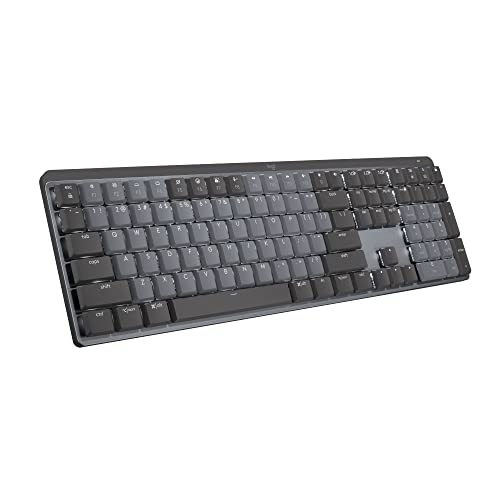 Logitech MX Mechanical Wireless Illuminated Keyboard TactileFull Size17.9 x 5.9 x 2.1 inches2.55 poundsCheck on Amazon
For gaming, the ASUS ROG Strix Scope II 96 Wireless is the strongest wireless mechanical pick because it combines a 2.4 GHz connection with a very long rated battery life, while the Keychron K8 Pro suits typists who want a hot-swappable TKL, and the NuPhy Air75 V2 suits buyers who prefer a slim low-profile board. The real dividing line is how the keyboard connects: only 2.4 GHz dongle modes give the low latency that competitive players want, while Bluetooth is better for switching between laptop, tablet and phone.
At a Glance
| Keyboard | Best for | Key stated specs | Limits |
|---|---|---|---|
| ASUS ROG Strix Scope II 96 Wireless | Gaming with a numpad | 96% layout, 2.4 GHz, Bluetooth 5.1 (up to 3 devices) and USB-C, ROG NX Snow linear switches (45 g actuation), hot-swappable, rated up to 1,500 hours with lighting off and about 90 hours with it on | Premium tier; large for small desks |
| Keychron K8 Pro | Tinkerers who want a TKL | 87 keys, Bluetooth 5.1 (3 devices) plus USB-C, 4,000 mAh battery rated up to 100 hours at lowest backlight, QMK programmable, hot-swappable | No 2.4 GHz dongle; about 40 hours at full brightness |
| NuPhy Air75 V2 | Low-profile, portable typing and gaming | 2.4 GHz, Bluetooth 5.1 and USB-C, 4,000 mAh battery rated about 220 hours with RGB off, QMK/VIA, PBT keycaps | Low-profile switches feel different from standard ones; battery drops to about 35 to 57 hours with RGB on |
| Logitech G915 X Lightspeed TKL | Premium low-profile gaming | Newegg calls it a benchmark for premium wireless gaming keyboards | Premium tier |
| Rosewill Neon S75 | Budget tri-mode | 75% layout, tri-mode, hot-swappable switches, per Newegg | Less polished build and software |
How to Choose
Connection modes
Wireless mechanical keyboards come in three types. Bluetooth-only boards such as the Keychron K8 Pro are great for work and multiple devices, but Bluetooth can add latency. Tri-mode boards, like the NuPhy Air75 V2 and ROG Scope II 96, add a 2.4 GHz dongle for gaming and USB-C for wired use. For fast games, choose a 2.4 GHz or wired mode.

AULA F75 Pro Wireless Mechanical Keyboard,75% Hot Swappable Custom Keyboard with Knob,RGB Backlit,Pre-lubed Reaper Switches,Side Printed PBT Keycaps,2.4GHz/USB-C/BT5.0 Mechanical Gaming Keyboards
Chosen because it specifies 75% Hot Swappable Custom Keyboard with Knob and RGB Backlit.
View on AmazonLogitech MX Mechanical Wireless Illuminated Keyboard Tactile - Graphite | Low-profile full-size, 3 device Bluetooth pairing, Smart backlight auto-adjusts, USB-C rechargeable, Up to 15 day battery
Chosen because it specifies Graphite and Low-profile full-size.
View on Amazon
AULA S99 Gaming Keyboard, Wireless Green Creamy Computer Keyboards | Tri-Mode Bluetooth/2.4GHz/USB-C Membrane Keyboard with Number Pad,99Keys,RGB Backlit,Programmable,Creamy Silicone Structure
Chosen because it specifies Wireless Green Creamy Computer Keyboards and 99Keys.
View on Amazon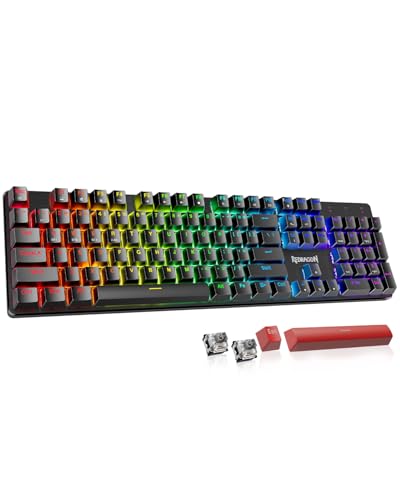
Redragon K671KS Wireless Mechanical Gaming Keyboard, Tri Mode BT/2.4G/USB-C Hot Swappable Custom Keyboard, RGB Backlit Computer Gaming Keyboards, PBT Keycaps, Programmable for PC/Tablet/MAC
Chosen because it specifies Tri Mode BT/2.4G/USB-C Hot Swappable Custom Keyboard and RGB Backlit Computer Gaming Keyboards.
View on AmazonLayout
- Full or 96%: keeps the numpad; suits spreadsheets and sim games.
- TKL (87 keys): drops the numpad for more mouse room.
- 75%: compact with an arrow cluster and function row.
- 60% and 65%: the smallest, with layers for missing keys.
Switches
Linear switches are smooth and quiet, tactile ones give a bump, and clicky ones are loud. The ROG model uses linear NX Snow switches with a 45 g actuation force per Asus. Hot-swappable sockets let you change switches later without soldering, though you need compatible three-pin or five-pin switches as the maker specifies.
Battery life
Makers’ figures are for lighting off. RGB cuts runtime heavily, as the NuPhy and ROG numbers show. If you like lighting, expect closer to the lower figure.
Low-profile or standard height
Low-profile keyboards are thin and quiet, but have shallower travel. Standard height boards feel more traditional and offer more switch choice.
Pick 1: ASUS ROG Strix Scope II 96 Wireless
TechRepublic picks this as its gaming choice. Asus lists 2.4 GHz wireless, Bluetooth 5.1 for up to three devices and wired USB-C. The 96% layout keeps a numpad in a body shorter than full-size. Reviewers at Tom’s Guide, Tom’s Hardware and PCWorld have covered it; PCWorld calls it a great high-end keyboard. The battery rating of 1,500 hours with lighting off is the longest among these boards, but the 90-hour figure with RGB is more realistic for backlit use.
Choose it if
- You game and want a numpad.
- You want hot-swappable sockets and pre-lubed linear switches.
Skip it if
- You have a small desk or want a lower cost.
Pick 2: Keychron K8 Pro
CNN Underscored names the K8 Pro its best wireless mechanical keyboard, praising the balance of typing comfort, features and wireless connectivity, though that review is about ten months old. It is an 87-key TKL with Bluetooth 5.1 for three devices, USB-C wired, full QMK programmability and hot-swappable switches. The battery is 4,000 mAh, rated up to 100 hours at the lowest backlight and around 40 hours at full brightness. There is no 2.4 GHz dongle, so competitive players may prefer wired mode during matches.
Choose it if
- You want a TKL for work and casual gaming.
- You enjoy customisation.
Skip it if
- You want a dedicated low-latency wireless dongle.
Pick 3: NuPhy Air75 V2
This is a low-profile 75% keyboard with a 2.4 GHz dongle, Bluetooth 5.1 and USB-C. The 4,000 mAh battery is rated at about 220 hours with RGB off, and about 35 to 57 hours with RGB on. It supports QMK and VIA and uses PBT doubleshot keycaps. Roundups include it as the low-profile pick.
Choose it if
- You want a thin board you can carry.
Skip it if
- You prefer deep travel and a full-height typing feel.
Alternatives
- Logitech G915 X Lightspeed TKL: a premium low-profile gaming board.
- ASUS ROG Strix Morph 96 Wireless: Newegg’s mid-range pick.
- Rosewill Neon S75: a budget tri-mode 75% board with hot-swappable switches.
- NuPhy Node75 Low-Profile and Lofree Flow 2 100: TechRepublic’s value and premium low-profile picks.
- ASUS ROG Azoth 96 HE: a premium Hall effect board with an OLED display.
- Keychron Q Ultra family: listed by Remote Chance and TechRepublic as the pick for people who want a heavy, premium typing build.
Budget Tiers
- Budget: Rosewill Neon S75, Ducky OK-M.
- Mid-range: Keychron K8 Pro, NuPhy Air75 V2, ROG Strix Morph 96.
- Premium: ROG Strix Scope II 96, Logitech G915 X TKL, ROG Azoth 96 HE.
Pick X If You Want…
| If you want | Choose | Reason |
|---|---|---|
| Low-latency gaming and a numpad | ASUS ROG Strix Scope II 96 Wireless | 2.4 GHz and 96% layout |
| A TKL to customise | Keychron K8 Pro | QMK and hot-swap |
| A thin portable board | NuPhy Air75 V2 | Low-profile, tri-mode |
| Lowest cost | Rosewill Neon S75 | Budget tri-mode 75% |
| Longest battery life | ASUS ROG Strix Scope II 96 Wireless | Rated up to 1,500 hours with lighting off |
| Multi-device work | Keychron K8 Pro | Bluetooth for three devices |
Practical Notes
- Update the firmware through the maker’s tool or QMK configurator before you start.
- Keep the dongle on a short USB extension away from other wireless devices to reduce interference.
- Turn off lighting for longer battery life.
- If your operating system is Mac, check that the keyboard has a Mac layout switch and keycaps.
Switch Types Explained for Gamers
Linear switches move straight down with no bump, which many gamers prefer for repeated presses and quick taps. Tactile switches add a small bump at the actuation point, helpful for typing accuracy. Clicky switches add an audible click and are rarely a good match for shared rooms or voice chat. Low-profile switches, such as those on the NuPhy Air75 V2 class of keyboards, have shorter travel, so they feel quicker but different from standard height. Actuation force matters too: ASUS lists a 45 g force for the NX Snow linear switch, which is on the lighter side, so accidental presses are possible if you rest your fingers on the keys.
Hall Effect and Adjustable Actuation
A newer class of gaming keyboards uses magnetic Hall effect switches that let you change the actuation point and, on some models, use rapid-trigger behaviour. The ASUS ROG Azoth 96 HE, listed by Remote Chance in its premium tier, is an example with an OLED display. These features can help in fast shooters and rhythm games, but they cost more and the battery life on wireless models depends on how the maker implements the sensors, so read the stated runtime.
Noise, Foam and Typing Feel
Pre-lubed switches and dampening foam reduce rattle and make the sound deeper. If you share a room or stream, prefer a board with dampening and linear or silent switches. Keycap material matters too: PBT plastic, as listed on the NuPhy Air75 V2, resists shine and wear better than thin ABS plastic. A heavier case and a gasket mount, which Keychron highlights on its Q series, usually give a more solid feel, but they add weight that you notice in a backpack.
Software, Firmware and Remapping
QMK and VIA support, listed for the Keychron K8 Pro and NuPhy Air75 V2, lets you remap keys, create macros and layers through a configurator without installing vendor software on every computer. Brand software such as Asus Armoury Crate works for lighting and macros but runs only on supported operating systems. If you use several computers, open-source firmware is easier because the settings live on the keyboard.
Pairing and Latency Tips
- Plug the 2.4 GHz dongle into a front or desk-level port with a short extension cable to avoid interference from large metal cases or other radio devices.
- Use Bluetooth for work devices and 2.4 GHz or USB-C for games.
- Turn off unneeded RGB effects to extend battery life, as the NuPhy and ROG figures show.
- Keep firmware updated; makers often fix connection bugs this way.
- If the keyboard goes to sleep quickly, change the sleep timer in the maker’s tool.
Lithium Battery Care
These keyboards contain lithium batteries. Charge them with the supplied cable or a standard USB charger, do not leave them in a hot car, and stop using the keyboard and contact the maker if the case swells or the battery becomes unusually hot.
Frequently Asked Questions
Are wireless mechanical keyboards good enough for gaming?
Yes, if they use a 2.4 GHz dongle or wired mode. Bluetooth adds more delay, which matters in fast shooters.
How often will I need to charge it?
It depends on lighting. Makers rate battery life with lighting off; with RGB on, runtimes drop to tens of hours.
What does hot-swappable mean?
You can pull switches out and push new ones in without soldering. Check which switch types the maker supports.
Which layout is best?
TKL and 75% free up mouse space. A 96% layout keeps a numpad. Pick the smallest layout that has every key you use.
Can I use it wired as well?
Most do through USB-C, which also charges the battery.
Is a low-profile keyboard better for wrists?
Some people find lower keys more comfortable, but a wrist rest and good posture matter more. If you have persistent pain, speak to a doctor.
FAQ
Are wireless mechanical keyboards good enough for gaming?
How often will I need to charge it?
What does hot-swappable mean?
Which layout is best?
Can I use it wired as well?
Is a low-profile keyboard better for wrists?
More from Amazon
Programs that pair well with the guide above. Offers and eligibility are set by Amazon and may change.
Free shipping on eligible items, Prime Video and more. Eligible new members can start with a free trial.
Start a Prime free trialAd-free music streaming. Eligible new subscribers can start with a free trial.
Try Music Unlimited freeA Prime membership for ages 18-24 with a trial period. Eligibility is set by Amazon.
See Prime for Young AdultsAudiobooks and podcasts to listen to on the go. Eligible new members can start with a free trial.
Try Audible freeAs an Amazon Associate we earn from qualifying purchases.