Our Top Picks
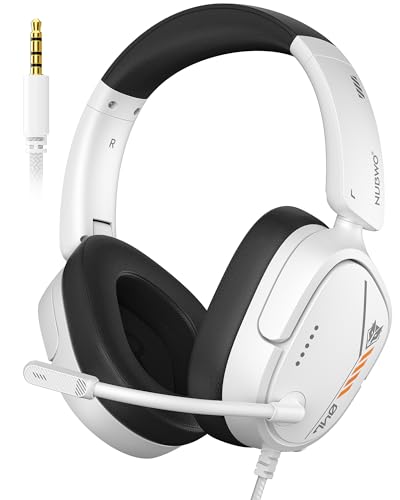 NUBWO HG04L Gaming Headset for PS5/PS4PlayStation/Xbox2.36 x 6.1 x 7.17 inches0.6 poundsCheck on Amazon
For a budget Xbox One headset, the Turtle Beach Recon 70 is the cheapest dependable wired option, the HyperX CloudX is the step up for a no-frills wired headset with a long track record, and the Xbox Wireless Headset is the one to choose if you want cable-free play and are willing to move up in budget. The key rule for any Xbox One buyer is connection type: a wired headset that uses the 3.5 mm jack works with the controller, while many wireless headsets sold today rely on dongles that Xbox consoles do not accept.
At a Glance
| Headset | Connection | Best for | Reviewer notes | Limits |
|---|---|---|---|---|
| Turtle Beach Recon 70 | Wired, 3.5 mm | Lowest-cost Xbox headset | RTINGS lists Xbox, PlayStation, Switch and PC compatibility; CNN Underscored found the mic surprisingly good but the audio just okay | Plastic build; basic sound |
| HyperX CloudX | Wired, 3.5 mm | Wired Xbox play with a reputation for durability | Described by roundups as a no-frills budget recommendation for years | No wireless; no extras |
| Xbox Wireless Headset | Direct wireless to Xbox plus Bluetooth | Cable-free play with simple controls | CNN Underscored calls it dependable with good overall sound and intuitive dial controls | Highest budget of this group |
| Razer Kaira X | Wired | Style and sound under a mid budget | Eneba calls it the best under-budget gaming headset | Wired only for the console version |
| Corsair HS35 v3 | Wired 3.5 mm; wireless version is PC-focused | Console wired use or PC | TechRadar’s budget pick | Wireless dongle not supported on Xbox per TweakTown and The Shortcut |
Compatibility With Xbox One
Xbox One consoles do not accept generic USB dongles for audio. That is the most common reason a headset fails to work after purchase. These are the connection types that do work.
NUBWO HG04L Gaming Headset for PS5/PS4, Xbox Series X|S/Xbox One, Switch | 40mm Speakers, Clear Unidirectional Mic, 250g Lightweight, Soft Memory Earmuffs, 3.5mm Jack for Gaming & Work
Chosen because it specifies Xbox Series X and S/Xbox One.
View on Amazon
BENGOO G9000 Stereo Gaming Headset for PS4 PC Xbox One PS5 Controller, Noise Cancelling Over Ear Headphones with Mic, LED Light, 7.1 Surround Sound, Soft Memory Earmuffs for Nintendo Xbox Series X|S
Chosen because it specifies Noise Cancelling Over Ear Headphones with Mic and LED Light.
View on Amazon
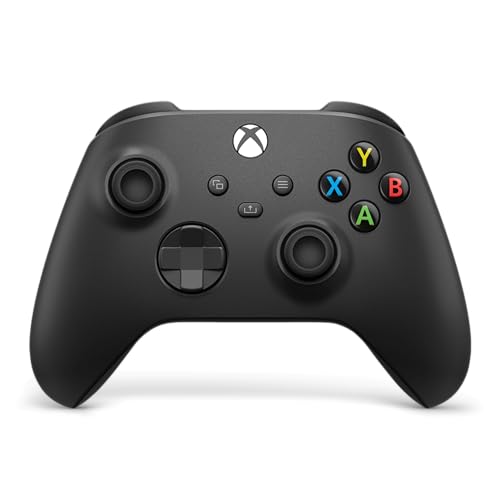
XBOX Wireless Gaming Headset | Carbon Black | Over Ear Headphones, Spatial Audio with Dolby Atmos, Play on Consoles & PCs & TVs and more
Chosen because it specifies Carbon Black and Over Ear Headphones.
View on Amazon- Wired through the controller’s 3.5 mm jack: works with a 3.5 mm headset on later controllers. The original Xbox One controller launched without a headset jack and needs Microsoft’s stereo headset adapter, so check which controller you own.
- Xbox wireless protocol: headsets built to talk to the console directly, such as the Xbox Wireless Headset, which pairs without a separate adapter.
- Bluetooth: Xbox One consoles do not use Bluetooth audio. The Xbox Wireless Headset uses the Xbox wireless link for the console and Bluetooth for phones.
- PC-only wireless: headsets that depend on a USB dongle usually will not work on the console, even if the same headset works on a PC.
Windows Central and other outlets note that mics, chat mix and EQ depend on the headset and console generation, so read the maker’s compatibility list before buying.
Pick 1: Turtle Beach Recon 70
The Recon 70 is a wired headset with a universal 3.5 mm connection, which RTINGS lists as compatible with PC, PlayStation, Xbox and Nintendo Switch. It is the cheapest dependable option, and CNN Underscored described the mic as surprisingly good while finding the plastic design slightly tight and the sound just okay. It is a sensible first headset or backup, not a showpiece.
Choose it if
- You want the lowest cost.
- You need a headset that works across several consoles.
Skip it if
- You have large ears and want a roomy cup.
- You want richer sound.
Pick 2: HyperX CloudX
This is a wired headset that roundups call a consistent budget recommendation for years. It is built for Xbox use and does not need a battery or charging, which reduces points of failure. The compromise is that it is simple: no wireless and few extras.
Choose it if
- You prefer wired reliability and a durable build.
Skip it if
- Cable length matters to you or you sit far from the controller.
Pick 3: Xbox Wireless Headset
Several outlets list this as the best-value wireless option for Xbox. It pairs directly with the console with no dongle, supports Bluetooth for a phone in parallel, and uses dial controls for volume and chat balance. Microsoft also lists Dolby Atmos support. It sits above the wired models in budget, but removes cable clutter and compatibility worry.
Choose it if
- You want simplicity and wireless play.
Skip it if
- You only need a cheap wired headset or want a replaceable battery.
Alternatives
- Razer Kaira X: a wired headset that one outlet calls the best under its price ceiling.
- Corsair HS35 v3: TechRadar’s budget pick, but TweakTown and The Shortcut state that the wireless version does not work with Xbox consoles over a dongle; use the wired connection if you buy it.
- Logitech G432: RTINGS’ budget pick for PC, but its customisation features do not work on Xbox.
- RYR Captain 200: a wireless budget option listed with 50 mm drivers and a 45-hour battery, but read its Xbox compatibility carefully.
What to Look For
Microphone
A detachable or flip-up boom mic is easier to manage. Check how it sounds in chat reviews and whether it mutes with a flip.
Comfort
Weight and clamp pressure matter in long sessions. Memory-foam or leatherette cushions can feel warm during longer play.
Sound signature
Budget headsets often boost bass. For competitive shooters, clear mids help with footsteps; for story games, fuller bass may be nicer.
Battery life
If wireless, note the maker’s stated hours and whether you can play while charging.
Chat features
Dial controls and chat mix are useful on console. Wired headsets may need in-line controls.
Budget Tiers
- Entry: Turtle Beach Recon 70, other basic wired headsets.
- Budget plus: HyperX CloudX, Razer Kaira X.
- Mid-range: Xbox Wireless Headset and similar wireless models.
Pick X If You Want…
| If you want | Choose | Reason |
|---|---|---|
| The lowest cost | Turtle Beach Recon 70 | Wired, works across consoles |
| A durable wired set | HyperX CloudX | Long-standing budget choice |
| Wireless without a dongle | Xbox Wireless Headset | Pairs directly with Xbox |
| A stylish wired set | Razer Kaira X | Outlet’s best-in-class pick at its level |
| A PC and Xbox wired set | Corsair HS35 v3 (wired) | TechRadar’s budget pick |
Wired Versus Wireless on a Budget
Wired headsets are cheaper to make, need no charging and have no connection drop-outs, which explains why the cheapest dependable options are wired. Their drawbacks are the cable and, on Xbox, the fact that the controller must have a 3.5 mm headset jack or an adapter. Wireless Xbox-compatible headsets remove the cable and often add useful features such as chat mix dials, but they cost more and need to be charged. If you sit within a metre or two of the console and use the same controller every night, wired is a good value. If your seat is far from the console or you move around, wireless pays off.
Chat, Mic and Party Considerations
Voice chat is the main reason to buy a headset on console. A boom microphone that sits close to the mouth cuts background noise, and a flip-to-mute mic is faster than reaching for a controller button. On Xbox, the chat mix balance between game audio and voice can be adjusted in the console settings or on the headset itself when a dial is present. Reviewers differ on the quality of budget mics, with CNN Underscored saying the Recon 70 mic was surprisingly good for its level, so read both the mic and the sound comments in reviews.
Comfort for Long Sessions
Budget headsets usually trade weight and padding for cost. Look at the maker’s stated weight, the size of the ear cups and the headband adjustment. People who wear glasses often prefer softer cushions because rigid pads press on the arms of the frames. If the headset feels tight, gently stretching the band over a stack of books for a day sometimes helps, although it is best to follow the maker’s guidance. Take breaks every hour or so, and lower the volume if you notice ear fatigue.
Older Consoles and Newer Ones
The Xbox One generation and the Xbox Series X and S share much of the same headset ecosystem, so a wired 3.5 mm headset or an Xbox wireless headset you buy now should carry across if you upgrade. Microsoft lists the Xbox Wireless Headset as compatible with Xbox consoles and Windows, which makes it a safer long-term purchase than a PC-only wireless model. Features such as spatial audio can vary by console and by headset, so read the maker’s page for the specific console you own.
Care and Longevity
Wipe cushions with a slightly damp cloth, avoid pulling on the cable, and store the headset on a stand instead of the floor. Replacement ear pads are available for some models, which is one reason a long-running wired model like the HyperX CloudX has a reputation for lasting. For wireless models, charge the battery regularly rather than letting it fall to zero for long periods.
Frequently Asked Questions
Will any 3.5 mm headset work on Xbox One?
Mostly yes on newer controllers with a headset jack. Older launch controllers need Microsoft’s headset adapter. Check the mic support, since some TRRS headsets need a specific wiring.
Can I use a USB dongle headset on Xbox One?
Generally no, unless the headset is specifically made for Xbox. Reviewers note that PC-focused dongles are not supported.
Is the Xbox Wireless Headset worth the higher cost?
For many buyers yes, because it removes cables and connection issues, though a wired headset is cheaper.
Does my headset work on Xbox Series X too?
The wired and Xbox-built options generally do. Check the maker’s list for each model.
Do I need Dolby Atmos?
No. It is a nice extra on supported headsets but not necessary for good chat or gameplay.
How do I protect my hearing?
Keep volume at a comfortable level and take breaks. If you notice ringing or discomfort, stop and speak to a doctor.
FAQ
Will any 3.5 mm headset work on Xbox One?
Can I use a USB dongle headset on Xbox One?
Is the Xbox Wireless Headset worth the higher cost?
Does my headset work on Xbox Series X too?
Do I need Dolby Atmos?
How do I protect my hearing?
More from Amazon
Programs that pair well with the guide above. Offers and eligibility are set by Amazon and may change.
Free shipping on eligible items, Prime Video and more. Eligible new members can start with a free trial.
Start a Prime free trialAd-free music streaming. Eligible new subscribers can start with a free trial.
Try Music Unlimited freeA Prime membership for ages 18-24 with a trial period. Eligibility is set by Amazon.
See Prime for Young AdultsAudiobooks and podcasts to listen to on the go. Eligible new members can start with a free trial.
Try Audible freeAs an Amazon Associate we earn from qualifying purchases.