Key takeaways
- A product advertises “wide angle” without stating the field of view in degrees.
- Resolution is listed, but the sensor size, frame rate, or USB requirement is missing.
- Autofocus is promised without explaining whether it can be disabled.
- The camera has a very wide lens but no digital crop or framing control for single-person calls.
- Marketing claims “HDR,” “AI,” or “low light” without sample footage under comparable conditions.
- The mount has no rubber padding, no tripod thread, or a hinge that appears too weak for the camera’s weight.
- The listing does not specify warranty length, operating-system compatibility, included cable, or return terms.
Shopping for a webcam is easy if you only compare resolution. It is much harder when a camera looks too wide, crops your face, hunts for focus, or makes a tidy desk appear cluttered. The most common mistake is assuming that a higher number—4K instead of 1080p, for example—automatically means a better stream. In practice, field of view, focal length, lighting, mounting height, autofocus behavior, microphone quality, and software support usually matter more.
This streaming webcam buying guide field of view and focal length overview focuses on the details that affect real desks, bedrooms, home offices, and small studios. A 1080p webcam with a sensible lens can look more flattering and professional than a poorly positioned 4K model. The goal for 2026 is not simply to buy the highest specification; it is to match the camera to your room, distance, and type of content.
Our top picks
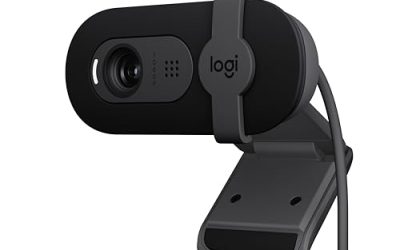
 UGREEN FineCam Lite 2K Webcam with Auto
- Full HD 2K Webcam: UGREEN webcam is upgraded…
- Integrated 2 Noise-Cancelling Mics: UGREEN webcam for PC…
- Auto-Focus & 86° FOV: This computer camera features…
 MEE Audio 201W 1080p HD Webcam with
- WIDE ANGLE FULL HD 1080p VIDEO: The MEE…
- Use with the included extendable tripod for a…
- AUTOFOCUS + AUTOMATIC LOW LIGHT CORRECTION: Real-time autofocus…
As an Amazon Associate we earn from qualifying purchases at no extra cost to you.
Decide These 3 Things First
- How far will you sit from the camera? Measure from the intended lens position to your face. Most laptop and monitor setups place the camera about 18 to 30 inches away. A camera on a tripod may sit 3 to 6 feet away.
- How much of the room should appear? A narrow 65- to 75-degree field of view is usually best for one person. An 80- to 90-degree view works for a wider desk or two people but shows more background. Views above 95 degrees can create noticeable edge distortion.
- Will you move, stream, or make calls? Choose autofocus if you lean toward the camera, display objects, or move during streams. Fixed focus can be perfectly adequate for a stationary video-call setup and often costs less.
Also decide whether you need a built-in microphone, a privacy shutter, a tripod mount, or a camera that can be used without installing special software. These seemingly small choices determine whether the webcam remains convenient after the first week.
Size and Field of View
Webcam bodies are commonly about 3.5 to 6 inches wide, 1 to 2 inches deep, and under 2 inches tall. Compact models fit neatly on laptop lids and narrow monitor bezels. Larger cameras may offer better microphones, more controls, or a larger lens, but they can block the top edge of a thin display.
Field of view, or FOV, describes how much the lens captures from left to right. A 60- to 75-degree camera frames one face and a limited background. An 80- to 90-degree camera shows more of a desk, chair, or second person. A 100-degree-plus camera is useful for demonstrations and small groups, but faces near the edges can look stretched.
Focal length is related but not identical to FOV. A shorter focal length creates a wider view; a longer focal length creates a tighter, more natural-looking frame from the same camera position. For a single presenter, a moderate view around 70 to 80 degrees is a practical starting point. If your webcam sits only 12 to 18 inches away, avoid an aggressively wide lens unless you specifically want a roomier composition.
Material and Lens Construction
Most webcams use plastic housings, and that is not automatically a weakness. A quality plastic body keeps weight low, which matters when the camera hangs from a laptop screen. Look for a hinge that holds its angle without wobbling and a rubberized or padded contact surface that will not scratch a display.
The lens is more important than a glossy shell. Glass elements can resist scratches and may handle contrast better, while plastic lenses keep cost and weight down. Do not treat “glass lens” as proof of superior image quality, however. Sensor size, image processing, lighting, and lens design all contribute.
A standard USB-A cable is convenient for older desktops, while USB-C is increasingly useful with modern laptops. Check whether the cable is permanently attached. A detachable cable is easier to replace, but a fixed cable has fewer connection points to loosen. A threaded 1/4-inch mount adds flexibility for a mini tripod or full-size stand.
Construction, Mounting, and Privacy
A webcam should stay level when you adjust the screen or tap the desk. Test the mounting clip for three points of contact: a stable lower lip, a grippy upper surface, and a hinge that does not slowly sag. A camera weighing roughly 3 to 8 ounces is generally easy to mount on a monitor; heavier models may need a tripod.
Measure the usable monitor bezel before buying. Some clips need approximately 0.25 to 0.75 inch of top-edge clearance. On a laptop, make sure the camera does not press against the screen when the lid closes. A separate mini tripod is useful when the lens needs to sit at eye level instead of looking down from the top of a display.
A sliding privacy shutter is preferable to a loose lens cover because it cannot easily be misplaced. A shutter covers the lens but does not disconnect the microphone, so use your operating system or meeting app to mute audio when privacy matters.
Comfort and Performance
For most video calls, 1080p at 30 frames per second is sufficient. It produces a clear image without demanding as much USB bandwidth or computer processing as 4K. A 2K camera can add detail when you crop the image, while 4K is most useful for creators who reframe footage, record locally, or use a large monitor.
Autofocus is helpful when you move closer to the lens, hold products up to the camera, or alternate between your face and a document. It can also “hunt” in dim rooms or when a high-contrast object enters the frame. Fixed focus is simpler and often steadier when your face remains about 20 to 30 inches from the camera.
Low-light correction can brighten a dark image, but software cannot create detail that the sensor never captured. A small lamp positioned slightly above and to one side of your face often improves the result more than upgrading from 1080p to 4K. Look for exposure controls, white-balance options, and a way to disable excessive automatic smoothing.
Built-in microphones are convenient for casual calls, but they are rarely a replacement for a dedicated USB microphone. A webcam microphone is acceptable when it sits within about 2 feet of you and the room is quiet. For streaming, prioritize clean camera placement and use a headset or separate microphone when possible.
Price Tiers
Budget: $25 to $50. Expect 1080p resolution, a basic microphone, a monitor clip, and modest low-light performance. The MEE Audio 201W is listed at $36.95 and includes a mini tripod, wide-angle lens, autofocus, and low-light correction. The UGREEN FineCam Lite 2K is listed at $39.99 and adds 2K resolution and autofocus. These features are attractive for calls, classes, and entry-level streaming, but verify the actual FOV and software controls before purchasing.
Midrange: $60 to $120. This tier typically offers better image processing, more reliable autofocus, improved microphones, USB-C options, and stronger mounts. It is the sensible range for frequent streamers and remote workers who want consistent performance without paying for specialized production features.
Premium: $130 to $300 or more. Premium webcams may include 4K capture, larger sensors, face tracking, motorized framing, HDR, onboard controls, or advanced software. These features are worthwhile when you record content, use a green screen, or need a camera to follow movement. They are unnecessary for a fixed, well-lit conference-call setup.
Warranty, Compatibility, and Support
Look for at least a one-year limited warranty and a clearly stated return period of 30 days or longer. Confirm whether firmware updates and desktop software support your operating system. A webcam that works as a standard USB video device should function in common calling and streaming applications without requiring an account.
Check the connection type, included cable length, and system requirements. A 4K camera can require more processing power and a faster USB connection than a 1080p model. Also confirm whether the advertised frame rate applies to every resolution or only to a lower setting.
Delivery and Assembly
Most webcams need no assembly beyond unfolding the clip, connecting the USB cable, and selecting the camera in your application. Allow about 5 minutes for setup and another 10 minutes to adjust height, FOV, exposure, and microphone settings. If a tripod is included, verify that its folded length—often about 4 to 8 inches—fits your intended storage space.
Before ordering, check the box contents. A camera may include a cable but no tripod, privacy cover, or USB adapter. For a desk setup, a 5- to 6-foot cable is usually comfortable; a laptop mounted on a side table may need 8 feet or more. Faster shipping is useful, but compatibility and return terms matter more than receiving a webcam one day earlier.
Spec Checklist
| Spec | Budget | Mid | Premium |
|---|---|---|---|
| Resolution and frame rate | 1080p at 30 fps | 1080p or 2K at 30–60 fps | 4K at 30 fps; 1080p at 60 fps |
| Field of view | 70–90 degrees | 75–95 degrees, often adjustable | 65–100 degrees, sometimes with digital framing |
| Focus | Fixed or basic autofocus | Reliable autofocus | Fast autofocus, tracking, or motorized framing |
| Mounting | Monitor clip; 1/4-inch mount is a bonus | Reinforced clip and tripod mount | Adjustable stand, tripod mount, or pan-and-tilt system |
| Privacy | Manual cover or none | Integrated sliding shutter | Integrated shutter or electronic privacy mode |
| Typical price | $25–$50 | $60–$120 | $130–$300+ |
Red Flags
- A product advertises “wide angle” without stating the field of view in degrees.
- Resolution is listed, but the sensor size, frame rate, or USB requirement is missing.
- Autofocus is promised without explaining whether it can be disabled.
- The camera has a very wide lens but no digital crop or framing control for single-person calls.
- Marketing claims “HDR,” “AI,” or “low light” without sample footage under comparable conditions.
- The mount has no rubber padding, no tripod thread, or a hinge that appears too weak for the camera’s weight.
- The listing does not specify warranty length, operating-system compatibility, included cable, or return terms.
FAQ
What field of view is best for streaming?
A 70- to 80-degree FOV is a strong default for one person sitting 18 to 30 inches from the camera. Choose 90 degrees or more when you want to show a wider desk, instruments, artwork, or a second person. Wider is not automatically better because it can expose clutter and distort faces near the edges.
Is focal length more important than resolution?
For framing and facial appearance, yes. A suitable focal length keeps your face naturally proportioned and places the background at a comfortable distance. Resolution matters after the framing is right. A well-positioned 1080p webcam can look better than a badly positioned 4K camera with an overly wide lens.
Should I buy autofocus or fixed focus?
Buy autofocus if you move, demonstrate products, or change your distance from the camera. Choose fixed focus for a stationary desk setup where your face remains in one position. Fixed focus can avoid distracting focus changes, while autofocus provides more flexibility.
Is a $40 webcam good enough for video calls?
Often, yes. A webcam in the $35 to $50 range can provide 1080p or 2K video, a usable microphone, autofocus, and a basic mount. Expect to improve the result with a lamp, careful camera height, and a headset or separate microphone. Spend more only when you need 4K, tracking, better controls, or consistently stronger low-light performance.