Key takeaways
- Smoother movement: Gestures, product demonstrations, gaming reactions, and quick head turns generally look more fluid at 60fps.
- Better for active formats: Fitness streams, cooking demonstrations, unboxings, and standing presentations benefit more from the extra frames than a stationary face cam does.
- More flexibility during editing: A 60fps recording can be slowed modestly in post-production while retaining smoother motion, assuming your recording software saves the footage at that frame rate.
- Less motion judder: Scrolling, panning, or moving objects may appear cleaner than they do at 30fps.
- Longer useful life: If you expect to add more movement to your content, buying 60fps once may prevent an upgrade later.
The Short Answer
No—60fps is not necessary for most stream face cam webcams. Choose 60fps only if your stream includes frequent movement and your streaming platform, lighting, and computer can all support it. For a mostly seated face cam, a sharp 1080p image at 30fps is usually the better value.
Frame rate describes how many still images a webcam captures each second. A 30fps camera records 30 frames per second; a 60fps camera records twice that. The higher number can make hand gestures, head turns, and camera motion look smoother, but it does not automatically make your face look clearer. Resolution, lighting, autofocus behavior, exposure, and microphone quality often matter more.
Our top picks
 AVerMedia Live Streamer CAM 315
- Full-HD Stream Webcam: AVerMedia Live Streamer CAM 315…
- 95° FOV Ultra-Wide Angle: With 95° FOV, one…
- Sliding Privacy Shutter: The handy swivel-arm privacy shutter…
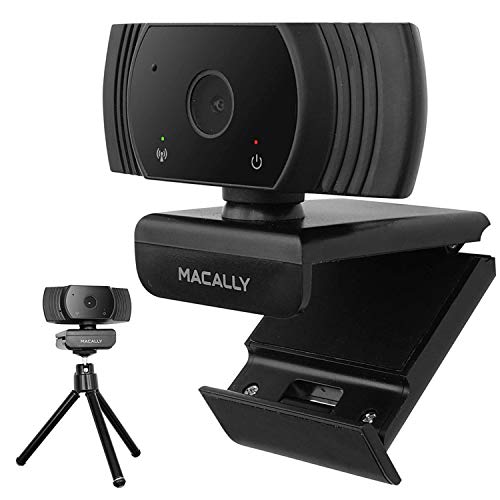 Macally 1080P Webcam with Microphone
- Usb Webcam for any Situation: As video calls…
- Capture and Share Incredible Moments Virtually: Crystal clear…
- Setup in Minutes (Tripod Included): The webcam is…
As an Amazon Associate we earn from qualifying purchases at no extra cost to you.
That distinction is especially important when comparing inexpensive webcams. A reliable 1080p/30fps camera with decent lighting can look more polished than a poorly lit 1080p/60fps camera. For most people choosing a face cam in 2026, 60fps is a useful feature—not a requirement.
What You Actually Get
A 60fps webcam gives your computer more image frames to work with. At 1080p, that means up to 60 full-HD frames each second, provided the camera, USB connection, software, and streaming settings are all configured for it. The visible benefit is smoother motion. Quick gestures have less apparent stutter, and movement across the frame can look more fluid.
It does not mean your stream will automatically broadcast at 60fps. Your streaming software may be set to 30fps, your platform may limit the camera feed, or your internet connection may not have enough upload capacity for a higher-bitrate video stream. If the final stream runs at 30fps, a 60fps webcam may offer little or no viewer-facing advantage.
There is also a lighting cost. At 60fps, each frame has less time to collect light than it does at 30fps when shutter speed is held comparable. In a dim room, the camera may compensate by increasing gain, which can produce a noisier, softer, or more washed-out image. A bright, diffused key light can help, but that adds another purchase and takes space on your desk.
The AVerMedia Live Streamer CAM 315 is a relevant example: it is listed as a 1080p/60fps webcam with built-in microphones, fixed focus, and a wide adjustable field of view. Its listed price is $92.87. The 60fps capability is attractive for active creators, but fixed focus means you should consider how close you sit and whether you regularly move toward or away from the camera.
By comparison, the Macally 1080P Webcam is a 1080p/30fps USB camera with a microphone and a wide 120-degree viewing angle. Its listed price is $10.99. That lower frame rate is entirely adequate for many video calls, talking-head streams, tutorials, and casual broadcasts. The wide angle can include more of a room, although it may make a face appear smaller unless the camera is positioned relatively close.
Pros
- Smoother movement: Gestures, product demonstrations, gaming reactions, and quick head turns generally look more fluid at 60fps.
- Better for active formats: Fitness streams, cooking demonstrations, unboxings, and standing presentations benefit more from the extra frames than a stationary face cam does.
- More flexibility during editing: A 60fps recording can be slowed modestly in post-production while retaining smoother motion, assuming your recording software saves the footage at that frame rate.
- Less motion judder: Scrolling, panning, or moving objects may appear cleaner than they do at 30fps.
- Longer useful life: If you expect to add more movement to your content, buying 60fps once may prevent an upgrade later.
Cons
- Higher cost: A 60fps webcam can cost roughly $70 to $150, while basic 1080p/30fps models often range from about $10 to $60.
- Greater lighting demands: Poor room lighting can make 60fps footage look grainier or darker instead of better.
- More data and processing: Recording and encoding 1080p at 60fps uses more computer resources and can require higher video bitrates.
- No automatic sharpness upgrade: Frame rate does not improve lens quality, color accuracy, dynamic range, or microphone performance.
- Potentially unnecessary for seated streams: If your shoulders and head barely move, the difference may be difficult for viewers to notice.
- Fixed-focus limitations on some models: A 60fps webcam with fixed focus may be less forgiving if you frequently change your distance from the lens.
Who Should Buy It
Buy a 60fps webcam if movement is a central part of your content. This includes streamers who demonstrate products, use expressive hand gestures, play instruments, exercise, cook, draw on camera, or regularly stand and move around. It is also a sensible choice if you record locally for editing and want the option to slow footage down.
It can make sense for creators who already own a bright key light, a capable computer, and a streaming setup configured for 60fps. In that situation, the extra frames are easier to use without sacrificing exposure or creating encoding problems. Confirm that your chosen software and platform accept the frame rate you want before paying extra.
Who Should Skip It
Skip 60fps if your content is primarily a seated talking-head stream, casual video calls, remote meetings, or occasional social broadcasts. In those situations, spend the difference on lighting, a better microphone, a stable mount, or a camera with more dependable autofocus. Those upgrades are often more noticeable than moving from 30fps to 60fps.
You should also skip it if you stream in a dim room or use an older computer that already struggles with video encoding. A clean 1080p/30fps image is preferable to a noisy 60fps image that drops frames or causes your game and stream software to compete for system resources.
Cheaper Alternatives
| Option | Cost | Trade-off |
|---|---|---|
| Macally 1080P Webcam | $10.99 listed; roughly $10–$25 | 1080p at 30fps and a 120-degree view deliver strong basic value, but you give up 60fps and may need careful positioning to avoid a room-heavy frame. |
| Basic 1080p/30fps webcam | About $20–$60 | Usually sufficient for face cams, but image quality, autofocus, microphones, and low-light performance vary widely by model. |
| AVerMedia Live Streamer CAM 315 | $92.87 listed; roughly $80–$110 | You get 1080p/60fps recording, microphones, and an adjustable wide field of view, but the price is higher and the fixed focus may not suit frequent distance changes. |
Prices can change, but the buying lesson is consistent: compare the complete setup, not only the frame-rate specification. If a $10 to $30 webcam leaves enough money for a $20 to $50 light or a better microphone, that combination may improve your stream more than a camera upgrade alone.
FAQ
Does 60fps make a webcam look better?
It can make movement look smoother, but it does not inherently make the image sharper or more attractive. A well-lit 1080p/30fps webcam can look better than a poorly lit 1080p/60fps model. Lens quality, exposure, color, focus, and room lighting have a major effect on perceived quality.
Is 30fps enough for a Twitch or YouTube face cam?
Yes. Thirty frames per second is enough for most seated face cams, commentary, interviews, tutorials, and livestream conversations. Choose 60fps when your content involves frequent movement or when you specifically want smoother local recordings. Check your streaming software and platform settings so the camera’s higher frame rate is actually being used.
Does 60fps require a better computer?
Usually, yes, although the exact requirement depends on resolution, encoding settings, games, and other programs running at the same time. At 1080p, 60fps creates twice as many frames as 30fps, which can increase camera, capture, and encoding workload. If your system is close to its limit, 30fps may produce a more stable stream.
Should I prioritize 4K or 60fps?
For most face cams, prioritize dependable 1080p, good lighting, and stable focus before chasing 4K or 60fps. A 4K camera can provide extra detail and cropping flexibility, while 60fps provides smoother movement; neither is essential for a typical seated stream. Pick the feature that matches your content, and use the remaining budget on the part of your setup viewers will notice most.