
Key takeaways
- Excellent all-day ergonomic comfort with premium materials
- MagSpeed electromagnetic scroll wheel is a genuine productivity boost
- Quiet clicks, 8,000 DPI tracking on glass, and multi-device Flow support
- Reliable receiver-free Bluetooth pairing across several machines
What's inside
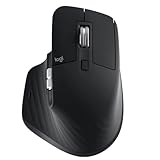
The Logitech MX Master 3S is a premium wireless productivity mouse built for people who spend long days at a desk rather than in a competitive match. This Bluetooth graphite version connects without a receiver dongle, pairing directly to a laptop or desktop, and centers its appeal on ergonomics, an 8,000 DPI sensor, and Logitech’s signature ultra-fast MagSpeed scroll wheel.
It is aimed at developers, writers, designers, and multitaskers who want comfort across many hours and the ability to fly through long documents and spreadsheets. If you juggle several machines, track on unusual surfaces like glass, or want near-silent clicks in a shared office, it is tailor-made for you. Competitive gamers, on the other hand, should look elsewhere: this is a heavy, sculpted mouse tuned for control and comfort, not twitch aiming.
As an Amazon Associate we earn from qualifying purchases at no extra cost to you. Product prices and availability are accurate as of the date shown and are subject to change.




⚡ Save on Your Next PC — Amazon Prime
Prime members get fast free shipping on the systems above, plus early access to Prime Day & Black Friday PC deals. New members get a 30-day free trial.
Watch: Logitech MX Master 3S Review — Video Review
Design & Build
The MX Master 3S is unmistakably a productivity tool. Its tall, sculpted right-handed shell supports the palm and thumb naturally, and the materials feel genuinely premium, with a soft-touch finish that resists fingerprints. The standout is the electromagnetic MagSpeed scroll wheel, which switches between ratcheted and free-spinning modes automatically, plus a dedicated thumb wheel for horizontal scrolling and a gesture button under the thumb. This 3S revision refines the earlier model with quieter click switches that cut noise substantially without losing tactility.
Performance
For its intended use the 3S is superb. The 8,000 DPI sensor tracks accurately even on glass and glossy desks, so you can ditch the mouse pad, and multi-device support lets you flow between up to three computers, even copying and pasting across them with Logitech’s Flow software. The MagSpeed wheel is a productivity multiplier once you get used to flicking through thousand-line files in a single spin.
Where it falls short is anything fast or symmetrical. At roughly 140 grams it is deliberately heavy, which aids control for desk work but makes it a poor gaming mouse. The shape is strictly right-handed, and while the sensor is precise, the polling and latency are tuned for office use rather than the instant response competitive titles demand. The price is also firmly premium, and left-handed users are simply not accommodated.
Pros & Cons
- Excellent all-day ergonomic comfort with premium materials
- MagSpeed electromagnetic scroll wheel is a genuine productivity boost
- Quiet clicks, 8,000 DPI tracking on glass, and multi-device Flow support
- Reliable receiver-free Bluetooth pairing across several machines
- Heavy and sculpted, making it unsuitable for competitive gaming
- Right-handed only, with no left-handed variant
- Premium price relative to ordinary office mice
Alternatives to Consider
If you want the newest features and are willing to pay more, the Logitech MX Master 4 adds haptic feedback to the same productivity-focused formula. Travelers and users with smaller hands or tighter bags should consider the Logitech MX Anywhere 3S, a compact version that keeps fast scrolling in a more portable body. And if you want a matching desk setup, the Logitech MX Keys S Combo bundles a comparable keyboard and mouse together.
Frequently Asked Questions
Can I use the MX Master 3S for gaming?
You can, but it is not designed for it. Its weight and productivity-tuned response make it fine for slow strategy or casual games, while fast shooters call for a dedicated lightweight gaming mouse.
Does the Bluetooth version work without the dongle?
Yes. This model pairs over Bluetooth directly, so you do not need a USB receiver, which frees up a port and simplifies use with laptops.
How quiet are the clicks really?
The 3S revision cuts click noise dramatically compared to the older MX Master 3, making it well suited to shared offices, libraries, or late-night work without disturbing others.
Will it track on a glass desk?
Yes. The upgraded 8,000 DPI sensor is rated to work on glass surfaces at least a few millimeters thick, so most glossy and glass desks work without a pad.
Verdict
The Logitech MX Master 3S is close to the definitive productivity mouse, combining all-day comfort, class-leading scrolling, and thoughtful multi-device features into one refined package. Its weight, right-handed-only shape, and premium price are the honest trade-offs, but if your day revolves around documents, code, and creative apps rather than competitive games, it is worth every gram and dollar.
