
Key takeaways
- Hall effect switches with adjustable actuation and rapid trigger
- Premium aluminum-and-wood frame with a compact TKL footprint
- Three connection modes plus hot-swap sockets and QMK web config
- Cross-platform support for Mac, Windows, and Linux out of the box
What's inside
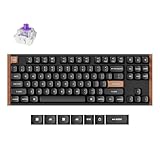
The Keychron K8 HE is a tenkeyless (TKL) wireless mechanical keyboard built around Hall effect magnetic switches, a technology that lets each key sense exactly how far it is pressed. That unlocks adjustable actuation points and rapid trigger, features once reserved for expensive gaming boards, wrapped in Keychron’s familiar cross-platform design with an aluminum and wood frame.
It is aimed at players who want the analog precision and fast repeated inputs of Hall effect switches without abandoning a keyboard they can also use for daily work across Mac, Windows, and Linux. The compact TKL layout suits gamers who want more mouse room, and the hot-swappable sockets appeal to tinkerers. If you specifically need a numpad, prefer the lowest possible latency of a pure wired board, or want a silent office typer, the caveats below matter.
As an Amazon Associate we earn from qualifying purchases at no extra cost to you. Product prices and availability are accurate as of the date shown and are subject to change.


⚡ Save on Your Next PC — Amazon Prime
Prime members get fast free shipping on the systems above, plus early access to Prime Day & Black Friday PC deals. New members get a 30-day free trial.
Watch: Keychron K8 Review — Video Review
Design & Build
The K8 HE feels like a serious piece of hardware. The aluminum frame with a wood accent strip gives it real heft and a premium look, and the TKL layout trims the number pad to keep the footprint tidy. It offers three connection modes, 2.4GHz wireless, Bluetooth 5.2, and wired USB, plus per-key RGB lighting. The magnetic switches are hot-swappable, so you can replace them without soldering, and QMK-style web configuration lets you remap keys and tune behavior. Keycaps and stabilizers are solid for a board at this level, though enthusiasts may still want to swap in aftermarket sets.
Performance
The Hall effect switches are the headline. Because they read analog travel, you can set a shallow actuation point for lightning-fast gaming inputs or a deeper one to avoid accidental presses, and rapid trigger resets the key the instant you lift, which is a real advantage in movement-heavy games. In practice the board feels responsive and consistent, and the ability to fine-tune each key is genuinely useful once you dial it in.
There are trade-offs to weigh. Wireless modes are convenient but add a touch of latency versus wired, so competitive purists will want the cable. The magnetic switches are smooth but not to everyone’s taste for typing feel, and the board is on the louder side unless you choose quieter switch options. Configuring actuation and rapid trigger through software has a learning curve, and the TKL layout, while great for gaming, means anyone doing heavy number entry will miss the dedicated keypad.
Pros & Cons
- Hall effect switches with adjustable actuation and rapid trigger
- Premium aluminum-and-wood frame with a compact TKL footprint
- Three connection modes plus hot-swap sockets and QMK web config
- Cross-platform support for Mac, Windows, and Linux out of the box
- Wireless modes add slight latency compared to wired play
- Louder by default and no dedicated number pad
- Tuning actuation and rapid trigger has a learning curve
Alternatives to Consider
If you value the QMK ecosystem and Keychron’s Super Banana switches more than Hall effect, the Keychron K8 Max is a mechanical TKL with the same connectivity flexibility. Players chasing the absolute highest polling should look at the Keychron K8 Ultra 8K, which pushes to an 8000Hz report rate. And for quiet offices, the standard Keychron K8 with Silent Red switches keeps the layout while dramatically lowering typing noise.
Frequently Asked Questions
What is the advantage of Hall effect switches?
They sense analog key travel magnetically, letting you set custom actuation depths and use rapid trigger, which resets the key the moment you release it. That means faster, more precise repeated inputs in fast-paced games.
Should I game wirelessly or wired on the K8 HE?
Wireless is convenient and fine for most players, but for the lowest, most consistent latency in competitive play, connect over the wired USB mode.
Can I use it with a Mac?
Yes. The K8 HE ships with both Mac and Windows keycaps and layouts and works across Mac, Windows, and Linux, making it a flexible daily driver.
Are the switches hot-swappable?
Yes. The magnetic switches sit in hot-swap sockets, so you can pull and replace them without soldering if you want a different feel down the line.
Verdict
The Keychron K8 HE bridges two worlds neatly: it brings genuinely useful Hall effect gaming features to a keyboard that is still a comfortable, cross-platform daily typer with a premium build. The wireless latency, default loudness, and missing numpad are reasonable compromises for what it offers, and for players who want analog precision without giving up flexibility, it is one of the more compelling TKL boards you can buy.
