Key takeaways
- Buy the card that matches your monitor; a 4K GPU is wasted on a 1080p display and vice versa.
- Prioritize 16GB of VRAM for 1440p and 4K builds you intend to keep for several years.
- Factor upscaling into your decision: DLSS and FSR can turn a mid-range card into a high-refresh performer.
- Confirm power supply wattage and physical case clearance before you buy a large, high-end card.
The graphics card is the single component that most defines how a game looks and feels. It decides your frame rate, the resolution you can play at comfortably, and whether features like ray tracing and AI upscaling are on the table. Because GPUs vary wildly in price and performance, picking the right one is the difference between a smooth, future-proof rig and an expensive disappointment.
This 2026 guide walks you through the numbers that matter: how much VRAM you actually need, how to match a card to your monitor’s resolution and refresh rate, what DLSS and FSR bring to the table, and how to avoid bottlenecks with the rest of your system. You will finish knowing exactly which tier of card fits your games and your budget.
Our top picks
 ASUS Dual NVIDIA GeForce RTX 5060 8GB
- Product Group: Personal Computer
- Binding: Personal Computers

 ASUS TUF Gaming GeForce RTX™ 5080 16GB
- Product Group: Personal Computer
- Binding: Personal Computers


 GIGABYTE Radeon RX 9070 XT Gaming OC
- Product Group: Personal Computer
- Binding: Personal Computers

As an Amazon Associate we earn from qualifying purchases at no extra cost to you. Ratings are shown as listed on Amazon.
⚡ Save on Your Next PC — Amazon Prime
Prime members get fast free shipping on the systems above, plus early access to Prime Day & Black Friday PC deals. New members get a 30-day free trial.
Watch: How to Choose a Graphics Card (2026 Guide) — Video Review
Match the Card to Your Resolution and Refresh Rate
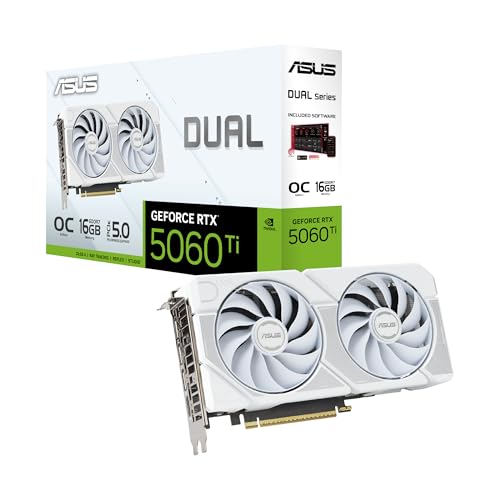
Resolution is the first filter. For high-refresh 1080p, an efficient card like the ASUS Dual RTX 5060 or XFX Radeon RX 9060 XT delivers excellent frames without overspending. For 1440p, step up to something like the ASUS RTX 5060 Ti 16GB or GIGABYTE RX 9070 XT to hold high frame rates in demanding titles. For 4K and maxed-out settings, a flagship such as the ASUS TUF RTX 5080 or RTX 5070 Ti is the sensible target. Buying more card than your monitor can display is wasted money.
How Much VRAM You Actually Need
Video memory holds textures and frame data, and modern games at high settings are increasingly hungry. For 1080p, 8GB on a card like the ASUS Dual RTX 5060 is usually enough today. For 1440p and 4K, aim for 16GB, which is why cards like the RX 9060 XT 16GB, RTX 5060 Ti 16GB, and RTX 5080 are safer long-term picks. Running out of VRAM causes stutter and texture pop-in that no amount of raw power can fix, so err toward more if you plan to keep the card for years.
Ray Tracing, DLSS, and FSR
Two feature sets separate the current generation. Ray tracing produces realistic lighting and reflections but is demanding, while AI upscaling recovers the lost frames. NVIDIA’s DLSS 4 (on RTX 5000-series cards like the RTX 5070 and 5080) and AMD’s FSR (on RDNA 4 cards like the RX 9070 XT) render at a lower internal resolution and intelligently upscale, often doubling frame rates. If ray tracing matters to you, weigh how each brand’s upscaler performs in the games you actually play.
Avoiding Bottlenecks: CPU, Power, and Case
A fast GPU needs a system that can keep up. Pair a high-end card with a capable CPU or the processor will cap your frames, especially at 1080p. Check that your power supply meets the card’s wattage recommendation with headroom to spare, and confirm the card physically fits your case: larger models like the 2.5-slot TUF RTX 5080 need clearance for length, height, and cooling. A great GPU in a starved system never reaches its potential.
New vs. Value: Reading the Tiers
GPU naming can be confusing, so focus on tiers rather than badges. Entry cards (RTX 5060, RX 9060 XT) target 1080p value. Mid-range cards (RTX 5060 Ti, RX 9070 XT) own the 1440p sweet spot where most gamers get the best experience for the money. High-end cards (RTX 5070 Ti, RTX 5080) chase 4K and high-refresh performance. Decide which tier your gaming lives in first, then compare specific models within it on price, cooling, and warranty.
Tips
- Buy the card that matches your monitor; a 4K GPU is wasted on a 1080p display and vice versa.
- Prioritize 16GB of VRAM for 1440p and 4K builds you intend to keep for several years.
- Factor upscaling into your decision: DLSS and FSR can turn a mid-range card into a high-refresh performer.
- Confirm power supply wattage and physical case clearance before you buy a large, high-end card.
Frequently Asked Questions
Is 8GB of VRAM still enough in 2026?
For 1080p gaming, 8GB on a card like the RTX 5060 remains workable today. For 1440p or 4K, or if you want the card to last several years, 16GB models are the wiser choice.
Should I choose NVIDIA or AMD?
NVIDIA’s RTX cards lead in ray tracing and DLSS quality, while AMD’s Radeon RX cards often deliver more raw rasterization performance per dollar. Compare both in the specific games you play at your target resolution.
What resolution can a mid-range card handle?
Cards like the RTX 5060 Ti and RX 9070 XT are built for 1440p high-refresh gaming, where most players get the best balance of visual quality and frame rate for the money.
Do I need ray tracing?
It is a visual bonus, not a requirement. If lighting realism excites you and you have a capable card, enable it with upscaling on. If you prioritize raw frame rate, you can leave it off and still enjoy every game.
Conclusion
A great graphics card purchase starts with your monitor and works backward: pick the tier that matches your resolution and refresh rate, ensure enough VRAM to last, and lean on DLSS or FSR to stretch your frames. Confirm the rest of your system can support the card, and you will land on a GPU that delivers the smooth, sharp gaming experience you are paying for without overspending on power you will never use.