Key takeaways
- Refresh rate over resolution: At this budget, 1080p at 144Hz beats 1440p at 60Hz every time. Higher refresh rates deliver smoother motion and lower input lag, and a mid-range GPU can actually drive 144 frames per second at 1080p in most competitive titles.
- Panel type matters more than you think: IPS panels offer noticeably better color accuracy and viewing angles than the TN and cheaper VA panels that used to dominate this price bracket. In 2026, IPS is affordable enough that there’s little reason to settle for less unless you’re buying purely for esports.
- Treat “1ms” claims skeptically: Manufacturers quote MPRT (motion blur reduction) or gray-to-gray figures that don’t reflect real-world pixel response. Look instead for features like backlight strobing (ELMB, MBR) and variable overdrive, which do more for motion clarity than a marketing number.
- Confirm adaptive sync support for your GPU: FreeSync is near-universal now, but G-Sync Compatible certification means NVIDIA has validated the panel for flicker-free variable refresh. If you’re on a GeForce card, that certification is worth prioritizing.
- Check the stand and the ports before you buy: Budget monitors frequently ship with tilt-only stands and a single DisplayPort. If you need height adjustment, dual inputs for a console, or VESA mounting, verify those specifics — they’re the most common source of post-purchase regret at this price.
What's inside
Shopping for a gaming monitor under $300 in 2026 should be simple, but it rarely is. Spec sheets are crowded with overclocked refresh rates, “1ms” claims measured three different ways, and HDR badges that mean almost nothing on a panel this affordable. Meanwhile, the genuinely important differences — panel type, real motion clarity, stand adjustability, and whether the ports match your GPU or console — are buried in the fine print.
This guide cuts through it. Every monitor below is a 1080p, high-refresh display that realistically sells under $300, and most sit comfortably beneath $200. We cover what actually matters at this budget, then review the standout picks — from ultra-cheap 22-inch options for secondary rigs to 27-inch IPS panels that punch far above their price. The goal is straightforward: maximum frames-per-dollar without buying a monitor you’ll want to replace in a year.
As an Amazon Associate we earn from qualifying purchases at no extra cost to you. Product prices and availability are accurate as of the date shown and are subject to change.






⚡ Save on Your Next PC — Amazon Prime
Prime members get fast free shipping on the systems above, plus early access to Prime Day & Black Friday PC deals. New members get a 30-day free trial.
Watch: Best Gaming Monitor Under $300 — Video Review
How to Choose Gaming Monitor Under $300
- Refresh rate over resolution: At this budget, 1080p at 144Hz beats 1440p at 60Hz every time. Higher refresh rates deliver smoother motion and lower input lag, and a mid-range GPU can actually drive 144 frames per second at 1080p in most competitive titles.
- Panel type matters more than you think: IPS panels offer noticeably better color accuracy and viewing angles than the TN and cheaper VA panels that used to dominate this price bracket. In 2026, IPS is affordable enough that there’s little reason to settle for less unless you’re buying purely for esports.
- Treat “1ms” claims skeptically: Manufacturers quote MPRT (motion blur reduction) or gray-to-gray figures that don’t reflect real-world pixel response. Look instead for features like backlight strobing (ELMB, MBR) and variable overdrive, which do more for motion clarity than a marketing number.
- Confirm adaptive sync support for your GPU: FreeSync is near-universal now, but G-Sync Compatible certification means NVIDIA has validated the panel for flicker-free variable refresh. If you’re on a GeForce card, that certification is worth prioritizing.
- Check the stand and the ports before you buy: Budget monitors frequently ship with tilt-only stands and a single DisplayPort. If you need height adjustment, dual inputs for a console, or VESA mounting, verify those specifics — they’re the most common source of post-purchase regret at this price.
The Best Picks Reviewed
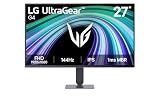
LG UltraGear 27G414B-B (27-inch)
This is the best all-around buy on the list: a 27-inch IPS panel at 144Hz with G-Sync Compatible certification, HDR10, built-in speakers, and — crucially at this price — a height-adjustable stand. The larger screen makes 1080p slightly softer than on a 24-inch, but for immersive single-player gaming and console play, the extra real estate is a fair trade.
ASUS TUF Gaming VG249QE5A (24-inch)
ASUS packs genuinely useful motion technology into a budget chassis here, with Extreme Low Motion Blur Sync and Variable Overdrive that meaningfully sharpen fast camera pans in shooters. The 146Hz overclock is marginal, but the three-year warranty and DisplayWidget Center software make this the safest long-term pick for competitive players.
LG UltraGear 24G411A-B (24-inch)
Essentially the 27-inch model’s smaller sibling, this one trades screen size and stand adjustability for a lower price while keeping the IPS panel, 144Hz overclock, and G-Sync Compatible support. At 24 inches, 1080p looks noticeably crisper, making this the sweet spot for desk setups where you sit close to the display.
MSI PRO MP243L E14 (24-inch)
MSI aims this squarely at dual-duty desks: it’s a 144Hz IPS gaming panel with slim four-side bezels and a VGA port for older office hardware or legacy machines. Adaptive sync and VESA mounting are included, though the tilt-only stand and lack of DisplayPort-plus-dual-HDMI flexibility keep it a step behind the LG and ASUS options.
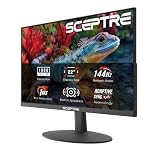
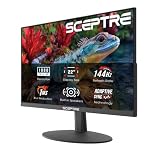
Sceptre E225W-FW144 (22-inch)
The cheapest credible entry point to 144Hz gaming, this 22-inch Sceptre includes both HDMI and DisplayPort plus built-in speakers — a rare combination this far down the price ladder. Color accuracy and viewing angles are its clear weak points, so treat it as a superb secondary display or a first monitor for a budget build rather than a primary gaming screen.
Frequently Asked Questions
Is 1080p still worth buying in 2026?
Yes, especially under $300. At 24 inches, 1080p delivers a sharp image at normal viewing distance, and it lets mid-range and older GPUs sustain high frame rates without upscaling. Stepping up to 1440p at this budget almost always means sacrificing refresh rate or panel quality.
Do I need 144Hz if my GPU can’t hit 144 fps?
You’ll still benefit. A high-refresh panel reduces input lag and displays frames sooner even below its maximum rate, and adaptive sync keeps the experience smooth at variable frame rates. It also gives you headroom when you eventually upgrade your graphics card.
Will these monitors work with a PS5 or Xbox Series X?
All of them accept a console over HDMI at 1080p, and most will run at 120Hz in supported games. Just confirm the specific HDMI version and check that VRR is enabled in your console’s display settings for the smoothest result.
Is HDR worth paying for at this price?
Not really. “HDR10” or “HDR Ready” on a sub-$300 monitor means the display accepts an HDR signal, not that it has the brightness or local dimming to render it well. Prioritize refresh rate, panel type, and stand quality instead — and leave HDR off in most games.
Final Thoughts
For most buyers, the LG UltraGear 27G414B-B is the strongest overall value here, pairing a 27-inch IPS panel with G-Sync Compatible support and a height-adjustable stand that budget monitors almost never include. Competitive players who want the sharpest motion and the longest warranty should look at the ASUS TUF Gaming VG249QE5A, while anyone building a second rig or a first gaming PC on a tight budget will find the Sceptre E225W-FW144 delivers real 144Hz gaming for remarkably little money.