Our Top Picks
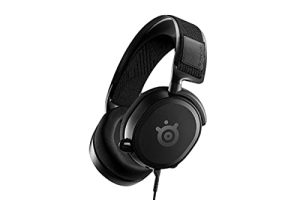
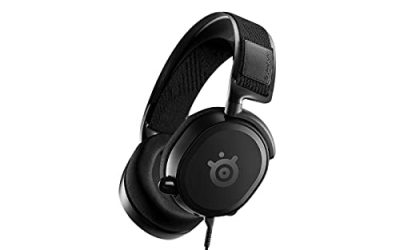
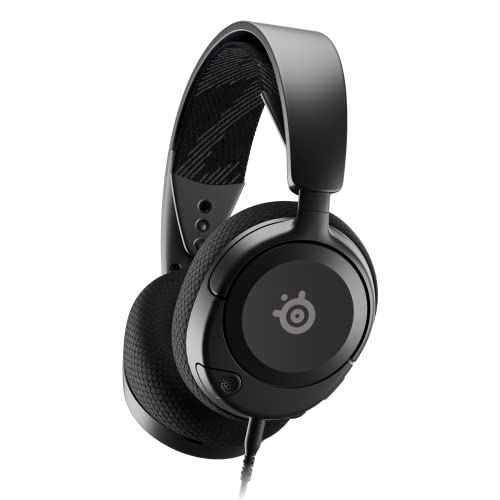 SteelSeries Arctis Nova 1 Multi-System Gaming HeadsetWired7.48 x 6.89 x 3.43 inches0.52 poundsCheck on Amazon
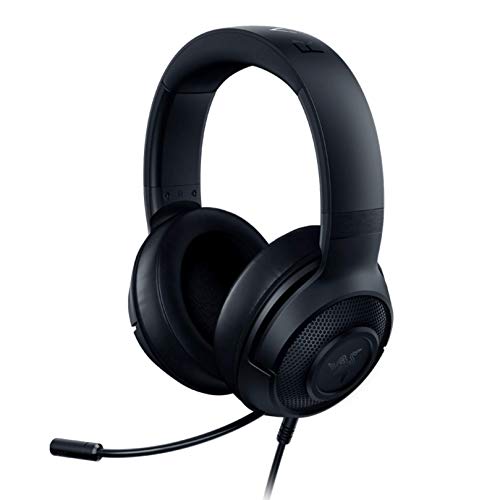 Razer Kraken X Ultralight Gaming Headset: 7.1 SurroundHeadset6.3 x 8.27 x 3.47 inches0.6 poundsCheck on Amazon
 Logitech G432 Wired Gaming Headset7.2 x 3.2 x 6.8 inches7.8 x 4.3 x 9 inches0.7 poundsCheck on Amazon
 Turtle Beach Recon 70 Wired Multiplatform Gaming HeadsetStandard7.8 x 76.8 x 2.68 inches0.84 poundsCheck on Amazon
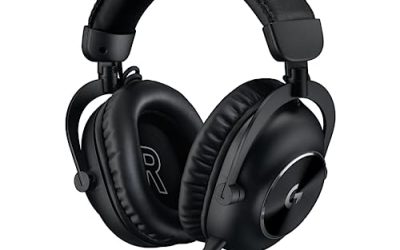
For a beginner, the best first gaming headset is a wired model that is light, comfortable, and simple to use, and the SteelSeries Arctis Nova 1 fits that bill best at 236 g with 40 mm drivers and a retractable mic. The HyperX Cloud Stinger 2 and Razer Kraken X cover the same basics for less, while the Logitech G432 adds surround sound and the Turtle Beach Recon 70 is the simplest plug-and-play pick of the five. Every headset below connects with a single 3.5 mm jack, works on PC and consoles, and needs no extra software to sound good.
This guide is for first-time gamers buying their first headset, parents picking a first headset for a young gamer, and anyone moving from earbuds or TV speakers to a proper gaming headset. Each pick below was chosen from its Amazon listing — driver size, weight, mic design, and connection type — with comfort and ease of use weighed ahead of extra features.
Quick Picks
As an Amazon Associate we earn from qualifying purchases
| Product | Best for | Key spec |
|---|---|---|
| SteelSeries Arctis Nova 1 | Lightest all-day comfort | 236 g, 40 mm drivers |
| HyperX Cloud Stinger 2 | Spatial audio on a budget | 50 mm drivers, DTS Headphone:X |
| Razer Kraken X | Lightest-feeling Razer pick | 250 g, 40 mm drivers, 7.1 on PC |
| Logitech G432 | Surround sound for PC play | 50 mm drivers, DTS Headphone:X 2.0 |
| Turtle Beach Recon 70 | Simplest plug-and-play | 232 g, 40 mm speakers, 3.5 mm |
How to Choose
Comfort Comes First
A headset that hurts after an hour will sit in a drawer, so weight and padding matter more than any feature on the box. Look for a model under 280 g with soft memory foam ear cushions and a headband that spreads the load instead of pressing on one spot. Rotating earcups help the headset rest flat around your neck during breaks, and a flexible headband fits more head shapes. If you wear glasses, look for cushions with channels or soft foam that does not press the arms of your frames into your head. Comfort is the one thing you cannot fix with settings, so treat it as the first filter.
Wired Beats Wireless for a First Headset
A first headset should work the moment you plug it in, and a wired model does exactly that. There is no battery to charge, no pairing step, and no signal dropout in the middle of a match. A single 3.5 mm jack connects to a PC, a console controller, a handheld, or a phone, so one headset covers every device you own. Wireless headsets add cost and complexity — charging habits, firmware updates, and dongles that get lost — and none of that helps a beginner enjoy games more. Once you know what you like, wireless is a fine upgrade, but wired is the simpler and more reliable place to begin.
Mic Quality Matters More Than You Think
Your squad hears your mic far more than you hear your own headset, so a clear mic is worth real attention. Look for a mic that mutes easily — a flip-up arm, a retractable boom, or a simple mute switch — so you are never stuck broadcasting background noise. A cardioid or bidirectional mic picks up your voice and rejects sound from the sides, which keeps keyboard clicks and room noise out of chat. Position the mic a couple of finger widths from your mouth and angle it slightly away from your nose to avoid breathing sounds. A headset with a weak mic will frustrate your teammates even if its speakers sound great.
Check Compatibility Before You Buy
Most beginner headsets use a 3.5 mm jack, which plugs into nearly anything, but the details still deserve a check. A single 3.5 mm plug carries both game sound and mic chat on consoles, controllers, phones, and most laptops. Some desktop PCs split the mic and headphone jacks into two separate sockets, and those need a small Y-splitter cable, which is usually sold separately. USB headsets like the Logitech G432 need a free USB port for their surround sound, and the surround feature itself usually works on PC only. Match the headset to the device you play on most, and confirm the connection type before you order.
The 5 Best Options
SteelSeries Arctis Nova 1
At 236 g, the Arctis Nova 1 is the lightest headset in this guide, and that low weight is the reason it disappears on your head during long sessions. The ComfortMAX system pairs an adjustable elastic headband with AirWeave memory foam cushions, and the earcups rotate to fit different head shapes. Its 40 mm Hi-Fi drivers deliver clear, balanced sound, and the 360-degree spatial audio helps you judge where footsteps and reloads are coming from. The ClearCast Gen 2 mic retracts fully into the earcup when you do not need it, which keeps the headset tidy for music or solo play.
Specs
- 40 mm custom Hi-Fi neodymium drivers
- Frequency response: 20–22,000 Hz
- Impedance: 36 ohm
- Weight: 236 g
- ClearCast Gen 2 retractable bidirectional noise-cancelling mic
- Wired 3.5 mm connection
- 360-degree spatial audio, compatible with PS5 Tempest 3D Audio and Microsoft Spatial Sound
- ComfortMAX system with AirWeave memory foam ear cushions
- On-ear volume wheel and mic mute button
- Works with PC, PS5, PS4, Xbox, Switch, and mobile
Best for: Beginners who want the lightest, most comfortable headset for long sessions.
Watch out for: 3.5 mm only, so older desktops with separate mic and headphone jacks need a Y-splitter, and the Sonar software features are PC-only.
ASIN: B0B8Q4CR52
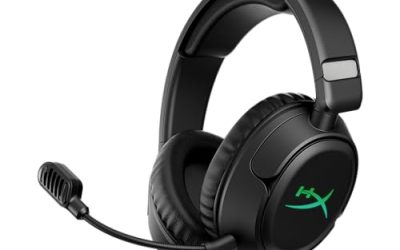
HyperX Cloud Stinger 2

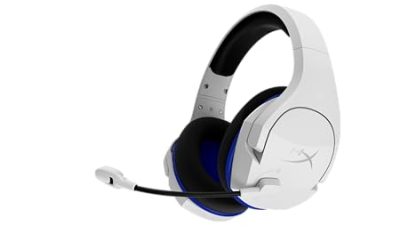
The Cloud Stinger 2 is the classic first headset for a reason: it is light at 275 g, comfortable for hours, and its 50 mm drivers give games a full, punchy sound. A two-year DTS Headphone:X activation code comes in the box, adding spatial audio on PC and Xbox that helps you place sounds around you. The swivel-to-mute mic flips up to silence itself without any button to hunt for, and the earcups rotate 90 degrees so the headset sits flat around your neck between matches. Memory foam cushions and a padded headband round out a headset that asks very little of a new gamer.
Specs
- 50 mm dynamic drivers with neodymium magnets
- Frequency response: 10 Hz–28 kHz
- Impedance: 32 ohm
- Weight: 275 g
- DTS Headphone:X Spatial Audio, two-year activation code included
- Swivel-to-mute noise-cancelling microphone
- Wired 3.5 mm connection (4-pole CTIA)
- Earcups rotate 90 degrees
- Memory foam ear cushions with leatherette
- On-ear volume control
- PC compatible
Best for: Beginners who want big-driver sound and spatial audio without a big learning curve.
Watch out for: The DTS Headphone:X code lasts two years, after which the app asks for a paid renewal, and the mic is fixed — it swivels up to mute but does not detach.
ASIN: B0B8PGDMWK
Razer Kraken X
The Kraken X is the lightest Razer headset ever made at 250 g, and its aluminum frame keeps it rigid where cheaper plastic headsets flex. Custom-tuned 40 mm drivers give a bright, detailed sound that suits competitive games, and software 7.1 surround on PC adds direction to footsteps and gunfire. The bendable cardioid mic stays where you put it and rejects background noise, while on-headset controls put volume and mute under your thumb. Oval leatherette cushions with eyewear channels make it a kind choice for glasses wearers on a budget.
Specs
- 40 mm custom-tuned drivers with neodymium magnets
- Frequency response: 12 Hz–28 kHz
- Impedance: 32 ohm at 1 kHz
- Weight: 250 g
- 7.1 surround sound on PC via software
- Bendable cardioid microphone, unidirectional ECM boom
- Analog 3.5 mm connection, 1.3 m cable
- Lightweight aluminum frame
- On-headset volume wheel and mic mute switch
- Oval leatherette ear cushions with memory foam and eyewear channels
- Works with PC, PS4, PS5, Switch, Xbox One, Xbox Series X and S, and mobile
Best for: Competitive beginners who want a light headset with clear directional sound.
Watch out for: The 7.1 surround works on PC only — consoles and mobile get stereo — and the mic is fixed, not detachable. The 1.3 m cable is short for some desk setups.
ASIN: B07RMC5BRL
Logitech G432
The G432 is the headset to pick when surround sound matters most to you, because its USB DAC unlocks DTS Headphone:X 2.0 and 7.1 surround on PC. Large 50 mm drivers move plenty of air for explosions and engine roars, and the flip-to-mute boom mic swings out of the way when you do not need it. Leatherette earcups seal in sound and keep outside noise down, and the headset works with PC, Mac, PlayStation, Xbox, and Switch through its USB and 3.5 mm connections. It is the bulkiest headset in this guide, so it suits players who stay at a desk.
Specs
- 50 mm audio drivers
- 7.1 surround sound with DTS Headphone:X 2.0
- Flip-to-mute boom microphone
- USB DAC plus 3.5 mm connection
- Leatherette earcups
- Works with PC, Mac, PS4, Xbox One, and Nintendo Switch
Best for: PC players who want surround sound and a full, bass-heavy game sound.
Watch out for: The surround features need the USB DAC on a PC, and this is the bulkiest headset in the guide — leatherette earcups can also feel warm in long sessions.
ASIN: B07MRMHML9
Turtle Beach Recon 70
The Recon 70 is the simplest headset in this guide, and that simplicity is its strength. There is no battery, no software, and no pairing — you plug the 3.5 mm jack in and play. At 232 g it is the lightest pick here, with synthetic leather cushions and a padded headband that stay comfortable for hours. Its 40 mm speakers deliver clear game sound, and the flip-to-mute mic swings up to silence itself the moment you lift it. A master volume wheel on the earcup lets you adjust sound without opening any menu, which is exactly what a first headset should do.
Specs
- 40 mm speakers with neodymium magnets
- Frequency response: 20 Hz–20 kHz
- Impedance: 32 ohm
- Weight: 232 g
- Fixed omni-directional flip-to-mute microphone
- Wired 3.5 mm jack, 4 ft / 1.2 m cable
- Master volume wheel and mic mute on the earcup
- Over-ear closed design with synthetic leather cushions and foam
- Passive design, no battery and no charging
- Works with PS5, PS4, Xbox Series X and S, Xbox One, PC, and mobile
Best for: Absolute beginners and young gamers who want the simplest possible first headset.
Watch out for: Desktops with separate mic and headphone jacks need a Y-splitter, sold separately, and the fixed mic does not detach for music-only use.
ASIN: B0CWS6WV23
Which One Fits Your Situation
First Headset for a Young Gamer
Pick the Turtle Beach Recon 70 or the Razer Kraken X. Both are light, simple to use, and forgiving of rough handling, with no battery or software to manage. The Recon 70 is the lighter of the two at 232 g and its volume wheel is easy to reach, while the Kraken X adds a sturdier aluminum frame and a bendable mic. Either one lets a young gamer plug in and play without a parent having to configure anything.
Long Sessions and Glasses Wearers
Pick the SteelSeries Arctis Nova 1 first. At 236 g it is the lightest headset here, and its AirWeave memory foam cushions and rotating earcups keep pressure low over long sessions. The HyperX Cloud Stinger 2 is the backup choice — slightly heavier at 275 g, but its rotating earcups and soft leatherette pads also treat glasses wearers kindly. Avoid the bulkiest options if your sessions run past three hours.
PC Play With Surround Sound
Pick the Logitech G432 if you play mostly on PC. Its USB DAC enables DTS Headphone:X 2.0 and 7.1 surround, which gives footsteps and reloads a clear direction. The HyperX Cloud Stinger 2 is the runner-up — its included DTS Headphone:X code adds spatial audio on PC and Xbox for a similar effect. Remember that surround sound in this guide works through PC software, so console players should weigh comfort and mic quality instead.
Console and Mobile Play
Pick the SteelSeries Arctis Nova 1 or the Turtle Beach Recon 70. Both connect through a standard 3.5 mm jack, so they plug into a console controller, a handheld, or a phone. The Nova 1 adds a retractable mic and 360-degree spatial audio that works with console 3D audio, while the Recon 70 is the lighter and simpler of the two. The G432 is the one pick to skip here, since its surround features need a PC.
Common Mistakes
- Buying wireless first. A wireless headset adds charging, pairing, and dongles to your routine, and none of that improves your first games. A wired headset works the moment you plug it in.
- Ignoring weight. A headset over 300 g presses on your head and neck during long sessions. Light models like the 232 g Recon 70 and the 236 g Nova 1 stay comfortable far longer.
- Assuming surround sound works everywhere. Most surround features in this guide run through PC software, so console and mobile players get stereo. Buy for the sound you will actually hear.
- Forgetting the mic. A headset with a weak mic makes squad chat a chore for everyone else. Check the mic design — flip-to-mute, retractable, or bendable — before you buy.
- Skipping the splitter check. Some desktop PCs use separate mic and headphone jacks, and a single 3.5 mm plug needs a small Y-splitter to use the mic. Confirm your PC layout or keep a splitter handy.
Frequently Asked Questions
Do I need a wireless headset to game well?
No. A wired headset delivers the same game sound with no battery to charge, no pairing step, and no wireless dropouts. Every headset in this guide is wired, and all five plug into a PC, console, or phone with a single 3.5 mm jack. Wireless is a convenience upgrade for later, not a requirement for good play.
Can I use a gaming headset with my phone?
Yes, as long as your phone has a 3.5 mm headphone jack or a small USB-C or Lightning adapter. All five headsets in this guide connect through a 3.5 mm plug, so they work for mobile games, calls, and music. The mic works for voice chat too. If your phone has no jack, check that the adapter you buy carries mic audio as well as sound.
Why does my headset mic sound quiet on PC?
Check that the mic boom sits a couple of finger widths from your mouth, angled slightly to one side. Confirm the plug is fully seated, and if your desktop uses separate mic and headphone jacks, use a Y-splitter so the mic circuit connects. Then raise the mic input level in your sound settings. A mic that sits too far away is the usual cause of quiet chat.
How do I keep a beginner headset lasting longer?
Coil the cable loosely instead of wrapping it tight, since sharp bends break wires inside the cord over time. Flip the mic up when you are done so it does not snag on your desk, and store the headset on a hook or stand rather than tossing it in a drawer. Wipe the cushions with a dry cloth now and then. Gentle handling adds years to a budget headset.
FAQ
Do I need a wireless headset to game well?
Can I use a gaming headset with my phone?
Why does my headset mic sound quiet on PC?
How do I keep a beginner headset lasting longer?
More from Amazon
Programs that pair well with the guide above. Offers and eligibility are set by Amazon and may change.
Free shipping on eligible items, Prime Video and more. Eligible new members can start with a free trial.
Start a Prime free trialAd-free music streaming. Eligible new subscribers can start with a free trial.
Try Music Unlimited freeA Prime membership for ages 18-24 with a trial period. Eligibility is set by Amazon.
See Prime for Young AdultsAudiobooks and podcasts to listen to on the go. Eligible new members can start with a free trial.
Try Audible freeAs an Amazon Associate we earn from qualifying purchases.