Key takeaways
- A practical guide to the best console headsets for PS5, Xbox, and Switch, covering wireless and wired options, comfort, mic clarity, and compatibility.
As an Amazon Associate we earn from qualifying purchases.
A console headset has one job that matters more than any feature list: it has to connect to your console without fuss, put game audio and voice chat in your ears clearly, and stay comfortable through a long evening of play. The wrong choice usually fails in a quiet way. It pairs with a phone but not a PlayStation, it needs an adapter nobody mentioned, or its microphone sounds fine in a shop demo and muddy in a party chat. Sorting the connection first, then sound, microphone, and comfort, keeps the decision simple and avoids a return.
This guide is written for PlayStation players chasing spatial sound, Xbox households sharing one headset between consoles, Switch owners who move between handheld and docked play, and late-night players who need quiet for the house and clear chat for the squad. Instead of ranking models, it explains how console headsets differ, so you can match a type to your setup and buy once.
How to Choose
Match the Connection to Your Console
Every console handles headset audio differently, so the connection decides compatibility before anything else. PlayStation consoles accept most USB dongles and wired headsets through the controller jack, while Xbox consoles need headsets built for the Xbox wireless protocol or a wired connection through the controller. Nintendo Switch supports wired headsets easily, and wireless only through a USB dongle in docked mode or Bluetooth with limits on handheld. Bluetooth alone rarely carries game chat, and a headset made for one console may stay silent on another. Check the box for your console by name, confirm whether chat needs a separate cable or app, and confirm the dongle fits the port you plan to use.
Sound That Fits the Games You Play
Driver size alone does not decide how a headset sounds, and the games you play should shape the choice. Competitive shooters reward clear footsteps, directional cues, and a restrained low end that keeps gunfire from drowning out movement. Story-driven and open-world games benefit from wider staging, stronger bass, and spatial audio that makes environments feel large. Some headsets add surround processing or companion-app equalizers that let you tune the balance, while others keep a fixed tuning that either suits you or does not. Listen for separation between effects, dialogue, and music rather than loudness, and favor a balanced profile if you switch between genres often.
Microphone Clarity for Squad Chat
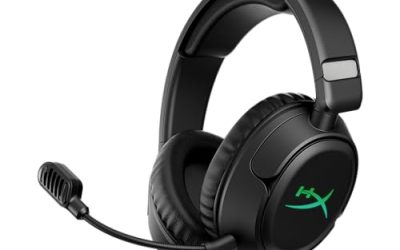
A headset microphone is judged by your teammates, not by you, so clarity matters more than raw volume. A boom microphone that sits close to the mouth picks up speech cleanly, while a flip-to-mute design lets you silence yourself quickly between rounds. Noise reduction helps in a shared room, though it can clip quiet words when it is too aggressive. Detachable microphones suit players who also use the headset for music or travel, and a sidetone control lets you hear your own voice so you stop shouting. Test the microphone in a real party chat before a long session, because a mic that sounds thin at home sounds thinner to everyone else.
Comfort, Weight, and Battery Life
A headset that hurts after an hour is a bad headset no matter how good it sounds. Clamp force, ear cushion depth, and weight decide comfort more than padding thickness alone, and glasses wearers should look for soft cushions that do not press frames into the temples. Wireless models add battery life to the equation, and a headset that runs out mid-match needs a wired fallback or a quick charge that restores useful play. Check whether the headset charges over a standard USB-C cable, works while charging, and folds flat for storage. Comfort is personal, so a model that fits one head shape may press awkwardly on another.
Wired vs Wireless on Consoles
Wireless headsets free you from the cable between controller and ears, which matters most on a couch where the controller already sits in your hands and a cable can snag or tug. A dedicated 2.4GHz dongle keeps latency low enough for competitive play, and Bluetooth adds a second connection for phone calls or music between matches. The trade is upkeep: batteries need charging, firmware updates occasionally change behavior, and a lost dongle can leave a wireless headset unusable until it is replaced. Players who value freedom of movement and a clean setup usually accept that trade without regret.
Wired headsets remove the battery question entirely and keep the setup simple. A cable into the controller jack works on every modern console, and a USB wired connection adds digital audio features on PlayStation and Switch docks. The cable is the compromise: it can catch on an armrest, limit how far you sit from the screen, and wear at the connector after years of use. For players who sit close to the screen, share a headset across a household, or dislike charging gear, wired remains the dependable choice.
Many households end up with one of each. A wireless headset serves the main player who games for hours, while a wired spare covers guests, younger players, and the nights the wireless battery runs flat. If you can only buy one, weigh how far you sit from the console against how much you dislike cables. Couch players sitting well back from the screen gain the most from wireless, while desk players close to a monitor lose little by staying wired.
Comfort and Fit for Long Sessions
Long sessions expose fit problems that a short listen never shows. Ear cushions that feel soft at first can trap heat after an hour, and a headband that presses on one spot becomes a headache by the third match. Over-ear cups that fully surround the ear spread pressure better than on-ear pads, and breathable fabric cushions stay cooler than sealed leatherette in a warm room. Weight matters too: a heavy headset pulls forward during fast head turns, while a lighter frame disappears until the battery reminds you it exists. If your ears feel hot within half an hour of putting the headset on, that warmth will only build as the session goes on, so treat early heat as a warning sign.
Adjustability decides whether a headset fits a wide range of heads or only an average one. Look for a headband that extends smoothly on both sides, earcups that swivel to sit flat against the head, and a clamp that holds the headset in place without squeezing. Players with glasses should test fit with frames on, since cushions that seal well on bare skin can press frames into the temples. If possible, wear a candidate headset for at least half an hour before committing, because comfort verdicts made in five minutes are the ones most often regretted.
Which One Fits Your Situation
PlayStation Players Who Want 3D Audio
PlayStation owners get the most from a headset that supports the console spatial audio format and connects by USB dongle or controller jack without extra hardware. A clear microphone and a comfortable fit matter more than extra features, since the console already handles the spatial processing. Choose a model that lists PlayStation compatibility by name and keeps game and chat balance adjustable from the headset itself.
Xbox Households Sharing One Headset
Xbox households should pick a headset built for the Xbox wireless protocol, because that connection pairs directly with the console and keeps chat working without a cable. A durable frame and replaceable ear cushions help when several people share one headset, and a long battery suits evenings when the console stays on for hours. Confirm the headset also works on the other devices your household uses before settling.
Switch Owners Playing Handheld and Docked
Switch players need a headset that works in two modes: wired through the headphone jack in handheld play and wireless or USB when docked. A lightweight wired headset is the simplest answer, and a compact wireless model with a small dongle is the flexible one. Keep the cable short enough to avoid tangles in handheld mode, and check that voice chat works through the game or app your group uses.
Late-Night Players and Streamers
Late-night players need closed earcups that keep game sound in and household noise out, plus a microphone that stays clear at low volume. Streamers add one more need: a headset that does not leak sound into the microphone and sits comfortably under long sessions. A wired connection avoids battery surprises during a broadcast, and a flip-to-mute microphone gives instant silence between segments.
Common Mistakes
- Buying a headset made for one console and expecting it to work fully on another, including chat. Always check compatibility by console name, not by a generic multiplatform label.
- Judging sound by driver size or loudness alone. Directional clarity, balance, and separation between dialogue and effects matter more in actual play.
- Ignoring the microphone until the first squad night. A thin or noisy microphone frustrates teammates and cannot be fixed with an equalizer.
- Choosing a heavy headset with stiff cushions for long sessions. Comfort decides whether a headset gets used daily or sits on a shelf.
- Forgetting battery and charging habits with wireless models. A headset that dies mid-match needs a wired fallback or a charging routine that fits your schedule.
Frequently Asked Questions
Do console headsets work on every console?
No. Most headsets work on at least one console, but full support including chat varies. PlayStation accepts many USB and wired headsets, Xbox needs models built for its wireless protocol or a wired controller connection, and Switch handles wired headsets best. Check the headset listing for your console by name before buying, and confirm whether voice chat needs anything extra.
Is wireless better than wired for consoles?
Wireless suits couch players who sit far from the screen and dislike cables, while wired suits players who want zero charging and the simplest setup. A 2.4GHz dongle keeps latency low for competitive play, while Bluetooth alone often lacks game chat support. The better choice depends on your seating distance, tolerance for charging, and whether you play competitively.
Can I use a console headset for phone calls and music?
Many console headsets handle calls and music through Bluetooth or a wired connection, though controls and microphone quality vary. A headset with simultaneous Bluetooth and console audio lets you take a call without leaving the game, while a wired phone connection works for music on the move. Check that the microphone works over the connection you use.
How long should a wireless console headset battery last?
A wireless console headset should last through several long sessions before needing a charge, and most current models manage a full evening of play with room to spare. Battery life drops with higher volume and extra features, so treat the headline figure as a best case. A wired fallback or fast charging covers the nights when the battery runs low.
FAQ
Do console headsets work on every console?
Is wireless better than wired for consoles?
Can I use a console headset for phone calls and music?
How long should a wireless console headset battery last?
More from Amazon
Programs that pair well with the guide above. Offers and eligibility are set by Amazon and may change.
Free shipping on eligible items, Prime Video and more. Eligible new members can start with a free trial.
Start a Prime free trialAd-free music streaming. Eligible new subscribers can start with a free trial.
Try Music Unlimited freeA Prime membership for ages 18-24 with a trial period. Eligibility is set by Amazon.
See Prime for Young AdultsAudiobooks and podcasts to listen to on the go. Eligible new members can start with a free trial.
Try Audible freeAs an Amazon Associate we earn from qualifying purchases.