Key takeaways
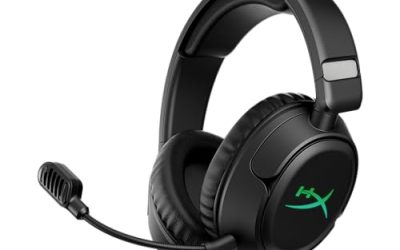
- Our guide to the best hyper x headsets for PC, console and mobile play compares drivers, comfort, microphones and battery life so you can pick the right one.
As an Amazon Associate we earn from qualifying purchases.
HyperX sells a lot of headsets that look nearly identical at first glance, yet the differences between them decide whether you end up happy or frustrated. One model gives you a long wireless battery and spatial audio for PC, another keeps things simple with a wired connection that works on almost anything, and a third trades a little sound quality for a lighter frame and a lower price. The real decision is not which headset is best in general, but which combination of sound, comfort, microphone and connection matches the way you actually play.
This guide is written for competitive PC players who need clear footsteps, console players who want one headset for the living room, streamers who talk for hours, and casual players who switch between a PC, a console and a phone. Instead of ranking models on hype, it compares the HyperX lineup by the specifications and connection types listed for each model, so you can match a headset to your setup before you buy.
The HyperX Lineup in Brief
The HyperX Cloud family is the core of the range, and most buyers end up choosing between a handful of familiar names. The Cloud II is the long-running wired option, built around 53mm drivers, virtual surround sound through its USB sound card, and a detachable noise-cancelling microphone. It works on PC, PlayStation and Xbox through its wired connections, and its memory foam ear cushions and leatherette finish have made it a default recommendation for players who want a dependable wired headset without a complicated setup.
The Cloud Alpha sits beside it as the wired step-up for sound quality. Its dual-chamber drivers split bass away from the mids and highs, which keeps explosions from drowning out dialogue and footsteps. An aluminum frame gives it a sturdier feel than the plastic frames found on many rivals, and the detachable microphone and braided cable round out a package aimed at players who value durability and cleaner audio over wireless convenience.
For players who want to cut the cable, the Cloud Alpha Wireless keeps the same dual-chamber driver idea and adds a battery life rated at up to 300 hours, along with DTS Headphone:X spatial audio and a detachable noise-cancelling microphone. That battery figure is the headline, because it means charging becomes a rare chore rather than a nightly routine, although the full feature set, including software equalizer controls, is aimed mainly at Windows PC players.
The Cloud Flight and Cloud II Wireless cover the middle of the wireless range, with battery life rated around 20 to 30 hours, 2.4GHz wireless connections, memory foam ear cushions and detachable microphones. The Cloud Flight adds a rotating ear cup design and a built-in mixer style layout, while the Cloud II Wireless leans on DTS spatial audio and a simpler control scheme, so the choice between them often comes down to which control layout and battery rating fits your sessions.
At the lighter and more affordable end, the Cloud Stinger family targets players who want a comfortable wired headset without paying for extras they will not use. The original Cloud Stinger uses 50mm drivers, a swivel-to-mute microphone and a lightweight frame, and the Stinger 2 updates the design with improved drivers and a wider frequency response. Both are straightforward plug-and-play headsets, and both suit younger players or anyone buying a second headset for a shared setup.
The newest wired flagship, the Cloud III, brings angled 53mm drivers, DTS spatial audio, memory foam ear cushions and a 10mm microphone, with USB-C, USB-A and 3.5mm connections in the box. Its wireless sibling, the Cloud III Wireless, adds 2.4GHz and Bluetooth connections with battery life rated at up to 120 hours over 2.4GHz and up to 200 hours over Bluetooth. Together they show where the lineup is heading: one headset that covers PC, console and mobile through several connection types rather than a single cable.
How to Choose
Driver size and sound tuning
Driver size tells you something useful, but it does not tell you everything, so treat it as one clue among several. HyperX headsets generally use 50mm or 53mm drivers, and the larger drivers in the Cloud II and Cloud III can produce a fuller low end, while the dual-chamber design in the Cloud Alpha separates bass from the mids and highs for a cleaner soundstage. Pay attention to tuning too: heavy bass suits cinematic single-player games, while a flatter tuning helps competitive players pick out footsteps and reload sounds. Compare the frequency response and driver notes listed for each model rather than assuming the biggest driver always wins.
Comfort and fit for long sessions
Look at the weight listed for each model, because the Cloud Stinger models are noticeably lighter than the aluminum-framed Cloud Alpha, and that difference adds up across a long evening. Memory foam ear cushions help distribute pressure, and leatherette cushions seal in sound but can trap heat, while fabric or velour style cushions breathe better at the cost of a little isolation. Check the headband padding and clamping force, since a tight clamp causes headaches and a loose one lets the headset slide during quick head movements. Glasses wearers should favor softer cushions and a lighter clamp, and anyone with a larger head should confirm the headband extends far enough before committing.
Microphone quality and mute control
Your teammates hear your microphone far more than you hear it yourself, so judge it by how it handles background noise and how easy it is to mute. HyperX headsets typically use a detachable boom microphone with noise-cancelling pickup, which focuses on your voice and reduces keyboard clatter and fan hum. A microphone that mutes when you flip it up, as on the Cloud Stinger models, is quick and reliable in the middle of a match, while a button mute with an LED indicator, as on the Cloud Alpha Wireless, tells you at a glance whether you are live. Consider whether the microphone detaches, since a removable mic turns a gaming headset into normal headphones for music or travel.
Connection type and platform compatibility
Connection type decides where your headset works, so check it before anything else. A 3.5mm wired connection is the most universal option, working on PC, PlayStation, Xbox, Nintendo Switch and mobile devices through a single jack, while a USB connection adds virtual surround sound and software controls but ties the headset to PC or PlayStation. Wireless models use a 2.4GHz USB dongle for low-latency PC and PlayStation play, and some newer models add Bluetooth for phones and handhelds. Xbox compatibility deserves a special check, because some wireless headsets that work on PC and PlayStation do not work wirelessly on Xbox, and the CloudX Flight exists as the Xbox-licensed option.
Wired or Wireless: Which Connection Suits You
Wired headsets remain the safest choice for most buyers, and the reasons are practical rather than nostalgic. A wired connection has no battery to charge, no wireless interference to worry about, and no latency beyond the cable itself, which matters in competitive games where a split second of audio delay can hide a footstep. Wired models also tend to cost less than their wireless equivalents, and they work on more devices out of the box, since a 3.5mm jack needs no dongle and no software. The trade-off is the cable itself: it can snag on a chair arm, pull the headset sideways, or tangle with a keyboard cable, so cable length and a detachable cable design are worth checking if your PC sits far from your seat.
Wireless headsets earn their place when freedom of movement matters more than anything else. Being able to stand up, grab a drink, or walk across the room without removing your headset changes how a long session feels, and modern 2.4GHz wireless connections are fast enough that most players will not notice any delay. Battery life is the number that separates good wireless headsets from annoying ones: a model rated at 30 hours needs charging every few days, while a model rated at 300 hours can go weeks between charges, which removes the most common wireless frustration entirely. The costs are a higher price, a USB dongle that occupies a port, and the need to remember charging, so wireless makes the most sense for dedicated PC players who sit in one place and value comfort over universality.
A sensible middle ground is to choose a wireless headset that still works wired when the battery runs out, or to keep a wired headset as your main option and add wireless later. Many HyperX wireless models include a cable for wired listening, which turns a dead battery from a session-ending problem into a minor inconvenience. If you play on several platforms, a wired headset avoids the compatibility gaps that wireless models sometimes have on Xbox or Switch, while a wireless headset with both 2.4GHz and Bluetooth covers a PC and a phone in one device. Let your setup decide: one desk and one PC favors wireless, while a shared living room with several consoles favors wired.
Which One Fits Your Situation
Competitive PC play
Competitive players should prioritize clear positional audio, a reliable microphone, and a connection with no perceptible delay. The Cloud Alpha and Cloud III are strong fits here, since their driver designs keep footsteps and directional cues distinct from background noise, and their wired connections remove any worry about wireless lag or a dying battery mid-match. A detachable noise-cancelling microphone keeps callouts clear, and memory foam cushions help during long ranked sessions.
Console gaming on the couch
Console players need a headset that works with a controller, survives being passed between players, and stays comfortable at a distance from the screen. A wired model with a 3.5mm connection plugs straight into a PlayStation or Xbox controller and works immediately, while the CloudX Flight is the purpose-built wireless choice for Xbox owners who want game and chat mixing without a cable. Favor a lighter headset for long sessions, and check wireless support for your console.
Streaming and voice chat
Streamers spend as much time talking as listening, so microphone clarity and long-session comfort matter more than raw volume. The Cloud Alpha Wireless suits streamers who want a clean voice signal and the freedom to move around a streaming room, with its detachable noise-cancelling microphone and LED mute indicator giving quick control during a broadcast. The Cloud II is a solid wired alternative for streamers on a budget, with virtual surround sound and a dependable microphone.
Everyday play and mobile use
Casual players who switch between a PC, a console and a phone need versatility more than specialization. A wired headset with a 3.5mm connection is the simplest answer, since it moves between devices without pairing or charging, and the Cloud Stinger models are light and affordable enough to keep by the couch or carry in a bag. A detachable microphone also helps, since the headset doubles as normal headphones for music once the boom is removed.
Common Mistakes
- Buying a wireless headset for Xbox without checking whether that exact model supports Xbox wireless, since several PC and PlayStation wireless models do not work wirelessly on Xbox at all.
- Choosing the heaviest headset in the lineup for long sessions, then discovering that a sturdy aluminum frame becomes uncomfortable after two or three hours of continuous play.
- Ignoring the microphone mute design and realizing mid-match that you cannot tell whether your teammates can hear you.
- Picking a headset for its surround sound label alone, when the driver tuning and the game itself matter more for hearing footsteps and directional cues.
- Forgetting to check cable length and connection types, and ending up with a headset that cannot reach your PC or connect to your controller without an extra adapter.
Frequently Asked Questions
Are HyperX headsets good for competitive gaming?
Yes, several HyperX models suit competitive play well, especially the Cloud Alpha and Cloud III, whose driver designs keep footsteps and directional cues clear. A wired connection removes any concern about wireless delay, and the detachable noise-cancelling microphones keep team callouts clean. Comfort matters just as much as sound, so choose memory foam cushions and a frame weight you can wear for several hours.
Do HyperX headsets work on PlayStation, Xbox and Nintendo Switch?
Most wired HyperX headsets work on all three through a 3.5mm connection, either directly or through the controller, while USB connections usually add features on PC and PlayStation. Wireless support varies by model and platform, so check the compatibility list for each headset before buying. Xbox owners should look for Xbox-licensed models like the CloudX Flight for full wireless support.
How long does the battery last on HyperX wireless headsets?
Battery life varies widely across the range, from around 20 to 30 hours on the Cloud Flight and Cloud II Wireless to up to 300 hours on the Cloud Alpha Wireless. The Cloud III Wireless is rated at up to 120 hours over 2.4GHz and up to 200 hours over Bluetooth. Treat rated figures as a best-case guide, since volume and spatial audio affect real-world life.
Wired or wireless: which HyperX headset should I choose?
Choose wired if you play on several platforms, want the lowest latency, and prefer never thinking about charging. Choose wireless if you play mainly on one PC, value freedom of movement, and want a long battery life that makes charging rare. A wireless model with a backup wired cable gives you both options, so check whether the headset you like includes one.
FAQ
Are HyperX headsets good for competitive gaming?
Do HyperX headsets work on PlayStation, Xbox and Nintendo Switch?
How long does the battery last on HyperX wireless headsets?
Wired or wireless: which HyperX headset should I choose?
More from Amazon
Programs that pair well with the guide above. Offers and eligibility are set by Amazon and may change.
Free shipping on eligible items, Prime Video and more. Eligible new members can start with a free trial.
Start a Prime free trialAd-free music streaming. Eligible new subscribers can start with a free trial.
Try Music Unlimited freeA Prime membership for ages 18-24 with a trial period. Eligibility is set by Amazon.
See Prime for Young AdultsAudiobooks and podcasts to listen to on the go. Eligible new members can start with a free trial.
Try Audible freeAs an Amazon Associate we earn from qualifying purchases.