Key takeaways
- Compare HDMI ARC and eARC for gaming soundbars, including bandwidth, audio formats, latency, CEC, TV passthrough, cables, and setup checks.
HDMI ARC and eARC both return television audio to a compatible soundbar through an HDMI cable. For a gaming setup, eARC is the more capable connection because it has substantially more audio bandwidth and is designed for formats including uncompressed multichannel audio. ARC can still be entirely adequate for stereo PCM and supported compressed surround formats. The right answer depends on the complete chain: console or PC, television, soundbar, cable, settings, and the audio format a game actually outputs.
This guide explains capabilities rather than promising a particular product will pass every format. Port labels and manufacturer manuals remain authoritative for the exact devices you own.
Our top picks


As an Amazon Associate we earn from qualifying purchases at no extra cost to you.
ARC and eARC in plain language
ARC means Audio Return Channel. It allows a TV to send sound back through a designated HDMI port, so the same television can collect audio from built-in apps and attached sources. eARC means Enhanced Audio Return Channel. HDMI Licensing Administrator describes eARC as supporting advanced audio formats and providing greater bandwidth than ARC.
The direction matters. Connect the soundbar’s TV/ARC or TV/eARC socket to the television port explicitly labeled ARC or eARC. A normal HDMI input is not automatically a return channel. Likewise, a gaming monitor with HDMI inputs rarely supports ARC unless its specifications say so.
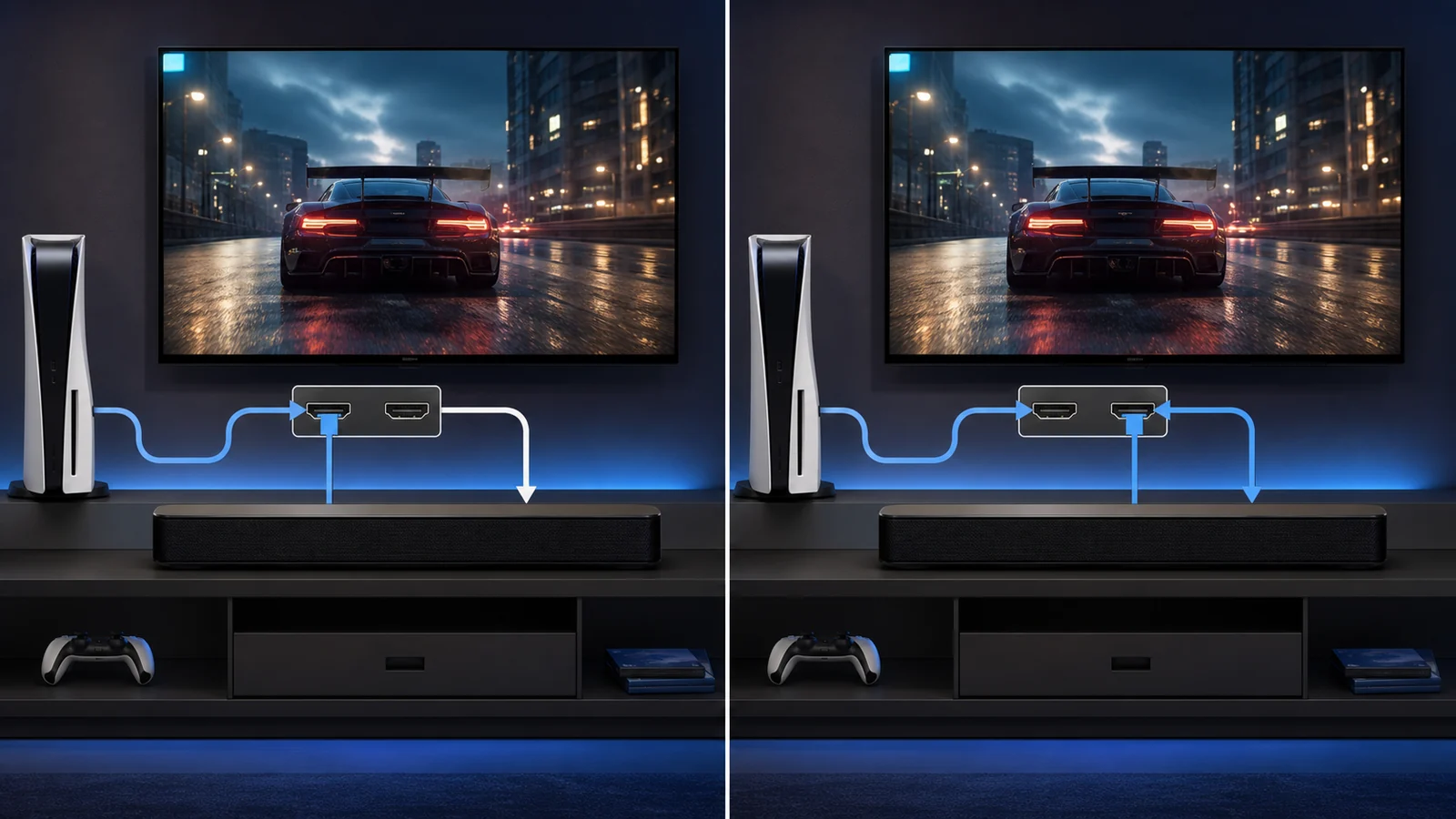
Neither standard determines picture quality on its own. If the console connects directly to the TV, video never passes through the soundbar. The TV sends only audio back. This arrangement can preserve 4K, high refresh rate, HDR, ALLM, and VRR even when a soundbar’s HDMI input cannot pass all those modes.
The practical differences
| Question | ARC | eARC |
|---|---|---|
| Typical role | TV audio return over HDMI | Higher-capacity TV audio return |
| Stereo PCM | Commonly supported | Supported |
| Uncompressed multichannel PCM | Generally not the ARC use case | Designed to support it when both devices do |
| High-bitrate lossless formats | Limited | May support formats such as Dolby TrueHD when the chain supports them |
| Lip-sync capability | Implementation varies | Includes enhanced lip-sync provisions, but device behavior still matters |
| Cable guidance | HDMI cable appropriate to devices | HDMI.org specifies an HDMI cable with Ethernet or Ultra High Speed HDMI Cable for eARC |
| Device control | Often paired with HDMI-CEC | Also commonly paired with HDMI-CEC |
Format labels are not guarantees. A TV may decode one format but refuse to pass it through; a soundbar may accept Atmos only through eARC or its own HDMI input; a PC game may output multichannel PCM rather than an encoded bitstream. Read the TV’s audio passthrough table and the soundbar’s supported-input table together.
When ARC is enough
ARC is reasonable when you use stereo, a supported compressed 5.1 format, or a soundbar whose capabilities do not exceed the link. It can also suit a simple console setup where reliable power and volume control are more important than lossless audio.
Do not upgrade a television solely because an eARC logo exists elsewhere. First determine what your source sends and what the soundbar can reproduce. A compact two-channel bar cannot turn an uncompressed 7.1 signal into eight physically separated speakers. Better transport capacity does not remove acoustic limits.
ARC may also be the sensible fallback when eARC handshaking is unstable. If audio cuts out, test ARC mode or stereo PCM. A stable, supported signal is more useful than a theoretically superior format that repeatedly loses sync.
When eARC is worth prioritizing
Choose eARC when a PC or current console sends multichannel PCM, when you want to preserve supported lossless movie soundtracks, or when the TV is the central switch for several HDMI 2.1 sources. It is particularly useful when direct-to-TV video is necessary to retain high-refresh gaming features while the soundbar receives the richest audio format the TV can pass.
For PC gaming, uncompressed multichannel PCM is an important distinction. Optical and conventional ARC have tighter format constraints. An eARC path may let the TV return that signal to a compatible soundbar, provided Windows, GPU drivers, TV firmware, and the bar all expose the intended channel layout.
Atmos also needs careful language. Dolby Atmos is not one connector and can travel in different containers. Compatibility depends on the source and application. A streaming app’s compressed Atmos and a disc player’s lossless Atmos path are not identical. Confirm the exact source scenario rather than treating “Atmos supported” as universal.
The best wiring pattern for gaming
For most TV-centered systems, start here:
- Connect the console or gaming PC directly to the TV’s high-bandwidth HDMI input.
- Connect the TV’s labeled eARC/ARC port to the soundbar’s labeled TV audio port.
- Enable the TV’s enhanced HDMI input mode for the gaming source.
- Enable eARC or ARC and any required HDMI-CEC setting.
- Select the TV or HDMI display as the source device’s audio output.
- Begin with stereo PCM, then add passthrough or multichannel modes one at a time.
Direct-to-TV video avoids making the soundbar’s video passthrough a bottleneck. If you instead connect source → soundbar → TV, verify resolution, refresh, VRR, HDR, color format, and HDCP support on the exact soundbar input and output.
Our guide to connect a soundbar to a gaming PC covers USB, optical, analog, Bluetooth, and HDMI alternatives.
ARC/eARC does not guarantee low latency
The return channel itself is only one part of the delay. A television may buffer video, decode audio, transcode formats, apply virtual surround, then send the result to a soundbar that performs more processing. Game Mode may reduce video processing without changing every audio stage.
If a gunshot is heard after the muzzle flash, simplify the chain. Enable Game Mode, disable optional motion processing, use passthrough where supported, turn off extra sound modes, and test stereo PCM. Then restore features individually. Do not use an arbitrary lip-sync adjustment until you know whether audio is late or video is late; some controls can only delay sound further.
The soundbar input lag guide provides a systematic diagnosis sequence.
HDMI-CEC: convenient but not identical to ARC
CEC lets devices exchange control commands such as power, volume, and input switching. Manufacturers often give it proprietary names. ARC setups frequently require CEC to be enabled, but CEC and audio return are separate functions.
CEC can create confusing behavior in multi-device systems. A console may wake the TV, the TV may wake the bar, and another device may steal the input. Configure one source at a time. If troubleshooting, record current settings before disabling CEC, because doing so may also disable ARC control on some televisions.
Cable selection without marketing confusion
Do not assume an expensive cable improves sound. Use a certified cable appropriate to the required feature and length. HDMI.org states that eARC works with HDMI cables with Ethernet and Ultra High Speed HDMI cables. For a source-to-TV link carrying 4K at 120 Hz, the required video bandwidth may be the stricter cable requirement.
Keep the run short where practical, avoid sharp bends, and fully seat both ends. If a long in-wall or active cable is required, confirm its direction and supported features. A cable that passes video does not prove that CEC and eARC are working reliably.
Setup checklist
- Confirm both endpoints explicitly support the same return-channel standard.
- Use the correct labeled ports, not merely available HDMI sockets.
- Update TV and soundbar firmware before deep troubleshooting.
- Enable the television’s external-speaker output.
- Start with PCM and no spatial processing.
- Verify each console or PC audio setting separately.
- Test power-on, wake-from-sleep, volume control, and source switching.
- Check whether the TV passes the desired format from external HDMI inputs.
If hardware is still undecided, the best gaming soundbar guide explains how to compare inputs, size, and room fit.
FAQ
Can an ARC soundbar connect to an eARC TV?
Usually, eARC is designed with ARC compatibility, but the connection will operate according to the shared capabilities and device implementation. Check both manuals, use the labeled ports, and expect ARC-level format limits when the soundbar supports only ARC.
Does eARC improve stereo sound quality?
Not automatically. If the existing ARC link already carries the intended stereo PCM signal without errors, eARC does not improve the speakers, amplifier, room acoustics, or mix. Its advantage is transport capability and system design, not an automatic tonal upgrade.
Is optical better than ARC?
Optical can be stable and simple, but it lacks HDMI control and eARC’s format capacity. It may be useful for diagnosis or a stereo setup. Choose according to supported formats and reliability rather than assuming digital connectors all behave identically.
Bottom line
For a new gaming TV and soundbar system, eARC is the stronger default because it supports a broader range of audio signals while allowing the console or PC to connect directly to the television. ARC remains useful for stereo and compatible compressed formats. Build the chain around verified capabilities, test a simple PCM baseline, and add processing only after video modes and synchronization are stable.
Primary sources
- HDMI Licensing Administrator: Enhanced Audio Return Channel
- Dolby: Soundbar setup guide
- Microsoft Support: Turn on spatial sound in Windows