Key takeaways
- Place a gaming soundbar without blocking the screen, ports, microphones, or acoustic path, then tune distance, subwoofer position, and desk reflections.
Gaming soundbar placement is a geometry problem before it is an equalizer problem. The bar needs a clear path to the listener, enough space for its drivers and vents, and a position that does not block the display, remote sensor, webcam, or controls. A compact bar placed carefully can sound clearer than a more expensive model pushed behind a monitor stand. Measure first, establish symmetry, and tune only after the physical layout is stable.
Start with the acoustic center
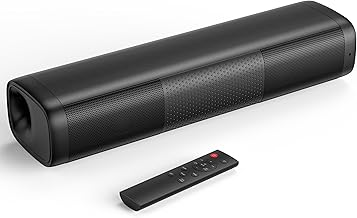
Place the soundbar so its center aligns approximately with the screen center and the seated listener. Dialogue and other center-panned sounds then appear to come from the display rather than one side of the desk. A small lateral offset may be unavoidable, but do not place the entire bar beyond one edge of the monitor when a centered shelf or riser can solve the problem.
Our top picks



As an Amazon Associate we earn from qualifying purchases at no extra cost to you.
Aim the drivers toward ear level. Many desktop bars fire forward; some angle upward. Read the manual because rotating an upward-angled design can change its intended response. Dolby’s speaker setup guidance shows the importance of listener-facing geometry for multichannel systems, although a compact stereo bar cannot reproduce discrete speaker placement simply through positioning.
Keep the front grille unobstructed. Monitor feet, decorative objects, controllers, and the lip of a desk shelf can block high frequencies. If the bar has side-firing or upward-firing drivers, leave the clearances specified by its manufacturer.
Under-monitor placement on a PC desk
Under the monitor is usually the most coherent desktop location because sound follows the image and both ears remain near equal distance from the bar. Before buying, measure three dimensions: the free width between or inside the monitor feet, vertical clearance below the bezel, and depth from the front edge to the stand column.
The bar should not cover the bottom pixels, power LED, joystick, or infrared receiver. It also should not force the monitor so high that the top of the display sits well above eye level. OSHA’s computer workstation guidance recommends positioning the monitor to reduce awkward neck posture; audio placement should not undermine that basic ergonomics principle.
If the stock stand leaves too little clearance, a stable monitor arm can create space, but verify desk thickness, arm capacity, VESA compatibility, and clamp position. Do not balance the monitor on improvised blocks. A purpose-built riser must support the display and leave ventilation around the bar.
Set the bar near the desk’s front half rather than against the rear wall when possible. A deep recess beneath a shelf can make sound boxy by creating a short cavity. Move the bar forward in small increments while listening to spoken dialogue; stop when voices become clearer without making the bar vulnerable to bumps.
Above-monitor mounting is a fallback
Above-screen placement can free desk space, but it raises the apparent source and often increases the distance to the listener. Use a manufacturer-approved mount or a shelf rated for the complete load. Angle the bar toward the listening position if the product supports safe adjustment.
Do not place a soundbar on the thin top bezel of a monitor. Adhesive pads are not structural mounts, and heat or vibration can weaken them. Avoid covering display vents. Route the cable with strain relief so its weight cannot pull the bar or connector.
An above-monitor bar can also compete with a webcam. Keep the camera close to the display centerline and ensure the soundbar does not appear in its field of view. If the bar includes microphones, follow its manual for distance and obstruction requirements rather than assuming any exposed location is suitable.
TV and console placement
For a television, center the bar directly below the screen whenever furniture and controls permit. The front edge should be flush with or slightly ahead of the cabinet edge; placing it far back can create early reflections from the furniture surface. Keep the television’s remote receiver visible.
Wall-mounted bars should use hardware rated for the wall structure and product weight. Mounting into drywall alone without an appropriate system can fail. Follow the television and soundbar manufacturers’ clearances, and use a qualified installer when wall construction or cable routing is uncertain.
If a full-size bar uses upward-firing height drivers, do not place it inside a cabinet. Dolby notes that reflected-height systems depend on ceiling geometry and a clear upward path. Very high, vaulted, absorptive, or irregular ceilings can reduce the intended effect. A product labeled Dolby Atmos may still use virtualization instead of physical upward drivers, so check its channel layout.
Our soundbar guide for PS5 and Xbox Series X covers console signal routing; placement cannot restore audio formats removed by an incompatible HDMI chain.
Distance and listening position
Desktop listening is near-field. Sit too close to a long soundbar and the left and right ends may feel disconnected; sit too far away and desk reflections dominate. Begin at your normal keyboard position, centered on the bar. Avoid tuning from the side of the room if only the primary gaming seat matters.
For couch setups, use the main seating position as the reference but test adjacent seats. Virtual surround processing can have a smaller sweet spot than a conventional stereo presentation. If dialogue sounds diffuse off-axis, a less aggressive spatial mode may serve the household better.
Do not push the couch against the rear wall solely to increase screen distance. Bass often builds near boundaries, and rear reflections can blur sound. Even a modest gap may improve consistency, subject to room layout and safety.
Subwoofer positioning
A separate subwoofer is not required for every desk, but it adds low-frequency extension that a slim bar cannot produce. Start on the floor near the front wall, not inside a closed cabinet. Leave the port and amplifier ventilation unobstructed.
Corners can increase bass output, but they can also exaggerate a narrow range and make explosions overwhelm dialogue. Move the subwoofer in small steps along the front wall while playing a familiar bass sweep or varied game soundtrack. The goal is even bass at the seat, not maximum vibration.
The “subwoofer crawl” can identify useful positions: place the sub temporarily at the listening seat, play a controlled bass signal at moderate level, then listen at possible floor positions. This is a practical placement method, not a precision room measurement. Keep cables away from walkways and never place powered equipment where spills are likely.
Desk reflections and isolation
A hard desktop produces an early reflection close to direct sound. The effect depends on driver height, angle, and desk depth. Raising the bar a small amount or moving it forward can change clarity more effectively than extreme EQ. Use stable rubber feet or the supplied stand; soft foam that blocks a port is not appropriate.
Mechanical vibration can travel into a hollow desk, creating buzz that sounds like speaker distortion. Test at a moderate volume while touching loose accessories, cable trays, and monitor risers. Isolate the bar or secure the rattling object rather than reducing every bass frequency.
Avoid placing the bar directly against a wall unless the manual anticipates it. Rear ports need clearance. Boundary proximity can increase bass, so reset EQ after a major position change.
Keep microphones separate
A soundbar playing game audio near an open microphone creates echo and feedback risk. Headsets remain the easiest solution for competitive voice chat. If speakers are necessary, place a directional microphone close to the mouth, lower speaker volume, and enable the communication application’s echo cancellation where available.
Do not put a desktop microphone directly in front of the bar. A boom arm can move it closer to the user and out of the direct acoustic path. Noise gates do not remove loud game audio while the player speaks, so positioning and level remain important.
Cable routing and wireless considerations
Separate signal, power, and microphone cables where practical. Do not bend HDMI or USB connectors sharply against the wall. Use removable ties and leave a service loop so the bar can move for cleaning without pulling ports.
Bluetooth reduces cable clutter but may add latency and can switch profiles when microphones are active. Use wired USB, HDMI, optical, or analog connection for timing-sensitive play when supported. The soundbar input-lag guide explains why connection type matters more than physical distance for synchronization.
For wireless subwoofers, keep the pairing path away from dense metal furniture and crowded wireless equipment when the manual recommends it. Do not assume a drop-out is acoustic; test the radio link and power first.
A repeatable placement procedure
- Photograph or note current cable and EQ settings.
- Center the soundbar and clear every driver and vent.
- Set it flush with the furniture edge and aim it toward ear level.
- Disable extreme surround and EQ presets for the baseline.
- Listen to dialogue, panned effects, music, and a bass sweep at normal volume.
- Move one component at a time by a small, measured distance.
- Recheck neighboring seats and microphone pickup.
- Apply modest EQ only after choosing the physical position.
This method separates placement changes from processing changes. If several variables move together, the improvement cannot be attributed reliably.
Common placement failures
Putting a bar behind the monitor blocks high-frequency output. Pushing it deep into a shelf creates cavity reflections. Placing an upward-firing model under a shelf defeats its intended path. Centering the bar while sitting permanently off-center does not solve the listener geometry. Setting the subwoofer to maximum gain in a corner creates impressive but inaccurate bass.
The final mistake is copying another room’s EQ. Furniture, dimensions, surface materials, and listening distance change the result. Use published guidance for safe clearances, then tune in the actual room.
Final recommendation
Center the gaming soundbar under the display, keep its drivers unobstructed, bring its front close to the furniture edge, and aim it toward the primary seat. Treat above-screen mounting and cabinets as constrained alternatives. Position the subwoofer for even response rather than maximum output, protect microphone separation, and change one variable at a time. Good placement makes every later connection and EQ decision easier.
Sources
- Dolby: Speaker setup guides
- OSHA: Computer workstation monitor positioning
- HDMI.org: Gaming features and connections