Our Top Picks
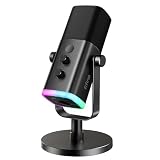
 FIFINE AmpliGame AM8 USB/XLR Dynamic Microphone for Gaming3.35 x 4.96 x 9.65 inches1.7 PoundsCheck on Amazon
The FIFINE AmpliGame AM8T is the best overall pick for most streamers who want an XLR microphone for streaming without buying a pile of extras: it is a dynamic cardioid mic that plugs into a PC over USB today and into an audio interface over XLR later, and it ships with a boom arm. If you already own an interface and want a pure XLR mic, the Elgato Wave DX is the cleaner choice. “XLR” simply means the mic uses the three-pin professional connector, so it needs a preamp or interface to run.
Quick List
- FIFINE AmpliGame AM8 – best for a first hybrid USB/XLR mic with RGB and on-mic controls
- FIFINE AmpliGame AM8T – best for a complete kit with boom arm that grows into an XLR chain
- FIFINE AmpliTank K688CT – best for podcast-style kits with shock mount and a high stated SPL
- MAONO PD200W – best for streamers who want wireless, USB and XLR in one mic
- FIFINE AmpliGame AM8W – best for white or light-colored desk setups
- Elgato Wave DX – best for a pure XLR dynamic mic paired with an existing interface
Which One Is Right for You?
| If you… | Choose |
|---|---|
| already run an audio interface or mixer and want only the microphone | Elgato Wave DX |
| want a mic and boom arm in one box, with USB now and XLR later | FIFINE AmpliGame AM8T |
| plan to host guests or record on the move without cables | MAONO PD200W |
| need a shock mount and windscreen with the arm | FIFINE AmpliTank K688CT |
| already own a stand or arm and want the simplest hybrid mic | FIFINE AmpliGame AM8 |
| build around a white desk, white keyboard and white peripherals | FIFINE AmpliGame AM8W |
Five of the six picks are hybrids, so the real question is how you will use the XLR side. If your plan is to stay on USB for a year and upgrade later, any of the FIFINE or MAONO models works. If you are already building an interface-based chain, the Wave DX avoids paying for USB electronics you will not use.
FIFINE AmpliGame AM8 USB/XLR Dynamic Microphone for Gaming Streaming
Picked as a relevant option in this category.
View on Amazon
FIFINE AmpliGame AM8T XLR/USB Gaming Microphone Set, Dynamic PC Mic
Chosen because it specifies Dynamic PC Mic.
View on Amazon
FIFINE AmpliTank K688CT Podcast Microphone Kit, USB/XLR Dynamic Mic | Streaming Mic with Boom Arm for PC/Mixer, with Mute Button, Headphone Jack for Instrument Recording Vocal Gaming Voice-Over
Chosen because it specifies USB/XLR Dynamic Mic and Streaming Mic with Boom Arm for PC/Mixer.
View on Amazon
MAONO PD200W Hybrid Wireless Podcast Microphone for PC, Dynamic XLR USB Mic
Chosen because it specifies Dynamic XLR USB Mic.
View on Amazon
FIFINE AmpliGame AM8W XLR/USB Gaming Microphone for Streaming Podcasting
Picked as a relevant option in this category.
View on Amazon
Elgato Wave DX Dynamic XLR Microphone, Cardioid Pattern
Chosen because it specifies Cardioid Pattern.
View on AmazonAll 6 Picks in Detail
1. FIFINE AmpliGame AM8 – Best for a First Hybrid Mic
As an Amazon Associate we earn from qualifying purchases at no extra cost to you.

The AM8 is the base model of the AmpliGame family and suits a streamer who already has a mic stand or arm and wants a dynamic microphone that works the moment it is plugged in. The listing describes a cardioid dynamic capsule, a stated 50Hz-16kHz frequency response, and both USB and XLR connections. Note that the XLR cable is not included.
- Dynamic cardioid pickup to reject off-axis room noise
- Stated frequency response of 50Hz-16kHz
- USB for direct PC use, XLR for an interface or mixer
- Tap-to-mute, gain knob and headphone jack with volume control
- RGB ring with three modes and more than ten colors (USB only, per the listing)
In practice this is the model to consider if a friend hands you a spare desk stand: you can start on USB tonight, keep the headphone jack for zero-delay monitoring of your own voice, and leave the XLR socket as an upgrade path. Because the XLR cable is sold separately, budget for it when you eventually add an interface.
Pros
- Controls on the mic body, so muting does not depend on software
- Works plug and play over USB
Cons
- No arm or stand in the listing details we reviewed; confirm what is in the box
- XLR cable is a separate purchase
Compared with the AM8T just below it, this is the same microphone concept without the boom arm, so choose it only if your desk setup is already sorted.
2. FIFINE AmpliGame AM8T – Best for a Complete Starter Kit

The AM8T packages the AM8 idea with a boom arm, which is why it leads this list. A new streamer gets a microphone, a way to position it and both connection options in one purchase. The listing states a -50dB sensitivity figure, a cardioid pattern, an external windscreen, a mute button, a gain knob and a headphone jack.
- Dynamic microphone with cardioid polar pattern
- Boom arm included in the kit
- USB plug and play, plus XLR for mixers or sound cards
- Stated sensitivity of -50dB
- Works with OBS and Streamlabs per the listing
- RGB lighting controlled by a button on the mic
For a new streamer the appeal is fewer decisions. The arm lets you park the capsule a few inches from your mouth and swing it away between sessions, and the windscreen handles basic plosives. Because the sensitivity figure and headphone jack are stated, you can also monitor yourself while gaming without installing extra software.
Setup tip: clamp the arm to the back edge of the desk, set the capsule roughly a fist away from your mouth and slightly off-axis, and then adjust the gain knob until loud moments sit comfortably below clipping. That sequence matters more to your sound than any single spec on the box.
Pros
- One box covers mic, arm and cabling for USB use
- No driver installation needed over USB
Cons
- Desk-clamp arms in kits are basic; check clearance with your monitor
- XLR cable is not confirmed in the listing; confirm on the product page
Against the K688CT, the AM8T leans toward gaming looks and RGB, while the K688CT leans toward podcast-style isolation hardware.
3. FIFINE AmpliTank K688CT – Best for Kit Buyers Who Want a Shock Mount

The K688CT is sold as a podcast microphone kit and suits creators who record voice, guitar or voice-over as well as stream. The listing states a maximum SPL of 120dB, a metal boom arm, and a windscreen plus shock mount to cut plosives and desk vibration.
- Dynamic microphone with USB and XLR outputs
- Stated SPL of 120dB for loud sources
- Metal boom arm included
- Windscreen and shock mount in the kit
- Tap-to-mute and gain knob on the mic
- Headphone jack with volume knob for monitoring
The kit idea works well for creators who record in a bedroom or shared space, where desk vibrations and keyboard taps are the main enemies. A metal arm and suspension mount are the sort of hardware people usually buy separately, so this bundle suits someone assembling a first proper voice rig in one step.
Setup tip: the shock mount only helps if the arm is anchored firmly, so tighten the clamp and route the cable along the arm with a tie rather than letting it dangle. Use the headphone jack to monitor yourself while recording, which makes it easier to catch pops and clipping early.
Pros
- Shock mount helps keep keyboard thumps out of the signal
- Headphone monitoring on the mic itself
Cons
- Larger kit takes more desk or clamp space
- Less gamer styling than the AmpliGame range
It is the closest alternative to the AM8T; pick the K688CT if vibration isolation matters more than lighting.
4. MAONO PD200W – Best for Wireless Flexibility

The PD200W is the most unusual microphone here: a hybrid with three modes, wireless, USB and XLR. It suits streamers who move between a desk, a couch and a co-host seat. The listing cites a 30mm dynamic capsule, cardioid pickup, an 82dB signal-to-noise ratio and up to 128dB SPL.
- 30mm dynamic capsule, cardioid pattern
- Wireless, USB and XLR operation
- One receiver can connect two mics for duo shows, each on its own track
- Three-stage noise cancellation per the listing
- MaonoLink app with four presets, EQ and reverb
Think of it as a mic for flexible shows: wireless when you walk to a second camera, USB when you want a quick plug-in session on a laptop or phone, XLR when you sit at a full interface. Check the listing for charging details and for the receiver hardware that ships in the box before you plan a two-host show.
Setup tip: decide on one primary mode before a show and check it for dropouts the evening before. If you use two mics on one receiver, assign each voice its own track in your recording software so you can fix levels afterwards, and keep the receiver within clear line of sight of the mics.
Pros
- Two-person recording on separate tracks
- App-based tuning for people who dislike hardware knobs
Cons
- Wireless adds a receiver and a charging routine; confirm battery life on the listing
- Digital noise processing can color the voice if pushed hard
Unlike the Wave DX, which does one job in analog, the PD200W trades simplicity for flexibility.
5. FIFINE AmpliGame AM8W – Best for White Setups
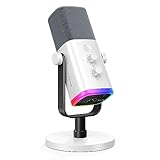
The AM8W is the AM8 in white. It is for streamers whose desk is built around light colors and who still want a dynamic cardioid mic with USB and XLR. The listing recommends speaking 2 to 6 inches from the capsule and notes that the RGB light, tap-to-mute, gain and headphone controls work only over USB.
- White finish with RGB ring
- Dynamic cardioid microphone
- USB and XLR connections
- Tap-to-mute, gain knob, headphone jack and volume control (USB only)
- Suggested speaking distance of 2 to 6 inches
Because the lighting and headphone controls are USB-only, the AM8W is best treated as a USB-first microphone with an XLR option kept in reserve. If you plan to run it through a mixer from day one, the extras will not work, and you may prefer the Wave DX.
Setup tip: because the suggested speaking range is only a few inches, a boom arm or a short desk stand helps keep distance consistent. A foam or mesh pop filter can tame plosives further, and a quick test recording will show if the light-colored body reflects glare into your webcam.
Pros
- Matches light-colored setups
- Same layout of controls as the AM8
Cons
- Onboard controls vanish when used over XLR
- Stand or arm is not confirmed in the listing; confirm on the product page
It is a cosmetic alternative to the AM8; choose by color, not by performance.
6. Elgato Wave DX – Best for a Pure XLR Chain

The Wave DX is the only XLR-only microphone in the list, so it suits streamers who already own an interface, mixer or capture device with a preamp. Elgato says it works with any XLR preamp or interface with no signal booster required, which makes it friendlier to modest preamps than many dynamic mics.
- Dynamic capsule, cardioid pattern
- Elgato publishes a 50-15,000 Hz range and 600 ohm impedance
- 5/8 inch mount with 3/8 and 1/4 inch thread adaptors
- Mono swivel mount keeps the cable from jamming when you aim the mic
- No USB, no RGB, no on-mic mute
Elgato also lists an internal pop filter and a steel chassis in its materials. It is a sensible partner for a capture card, mixer or interface from the same ecosystem, but it works with any standard XLR input. Use a short XLR cable and keep it away from power adapters to avoid hum.
Setup tip: pair it with a short, good-quality XLR cable and set your interface gain with the mic about a hand-width from your mouth. Speak at your normal streaming volume while raising gain, and stop when peaks fall comfortably below clipping. Use a boom arm that supports a 5/8 inch thread or one of the included adaptors.
Pros
- Simple analog signal path with no onboard processing
- Compact and light for an XLR mic
Cons
- Requires an interface and XLR cable you must buy separately
- No built-in monitoring or mute
Compared with the hybrid FIFINE models, it asks for more gear but leaves your upgrade path wide open.
Specs Compared
| Model | Connection | Capsule / pattern | Arm or stand | On-mic controls | Notes |
|---|---|---|---|---|---|
| FIFINE AmpliGame AM8 | USB and XLR | Dynamic, cardioid | Confirm on listing | Mute, gain, headphone volume, RGB | 50Hz-16kHz stated; XLR cable not included |
| FIFINE AmpliGame AM8T | USB and XLR | Dynamic, cardioid | Boom arm included | Mute, gain, headphone jack, RGB | -50dB sensitivity stated; windscreen |
| FIFINE AmpliTank K688CT | USB and XLR | Dynamic | Metal boom arm and shock mount | Mute, gain, headphone jack and volume | 120dB SPL stated |
| MAONO PD200W | Wireless, USB and XLR | 30mm dynamic, cardioid | Confirm on listing | App-based presets, EQ, reverb | 82dB SNR, 128dB SPL stated; dual-mic receiver |
| FIFINE AmpliGame AM8W | USB and XLR | Dynamic, cardioid | Confirm on listing | Mute, gain, headphone jack, RGB (USB only) | White finish |
| Elgato Wave DX | XLR only | Dynamic, cardioid | Swivel mount; 5/8 inch thread with adaptors | None | 50-15,000 Hz and 600 ohm per Elgato |
How We Chose These
We started with the products in the current catalog listings for this category and compared what each listing and manufacturer page actually states: connection type, capsule type, polar pattern, included hardware and on-mic controls. We favored microphones that suit streaming, meaning a dynamic cardioid design that tolerates untreated rooms, and we ranked kits above bare microphones when they remove purchase steps for a newcomer. We did not run audio measurements; this guide relies on published specifications and listing text, and where a listing is silent we say to confirm on the product page rather than guess. Order reflects fit for a typical streamer, not a score.
What to Look For
Dynamic versus condenser for streaming
Streaming rooms are usually untreated: a fan, a keyboard, a PC and a hard desk. A dynamic cardioid microphone responds mostly to what is close to the capsule and ignores much of the rest, which is why every pick here uses one. Condenser mics capture more detail and room sound, and they need phantom power over XLR, usually 48 volts. Dynamic mics do not require phantom power. If you later add a condenser, make sure your interface supplies it and that you switch it on only after connecting the cable.
USB, XLR or hybrid
USB mics have an analog-to-digital converter and preamp built in, so you plug in and talk. XLR mics send an analog signal to an interface, mixer or capture card with preamps, giving you better upgrade options and lower delay on dedicated gear, but you pay for the extra hardware. A hybrid starts as USB and becomes XLR later. Remember the caveat in the listings: some on-mic features, such as RGB and the headphone jack, may only work in USB mode.
Gain and preamp requirements
Dynamic microphones output a quiet signal. Many professional dynamics need roughly 50 to 60 dB of clean preamp gain to reach a healthy level when you speak at normal volume, while higher-output models need less. That is why Elgato highlights that the Wave DX needs no signal booster. If your interface is a budget model with modest gain, check the mic’s sensitivity (higher is easier to drive) before you buy, and avoid cranking the gain until background hiss rises.
Distance, mounting and monitoring
Placement matters more than price. In open air, each doubling of distance cuts the voice level by about 6 dB, so sitting 12 inches away instead of 6 forces you to add that gain back, along with extra room noise. The AM8W listing suggests 2 to 6 inches, which is a good starting range for most dynamic cardioid mics. A boom arm lets you hold that distance without blocking your monitor, and a shock mount reduces desk thumps. Add a pop filter or windscreen for plosive sounds like “p” and “b”.
Cables, power and noise
A balanced XLR cable cancels interference over long runs, so even 10 to 20 feet is fine if the cable is decent. Keep mic cables away from power bricks, monitors and LED strips, and cross them at right angles rather than running them side by side. For USB models, plug directly into the PC rather than through an unpowered hub, which can add dropouts. If you hear a buzz that changes when the monitor is on, the cause is usually a ground loop or a poorly placed cable rather than the microphone.
A worked example
Suppose you stream five nights a week and want to grow into a mixer-based setup. Buy a hybrid kit with an arm now, record over USB for a few months, then add an interface and XLR cable when you need more control. Total new parts at the upgrade step: interface and cable only. If you start with a Wave DX instead, you need the interface, cable and an arm on day one, but you never replace the mic.
Questions
Do I need an audio interface for an XLR microphone?
Yes, for the XLR connection you need an interface, mixer or capture device with a mic preamp, because the mic cannot plug into a PC directly. Hybrid models skip this need by offering USB, which is why they suit beginners.
Can I use a dynamic XLR mic without phantom power?
Yes. Dynamic microphones work without phantom power, and the cardioid dynamic mics in this list do not require it. Leave the 48-volt setting off unless the mic specifically asks for it.
Is a hybrid USB/XLR mic as good as a pure XLR mic?
The capsule matters most, and hybrids often use a capable dynamic capsule. A pure XLR mic gives you a simpler signal path and no built-in converter you will not use. Confirm the capsule and sensitivity details on each product page before comparing.
Why does my XLR mic sound too quiet?
Dynamic mics produce a low output, so the first fix is more preamp gain, then moving the mic closer, within about 2 to 6 inches of your mouth. If gain adds hiss, look for a mic with higher sensitivity or a cleaner interface preamp.
Do I need a boom arm?
You do not strictly need one, but it makes consistent distance easy and frees desk space. Kits like the AM8T and K688CT include arms, while the Wave DX and AM8 rely on a stand you supply or add.
Can I use these microphones with OBS?
Yes. Once the mic is recognized as an audio input device, either directly over USB or through your interface, OBS and similar streaming software can use it. The AM8T listing specifically names OBS and Streamlabs.
Update History
- October 14, 2026 – Initial publication; product set drawn from current catalog listings.
- Check the product page for current specifications and availability before buying.
Sources
- Manufacturer product and specification pages for Elgato (Wave DX technical specifications)
- Retailer listing titles, feature bullets and specification fields for FIFINE, MAONO and Elgato models