Our Top Picks
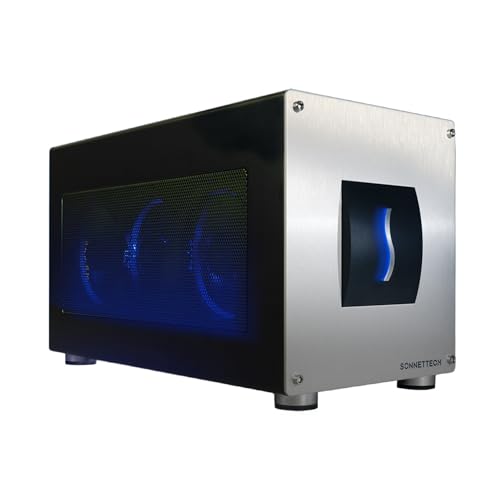
 Sonnet Breakaway Box 750ex Thunderbolt 3 eGPU Enclosure13.38 x 7.25 x 8 inches2 KilogramsCheck on Amazon


As an Amazon Associate we earn from qualifying purchases.
Affiliate Disclosure: This article contains affiliate links. If you buy through a link on this page, the site may earn a commission at no extra cost to you.
An external GPU enclosure lets a laptop borrow a desktop graphics card through a single cable. Dock at a desk, and a thin ultrabook drives games and GPU-heavy rendering with hardware it could never fit inside its own chassis. Undock, and the same machine goes back to being portable. The concept is simple, but the details decide whether it works: the connection type sets the bandwidth ceiling, the power supply decides which cards can run, and the interior decides whether your card fits.
Two honest caveats frame every pick below. First, no enclosure makes a card perform exactly as it would inside a desktop. Every connection here runs the card on four PCIe lanes, so some performance is always left on the table, and the loss grows when frames are sent back over the cable to the laptop’s internal screen instead of to a monitor plugged into the card. Second, this category is smaller than it was a few years ago. Apple Silicon ended eGPU support on Macs, integrated and mobile graphics have improved, and fewer brands release new boxes. The five products below are the credible current options, spanning Thunderbolt 5 flagships, proven Thunderbolt 3 enclosures, and an OCuLink dock for mini PCs and handhelds. None of them includes a graphics card, and two do not include a power supply either — each section states exactly what is in the box.
1. Razer Core X V2
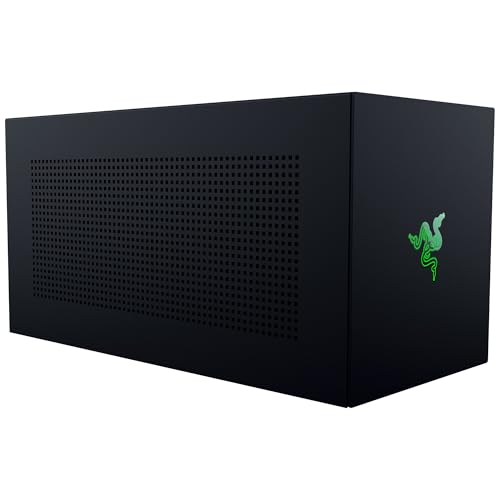
The Core X V2 is Razer’s current flagship and the enclosure built for the newest laptops. It connects over Thunderbolt 5, Thunderbolt 4, or USB4, and a Thunderbolt 5 link gives it up to 80 Gbps of bandwidth — double the Thunderbolt 3 and 4 ceiling. Razer also gives it the roomiest card bay in this roundup: desktop PCIe cards up to four slots wide fit inside, with PCIe 4.0 support, so even the thickest partner-model cards are accommodated. A built-in 120 mm fan with an adjustable curve handles cooling for the card.
The trade-off is that the V2 is a bare chassis. Razer does not include a power supply: you install a standard ATX unit of your own, and Razer recommends sizing it at your graphics card’s requirement plus 230 W of headroom, with ATX 3.1 units recommended for current cards. That is extra hardware to buy and fit, but it also means the power ceiling is whatever your chosen supply provides rather than a fixed internal limit. Charging is the strongest here — the V2 can supply up to 140 W to the laptop over the Thunderbolt 5 cable. There are no USB ports or Ethernet on the box; it is purely a graphics enclosure. Compatibility is Windows only: Razer requires Windows 10 RS5 or Windows 11, and states plainly that eGPUs are not supported on M1 and later Macs.
Specs
- Connection: Thunderbolt 5 / Thunderbolt 4 / USB4 (up to 80 Gbps on Thunderbolt 5)
- GPU support: PCIe desktop cards up to 4 slots wide, PCIe 4.0
- Power supply: not included — fits a standard ATX PSU (ATX 3.1 recommended)
- PSU sizing guidance: graphics card requirement plus 230 W
- Laptop charging: up to 140 W via Thunderbolt 5
- Cooling: built-in 120 mm fan, adjustable fan curve
- Extra ports: none
- System requirements: Windows 10 RS5 / Windows 11 or later
- Model: RC21-02270200-R3U1
- Graphics card: not included
2. Sonnet Breakaway Box 850 T5
Where the Razer asks you to bring your own power supply, Sonnet’s Breakaway Box 850 T5 includes everything. Its built-in 850 W power supply is the highest-wattage unit fitted to any enclosure here, with three 8-pin leads or a single 16-pin 12VHPWR connector for current high-end cards. The connection is Thunderbolt 5 at 80 Gbps, and the box also works with Thunderbolt 4 and USB4 Windows 11 systems, where the internal link runs at PCIe 3.0 speeds instead of the PCIe 4.0 path used over Thunderbolt 5. Card fit is generous: triple-wide cards up to 345 mm long are supported, covering the NVIDIA GeForce RTX 50, 40, and 30 series and AMD Radeon RX 9000, 7000, and 6000 series named in Sonnet’s documentation.
The 850 T5 also doubles as a desk dock. A downstream Thunderbolt port, three USB-A ports running at 10 Gbps, and 5 Gigabit Ethernet all hang off the same cable, and host charging runs up to 100 W. That convenience comes with bulk: at 210 x 400 x 250 mm and 6.4 kg before a card is installed, this is a permanent desk fixture rather than something that travels. Like the Razer, it is a Windows product — Sonnet documents it for Windows 11, with Intel Core 11th generation or newer (or Core Ultra) laptops on the Thunderbolt path, and no Mac eGPU support.
Specs
- Connection: Thunderbolt 5 (80 Gbps); also Thunderbolt 4 and USB4 on Windows 11
- Power supply: 850 W included
- GPU power connectors: three 8-pin or one 16-pin 12VHPWR
- GPU fit: up to 345 x 155 x 70 mm, triple-wide
- Laptop charging: up to 100 W
- Extra ports: 1x downstream Thunderbolt, 3x USB-A (10 Gbps), 5 Gigabit Ethernet
- Dimensions: 210 x 400 x 250 mm
- Weight: 6.4 kg (without graphics card)
- System requirements: Windows 11
- Model: GPU-850T5
- Graphics card: not included
3. Sonnet eGPU Breakaway Box 750ex
The 750ex is the mature Thunderbolt 3 option, and still the most complete single-cable desk setup of its generation. Its 750 W power supply supports cards drawing up to 375 W continuously, with a further 100 W of peak headroom, fed through two 8-pin (6+2 pin) connectors. The “ex” suffix marks the hub hardware: four USB Type-A ports and a Gigabit Ethernet jack share the one Thunderbolt cable with the GPU, so a keyboard, mouse, storage, and wired network all dock at once. Laptop charging runs up to 85 W, and a 0.8-meter Thunderbolt cable is included in the box.
Fit is the constraint to check. The slot takes a full-length, full-height card, but the maximum card size is 312 x 160 x 55 mm — double-width only. Many current cards wear triple-slot coolers and will not fit, so measure before ordering. In exchange, the 750ex keeps a compatibility advantage nothing newer here matches: alongside Windows machines with Thunderbolt 3, 4, or 5 ports, it supports Intel-based Macs running supported AMD cards. That makes it the default recommendation for an Intel Mac owner, with the hard limit that Apple Silicon Macs cannot use any eGPU at all.
Specs
- Connection: Thunderbolt 3 (40 Gbps)
- Power supply: 750 W included
- GPU power support: up to 375 W continuous, plus 100 W peak
- GPU power connectors: two 8-pin (6+2 pin)
- GPU fit: up to 312 x 160 x 55 mm, full-length, full-height, double-width
- Slot: PCIe 3.0 x16 mechanical (x4 electrical)
- Laptop charging: up to 85 W
- Extra ports: 4x USB Type-A, Gigabit Ethernet
- Dimensions: 18.5 x 34.0 x 20.2 cm
- Weight: 3.2 kg
- Compatibility: Windows with Thunderbolt; Intel Macs with supported AMD cards
- Model: GPU-750WEX-TB3
- Graphics card: not included
4. AKiTiO Node
The AKiTiO Node is the original value enclosure from 2017, still listed, and built around deliberate simplicity. A steel chassis with a carry handle holds a full-length, full-height, double-width card, and a built-in 400 W SFX power supply feeds it through the slot’s 75 W plus two 8-pin (6+2 pin) connectors — about 390 W in total for the graphics card. That is enough for a wide range of midrange cards, but it rules out flagship-class hardware, and the double-width limit rules out thick modern coolers regardless of wattage.
Everything else about the Node is minimal. There are no USB ports, no Ethernet, and no daisy-chain support. Most importantly, it delivers only 15 W over the Thunderbolt connection — enough for a trickle, not for running a laptop — so the machine’s own charger stays plugged in during use. Compatibility covers Windows 10 systems whose Thunderbolt 3 port supports external GPUs, and Intel Macs running macOS 10.13.4 or later with cards on AKiTiO’s compatibility list; AKiTiO notes the Node is not supported on Boot Camp. For a modest card and a compatible older laptop, it remains the straightforward enclosed option, provided its limits are accepted up front.
Specs
- Connection: Thunderbolt 3 (40 Gbps), PCIe 3.0 x4
- Power supply: 400 W SFX included
- GPU power support: about 390 W total (75 W slot plus two 8-pin 6+2 connectors)
- GPU fit: full-length, full-height, double-width cards
- Laptop charging: 15 W (5V/3A) — laptop’s own charger still required
- Extra ports: none; no daisy-chain support
- Case: SECC steel with carry handle
- Dimensions: 42.8 x 14.5 x 22.7 cm
- Compatibility: Windows 10; macOS 10.13.4+ on Intel Macs with listed AMD cards
- Model: NODE-T3IA-AKTU
- Graphics card: not included
5. MINISFORUM DEG1
The DEG1 takes a completely different route: no Thunderbolt at all. It connects over OCuLink, a cabled form of PCIe that tunnels a PCIe 4.0 x4 link at up to 64 Gbps without the Thunderbolt protocol overhead. Because the link is closer to a direct slot connection, OCuLink docks are popular with mini PC and handheld owners chasing the smallest performance penalty. The DEG1 itself is an open-frame board rather than an enclosure — a PCIe x16 slot on a compact frame with no walls, which means graphics cards of any length fit, and nothing traps heat around the card.
The compromises are equally clear. There is no power supply in the box: the dock takes an ATX or SFX unit through a standard 24-pin connector, with a force power-on feature so the supply starts with the dock. OCuLink carries no power delivery, so the host device runs on its own power, and there are no USB ports or hub functions of any kind. The host also needs an OCuLink port, which is common on mini PCs and some gaming handhelds but rare on laptops, and OCuLink lacks Thunderbolt’s polished plug-and-play behavior. Within that niche — a mini PC or handheld that already has the port — it is the most direct path to a full-size desktop card.
Specs
- Connection: OCuLink 4i (SFF-8612), PCIe 4.0 x4, up to 64 Gbps
- Form factor: open-frame dock, PCIe x16 slot (x4 electrical)
- GPU fit: no card length limit (open design)
- Power supply: not included — ATX or SFX via 24-pin connector
- Power feature: force power-on
- Laptop charging: none (OCuLink carries no power delivery)
- Extra ports: none
- Host requirement: a device with an OCuLink port (mini PCs, handhelds, select laptops)
- Graphics card: not included
How to Choose an eGPU Enclosure
Start with the port on your computer. Thunderbolt 5 offers the most bandwidth, Thunderbolt 4 and USB4 sit in the middle, and Thunderbolt 3 remains widely supported. OCuLink is the efficiency pick but only if your machine actually has the port. Two hard stops apply to every enclosure here: a laptop whose Thunderbolt or USB4 port lacks PCIe tunneling cannot run an eGPU at all — some Thunderbolt 4 laptops fall into this group, so confirm eGPU support in the laptop maker’s specifications — and no enclosure works with an Apple Silicon Mac.
Budget for the bandwidth penalty. All of these products run a desktop card on four PCIe lanes. Expect less performance than the same card in a desktop, with the gap widening at very high frame rates and when the internal laptop display is used, because finished frames travel back over the same cable. An external monitor connected directly to the graphics card avoids that return trip.
Do the power math before choosing a card. Enclosures with built-in supplies state their limits: the Sonnet 750ex supports cards up to 375 W, and the AKiTiO Node offers about 390 W. Bring-your-own-PSU designs move the decision to you — Razer’s guidance for the Core X V2 is to take the card’s power requirement and add 230 W. Check the connector types too: newer high-end cards may want a 16-pin 12VHPWR lead, which the Sonnet 850 T5 provides, while older designs use pairs of 8-pin connectors.
Measure the card, not just the slot count. Length and cooler thickness are the usual failures. The Core X V2 accepts cards up to four slots wide, the Breakaway Box 850 T5 up to triple-wide and 345 mm long, and both Thunderbolt 3 boxes here stop at double-width cards. The DEG1’s open frame sidesteps the question entirely.
Check charging wattage against your laptop. The Core X V2 delivers up to 140 W, the 850 T5 up to 100 W, and the 750ex up to 85 W — enough to retire the laptop’s own adapter for many ultrabooks. The AKiTiO Node’s 15 W is not, and the DEG1 offers none. A gaming laptop that shipped with a high-wattage adapter may still need it under full load even with a 100 W enclosure attached.
Decide whether you want a hub. The two Sonnet boxes fold USB ports and Ethernet into the same cable, which makes for a clean one-plug desk, though those devices share the connection’s bandwidth with the GPU. The Razer, AKiTiO, and MINISFORUM designs dedicate themselves to the graphics card and leave docking to a separate hub.
FAQ
Does an eGPU enclosure include the graphics card?
No. None of the five products here includes a graphics card — the card is always a separate purchase. The Razer Core X V2 and MINISFORUM DEG1 go one step further and do not include a power supply either, so factor an ATX or SFX unit into those builds.
Will an eGPU work with a Mac?
Only with an Intel-based Mac, a supported AMD graphics card, and an enclosure that supports macOS — here, the Sonnet 750ex or the AKiTiO Node. Apple Silicon Macs (M1 and later) do not support eGPUs in any enclosure, and NVIDIA cards are not supported on macOS.
Thunderbolt or OCuLink: which connection is better?
OCuLink moves more data with less overhead — up to 64 Gbps of near-direct PCIe — so less performance is lost across the cable. Thunderbolt is far more common on laptops, adds laptop charging and optional hub ports, and handles connecting and disconnecting more gracefully. The right answer is usually decided by which port your computer has.
Can I play on the laptop’s built-in screen?
Yes, every enclosure here can drive the internal display, but the image has to travel back over the same cable that feeds the card, which costs additional performance. An external monitor plugged into the graphics card’s own outputs is the faster arrangement.
Why is my laptop not charging from the enclosure?
Check the enclosure’s delivery figure against your laptop’s adapter. The AKiTiO Node provides only 15 W and the DEG1 none at all, so both expect the laptop’s own charger to stay connected. Even with a higher-wattage enclosure, a laptop under heavy CPU and GPU load can draw more than the cable supplies and top up slowly or not at all.
Conclusion
Match the enclosure to the port and the power plan. A Thunderbolt 5 laptop pairs naturally with the Razer Core X V2 if you are willing to choose your own power supply, or with Sonnet’s Breakaway Box 850 T5 if you want the supply, the ports, and the Ethernet included. Thunderbolt 3 owners are best served by the 750ex for a complete hub-equipped desk — or by the AKiTiO Node for a simpler, lower-power card. And if your mini PC or handheld carries an OCuLink port, the MINISFORUM DEG1 is the most direct route to a full-size card. In every case, confirm eGPU support on the computer first, measure the card second, and size the power supply third — in that order, an eGPU desk comes together without surprises.
More from Amazon
Programs that pair well with the guide above. Offers and eligibility are set by Amazon and may change.
Free shipping on eligible items, Prime Video and more. Eligible new members can start with a free trial.
Start a Prime free trialAd-free music streaming. Eligible new subscribers can start with a free trial.
Try Music Unlimited freeA Prime membership for ages 18-24 with a trial period. Eligibility is set by Amazon.
See Prime for Young AdultsAudiobooks and podcasts to listen to on the go. Eligible new members can start with a free trial.
Try Audible freeAs an Amazon Associate we earn from qualifying purchases.