Our Top Picks



As an Amazon Associate we earn from qualifying purchases.
Stock power supply cables are the part of a gaming PC that builders tolerate rather than choose. The stiff, rainbow-colored leads that come in the box fight every attempt at tidy routing, and they undo the look of an otherwise carefully planned build the moment the side panel goes on. Custom sleeved PSU cables fix that: individually sleeved wires in a coordinated color, pre-fitted with combs, turn the 24-pin motherboard lead and the GPU power runs into a deliberate part of the build’s design.
Before the picks, one safety distinction matters more than any color choice, and it runs through every product below. Extension cables are universal. An extension plugs into the component end of the cable that came with your power supply, and the connectors on the motherboard and graphics card side follow the ATX standard, so an extension kit works with any PSU brand. Full replacement cable kits are not universal. A replacement kit plugs directly into the power supply itself, and the pin layout on the PSU side is not standardized between brands, or even between model lines from the same brand. Plugging a replacement cable made for one PSU family into a different unit can send the wrong voltage down the wrong wire and damage a motherboard or graphics card. Every pick below is clearly framed as one type or the other, and the one replacement kit on the list names the exact PSU family it is built for.
Affiliate Disclosure: This article contains affiliate links. If you buy through a link on this page, we may earn a commission at no additional cost to you.
1. AsiaHorse 16AWG PSU Extension Cable Kit (White) — the full six-cable kit

AsiaHorse’s 16AWG kit is the most complete extension package in this roundup, and it is the natural starting point for a white-themed build. The box covers every visible power run in a modern system: one 24-pin ATX extension for the motherboard, two 4+4-pin EPS extensions for CPU power, and three 6+2-pin PCIe extensions for the graphics card. Dual EPS leads matter more than they used to, because many current motherboards have two CPU power sockets and high-end builds populate both.
The wires are 16AWG, a step thicker than the 18AWG used in basic kits, which keeps the sleeving looking full and holds a trained curve well once the included combs are fitted. Each cable is 30cm long, enough to bring the sleeved section into view and route it cleanly without leaving coils of slack behind the motherboard tray. AsiaHorse states plainly in the listing that this is an extension kit only: it connects to the power supply’s original cables and must never be plugged into the PSU itself. That clarity is exactly what a listing in this category should offer.
Specs
- Type: extension kit (universal, component-side connectors)
- Wire gauge: 16AWG
- Contents: 1x 24-pin ATX, 2x 4+4-pin EPS, 3x 6+2-pin PCIe
- Length: 30cm per cable
- Cable combs: included
- Color: white sleeving with white connectors
2. EZDIY-FAB PSU Cable Extension Kit 16AWG (Black Purple) — PET sleeving, dual EPS
EZDIY-FAB’s 16AWG kit matches the AsiaHorse package cable for cable — one 24-pin ATX, two 4+4-pin EPS and three 6+2-pin PCIe extensions at 300mm each — but wraps the wires in PET sleeving and offers colorways, like the black and purple version listed here, that suit darker builds with a single accent color. PET sleeving has a tighter, glossier weave than soft fabric braids, which gives the runs a crisp, uniform look under case lighting and wipes clean easily.
The 16AWG conductors give the cables enough body to hold the arc you bend into them, and the included combs keep the individual wires parallel from connector to connector. As with every extension kit, compatibility is simple: the component-side connectors follow the ATX standard, so the kit works with any power supply, modular or fixed-cable, because it only ever touches the ends of the cables you already own. Count your GPU’s power sockets before ordering any kit — a card with three 8-pin inputs uses all three PCIe extensions in the box.
Specs
- Type: extension kit (universal, component-side connectors)
- Wire gauge: 16AWG
- Sleeving: PET
- Contents: 1x 24-pin ATX, 2x 4+4-pin EPS, 3x 6+2-pin PCIe
- Length: 300mm per cable
- Cable combs: included
- Model: EZDPI228-5
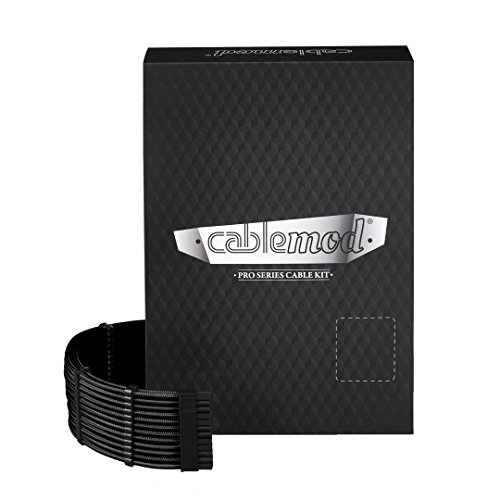
3. CableMod C-Series Pro ModMesh Sleeved Cable Kit for Corsair Type 4 — the replacement kit, for one PSU family only
This is the one full replacement kit in the roundup, and it exists to make the safety point concrete. CableMod’s C-Series Pro kit replaces the stock cables of specific Corsair power supplies entirely, plugging straight into the PSU with CableMod’s ModMesh sleeving, thicker Pro-series wire bundles and a finish level that extensions cannot quite match, because there is no hidden stock cable behind the motherboard tray at all.
The trade-off is absolute specificity. This kit is built only for Corsair Type 4 units — the RM Black Label, RMi and RMx families named in the listing. It does not fit Corsair Type 3 or Type 5 supplies, and it must never be used with another brand’s PSU, even if a connector physically clicks into place. The PSU-side pinout differs, and a cable that seats is not a cable that is wired correctly for your unit. If your power supply is one of the named Corsair Type 4 models, a matched replacement kit is the cleanest possible result. If it is anything else, choose one of the extension kits in this article instead, or the CableMod series made for your exact PSU line.
Specs
- Type: full replacement kit (plugs directly into the PSU)
- Compatibility: Corsair Type 4 only — RM Black Label, RMi and RMx series
- Sleeving: ModMesh
- Contents: full replacement cable set for the named PSU family (24-pin ATX, EPS, PCIe, SATA and peripheral leads)
- Model: CM-PCSR-FKIT-NKK-R
- Color: black
4. EZDIY-FAB Shield PCIe 5.1 GPU Extension Cable with 90-Degree 12V-2×6 Adapter — for current RTX cards
Graphics cards with the 16-pin connector changed the extension question. A standard kit’s 6+2-pin PCIe extensions cannot finish a build whose card takes a single 12V-2×6 (12VHPWR) plug, and bending a stiff 16-pin cable hard against a side panel is poor practice. EZDIY-FAB’s Shield extension is a dedicated answer: a 16-pin (12+4) male-to-female extension built to the PCIe 5.1 standard, with a 90-degree angled adapter at the card end so the cable leaves the connector downward instead of pressing toward the glass.
This is the Standard Type version, and the standard-versus-reverse detail is worth a moment before ordering: the right variant depends on which way up your card’s 16-pin socket faces, so check the listing’s orientation guide against your specific graphics card. Because it is an extension, it connects between the 16-pin lead from your power supply and the card, which keeps it brand-agnostic on the PSU side. Seat the connector fully until it clicks, leave the sense pins undisturbed, and use the included combs to keep the run straight. A partially seated 16-pin connector is the one installation error this connector family does not forgive.
Specs
- Type: GPU extension cable (16-pin male to female)
- Connector: 12V-2×6 / 12VHPWR, 16-pin (12+4), PCIe 5.1
- Design: 90-degree angled adapter, Standard Type orientation
- Intended cards: GeForce RTX 40 series with a 16-pin power socket
- Cable combs: included
- Color: white
5. KITCOM Custom Mod PSU Cable Sleeve Extension Kit — the longer 35cm option
Most extension kits stop at 30cm, which can run short in full-tower cases where the power supply sits far from the motherboard or the GPU run takes a long route around a radiator. KITCOM’s kit stretches each cable to 35cm and uses an 18AWG nylon braided sleeve in a black, red and grey mix that hides dust well and suits the large number of builds themed around those colors.
The package covers the core runs — a 24-pin ATX extension, a 4+4-pin EPS extension and 6+2-pin PCIe extensions — with combs included to keep the wires in line. The 18AWG conductors are the standard gauge found in most stock PSU leads, so the cables stay flexible and easy to route through tight grommets, at the cost of a slightly slimmer profile than the 16AWG kits above. For a mid-tower or a larger case on a careful budget of space and money, that trade is a sensible one, and the extra 5cm over standard kits is genuinely useful rather than a spec-sheet flourish.
Specs
- Type: extension kit (universal, component-side connectors)
- Wire gauge: 18AWG
- Sleeving: nylon braid
- Contents: 24-pin ATX, 4+4-pin EPS and 6+2-pin PCIe extensions (five-piece kit)
- Length: 35cm per cable
- Cable combs: included
- Colors: black, red and grey mix
How to Choose
Decide extension versus replacement first. Extensions are the safe default: they work with every power supply because they attach to the component end of your existing cables, where connectors are standardized. Replacement kits produce the cleanest result but are locked to one PSU family. Only buy a replacement kit when the listing names your exact PSU series, the way the CableMod C-Series kit names Corsair Type 4, and never move modular PSU cables between brands or between a brand’s own incompatible lines.
Count connectors against your actual hardware. Check how many EPS sockets your motherboard has (one or two), and how many PCIe power inputs your graphics card needs (one, two or three 8-pin sockets, or a single 16-pin 12V-2×6 socket). A kit with dual EPS and three PCIe extensions, like the AsiaHorse and EZDIY-FAB sets above, covers nearly every current build. Cards with a 16-pin socket need a dedicated 16-pin extension instead.
Weigh gauge against flexibility. 16AWG wire is thicker, presents a fuller sleeved look and holds a trained bend; 18AWG is the gauge of most stock cables and routes more easily through tight spaces. Either is electrically sound for normal cable lengths in a gaming PC; the choice is mostly about appearance and routing.
Match length to the case. Thirty centimeters is the standard extension length and suits most mid-towers. Measure the run in a full-tower or a case with a PSU shroud basement before ordering; a 35cm kit avoids coming up short, while excess length in a small case just becomes clutter to hide.
Mind the 16-pin rules. For 12V-2×6 and 12VHPWR cards, use a single purpose-built extension rather than stacked adapters, confirm standard or reverse orientation for angled versions, and press the connector home until it clicks with no gap at the housing.
FAQ
Are PSU extension cables compatible with any power supply?
Yes. Extensions plug into the ends of the cables that came with your PSU, and the connectors on that side follow the ATX standard shared by motherboards and graphics cards. The PSU brand and model do not matter for extensions.
Can I use a replacement cable kit made for a different PSU?
No. The connectors on the power supply side of a modular cable are not standardized, and pin layouts differ between brands and between product lines. A cable from another family can fit the socket while being wired wrong for your unit, which risks hardware damage. Only use a replacement kit that names your exact PSU series.
What is the difference between 16AWG and 18AWG sleeved cables?
16AWG wire is thicker, so sleeved cables look fuller, hold a bend better and show a small electrical advantage over long runs. 18AWG matches most stock PSU leads and is more flexible in tight routing. For typical extension lengths, the difference is mainly visual and tactile.
Do I need a special extension for an RTX 40 series graphics card?
If your card has the 16-pin 12V-2×6 power socket, yes — a dedicated 16-pin extension like the EZDIY-FAB Shield above. The 6+2-pin extensions in full kits are for cards with 8-pin sockets and cannot connect to a 16-pin card on their own.
How many PCIe extensions should a kit include?
Enough to match your graphics card: one per 8-pin socket on the card. High-power cards commonly use two or three 8-pin inputs, so a kit with three PCIe extensions, plus dual EPS leads for the motherboard, covers the widest range of current builds without a second purchase.
Conclusion
Clean power cabling comes down to one decision made correctly and a few details matched to your hardware. Choose an extension kit — AsiaHorse’s 16AWG set for the fullest cable count, EZDIY-FAB’s PET-sleeved kit for darker colorways, or KITCOM’s 35cm kit for larger cases — and the choice is safe with any power supply. Reserve a full replacement kit like CableMod’s C-Series for the exact Corsair Type 4 units it names, and give 16-pin graphics cards their own purpose-built extension. Get those calls right, and the cables stop being the part of the build you hide and become part of the design.
More from Amazon
Programs that pair well with the guide above. Offers and eligibility are set by Amazon and may change.
Free shipping on eligible items, Prime Video and more. Eligible new members can start with a free trial.
Start a Prime free trialAd-free music streaming. Eligible new subscribers can start with a free trial.
Try Music Unlimited freeA Prime membership for ages 18-24 with a trial period. Eligibility is set by Amazon.
See Prime for Young AdultsAudiobooks and podcasts to listen to on the go. Eligible new members can start with a free trial.
Try Audible freeAs an Amazon Associate we earn from qualifying purchases.