Our Top Picks



As an Amazon Associate we earn from qualifying purchases.
Every device on a gaming desk now seems to end in the same small oval plug: the gaming laptop, the handheld PC, the phone, the controller, the headset dock, the portable monitor. That shared connector creates a false sense of security. Two USB-C cables can look identical, feel identical and plug into the same ports, yet one moves data eighty times faster than the other, one carries a video signal to a monitor while the other carries none at all, and one can feed a full-size gaming laptop while the other tops out at phone wattage. The connector shape tells you nothing. The specification printed on the listing tells you everything.
The five cables below were chosen to cover the jobs a desk actually asks of USB-C, and they were picked by specification rather than by appearance. There is a full-speed dock and monitor cable for the single-cable desk setup, a USB4 cable for external drives, a two-headed charging cable that splits one charger between two devices, a soft silicone lead for the charging spot beside the keyboard, and a braided everyday cable for controllers and phones. One warning runs through the whole roundup, because it decides whether a setup works at all: a cable can never make a charger, a port or a drive faster than the slowest part of the chain. A 40Gbps cable plugged into a USB 2.0 port still runs at USB 2.0 speed, and a 240W cable behind a modest wall brick still delivers only what that brick can supply.
Affiliate Disclosure: This article contains affiliate links to products on Amazon. If you buy through these links, we may earn a commission at no additional cost to you. Product selections are based on published specifications and listing data, and commissions do not change which models are included.
1. Cable Matters Active Thunderbolt 4 Cable (6.6 ft)

This is the cable for the one-plug desk: a laptop connected to a dock or a USB-C monitor, where a single lead has to carry charging power, high-speed data and a video signal at the same time, across a distance long enough to route behind a desk. The Cable Matters active Thunderbolt 4 cable runs the full 2 metres while still delivering the complete Thunderbolt 4 specification: data at up to 40Gbps, charging at up to 240W, and video up to a single 8K display or two 4K displays. It is Intel certified, which means the design has passed Intel’s own validation for the Thunderbolt 4 label rather than simply using the connector.
The word “active” is the engineering detail that makes the length possible. Passive copper cables lose signal integrity as they get longer, which is why most full-speed Thunderbolt and USB4 cables stop at around 0.8 metres. This cable carries repeater electronics in the line that clean up and re-drive the signal, holding 40Gbps across the full 6.6 ft. The honest trade-offs follow from that design: it costs more effort to route than a short passive lead, the connector housings are bulkier, and an active cable is built for Thunderbolt and USB4 hosts rather than for being a generic spare. For a fixed desk run to a dock, though, it replaces the usual compromise of a short cable forcing the dock to sit in one exact spot.
Specs
- Standard: Thunderbolt 4 and USB4, Intel certified
- Data speed: up to 40Gbps
- Charging: up to 240W (USB PD 3.1 Extended Power Range)
- Video: up to 8K on a single display, or dual 4K displays
- Length: 6.6 ft (2 m)
- Design: active cable with signal repeaters
- Compatibility: Thunderbolt 4, Thunderbolt 3, USB4 and USB-C devices
- Connectors: USB-C to USB-C
2. Belkin Connect USB4 Cable (4 ft)
The Belkin Connect USB4 is the middle path between a full Thunderbolt dock cable and a plain charging lead, and it suits the external-drive side of a gaming setup: game libraries on portable SSDs, capture drives and fast backups. It is built to the USB4 specification with data transfer up to 20Gbps, which is twenty times the speed of the USB 2.0 wiring inside most charging cables and enough to keep a fast portable SSD busy. Charging support reaches up to 240W with USB Power Delivery, so the same cable can also serve as the main lead for a gaming laptop without becoming the bottleneck.
The 4 ft length is a deliberate part of the package. It is long enough to reach from a rear port or a dock to a drive sitting on the desk, without the signal compromises that push longer high-speed cables toward active designs. Two honest notes apply. First, 20Gbps is the USB4 generation this cable implements; a Thunderbolt 4 or 40Gbps USB4 port will still work with it, but transfers run at this cable’s ceiling, not the port’s. Second, buyers who need a cable primarily for a high-refresh USB-C monitor should confirm the display support of their exact setup and consider the fully specified Thunderbolt cable above, which is the one in this roundup built and certified around video duty.
Specs
- Standard: USB4 compliant
- Data speed: up to 20Gbps
- Charging: up to 240W (USB Power Delivery)
- Length: 4 ft (1.2 m)
- Connectors: USB-C to USB-C
- Use case focus: external SSDs, docks and laptop charging
- Compatibility: USB-C and Thunderbolt 3 / 4 ports (at the cable’s 20Gbps ceiling)
3. Anker 2-in-1 USB-C to USB-C Cable (4 ft, 140W)
Anker’s 2-in-1 solves a specific desk problem: one strong charger, two devices that both want power, and no free sockets left. One USB-C input splits into two USB-C outputs, and the cable manages a combined output of up to 140W, distributing power between the two connected devices according to what each one asks for. A single device on the cable can draw the full 140W, which covers fast charging for a large gaming laptop; plug in a phone or a handheld as the second device and the cable shares the budget between them instead of forcing a second wall brick into the strip.
The compromises are stated plainly by the specification. Data runs at USB 2.0 speed, up to 480Mbps, which is fine for syncing and accessories but slow for moving a game library, and this is a charging cable rather than a monitor cable. The shared budget also means the 140W headline is a total, not a per-device figure: two hungry laptops will divide it, and neither will charge at its maximum. The braided nylon jacket suits a lead that gets unplugged and replugged daily, and the 4 ft reach works from a desktop charger to the devices beside it. As a way to retire one charger from a crowded desk, it earns its place; as a data or display cable, it is the wrong tool.
Specs
- Design: one USB-C input splitting to two USB-C outputs
- Total output: up to 140W combined, dynamically distributed
- Single-device output: up to 140W
- Data speed: USB 2.0, up to 480Mbps
- Video: not a display cable
- Jacket: braided nylon
- Length: 4 ft
- Model: A8895
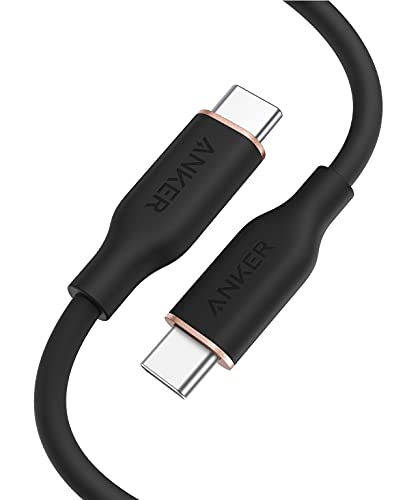
4. Anker 643 USB-C to USB-C Cable (Flow, 3 ft)
The Anker 643, sold as the Flow cable, is the charging lead for the spot where a cable is handled constantly: beside the keyboard, on a nightstand next to the setup, or in a travel kit. Its silicone finish over a graphene-core design makes it unusually soft and flexible, and it resists the tangling and stiffness that braided cables develop. Anker specifies a lifespan of 25,000 bends and a tensile strength of 220 lbs, and the cable ships with a silicone strap so it coils neatly instead of knotting in a drawer. Charging support reaches 100W with USB Power Delivery, which covers phones, tablets, handhelds and most laptops at full speed when paired with a suitable charger.
What it does not do is equally clear in the manufacturer’s own notes. Data transfer is USB 2.0 at up to 480Mbps, and the cable does not support media display at all, so it cannot run a USB-C monitor. At 3 ft it is also the shortest cable in this roundup, chosen for a charging spot rather than for reaching across a desk. None of that is a flaw in context: a dedicated charging cable that stays soft, untangled and gentle on the devices it brushes against is exactly what a desk’s main charging point needs, as long as nobody expects it to double as a dock lead.
Specs
- Charging: up to 100W (USB Power Delivery)
- Data speed: USB 2.0, up to 480Mbps
- Video: no media display support
- Jacket: silicone finish over a flexible graphene core
- Durability: 25,000-bend lifespan, 220 lb tensile strength
- Length: 3 ft (0.9 m)
- Extras: silicone cable strap included
- Model: A8552
5. UGREEN USB-C to USB-C Cable 100W (3.3 ft)
The UGREEN 100W cable is the straightforward braided workhorse: the spare lead that lives in a desk drawer, a backpack or a controller charging spot and gets used for everything. It supports up to 100W of USB Power Delivery charging, and it carries an e-marker chip, the small controller inside the plug that a cable needs before devices will trust it with more than 60W. That chip is the difference between a cable that can fast-charge a gaming laptop and one that silently limits it, and its presence is worth checking on any cable in this class. The nylon braided jacket and aluminium connector housings are built for repeated plugging, and the 3.3 ft length suits a charger-to-desk run.
Its limits match its role. Data transfer is USB 2.0 at up to 480Mbps, so it is a charging and syncing cable, not a drive or dock cable, and it is not the pick for a USB-C monitor connection. Buyers should also note that UGREEN sells this cable in several lengths and multi-packs under closely related listings, so the exact configuration on the product page is the one to confirm before ordering. Within its lane, though, it covers the most common desk job — full-speed charging for phones, controllers, handhelds and laptops — with the e-marker detail handled correctly.
Specs
- Charging: up to 100W (USB Power Delivery, 20V/5A)
- Chip: built-in e-marker for high-wattage negotiation
- Data speed: USB 2.0, up to 480Mbps
- Jacket: nylon braided
- Connector housings: aluminium
- Length: 3.3 ft (1 m)
- Connectors: USB-C to USB-C
How to Choose
Start with the job, because the right specification follows from it. For a dock or a USB-C monitor, the cable must carry video and high-speed data as well as power: that means a Thunderbolt 4 or USB4 cable with a stated display capability, like the Cable Matters at the top of this roundup. For an external SSD, data speed is the deciding figure: 20Gbps or 40Gbps cables keep a fast drive fed, while the USB 2.0 wiring inside most charging cables moves data at 480Mbps — a difference of more than forty times between the slowest and fastest cables in this article, hidden behind the same plug shape.
For pure charging, read the wattage and check for the e-marker. Cables are built to ceilings of 60W, 100W or 240W. Anything above 60W requires an e-marker chip so the charger and device can negotiate the higher current safely, and 240W cables follow the USB PD 3.1 Extended Power Range rules for the newest high-wattage laptops. Match the cable to the hungriest device it will feed: a phone charges happily on any cable here, but a gaming laptop on a 60W cable charges slowly or drains while in use. Remember also that the wattage is a ceiling shared with the charger — the brick, the cable and the device all have to agree on the number.
Length is a specification, not just a convenience. High-speed passive cables get shorter as speeds rise: full 40Gbps copper runs are typically around 0.8 metres unless the cable is an active design like the Cable Matters above. Charging cables face no such limit, which is why long, inexpensive leads are almost always USB 2.0 inside. Finally, choose the jacket for the location: silicone for a cable handled and coiled every day, braided nylon for runs that get dragged, stepped on and replugged, and keep a short cable at the charging spot so the desk stays clear.
FAQ
Can a USB-C cable charge a gaming laptop at full speed?
Yes, if all three parts support it: the charger must supply the wattage, the device must accept it, and the cable must be built for it. Look for a cable specified at 100W or 240W with an e-marker chip. A basic 60W cable will still charge most laptops, but slowly, and some will lose charge during heavy gaming sessions.
Why is one USB-C cable so much slower for file transfers than another?
Because the wires inside differ. Many charging cables contain only USB 2.0 wiring, which moves data at 480Mbps. Cables built for USB4 or Thunderbolt carry additional high-speed lanes and reach 20Gbps or 40Gbps. The plug looks the same in both cases, so the data speed printed in the specifications is the only reliable guide.
Will any USB-C cable work with a USB-C monitor?
No. A cable needs DisplayPort Alt Mode wiring to carry a video signal, and pure charging cables such as the Anker 643 state openly that they do not support media display. For a monitor or a dock, choose a cable whose listing specifies video support, such as the Thunderbolt 4 cable in this roundup.
Does a 240W cable charge a phone faster than a 100W cable?
No. The device decides how much power to draw, and phones draw far less than either figure. A higher-wattage cable only matters when a device can use the extra headroom, as large laptops can. The cable sets a ceiling; it cannot push a charger or a phone beyond their own limits.
Conclusion
A tidy USB-C drawer is really three different tools wearing the same plug. Keep one fully specified cable for the dock and monitor — the Cable Matters active Thunderbolt 4 if the run is long, the Belkin USB4 for fast external drives — and let charging cables be charging cables: the Anker 2-in-1 where one charger must feed two devices, the soft Anker 643 at the everyday charging spot, and the braided UGREEN as the spare that goes everywhere. Buy each cable by its printed specification — wattage, data speed, video support and length — and the identical-looking plugs stop being a gamble.
More from Amazon
Programs that pair well with the guide above. Offers and eligibility are set by Amazon and may change.
Free shipping on eligible items, Prime Video and more. Eligible new members can start with a free trial.
Start a Prime free trialAd-free music streaming. Eligible new subscribers can start with a free trial.
Try Music Unlimited freeA Prime membership for ages 18-24 with a trial period. Eligibility is set by Amazon.
See Prime for Young AdultsAudiobooks and podcasts to listen to on the go. Eligible new members can start with a free trial.
Try Audible freeAs an Amazon Associate we earn from qualifying purchases.