Our Top Picks


As an Amazon Associate we earn from qualifying purchases.
Affiliate Disclosure: This article contains affiliate links. If you buy through a link on this page, we may earn a commission at no extra cost to you.
A gaming desk concentrates more power hardware than almost any other furniture in the house: a PC, one or two monitors, a console, a headset charger, a phone charger, maybe a stream light and a USB hub. All of it converges on one power strip, and that strip usually ends up on the floor — gathering dust, getting kicked, and dragging a nest of adapter bricks down with it. An under-desk cable tray fixes the root of the mess. It is a metal basket that mounts beneath the desktop and holds the strip itself, plus the bricks and the coiled spare cable, up off the floor and out of sight.
It helps to separate the tray from its neighbours in the cable-management toolbox. A cable box hides a strip inside a closed lid but keeps it at floor level and traps heat around the bricks. A sleeve dresses a bundle of cables but holds no hardware. A raceway routes cables along a surface, and clips park individual cable ends at the desk edge. The tray is the only one that actually carries weight: the strip, the bricks and the slack all live in it. The five trays below split into two mounting camps — screw-mount models that bolt up permanently, and clamp-mount models that grip the desk edge with no drilling at all.
1. Monoprice Under Desk Cable Tray, Workstream Collection — The Long Screw-Mount Tray
Monoprice’s Workstream tray is the traditional design done at full length: a steel wire basket just over twenty-four inches long that screws to the underside of the desk and swallows an entire gaming power load in one run. That length is the headline. A full-size surge strip with a PC brick, a monitor adapter and a console brick laid end to end is exactly what shorter trays force you to split across two baskets; this one takes the whole row, with the open wire frame letting every cable drop in from above or feed out through the sides wherever it needs to go.
The tray is steel with a powder-coated finish, and Monoprice designed it with sit-stand desks in mind — it moves with the desktop, and it mounts under most wood or wood-composite tops. The honest limits: screw-mounting is permanent, so measure and mark before you drill, and the open frame hides nothing from a low viewing angle. It is a working tray, not a decorative one — and for a long strip with heavy bricks, it remains the benchmark.
Specs
- Type: Under-desk cable tray (open wire basket)
- Material: Steel, powder-coated finish
- Dimensions: 24.4 x 4.8 x 3.2 inches
- Mounting: Screw-mount under wood or wood-composite desktops
- Item weight: 1.4 pounds
- Model number: 133815 (Workstream Collection)
- Color: White
- ASIN: B07H48SY8G
- Source: https://www.amazon.com/dp/B07H48SY8G
2. Quszmd Under Desk Cable Management Tray 15.95″ — The No-Drill Clamp Pick
The Quszmd tray answers the renter’s problem: how to get a tray under a desk you are not allowed to drill. Instead of screws, it clips onto the desk edge with a clamp, so installation is a matter of positioning and tightening — and removal leaves no marks, which matters for rented rooms, dorms and glass or metal desks that should not be drilled at all. The maker is explicit that the clip-on mount works across wood, metal and glass tops, with one practical warning worth repeating: check what is already under your desk. Crossbars, modesty panels and frame rails can block a clamp tray, so measure the edge zone before ordering.
The basket itself is carbon steel, roughly sixteen inches long and just under five inches wide — sized for one power strip plus a couple of bricks rather than a whole battlestation row. That makes it a good second tray as much as a first one: clamp it at the end of a long desk for the console corner, or use it as the single hub of a compact setup. Clamp mounts always trade a little rigidity for their convenience, so load it sensibly and re-check the clamp tension after the first week.
Specs
- Type: Under-desk cable tray (clamp-on basket)
- Material: Carbon steel
- Dimensions: 15.95 x 4.72 inches (tray body)
- Mounting: Clip-on edge clamp, no drilling, no desk damage
- Item weight: 1.68 pounds
- Color: Black
- ASIN: B0C8NCJ16T
- Source: https://www.amazon.com/dp/B0C8NCJ16T
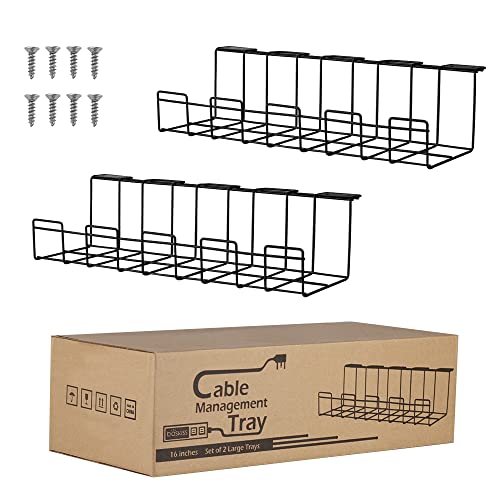
3. PAMO Cable Management Under Desk, Set of 2 — Two Steel Trays for Split Layouts
PAMO sells its tray as a pair, and the pair is the point. Two baskets of about seventeen inches each let you put power where the equipment actually is — one under the PC end of a long desk, one under the console or streaming end — instead of forcing every cable to converge on a single central pile. Each tray is pressed from coated steel a millimetre thick, with an open front edge so plugs and bricks can be added or swapped without unmounting anything.
Mounting is by screws, and the set includes ten cable ties to finish the job of bundling what lands in each basket. The dimensions deserve a note for gaming loads: at roughly four inches of width, the tray suits strips and bricks laid flat in a single row, which is how you want them for airflow anyway. Two mid-size trays also dodge the sag problem that can affect one very long basket loaded unevenly. If your desk is wide and your gear naturally clusters at both ends, this split layout is the tidiest answer here.
Specs
- Type: Under-desk cable trays, set of 2
- Material: Coated steel, 1 mm
- Dimensions per tray: 44 x 10 x 12 cm (about 17.3 x 3.9 x 4.7 inches)
- Mounting: Screw-mount under the desktop
- Included: 10 cable ties
- Part number: P-05-002
- ASIN: B08N1LM2GF
- Source: https://www.amazon.com/dp/B08N1LM2GF
4. DELAMU Under Desk Cable Management Tray — The Open Mesh, Airflow-First Pick
Delamu’s tray is built from metal mesh rather than wire rails or solid sheet, and it mounts with an F-clamp — no drilling, with silicone pads on the clamp faces to protect the desktop finish. The mesh construction is the most open design in this roundup: air moves through it from every side, and cables can pass through the mesh itself at almost any point along the run, which makes routing unusually forgiving when a new device joins the setup.
Two design details suit it to gaming desks specifically. The open-ended layout means a long strip can sit with its cable exiting either end instead of being forced into a U-turn, and the tray can be installed facing inward or outward, so you can choose whether the open side greets you or hides against the wall side. The clamp suits wood, glass, marble and metal desktops. The trade-off is the usual mesh one: it contains cables rather than concealing them, and small items like loose cable ends can poke through the grid. For a hot-running cluster of bricks, though, the ventilation argument wins.
Specs
- Type: Under-desk cable tray (metal mesh basket)
- Material: Metal mesh
- Mounting: F-clamp, no drilling; silicone pads protect the desktop
- Design: Open ends for cable pass-through; installs facing in or out
- Item weight: 1.76 pounds
- Color: White
- ASIN: B0FB3XTY2B
- Source: https://www.amazon.com/dp/B0FB3XTY2B
5. Baskiss Cable Management Tray, 2-Pack 40 cm — The Classic Wire Baskets
Baskiss is a familiar name in cable management, and its tray set is the classic wire-basket formula: two steel trays, each forty centimetres long, formed from 2 mm metal with wide square openings along the whole length. Those openings are the practical feature — plugs pass through them, not just cables, so you can rearrange what lives in the tray without unthreading everything, and the strip can sit at any point along the basket.
The pair gives you eighty centimetres of total tray, either split between two zones or mounted end to end. Installation is by screws — eight are included — and the trays can also hang from a desk frame where the frame design allows it. The listing rates the design around power strips, adapters and general cable loads, and the low profile hangs just far enough below the desktop to conceal the contents from standing eye level. This is the least fussy option in the group: no clamps to tension, no mesh to poke through, just two rigid baskets that disappear under the desk.
Specs
- Type: Under-desk cable trays, 2-pack
- Material: Steel wire, 2 mm
- Dimensions per tray: 40.64 x 12.95 x 5.08 cm (about 16 x 5.1 x 2 inches)
- Total coverage: 80 cm across both trays
- Mounting: Screw-mount (8 screws included) or hang on desk frame
- Set weight: 830 g
- Color: Black
- ASIN: B07Q5W52DT
- Source: https://www.amazon.com/dp/B07Q5W52DT
How to Choose
Measure the load before the tray. Lay out everything that will live in the basket: the strip itself, every brick, and the coils of spare cable. Measure the strip’s full length including its own cable exit, then check brick widths — a tray that fits the strip but not the fattest brick beside it has failed at its one job. When in doubt, go longer or split the load across two trays.
Clamp-mount versus screw-mount. Clamps are the right call for rented spaces, glass desks, and anyone who rearranges often; they grip the desk edge and come off cleanly. Their limits are edge clearance — a clamp needs a free run of edge with nothing behind it — and a lower tolerance for very heavy loads. Screws are the stronger, more permanent answer and work anywhere under a wood or composite top, but they commit you to a position. On a standing desk, check that the tray will not foul the crossbar or lifting columns at full height or full drop.
Be honest about heat. Bricks and strips get warm in normal use, and a tray concentrates them. Open wire and mesh designs ventilate freely, which is a real argument for them over closed boxes. Lay bricks side by side rather than stacking them, keep the strip’s sides unobstructed, and if a brick runs genuinely hot to the touch, that is a hardware problem no tray will solve — replace the brick.
Plan the cable entries. Decide where each cable enters and leaves before mounting: power comes up from the wall outlet at one end, device cables drop from the desktop at their own points. On a standing desk, leave a service loop — enough slack in the wall-to-tray run for the desk’s full travel. Finally, treat the tray as the hub, not the whole system: a short raceway along the back edge or a few clips at the drop points finish the runs the tray cannot cover.
FAQ
Will my power strip fit in a sixteen-inch tray?
Measure the strip body, then add the space its plugs and bricks take when laid beside it in the tray. Compact strips fit mid-size trays comfortably; long gaming strips with several bricks usually need a tray over twenty inches, or a two-tray split.
Clamp or screw mount for a standing desk?
Both move with the desktop, so either works. Screws are the safer choice for heavy loads; clamps are better if you cannot drill. Either way, confirm the tray clears the desk’s crossbar through the full height range, and leave slack in the cable run to the wall.
Do adapter bricks overheat inside a tray?
Open wire and mesh trays ventilate about as well as the floor does, and better than a closed box. Warm bricks are normal; stacking bricks on top of each other is what traps heat, so keep them in a single layer.
Can one tray hold a strip, a laptop brick and a console brick together?
Yes, if the combined length fits — that is the standard gaming load these trays are sized for. Add up the strip and brick lengths, compare with the tray’s inside length, and choose a long model or a pair if the total is close.
What handles the cables between the tray and my PC or monitors?
The tray is the hub under the desk. Short vertical runs from the desktop down into the tray usually need nothing more; longer exposed runs look best finished with a raceway section or a few desk-edge clips.
Conclusion
An under-desk tray turns a gaming desk’s cable mess from a floor problem into a solved one: the strip and its bricks get a fixed home, and the floor clears. Choose the long Monoprice if one big strip does everything, the PAMO pair or the Baskiss baskets for split or classic screw-mount layouts, and the Quszmd or Delamu if drilling is off the table — the Delamu’s mesh being the pick when brick heat is your main worry. Measure your strip, pick your mounting style, and the rest is ten minutes under the desk.
More from Amazon
Programs that pair well with the guide above. Offers and eligibility are set by Amazon and may change.
Free shipping on eligible items, Prime Video and more. Eligible new members can start with a free trial.
Start a Prime free trialAd-free music streaming. Eligible new subscribers can start with a free trial.
Try Music Unlimited freeA Prime membership for ages 18-24 with a trial period. Eligibility is set by Amazon.
See Prime for Young AdultsAudiobooks and podcasts to listen to on the go. Eligible new members can start with a free trial.
Try Audible freeAs an Amazon Associate we earn from qualifying purchases.