Our Top Picks
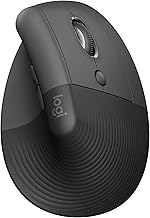
 Logitech Lift for Mac Vertical Ergonomic Wireless Mouse2.8" x 2.8" x 4.3"5.8 x 3.4 x 2.8 inches0.3 poundsCheck on Amazon
The best ergonomic mouse for tennis elbow and MacBook Air is one that keeps your forearm in a neutral handshake position or lets it rest completely, and pairs over Bluetooth with no dongle. For most people that means a vertical mouse such as the Logitech Lift for Mac, or a thumb trackball if you want the arm to stay still.
This guide is about comfort and compatibility, not treatment. A mouse cannot treat tennis elbow, and nothing here is medical advice. If you have ongoing pain, see a physician or physical therapist and use this list only to shop for a mouse that reduces awkward wrist and forearm positions.
Picks at a Glance
| Pick | Type | Connection (per listing) | Best for |
|---|---|---|---|
| Logitech Lift for Mac | Vertical | Bluetooth only, no receiver | MacBook Air users with small to medium hands |
| Logitech Ergo M575S | Thumb trackball | Bluetooth connectivity | Keeping the forearm still |
| Nulea M501 | Thumb trackball | Bluetooth and USB receiver, rechargeable | A cheaper rechargeable trackball |
| ProtoArc EM11 NL | Vertical | Wireless, rechargeable | Value vertical shape |
| TECKNET Ergonomic Mouse | Vertical | Bluetooth 5.0 and 2.4G, 3 devices | Switching between a MacBook, tablet and PC |
| UGREEN Ergonomic Wireless Mouse | Tilted ergonomic | Bluetooth and 2.4G, 3 devices | Quiet clicks and a gentle angle |
| Razer Pro Click V2 Vertical | Vertical | Listing says Windows and Mac support | A vertical shape with gaming-brand build |
Use the table to narrow the field, then read the pick sections for the trade-offs. Hand size changes everything, so a shape that suits one person can feel wrong to another.
The 7 Best Ergonomic Mice for a MacBook Air and Sore Forearms
Logitech Lift for Mac Vertical Ergonomic Wireless Mouse
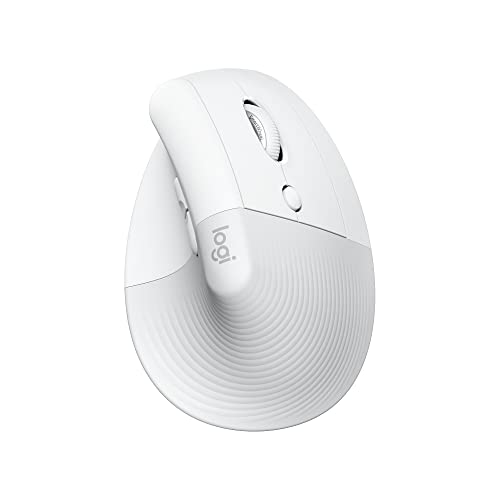
Logitech Lift for Mac Vertical Ergonomic Wireless Mouse - Off White | Bluetooth connectivity only, no USB receiver, quiet clicks, 4 customizable buttons, mac OS iPad OS compatible
Chosen because it specifies Off White and Bluetooth connectivity only.
View on AmazonThe Lift for Mac is the most direct answer to this keyword. The listing describes Bluetooth connectivity only, with no USB receiver, which matters because a MacBook Air has no spare full-size USB-A port. The shell is tilted into a vertical shape so your forearm turns toward a handshake position instead of lying flat. It is built for small to medium hands, and the listing mentions quiet clicks.
- Type: vertical, right-handed shell
- Connection: Bluetooth only, no receiver (per listing)
- Clicks: quiet clicks (per listing)
- Hand fit: small to medium; check the maker for the size guide
Best for: MacBook Air owners who want a vertical mouse with no dongle.
Skip if: you have large hands or want a left-handed shape.
Pros
- No receiver to lose or adapt
- Vertical posture reduces forearm twist
- Quiet clicks suit shared spaces
- Recognisable brand with long software support
Cons
- Not ideal for large hands
- Mid-range cost for a mouse
Logitech Ergo M575S Wireless Trackball Mouse
A trackball is a different answer to the same problem. The body stays put on the desk and your thumb moves the ball, so your forearm and elbow do not travel across the mat. The listing describes easy thumb control and Bluetooth connectivity. That makes it a sensible second option if a vertical mouse still leaves your arm moving all day.
- Type: thumb-operated trackball, stationary body
- Connection: Bluetooth (per listing); check the maker for receiver details
- Hand fit: right-hand thumb design
- Desk space: small footprint, no mouse pad needed
Best for: People who want the arm to stay still while the cursor moves.
Skip if: you do fast aim-based gaming or dislike thumb control.
Pros
- Forearm barely moves
- Needs very little desk space
- Bluetooth, so no dongle is required on a Mac
- Affordable for a trackball from a major brand
Cons
- Thumb fatigue can replace arm fatigue for some users
- Poor fit for fast FPS aim
Nulea M501 Wireless Trackball Mouse

Nulea M501 Wireless Trackball Mouse Ergonomic Thumb Control,4 DPI Levels | Rechargeable mouse with bluetooth USB receiver,3 device use,smooth tracking,compatible with PC Mac Windows
Chosen because it specifies 4 DPI Levels and Rechargeable mouse with bluetooth USB receiver.
View on AmazonThe Nulea M501 is another thumb-controlled trackball. The listing mentions four DPI levels, a rechargeable battery, and both Bluetooth and a USB receiver. If you like the idea of a trackball but would rather not buy the Logitech, this is the straightforward alternative.
- Type: thumb trackball
- DPI: 4 levels (per listing)
- Power: rechargeable (per listing)
- Connection: Bluetooth plus USB receiver (per listing)
Best for: A budget-minded trackball with USB charging.
Skip if: you need confirmed macOS software support; check the maker first.
Pros
- Rechargeable, no AA cells
- Four DPI steps for cursor speed
- Bluetooth for a laptop with limited ports
- Lower cost than the premium trackballs
Cons
- Brand is less established
- macOS button-mapping software is not confirmed in the listing
ProtoArc EM11 NL Wireless Ergonomic Vertical Mouse

ProtoArc EM11 NL Wireless Ergonomic Vertical Mouse, Rechargeable, Black | 58° vertical design supports a natural wrist posture, connect 3 devices via Bluetooth/2.4G USB-A, 500mAh USB-C rechargeable.
Chosen because it specifies Rechargeable and Black.
View on AmazonThe ProtoArc EM11 NL copies the vertical posture of the premium models at a lower tier. The listing mentions a 58 degree vertical design meant to support a more natural wrist position, and the mouse is rechargeable. It is a good place to start if you are not sure vertical mice suit you.
- Type: vertical, 58 degree design (per listing)
- Power: rechargeable (per listing)
- Connection: wireless; check the maker for the exact Bluetooth and 2.4G modes
- Colour: black in this listing
Best for: First-time vertical mouse buyers who want to try the shape cheaply.
Skip if: you need a proven Mac software suite with button remapping.
Pros
- Steep vertical angle
- Rechargeable battery
- Low cost of entry
- Light enough for a bag
Cons
- Software support is thinner than Logitech
- Finish is more basic than premium models
TECKNET Ergonomic Mouse, Wireless Bluetooth Vertical

TECKNET Ergonomic Mouse, 4800 DPI Wireless Bluetooth Vertical, 3-Device | Switch Among 3 Devices, 6 DPI Levels, BT 5.0/2.4G USB-A, Quiet Clicks, 6 Buttons, Battery-Powered, Right-Handed, Black
Chosen because it specifies 4800 DPI Wireless Bluetooth Vertical and 3-Device.
View on AmazonTECKNET’s vertical mouse targets people who work across several machines. The listing mentions three-device switching, six DPI levels, and Bluetooth 5.0 with a 2.4G receiver. For someone who moves between a MacBook Air, a tablet and a desktop, one mouse that remembers all three saves swapping gear.
- Type: vertical
- Devices: up to 3 (per listing)
- DPI: 6 levels, up to 4800 (per listing)
- Connection: Bluetooth 5.0 and 2.4G (per listing)
Best for: Multi-device workers who want a vertical shape.
Skip if: you need a left-handed or very large-hand design.
Pros
- Three-device switching
- Bluetooth 5.0 for the MacBook Air
- Six DPI levels cover work and light play
- Budget friendly
Cons
- Plastic shell feels basic
- Clicks are louder than silent models
UGREEN Ergonomic Wireless Mouse

UGREEN Ergonomic Wireless Mouse, Bluetooth & 2.4G Wireless, Quiet Clicks | 1000/1600/2000/4000 DPI, Up to 3 Device Connectivity, 6 Buttons, Multi-system compatibility, for Laptop, Desktop, PC
Chosen because it specifies Bluetooth & 2.4G Wireless and Quiet Clicks.
View on AmazonThe UGREEN mouse takes a softer approach: a tilted shape rather than a full vertical shell. The listing describes quiet clicks, DPI from 1000 to 4000, Bluetooth and 2.4G wireless, and up to three connected devices. For anyone who finds a steep vertical mouse strange at first, a gentler angle is easier to adopt.
- Type: ergonomic shaped, gentler angle than a full vertical
- DPI: 1000 / 1600 / 2000 / 4000 (per listing)
- Connection: Bluetooth and 2.4G, 3 devices (per listing)
- Clicks: quiet (per listing)
Best for: People who want a modest ergonomic tilt and quiet clicks.
Skip if: you want the steepest vertical angle available.
Pros
- Quiet clicks
- Easy adjustment from a normal mouse
- Three-device connectivity
- Low cost
Cons
- Less posture change than a true vertical mouse
- Few buttons
Razer Pro Click V2 Vertical Wireless Mouse

Razer Pro Click V2 Vertical Wireless Mouse, 6 Button Ergonomic Design | One Click AI Prompt, Supports Windows & Mac, Multi Device Connectivity via 2.4GHz, Bluetooth, or USB C Wired Mode, Chroma RGB
Chosen because it specifies 6 Button Ergonomic Design and One Click AI Prompt.
View on AmazonThis is the pick for people who want a vertical mouse with a gaming-brand pedigree. The listing says it has a six-button ergonomic design and supports both Windows and Mac. It sits at the top cost tier in this guide, so it is for buyers who have decided a vertical mouse is the right shape and want more build quality and buttons.
- Type: vertical wireless, six buttons (per listing)
- Platform: Windows and Mac (per listing)
- Software: Razer app; check the maker for macOS feature coverage
- Hand fit: not listed; check the maker guide
Best for: Gamers and creators who want a vertical shape with extra buttons.
Skip if: you want the lowest cost option.
Pros
- Mac support is stated in the listing
- More programmable buttons than the Lift
- Strong build and brand support
- Vertical posture
Cons
- Highest cost tier in this list
- Heavier than budget vertical mice is possible; check the maker for weight
Also Consider

Anker 2.4G Wireless Ergonomic Mouse, Right Hand Vertical Mouse USB Receiver | Multi-Device Connectivity, 800/1200/1600 DPI, Wireless Mouse for Laptop, Desktop, PC, 5 Buttons, Black (Batteries Required)
Chosen because it specifies Right Hand Vertical Mouse USB Receiver and Multi-Device Connectivity.
View on Amazon
Anker 2.4G Wireless Ergonomic Mouse. A low-cost vertical mouse that uses a USB receiver, so a MacBook Air needs a USB-C adapter. Good for a spare desk setup.- Apple Magic Mouse. It pairs easily with a Mac, but the flat, low shell is not an ergonomic design, so it is not the choice if forearm comfort drives the purchase.

Bloody A60L Optical Gaming Mouse with Light Strike (LK) Switch & Scroll - Fully Programmable and Advance Macros (A60L)
Chosen because it specifies Fully Programmable and Advance Macros (A60L).
View on Amazon
Bloody A60L Optical Gaming Mouse. A programmable gaming mouse with Light Strike switches. Check Bloody for macOS support before buying for a Mac, as it is not confirmed in the listing.
Vertical Mouse vs Trackball vs Standard Mouse
The three shapes trade off posture, learning time and flexibility. This table summarises what to expect before you commit to one.
| Shape | What changes for your arm | Learning curve | Watch out for |
|---|---|---|---|
| Standard flat mouse | Forearm rotated palm down, wrist often bent | None | The posture many comfort guides tell you to avoid |
| Vertical mouse | Forearm turns toward a handshake position | A few days | Hand size mismatch, left-handed availability |
| Thumb trackball | Forearm and elbow stay still, only the thumb moves | One to two weeks | Thumb strain, slow fast-flick aiming |
| Tilted ergonomic shape | A mild posture change | Almost none | Smaller benefit than a full vertical shell |
If your forearm aches after long sessions, start with the shape that changes the least about how you work, then move further if it helps. Many people try a vertical mouse first because it keeps the same hand-moves-mouse habit. A trackball is the bigger change, but it is also the only design that removes arm travel entirely.
Setting Up a Bluetooth Mouse on a MacBook Air
- Turn the mouse on and put it in pairing mode. On most models this means holding the Bluetooth or connect button until the light flashes.
- Open System Settings on the Mac and choose Bluetooth.
- Select the mouse from the list and wait for it to show as connected.
- Open Mouse settings in System Settings and set the tracking speed. Turn on or off natural scrolling to match your habit.
- Install the maker software if you want button remapping, after checking that the maker lists macOS support.
If you use a model with a USB receiver instead, you will need a USB-C to USB-A adapter on a MacBook Air. Bluetooth-only models such as the Lift for Mac avoid that step.
Desk Habits That Matter as Much as the Mouse
Buying an ergonomic mouse is only one part of a comfortable setup. The best ergonomic mouse for tennis elbow concerns still sits on a desk that may be working against you, so treat the points below as a checklist.
- Forearm support: let your forearm rest on the desk or armrest instead of floating. A floating arm adds load to the elbow.
- Elbow angle: keep it near a right angle with the shoulder relaxed. Raise the chair or lower the desk until it fits.
- Wrist position: keep it straight, not bent up or sideways. Vertical mice help here, but a bad desk height can undo the benefit.
- Grip: hold the mouse loosely. A tight grip can strain the forearm even with the best shape.
- Breaks: stand up, shake out your hands and stretch every 30 to 45 minutes.
- Alternate hands: if the model allows it, switching hands for light tasks can spread the load. Many vertical shells are single-handed, so check before buying.
Common Mistakes When Buying an Ergonomic Mouse
- Ignoring hand size: a vertical mouse that is too small makes you grip it like a claw. Compare your hand length to the maker chart.
- Skipping the adjustment period: the first days can feel odd. Give any new shape at least a week before judging it.
- Buying for gaming specs alone: high DPI figures do nothing for comfort. Focus on shape, weight and connection.
- Assuming a receiver will fit: a MacBook Air needs a USB-C adapter for USB-A dongles, so Bluetooth saves effort.
- Expecting a cure: a mouse is a comfort tool. Persistent elbow pain needs professional advice.
Best Picks by Situation
Small to medium hands
Start with the Logitech Lift for Mac, which is built for that range, or the UGREEN mouse if you prefer a gentler angle. A shell that is too large forces your fingers to stretch, which defeats the point.
Large hands
Look at the Razer Pro Click V2 or a trackball, since neither depends on a small shell. Check the maker dimensions, because hand fit is not listed for several of these mice.
Left-handed users
Most vertical mice here are right-handed shells. The Ergo M575S and Nulea M501 are thumb designs aimed at the right hand, so a left-handed buyer should confirm a mirrored version exists or look at ambidextrous trackballs from the same brands.
Tight cost tier
ProtoArc, TECKNET and UGREEN sit in the lowest cost tier in this guide. They are a sensible way to test whether a vertical shape suits you before paying more for a premium model.
One mouse for everything
TECKNET and UGREEN list three-device connectivity, so one mouse can serve a MacBook Air, a tablet and a desktop. If you also game, the Razer Pro Click V2 is the one that pairs Mac support with a gaming brand.
How We Chose
This is a research-based list. We did not use or handle these mice. We compared the maker listings, published specifications, and what independent review sites repeatedly said about posture and Mac pairing. We weighted four things: how far the design moves the forearm from a flat position, whether the mouse connects over Bluetooth to a MacBook Air without an adapter, how widely the model is stocked and supported, and the cost tier.
Where a spec was not shown on the listing, we say so instead of guessing. Check the maker page for hand-size charts and software compatibility before you buy.
Buying Guide: Ergonomic Mouse for Tennis Elbow Comfort and a MacBook Air
Pick the shape first
- Vertical mouse: turns the hand toward a handshake angle. Look for a 55 to 60 degree tilt if you want a clear change from a flat mouse.
- Thumb trackball: the body stays still, so the forearm does not move across the desk. Expect a learning curve of several days.
- Gentle ergonomic tilt: a good middle path if a full vertical shell feels odd.
Check Mac compatibility
- Prefer Bluetooth. A MacBook Air has only USB-C ports, so a USB-A receiver needs an adapter.
- Basic pointing works with nearly any Bluetooth mouse, but button remapping software may be Windows-first. Confirm macOS support on the maker page.
- Models labelled for Mac, such as the Lift for Mac, remove the guesswork.
Match the size to your hand
- Small to medium hands suit the Logitech Lift. Large hands often need a bigger shell.
- Measure from your wrist crease to the tip of your middle finger and compare it to the maker chart.
Consider the rest of the desk
- Keep your elbow near 90 degrees and your wrist straight.
- A mouse alone will not fix a poor desk or chair height.
- Take short breaks and stretch; this is common ergonomics advice, not treatment.
Gaming Mouse for MacBook Air: What Works
A gaming mouse for MacBook Air use needs low latency and a stable connection. Most Bluetooth mice work for casual play, while serious aim practice favours a 2.4G receiver with a USB-C adapter or a wired mouse. Because MacBook Airs do not run most competitive PC shooters natively, many owners play lighter titles or stream games, where a standard Bluetooth mouse is enough.
If you want one mouse for work and play, the Razer Pro Click V2 is the only pick above that lists Mac support alongside a gaming brand. Well-known gaming mice such as the Logitech G305 and G502 are flat designs and do not address forearm posture.
Non Slip Mouse Pad: Why It Matters
A non slip mouse pad has a rubber base that stops the mat creeping across the desk. That reduces the small corrective movements your forearm makes, which can add up over a long day. It also gives a vertical mouse a consistent surface.
- Look for a rubber or silicone base rather than a plain cloth back.
- Choose a size that lets your arm move without leaving the surface.
- Stitched edges stop fraying on frequently used mats.
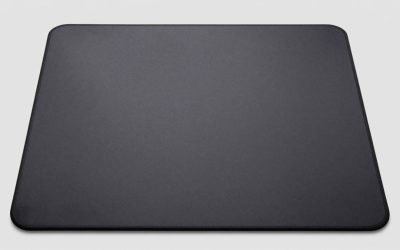
SteelSeries QcK Medium Gaming Mouse Pad

SteelSeries QcK Medium Gaming Mousepad — Black | Non-Slip Silicone Rubber Base — Peak Tracking and Stability — Optimized for Gaming Sensors — 320 mm x 270 mm
Picked as a relevant option in this category.
View on AmazonThe SteelSeries QcK Medium lists a non-slip silicone rubber base and a surface optimised for tracking and stability. It is a simple, widely known cloth pad that suits optical sensors and vertical mice alike. Choose it if you want a basic, dependable surface rather than extras. Trackball users do not need a mat at all.
Razer Gigantus V2 Cloth Gaming Mouse Pad (Large)
The Razer Gigantus V2 in the large size lists a thick, textured micro-weave cloth surface. The extra thickness gives your wrist some cushioning, and the larger area suits low-sensitivity play where the arm travels more. Check the listing for the base material before relying on it as a non slip mouse pad.
Bloody A60 Mouse: Does It Fit This Search?
The Bloody A60 mouse is an optical gaming mouse with Light Strike switches and fully programmable macros according to its listing. It is a conventional shape, so it is not an ergonomic choice for forearm comfort. It suits you if you want a gaming mouse with macro keys on a Windows PC. For a MacBook Air, confirm software support with Bloody first.
Frequently Asked Questions
What is the best mouse for tennis elbow?
There is no single best mouse, but a vertical mouse or a thumb trackball is the usual choice because they reduce forearm twisting. This is a comfort choice, not a treatment, so see a clinician for pain.
What is the best ergonomic mouse for MacBook Air?
The Logitech Lift for Mac is a strong answer because the listing describes Bluetooth only with no receiver. A thumb trackball such as the Ergo M575S is the alternative if you want the arm still.
Can I use a gaming mouse for MacBook Air?
Yes, most Bluetooth or USB gaming mice work for basic pointing. Macro software may be Windows-only, so check the maker page before buying.
Does a vertical mouse help tennis elbow?
A vertical mouse keeps the hand in a handshake position, which many people find less strained than a flat mouse. It does not cure the condition, and results vary by person.
Do I need a non slip mouse pad with an ergonomic mouse?
A non slip pad keeps the surface steady so you make fewer corrective movements. Trackball users do not need one because the body stays still.
Is the Bloody A60 mouse good for Mac?
The listing shows an optical gaming mouse with macros but does not confirm macOS software support. Check Bloody first; basic pointing may still work.
How long does it take to adjust to a vertical mouse?
Most people need several days to a couple of weeks. Start with short sessions and adjust your desk or chair height if your wrist feels bent.
Which One Should You Buy?
- Want the safest Mac pick: Logitech Lift for Mac.
- Want the forearm completely still: Logitech Ergo M575S, or the Nulea M501 for a lower cost.
- Want a cheap vertical shape: ProtoArc EM11 NL.
- Work across several devices: TECKNET Ergonomic Mouse.
- Want a gentle angle and quiet clicks: UGREEN Ergonomic Wireless Mouse.
- Want a gaming brand with Mac support: Razer Pro Click V2 Vertical.
Sources
- Logitech product pages for the Lift for Mac and Ergo M575S
- ProtoArc and TECKNET maker listings
- Razer Pro Click V2 maker page
- Independent ergonomic mouse reviews from MouseGearHQ and GeekyElectronics
Last updated: November 2026
FAQ
Bloody A60 Mouse: Does It Fit This Search?
What is the best mouse for tennis elbow?
What is the best ergonomic mouse for MacBook Air?
Can I use a gaming mouse for MacBook Air?
Does a vertical mouse help tennis elbow?
Do I need a non slip mouse pad with an ergonomic mouse?
Is the Bloody A60 mouse good for Mac?
How long does it take to adjust to a vertical mouse?
More from Amazon
Programs that pair well with the guide above. Offers and eligibility are set by Amazon and may change.
Free shipping on eligible items, Prime Video and more. Eligible new members can start with a free trial.
Start a Prime free trialAd-free music streaming. Eligible new subscribers can start with a free trial.
Try Music Unlimited freeA Prime membership for ages 18-24 with a trial period. Eligibility is set by Amazon.
See Prime for Young AdultsAudiobooks and podcasts to listen to on the go. Eligible new members can start with a free trial.
Try Audible freeAs an Amazon Associate we earn from qualifying purchases.