Our Top Picks
 Logitech MK540 Full Size Advanced Wireless Keyboard andFull-size17.5 x 6.5 x 3.5 inches1 poundsCheck on Amazon
 Logitech MX Keys S Combo Performance Wireless KeyboardKeyboard + Mouse Combo17.91 x 5.75 x 3.15 inchesCheck on Amazon
 HP 230 Wireless Mouse and Keyboard Combo1 Count (Pack of 1)1.09 x 5.76 x 17.32 inches0.18 poundsCheck on Amazon
A wireless keyboard and mouse combo is the simplest way to clear cables off a desk, and the best ones pair a quiet, full-size keyboard with a comfortable mouse and a receiver or Bluetooth link that just works. This guide ranks seven combos for home, office and casual gaming use, explains how to choose between receiver and Bluetooth, and answers common questions about Logitech and budget options.
Quick answer: choose a Logitech combo for the safest everyday pick, a Logitech MX Keys S Combo if you want a premium typing setup, and a budget combo such as the HP 230 or EDJO if you need basic wireless function at a modest tier.
Wireless Combos at a Glance
Most wireless combos use a small USB receiver that gives a stable connection without pairing. Premium combos add Bluetooth so you can connect a laptop or tablet. The table shows how the seven main picks differ.
| Combo | Connection | Keyboard feel | Best for |
|---|---|---|---|
| Logitech MK540 | USB receiver | Full-size quiet keys with palm rest | Reliable everyday work |
| Logitech MX Keys S Combo | Bluetooth or Logi Bolt receiver | Low-profile, smart backlight | Premium typing, multi-device |
| HP 230 | 2.4GHz receiver | Low-noise, numeric keypad | Basic office and home |
| EDJO Wireless Combo | 2.4G receiver | Full-size, silent, ergonomic | Budget silent setup |
| Lovaky 2.4G Combo | 2.4G receiver | Low-profile, quiet click | Simple budget set |
| ULSOU Ergonomic Wave Combo | 2.4G receiver | Wave keys with wrist rest | Comfort-first typists |
| Redragon S101M-KS | Tri-mode (wired, 2.4G, Bluetooth) | Gaming keyboard with RGB | Casual gaming |
How We Chose These Combos
This is a research-based guide. We did not use these combos ourselves. We compared maker specifications and product listings, then chose sets that cover different needs: office, comfort, multi-device and casual gaming. We limited each brand to two cards, covered a range of price tiers, and avoided quoting exact prices because listings change often. When a listing did not state a spec, we mark it as not listed and recommend checking the maker.
The 7 Best Wireless Keyboard and Mouse Combos
Logitech MK540 Advanced Wireless Keyboard and Mouse Combo
Logitech MK540 Full Size Advanced Wireless Keyboard and Mouse Combo | Full size quiet keyboard with number pad & integrated palm rest, full size ambidextrous mouse, includes USB-A Nano Receiver
Chosen because it specifies full size ambidextrous mouse and includes USB-A Nano Receiver.
View on AmazonThe Logitech MK540 Advanced is a full-size wireless keyboard and mouse combo with a quiet keyboard, number pad, integrated palm rest and a full-size ambidextrous mouse. It connects through an included USB-A Nano Receiver.
This is the combo to pick if you want something familiar and dependable. The full-size layout, palm rest and quiet keys suit long work sessions, and one receiver connects both devices.
- Keyboard: full size, quiet, number pad, palm rest
- Mouse: full-size, ambidextrous
- Connection: USB-A Nano Receiver
- Use: home and office
- Battery details: not listed here, check the maker
Best for: everyday home and office desks.
Skip if: you need Bluetooth for a tablet (receiver only is listed).
Pros
- Quiet full-size keyboard
- Palm rest
- Single receiver
- Ambidextrous mouse
Cons
- No Bluetooth listed
- Plain design
Logitech MX Keys S Combo Performance Wireless Keyboard and Mouse
Logitech MX Keys S Combo Performance Wireless Keyboard and Mouse - Graphite | Bluetooth or Logi Bolt USB receiver included, Connects up to 3 devices, Smart backlit keys, 8K DPI, fast scrolling
Chosen because it specifies Graphite and Bluetooth or Logi Bolt USB receiver included.
View on AmazonThe Logitech MX Keys S Combo pairs a low-profile wireless keyboard and a performance mouse. It connects by Bluetooth or the included Logi Bolt USB receiver, links up to three devices, has smart backlit keys and an 8K DPI mouse with fast scrolling.
This is the premium combo on the list. It is designed for people who type and click all day and move between a desktop and laptop.
- Keyboard: low-profile, smart backlit keys
- Mouse: 8K DPI, fast scrolling
- Connection: Bluetooth or Logi Bolt receiver
- Devices: up to 3
- Use: premium office work
Best for: professionals and multi-device users.
Skip if: you need a budget set or gaming-specific features.
Pros
- Multi-device switching
- Smart backlight
- Premium feel
- Bluetooth and receiver
Cons
- Higher tier than most combos here
- Not aimed at gaming
HP 230 Wireless Mouse and Keyboard Combo
HP 230 Wireless Mouse and Keyboard Combo - 2.4GHz Wireless Connection - Long Battery Life - Durable & Low-Noise Design - Windows & Mac OS - Adjustable 1600 DPI - Numeric Keypad (18H24AA#ABA)
Chosen because it specifies 2.4GHz Wireless Connection and Long Battery Life.
View on AmazonThe HP 230 combo uses a 2.4GHz wireless connection with a durable, low-noise design, an adjustable 1600 DPI mouse and a numeric keypad for Windows and Mac OS. It is listed with long battery life.
A straightforward budget-friendly pick from a familiar brand. It does the basics well and keeps noise down.
- Connection: 2.4GHz wireless
- Keyboard: low-noise, numeric keypad
- Mouse: adjustable 1600 DPI
- OS: Windows and Mac OS
- Battery: long life listed, exact runtime not listed here
Best for: basic office, school and home use.
Skip if: you want Bluetooth or an ergonomic design.
Pros
- Low-noise design
- Familiar brand
- Numeric keypad
- Simple setup
Cons
- Basic feature set
- No backlight listed
EDJO Wireless Keyboard and Mouse Combo, Full Size Silent Ergonomic

Wireless Keyboard and Mouse Combo, Full Size Silent Ergonomic Keyboard and Mouse, Long Battery Life, Optical Mouse, 2.4G Lag-Free Cordless Mice Keyboard for Computer, Mac, Laptop, PC, Windows
Chosen because it specifies Full Size Silent Ergonomic Keyboard and Mouse and Long Battery Life.
View on AmazonThe EDJO combo is a full-size silent ergonomic keyboard and optical mouse with long battery life and a 2.4G lag-free wireless connection for Mac, Windows and laptops.
A good budget choice if noise matters and you want a full-size layout. The listing highlights silent typing and a lag-free connection.
- Keyboard: full size, silent, ergonomic
- Mouse: optical
- Connection: 2.4G wireless
- Battery: long life listed, details not listed
- OS: Windows, Mac
Best for: budget buyers who want quiet keys.
Skip if: you want a well-known brand or Bluetooth.
Pros
- Silent keys
- Full-size
- Budget friendly
- Ergonomic design
Cons
- Brand is less established
- Little detail on battery
Lovaky 2.4G Wireless Keyboard Mouse Combo

2.4G Wireless Keyboard Mouse Combo, Full-Sized for Computer- Black | Ergonomic, Low profile Keys, 3 DPI Adjustable, 2.4G Quiet Click Keyboaed Set for Laptop/Windows/Mac Lovaky
Chosen because it specifies Full-Sized for Computer- Black and Ergonomic.
View on AmazonThe Lovaky combo is a full-size 2.4G wireless keyboard and mouse set with an ergonomic, low-profile key layout, three adjustable DPI levels and a quiet-click keyboard for laptop, Windows and Mac.
This is a simple, no-frills set for people who want wireless function at a low tier. The low-profile keys and quiet click suit shared spaces.
- Keyboard: full size, low profile, quiet click
- Mouse: 3 DPI levels
- Connection: 2.4G wireless
- OS: Windows, Mac
- Extras: ergonomic design
Best for: secondary desks and basic use.
Skip if: you want premium materials or Bluetooth.
Pros
- Quiet keys
- Adjustable DPI
- Full-size
- Budget tier
Cons
- Plastic build
- Fewer features
ULSOU Wireless Ergonomic Wave Keyboard and Mouse Combo
The ULSOU combo has a full-size wave keyboard with a wrist rest and an ergonomic mouse with three adjustable DPI levels. It works with Windows and Mac OS desktops and laptops over a 2.4G connection.
The wave shape and wrist rest aim to make long typing sessions more comfortable. It is a sensible budget alternative to premium ergonomic sets.
- Keyboard: full-size wave layout with wrist rest
- Mouse: ergonomic, 3 DPI levels
- Connection: 2.4G wireless
- OS: Windows, Mac OS
- Use: comfort-focused typing
Best for: people who type a lot and want ergonomic support.
Skip if: you prefer a flat, low-profile keyboard.
Pros
- Wrist rest
- Wave layout
- Adjustable DPI
- Budget tier
Cons
- Wave shape takes getting used to
- Build quality details not listed
Redragon S101M-KS Wireless Gaming Keyboard and Mouse

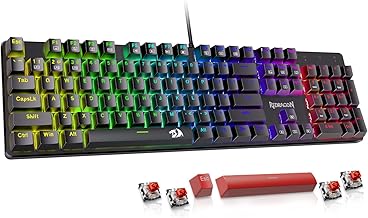
Redragon S101M-KS Gaming Keyboard and Mouse Wireless with Tri-Mode, RGB Keyboard and 4800 DPI Gaming Mouse, 10 Independent Multimedia Keys for Wins, PC, Computer, Wireless S101 Ideal for Gamer
Chosen because it specifies RGB Keyboard and 4800 DPI Gaming Mouse and 10 Independent Multimedia Keys for Wins.
View on AmazonThe Redragon S101M-KS is a wireless gaming keyboard and mouse set with tri-mode connectivity, an RGB keyboard, a 4800 DPI gaming mouse and ten independent multimedia keys for Windows PCs.
If you want a wireless combo that leans toward gaming, this is the pick. It offers more lighting and DPI options than office sets, and can run wired or wireless.
- Connection: tri-mode (listed as wired, 2.4G and Bluetooth modes)
- Keyboard: RGB, 10 multimedia keys
- Mouse: 4800 DPI
- Use: casual gaming
- Latency details: not listed, check the maker
Best for: casual gamers who want a combo.
Skip if: you need a quiet, professional look.
Pros
- Gaming features
- Tri-mode connectivity
- RGB lighting
- Multimedia keys
Cons
- Louder than office combos
- Not for competitive play
Also Consider
Redragon 75% Wireless Gaming Keyboard and Mouse Combo
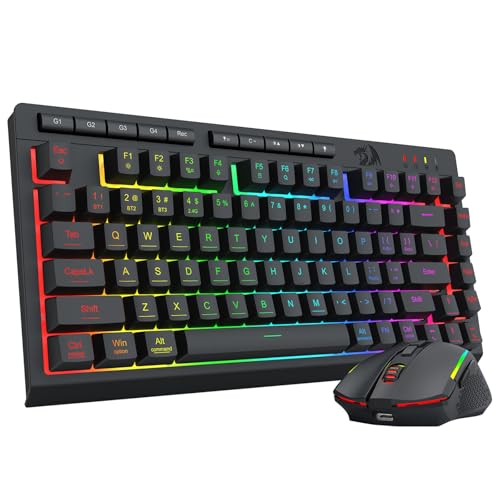
Redragon Wireless Gaming Keyboard and Mouse Combo, 75% Portable, Black | Bluetooth/2.4G/USB-C Wired, RGB Backlit, Quiet Rechargeable Macro Membrane Keyboard & 12800 DPI Mouse for Win/MAC
Chosen because it specifies 75% Portable and Black.
View on AmazonA portable 75 percent wireless gaming combo with Bluetooth, 2.4G and USB-C wired modes, RGB backlight, a quiet macro membrane keyboard and a 12800 DPI mouse.
OMOTON Wireless Keyboard and Mouse Combo with Phone Holder
A purple, full-size wireless combo with a built-in phone holder, 2.4GHz USB receiver, silent typing and adjustable DPI mouse.
MARVO Wireless Keyboard and Mouse Combo with Phone Holder
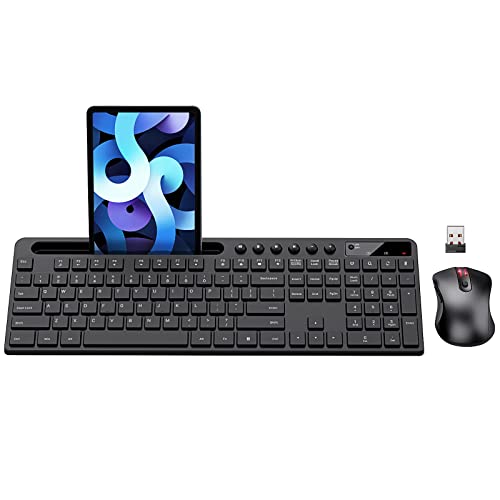
MARVO Wirelss Keyboard and Mouse Combo with Phone Holder, Full-Size, Black | 2.4G Ergonomic Wireless Computer Keyboard with 6 Multimedia, Phone Tablet Holder, Silent Mouse with 6 Button for Mac, Windows
Chosen because it specifies Full-Size and Black.
View on AmazonA full-size 2.4G ergonomic combo with six multimedia keys, a phone and tablet holder and a silent six-button mouse for Mac and Windows.
How to Choose a Wireless Keyboard and Mouse Combo
Receiver, Bluetooth or both
A USB receiver connects instantly and does not need pairing, but it uses a port. Bluetooth frees the port and lets you link a tablet or laptop, but pairing can take longer and range may vary. Premium combos like the MX Keys S Combo offer both. Budget sets usually use only a receiver.
Keyboard size and layout
Full-size keyboards include a number pad and suit spreadsheets and data entry. Compact boards save space but remove keys. Choose full-size for office work and compact for small desks.
Noise level
Quiet keys and silent mouse buttons matter in shared spaces. The Logitech MK540, HP 230 and EDJO all highlight quiet or low-noise design.
Ergonomics
Palm rests, wave layouts and ambidextrous mice improve comfort. The ULSOU wave set and the Logitech MK540 palm rest are examples. Ergonomic design is personal, so look for a return window.
Battery and power
Many combos list long battery life but not exact runtime. Check the maker page and plan to keep spare batteries or a charging cable depending on the model.
Operating system support
Most combos list Windows, and many also list Mac. If you use ChromeOS or Linux, check the listing carefully because not all sets mention support.
Wireless Combo for Gaming: What to Expect
Office combos are not designed for fast gaming. For casual play, they work, but a gaming mouse with a higher DPI range and a keyboard with better key response is a better match. The Redragon S101M-KS and Redragon 75 percent combo are the gaming-oriented options here. For serious competitive play, many players prefer separate wired or low-latency wireless devices.
SteelSeries and Other Gaming Brands
SteelSeries makes well-known gaming keyboards, such as the Apex line, but those are sold as keyboards rather than as wireless combos in the listings we reviewed. If you want a SteelSeries keyboard, pair it with a separate wireless mouse. Wired combos from gaming brands are also available if you prefer a cable.
Wireless Combo for a Higher Budget Ceiling
If you are searching for a wireless combo with a very high budget ceiling, you do not need to spend that much. The step up from a basic receiver combo to a premium one such as the MX Keys S Combo adds Bluetooth, multi-device switching and better materials. Beyond that tier, extra cost mostly buys brand and design rather than function. Pick the features you will use rather than the highest tier.
Logitech Keyboard and Mouse Combos: How the Lines Differ
Logitech sells several combo lines. The MK270, MK295 and MK345 are everyday full-size sets, with the MK295 listing SilentTouch and silent-click switches and the MK345 listing a palm rest. The MK540 adds an advanced full-size design. The MK955, MK850 and MX Keys S Combo are premium sets with multi-device features. Compare the feature list rather than the model number alone, and check the receiver type, because some use a USB-A Nano Receiver while others use Logi Bolt or Bluetooth only.
Setup Tips
- Install fresh batteries and switch the devices on.
- Plug the receiver directly into a USB port, preferably not behind a metal case.
- Keep the receiver within a few feet of the devices for best signal.
- Pair via Bluetooth in your system settings if the combo supports it.
- If the cursor lags, move the receiver closer or use a USB extension cable.
Best Combo by User Type
| User | Suggested combo | Why |
|---|---|---|
| Home office worker | Logitech MK540 | Quiet full-size keys, palm rest, one receiver |
| Laptop and tablet user | Logitech MX Keys S Combo | Bluetooth and receiver, three-device switching |
| Student on a budget | HP 230 or EDJO | Low-noise basics at a modest tier |
| Heavy typist with wrist discomfort | ULSOU wave combo | Wave layout and wrist rest |
| Shared bedroom or dorm | EDJO or Lovaky | Silent or quiet-click design |
| Casual gamer | Redragon S101M-KS | RGB, higher DPI and tri-mode connection |
Combo vs Separate Keyboard and Mouse
A combo is convenient: one receiver, matched design and a single purchase. Separate devices give you more choice, such as a mechanical keyboard with a gaming mouse. If you are happy with standard quality and want simplicity, a combo is the better value. If you have strong preferences about switches or mouse shape, buy separately.
Understanding Mouse DPI
DPI describes how far the cursor moves for a given hand movement. Office mice often offer a few levels, such as the 1600 DPI HP 230 or the three-level mice in the Lovaky and ULSOU sets. Higher DPI is not automatically better. It simply makes the cursor faster, so choose a level that feels controlled. Gaming mice such as the 4800 DPI model in the Redragon S101M-KS and the 8K DPI mouse in the MX Keys S Combo offer a wider range, which matters mostly for large displays and fast games.
Interference and Range Tips
- Keep the receiver away from large metal objects and external hard drives, which can disrupt the signal.
- Use a short USB extension cable to bring the receiver closer to your keyboard if the desk is cluttered.
- Avoid placing many wireless devices on the same side of the desk.
- If Bluetooth drops, remove the device from your system list and pair again.
Troubleshooting Common Problems
The keyboard works but the mouse does not
Check the mouse switch and battery. Re-seat the receiver, try another USB port, and test on a plain surface, since glossy or glass surfaces can confuse optical sensors.
Typing has noticeable delay
Low batteries and interference are the usual causes. Replace the batteries, move the receiver closer, and remove nearby wireless devices that might compete for the same channel.
Keys repeat or skip
Try cleaning around the keys with compressed air. If the problem continues, contact the seller, because it may be a hardware fault.
The receiver is lost
Some receiver-based combos pair only with their original receiver, while others can be re-paired with a replacement. Check the maker documentation. Storing the receiver in the mouse battery compartment, where the design allows, helps avoid losing it.
Battery and Care Tips
Turn devices off when traveling, replace batteries before they are completely drained to avoid leakage, and keep the keyboard dry. Clean the mouse sensor and feet occasionally with a soft cloth. Rechargeable models should be charged according to the maker’s instructions and stored with some charge if left unused for a long time.
What We Left Out
We did not include combos with very limited details or sets that are mainly sold as bundles with unrelated accessories. We also avoided listings that were not available at the time of research. Always confirm the current listing before purchase, since colors and bundled items can change.
Keyboard Types in Combos: Membrane, Scissor and Mechanical
Most combos use membrane or scissor-style keys. Membrane keys are soft and inexpensive. Scissor-style keys, often called low-profile, have shorter travel and a crisper feel, and they are common in premium combos such as the MX Keys S Combo. Mechanical keyboards are rare in combos, which is why the Redragon gaming set leans on RGB and macros rather than switch feel. For office work, any of the three is fine. Pick the one whose travel and noise you can live with all day.
Palm Rests and Desk Posture
A palm rest, such as on the Logitech MK540 and the ULSOU set, supports the heel of your hand and reduces the angle of your wrist. Keep the keyboard flat or at a gentle angle, with elbows near ninety degrees. A mouse that fits the size of your hand reduces strain, so full-size mice are better for larger hands and compact mice for smaller ones. If you feel discomfort, take breaks and consider an ergonomic set.
Sustainability and Batteries
Disposable batteries are convenient but create waste. If you replace batteries often, consider rechargeable cells or a rechargeable combo. Premium sets such as the MX Keys S Combo are rechargeable through USB-C, while many budget sets use replaceable batteries. Check the listing for the power type.
Comparing the Seven Picks Side by Side
- Quietest: the Logitech MK540, HP 230, EDJO and Lovaky all highlight quiet or silent operation. Premium low-profile keys on the MX Keys S Combo are also gentle.
- Most flexible connection: the MX Keys S Combo (Bluetooth plus receiver) and the Redragon S101M-KS (tri-mode).
- Most comfortable by design: the ULSOU wave set and the Logitech MK540 with palm rest.
- Easiest budget choice: the HP 230, EDJO and Lovaky.
- Best for gaming: the Redragon S101M-KS, with the Redragon 75 percent combo as an alternative.
If you are unsure, start with the Logitech MK540. It is a widely understood design with no complicated setup, and you can move up to a premium set later if you find you need Bluetooth or multi-device switching.
Compatibility Checklist Before You Buy
- Confirm your operating system is listed, especially if you use Mac, ChromeOS or Linux.
- Check that you have a free USB-A port, because many receivers use USB-A and some laptops only have USB-C. An adapter solves this.
- Look at the keyboard size and measure your desk, particularly if you plan to keep a monitor stand or laptop riser nearby.
- Check whether batteries are included, since some listings ship without them.
- Read the return policy so you can swap the set if the size or layout is wrong.
Buying Guide: Thresholds That Matter
- Choose Bluetooth if you use a tablet or laptop with limited ports.
- Choose a receiver-only combo for a simple desktop.
- Choose silent keys if you share a space.
- Choose ergonomic features if you type for hours.
- Choose a gaming combo only if you want RGB and extra DPI levels.
- Check return terms in case the size or feel is not right.
Frequently Asked Questions
What is the best wireless keyboard and mouse combo?
The Logitech MK540 is a strong all-round pick, and the MX Keys S Combo is the premium choice. Budget sets like the HP 230 and EDJO cover basic needs.
Is a Logitech keyboard and mouse combo worth it?
Yes, if you want a dependable receiver or Bluetooth setup and a familiar brand. Compare the specific model because features differ by line.
What should I look for in a wireless keyboard and mouse combo under a high budget limit?
You do not need a very high ceiling. Look for Bluetooth, multi-device switching and a comfortable layout, which are available in the premium tier.
Can I use a wireless combo for gaming?
Casual gaming is fine. For competitive play, choose a gaming keyboard and mouse with low-latency wireless or a wired connection.
Does a SteelSeries gaming keyboard come as a wireless combo?
The SteelSeries keyboards we found were sold alone. Pair one with a separate wireless mouse if you want that brand.
Do wireless combos lag?
Most receiver-based combos have no noticeable lag for office use. If you see lag, move the receiver closer or reduce interference.
How long do the batteries last?
Many listings claim long life but do not give exact figures. Check the maker’s page and expect it to vary with use.
Which One Should You Buy?
- Best overall: Logitech MK540.
- Best premium: Logitech MX Keys S Combo.
- Best budget with a known brand: HP 230.
- Best silent budget: EDJO combo.
- Best for comfort: ULSOU wave combo.
- Best for casual gaming: Redragon S101M-KS.
Sources
- Logitech, MK540 and MX Keys S Combo product pages
- HP, 230 wireless combo product page
- Redragon, S101M-KS product page
- Maker listings for EDJO, Lovaky, ULSOU, OMOTON and MARVO
Last updated: November 2026
FAQ
What is the best wireless keyboard and mouse combo?
Is a Logitech keyboard and mouse combo worth it?
What should I look for in a wireless keyboard and mouse combo under a high budget limit?
Can I use a wireless combo for gaming?
Does a SteelSeries gaming keyboard come as a wireless combo?
Do wireless combos lag?
How long do the batteries last?
More from Amazon
Programs that pair well with the guide above. Offers and eligibility are set by Amazon and may change.
Free shipping on eligible items, Prime Video and more. Eligible new members can start with a free trial.
Start a Prime free trialAd-free music streaming. Eligible new subscribers can start with a free trial.
Try Music Unlimited freeA Prime membership for ages 18-24 with a trial period. Eligibility is set by Amazon.
See Prime for Young AdultsAudiobooks and podcasts to listen to on the go. Eligible new members can start with a free trial.
Try Audible freeAs an Amazon Associate we earn from qualifying purchases.