Our Top Picks
A 2TB PCIe 4.0 drive is the sensible choice for most PC gamers: the Samsung 990 Pro suits buyers who want the top of the PCIe 4.0 class, the WD_BLACK SN850X is the usual balanced pick and is on the PS5 compatibility lists, and the Crucial T500 appeals to people who also edit video or stream. PCIe 5.0 drives such as the Crucial T705 are faster on paper, but roundups consistently say games load with little visible difference, so they make sense mainly for heavy file work. A budget option is the Crucial P310, with trade-offs explained below.
What 2TB buys you
Modern game installs are large, and a 2TB drive typically holds a healthy library without constant uninstalling. It also leaves room for the operating system and the free space an SSD needs to keep write speeds stable. Reviewers commonly advise leaving a portion of any SSD empty, because a nearly full drive can slow down once its fast write cache fills.

Samsung SSD 990 PRO 2TB, PCIe 4.0 M.2 2280, Up to 7,450 MB/s | NVMe Internal Solid State Hard Drive for High End Computing, Gaming, and Heavy Duty Workstations, (MZ-V9P2T0B/AM)
Chosen because it specifies PCIe 4.0 M.2 2280 and Up to 7.
View on Amazon
Samsung SSD 9100 PRO 2TB, PCIe 5.0x4 M.2 2280, Up to 14,700MB/s | NVMe Internal Solid State Hard Drive best for AI Computing, Gaming, and Heavy Duty Workstations (MZ VAP2T0B/AM)
Chosen because it specifies PCIe 5.0x4 M.2 2280 and Up to 14.
View on Amazon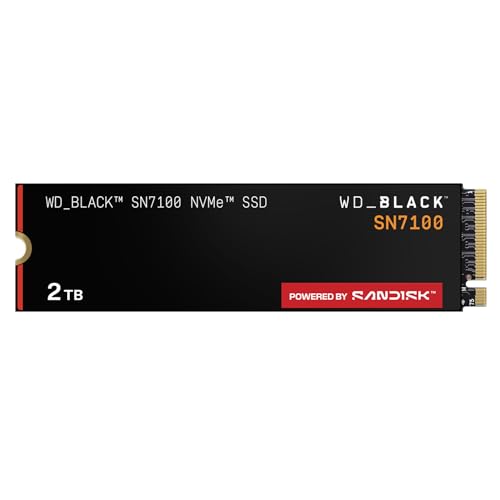
WD_Black SN7100 2TB NVMe SSD - Gen4 PCIe, M.2 2280, Up to 7,250 MB/s Read Speed, Up to 6,900 MB/s Write Speed, Next Gen TLC 3D NAND, for Laptops, Handheld Gaming Devices - WDS200T4X0E
Chosen because it specifies Gen4 PCIe and M.2 2280.
View on Amazon
fanxiang 2TB NVMe SSD PCIe Gen4 M.2 SSD for PS5, Up to 5000 MB/s, Internal Gaming 3D NAND SLC Cache Solid State Drive Upgrade Storage for PC/Laptops S690Q
Chosen because it specifies Up to 5000 MB/s.
View on AmazonAt a glance
| Drive | Interface | Maker-listed speed (read / write) | Endurance (2TB) | Best for |
|---|---|---|---|---|
| Samsung 990 Pro | PCIe 4.0 x4 | Up to 7,450 / 6,900 MB/s | 1,200 TBW | Peak PCIe 4.0 performance |
| WD_BLACK SN850X | PCIe 4.0 x4 | Up to 7,300 / 6,600 MB/s | 1,200 TBW | All-round gaming, PS5 expansion with heatsink model |
| Crucial T500 | PCIe 4.0 x4 | Up to 7,400 / 7,000 MB/s | 1,200 TBW | Gaming plus content creation |
| Crucial T705 | PCIe 5.0 x4 | Up to 14,500 / 12,700 MB/s | 1,200 TBW | Large file transfers, newest platforms |
| Crucial P310 | PCIe 4.0 x4 | Up to 7,100 / 6,000 MB/s | 440 TBW | Budget, handhelds (2230 version) |
Samsung 990 Pro: the high end of PCIe 4.0
Samsung lists the 2TB 990 Pro at up to 7,450 MB/s sequential read and 6,900 MB/s sequential write, with up to 1,400,000 random read IOPS and 1,550,000 random write IOPS, and 1,200 TBW of rated endurance under a five-year warranty. It includes 2GB of LPDDR4 DRAM and uses Samsung’s own controller and V-NAND with AES 256-bit encryption support. Several reviewers choose it as the best overall PCIe 4.0 gaming drive. KitGuru reports sequential results of roughly 7,477 MB/s read and 6,885 MB/s write in its own benchmark, matching the rating closely.
The trade-off is cost tier. It generally sits above the SN850X, and drive prices have risen across 2026 according to trackers, so the gap shifts. Heatsink and bare versions exist; check which fits your motherboard slot or console.
WD_BLACK SN850X: the balanced default
Western Digital lists the 2TB SN850X at up to 7,300 MB/s read and 6,600 MB/s write, with up to 1,200,000 random read IOPS and 1,100,000 random write IOPS, 1,200 TBW and a five-year warranty. It pairs a WD Black G2 controller with BiCS5 112-layer TLC and a pSLC cache that reviewers describe as roughly 600GB on the 2TB model, with sustained writes falling to about 1,500 MB/s once that cache is exhausted. For gaming, where reads dominate, that behavior rarely matters. PCGamesN measured about 6,973 MB/s sequential read.
The heatsink version is the one that appears on Sony’s PS5 compatibility list, which makes this the common recommendation for console storage expansion. An RGB heatsink variant is also available for desktop builds.
Crucial T500: for gamers who also create
Crucial lists the 2TB T500 at up to 7,400 MB/s read and 7,000 MB/s write, with 1,180K random read IOPS and 1,440K random write IOPS, 1,200 TBW and a five-year warranty. It uses a Phison E25 controller, TLC NAND and a DRAM cache. One review recommends it for gamers who also edit video, render 3D scenes or stream, because its write figures stay strong. The same review still ranks the 990 Pro first for pure gaming.
Crucial T705: PCIe 5.0 for specific needs
The T705 is rated at up to 14,500 MB/s read and 12,700 MB/s write on the 2TB model, with a Phison E26 controller, 232-layer Micron TLC, an LPDDR4 cache and 1,200 TBW. Roundups advise it only if you move very large files or want a PCIe 5.0 drive for future use. Two practical notes: PCIe 5.0 drives run hotter and usually need a good heatsink, and your motherboard must offer a PCIe 5.0 M.2 slot to reach the rated speeds. Club386 points out that PCIe 4.0 drives sometimes cost more than considerably faster PCIe 5.0 drives, so compare tiers before assuming PCIe 4.0 is cheaper.
Crucial P310: the budget route
Crucial lists the 2TB P310 at up to 7,100 MB/s read and 6,000 MB/s write, available in M.2 2280 and the smaller M.2 2230 size aimed at handheld PCs and laptops. Listings show 440 TBW and a Phison E27T controller. Tom’s Hardware describes it as DRAM-less and paired with recent QLC NAND, and retailers disagree about whether certain SKUs list TLC or QLC, so read the exact part number. QLC drives usually slow more sharply once their cache fills and carry lower endurance, which suits a game library but not constant large writes.
Other drives to compare
- Kingston KC3000: about 7,000 MB/s read and write by the maker’s rating, 1,600 TBW, Phison E18 controller, DRAM cache. Tech Advisor notes its peak write power draw is high.
- Seagate FireCuda 530: 7,300 MB/s read and 6,900 MB/s write, 2,550 TBW, 1GB DRAM cache, and a PS5-compatible design. Club386 highlights its class-leading endurance.
- Lexar NM790: up to 7,400 MB/s read and 6,500 MB/s write, 1,500 TBW, no DRAM, using Host Memory Buffer. Reviewers call it excellent and affordable.
Fit and compatibility notes
- Slot check: Most desktop boards use M.2 2280 slots. Handhelds and some laptops use 2230, so match the form factor.
- Interface: PCIe 5.0 drives work in PCIe 4.0 slots but run at PCIe 4.0 speeds.
- Console use: The PS5 requires a PCIe 4.0 drive with a heatsink that fits Sony’s limits; stick to models listed as compatible.
- Heat: Many motherboards ship with M.2 heatsinks. A drive with its own heatsink can be too tall for some board shrouds.
- Endurance: TBW is a warranty figure, not a prediction. Typical gaming workloads write far less than these limits.
Pick X if
| If you want | Choose | Reason |
|---|---|---|
| Best peak PCIe 4.0 results | Samsung 990 Pro | Highest listed PCIe 4.0 read speed here, DRAM cache |
| A safe all-round or PS5 drive | WD_BLACK SN850X | Heatsink model on Sony’s list, broad reviewer support |
| Strong writes for editing | Crucial T500 | 7,000 MB/s write rating |
| Fast large transfers | Crucial T705 | PCIe 5.0 speeds |
| Lowest cost tier | Crucial P310 or Lexar NM790 | Budget-oriented designs without full DRAM or with QLC |
Budget tiers
Budget: Crucial P310 and Lexar NM790 cost less by design, accepting DRAM-less or QLC trade-offs. Mid-range: WD_BLACK SN850X, Crucial T500 and Kingston KC3000 balance cache, endurance and speed. Premium: Samsung 990 Pro and the PCIe 5.0 Crucial T705 sit at the top.
How to choose between close rivals
The 990 Pro, SN850X and T500 are separated by small margins in game loading, so the decision often comes down to the heatsink option, the warranty terms in your region and the cost tier on the day you buy. Reviewers regularly note that real game load times differ by fractions of a second between top PCIe 4.0 drives, and that a faster sequential rating does not translate into proportionally faster gaming. If you mostly play and install games, prioritize a DRAM-equipped TLC drive with a heatsink-friendly design. If you also edit footage or copy large project folders, weigh the write ratings and sustained behavior more heavily. Finally, keep a note of the exact part number before ordering, because makers sell bare, heatsink and RGB variants under similar names, and a heatsink version that fits a console may be too tall for a laptop or small-form-factor board.
Also consider how you will use the rest of your storage. Many builders pair a fast 2TB system and game drive with a larger, slower drive for media, which keeps the fast drive free of clutter and preserves its free space. Cloning tools from the drive makers, such as Samsung Magician and WD Dashboard, help move an existing installation and report drive health, and they are worth installing for firmware updates when the maker provides them.
Frequently Asked Questions
Is PCIe 5.0 worth it for gaming in 2026?
For game loading, reviewers report little noticeable benefit over a good PCIe 4.0 drive. PCIe 5.0 helps with large file copies and professional workloads. It also requires a compatible slot and better cooling.
Is 2TB enough for a gaming library?
For most players, yes, especially if you rotate titles. Very large installs can fill it quickly, and you should leave free space for performance. A second drive can hold older games.
Does a DRAM cache matter?
A DRAM cache helps with random performance and consistency, particularly under mixed workloads. DRAM-less drives that use Host Memory Buffer, like the Lexar NM790, can still perform well in games. Heavy multitaskers benefit more from DRAM.
Will these drives work in a PS5?
Sony requires a PCIe 4.0 NVMe drive with adequate cooling and size limits. The SN850X heatsink model and Seagate FireCuda 530 are reported as compatible. Always confirm against Sony’s current list.
What does TBW mean?
TBW is the total terabytes written that the maker covers under warranty, alongside the warranty period. A 1,200 TBW rating is far above typical gaming use. It is more relevant for people who write large files daily.
Do I need a heatsink?
PCIe 4.0 drives often run fine under a motherboard heatsink. PCIe 5.0 models generally need substantial cooling. Follow the maker’s guidance and your motherboard manual.
FAQ
Is PCIe 5.0 worth it for gaming in 2026?
Is 2TB enough for a gaming library?
Does a DRAM cache matter?
Will these drives work in a PS5?
What does TBW mean?
Do I need a heatsink?
More from Amazon
Programs that pair well with the guide above. Offers and eligibility are set by Amazon and may change.
Free shipping on eligible items, Prime Video and more. Eligible new members can start with a free trial.
Start a Prime free trialAd-free music streaming. Eligible new subscribers can start with a free trial.
Try Music Unlimited freeA Prime membership for ages 18-24 with a trial period. Eligibility is set by Amazon.
See Prime for Young AdultsAudiobooks and podcasts to listen to on the go. Eligible new members can start with a free trial.
Try Audible freeAs an Amazon Associate we earn from qualifying purchases.