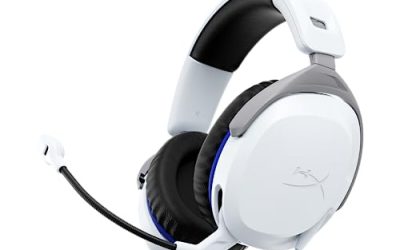
Key takeaways
- Find the best inexpensive headsets for PlayStation 4: clear game audio, a reliable mic, and all-day comfort, without paying for extras you will not use.
As an Amazon Associate we earn from qualifying purchases.
Finding the best inexpensive headsets for PlayStation 4 is mostly about knowing which features actually matter on the PS4 and which ones are marketing extras. The PS4 has a straightforward audio setup: the DualShock 4 controller has a 3.5 mm headset jack, the console supports USB headsets, and the system handles chat audio natively. That means a well-chosen budget headset can deliver clear footsteps, dialogue, and teammate chat without the cost of a flagship model. This guide explains what to look for, which designs suit different players, and how to get the most out of a modest budget.
How the PS4 Handles Headset Audio
Before comparing headsets, it helps to understand how the console routes sound. The PS4 sends game and chat audio through two main paths: the 3.5 mm jack on the DualShock 4 controller and the USB ports on the front of the console. A wired headset plugged into the controller is the simplest setup and works with almost every budget model. USB headsets connect directly to the console and are usually recognized automatically. The PS4 also supports a limited range of wireless headsets through a USB dongle, though wireless models at the lowest prices can introduce latency or connection quirks, so wired options tend to offer better value at this end of the market.
The PS4 audio settings let you choose whether all audio or only chat audio goes to the headset. For most players, sending all audio to the headset is the better choice: it keeps game sound, music, and voice chat in one place and avoids splitting your attention between the TV speakers and the headset. You can adjust this under Settings, then Devices, then Audio Devices. The volume controls on the headset itself, the controller, or the PS4 quick menu all work together, so pick whichever is easiest to reach mid-game.
What Matters in a Budget PS4 Headset
Sound Quality and Driver Size
Most inexpensive headsets use 40 mm or 50 mm drivers, and at this price the driver size alone does not tell you much. Tuning matters more. A headset tuned for gaming usually emphasizes midrange clarity so voices and footsteps cut through, with enough bass to make explosions feel present without drowning out detail. Overly bass-heavy tuning can muddy the midrange, which is exactly where enemy footsteps and callouts live. When reading descriptions, look for mentions of clear mids and balanced tuning rather than the biggest bass numbers.
Stereo sound is standard on the PS4, and the console supports virtual surround through compatible headsets and the system settings. True multi-driver surround headsets exist but are rare and expensive; most budget models offer virtual surround processing instead. Virtual surround can widen the soundstage in open-world games, but it is a nice extra rather than a necessity. A well-tuned stereo headset will serve most players perfectly well.
Microphone Quality
For multiplayer, the microphone is as important as the speakers. A good budget mic should capture your voice clearly without picking up every keyboard click or room noise in the background. Noise-canceling microphones, which filter out steady background sounds, are common even at low prices and are worth prioritizing if you play in a shared room. A flexible or flip-to-mute boom mic is convenient: you can position it close to your mouth for clearer pickup and mute it instantly between matches.
Some inexpensive headsets use an inline microphone built into the cable instead of a boom mic. These are lighter and simpler, but they sit farther from your mouth and tend to sound thinner. If you play competitive multiplayer regularly, a boom mic is the better choice. If you mostly play single-player games and only occasionally chat, an inline mic is fine.
Comfort for Long Sessions
Comfort is where cheap headsets vary the most. The two things to watch are clamping force and ear cushion material. A headset that squeezes too hard will cause headaches during a two-hour session, while one that is too loose will slide around and leak sound. Over-ear earcups that fully enclose the ear are generally more comfortable than on-ear pads, which press directly on the ear. Memory foam cushions and a padded headband distribute weight better than thin foam and bare plastic.
Weight matters too. Budget headsets are usually made of plastic, which keeps them light, and that is an advantage for long play sessions. A headset in the range of roughly 200 to 300 grams is comfortable for most people. If you wear glasses, look for softer ear cushions that do not press the arms of your glasses into your head; this is one of the most common comfort complaints with budget headsets, and softer foam helps a lot.
Build Quality and Cable
At low prices, build quality is a trade-off. Plastic construction is normal and keeps the price down, but the headband and the joints where the earcups meet the band are the weak points. A headset with a metal-reinforced headband or a simple, sturdy hinge design will usually last longer than one with thin, unreinforced plastic. A detachable cable is a useful feature because the cable is often the first part to fail; if it can be replaced, the headset survives a damaged cord.
Cable length matters for a PS4 setup. A cable around 1.2 to 1.5 meters is comfortable when the controller is in your hands and you are sitting a normal distance from the TV. Some headsets come with a longer cable or an extension, which is handy if you sit farther back. If the cable is too short, you will feel tethered to the controller; too long, and it tangles. Check the listed cable length before buying.
PS4 Compatibility
Almost any headset with a 3.5 mm plug works with the DualShock 4, which covers the majority of budget options. A few things are still worth checking. First, the PS4 uses a combined four-pole 3.5 mm jack that carries both audio and microphone signals, so a headset with a single combined plug connects directly. Headsets with separate audio and microphone plugs need a splitter adapter, which is inexpensive but an extra thing to buy. Second, some headsets designed for PC use a USB connection for power or for virtual surround features; those features may not work on the PS4, though the basic audio usually still works through the 3.5 mm connection. Third, check that any in-line controls, like volume wheels and mute switches, are within easy reach while you hold the controller.
Budget Headset Designs Compared
Wired Headsets With a Boom Mic
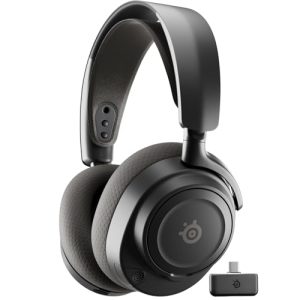
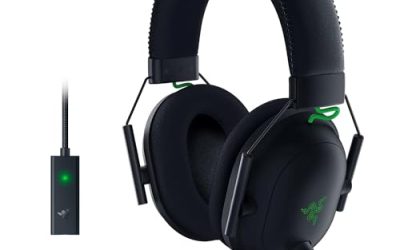
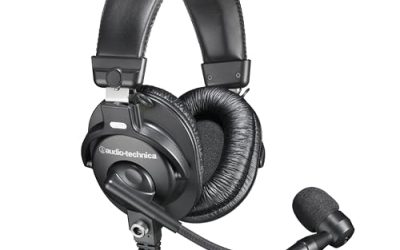
This is the classic budget gaming headset and usually the best value. A wired model with a boom microphone gives you reliable audio, no battery to charge, and no wireless interference. Models in this style from Turtle Beach, HyperX, and Logitech have long been popular with PS4 players because they are simple, durable enough for daily use, and focused on the essentials: clear sound, a decent mic, and reasonable comfort. If you want the most performance per dollar, start here.
Lightweight Stereo Headsets
Some budget headsets skip the boom mic and the extra features in favor of a light, simple design. These are a good fit for players who mainly enjoy story-driven games and only chat occasionally. They are often the most comfortable option for long sessions because there is less hardware hanging off the earcups. The trade-off is microphone quality, so they are not ideal for competitive multiplayer where clear communication matters.
Entry-Level Wireless Headsets
Wireless headsets free you from the cable, but at the lowest prices the compromises are real. Battery life on budget wireless models is usually shorter, charging adds a routine to remember, and some models introduce a small amount of audio delay that is noticeable in fast-paced games. If you go wireless on a budget, choose a model that uses a USB dongle rather than Bluetooth, because the PS4 does not support standard Bluetooth audio headsets. A dongle-based model pairs directly with the console and is far more reliable.
Headsets With Virtual Surround
A few inexpensive headsets advertise virtual surround sound, usually 7.1-channel processing delivered through a USB adapter or built into the headset. This can add a sense of space in games with large environments, helping you sense the direction of sounds. The effect is subtle and varies by game, so treat it as a bonus rather than a deciding factor. A headset with great stereo tuning and a good mic is a better buy than a mediocre headset with surround processing.
How to Choose the Right One for You
Start by thinking about how you actually play. If your evenings are mostly competitive multiplayer, prioritize the microphone and the ability to hear footsteps clearly. If you play long single-player campaigns, comfort and sound quality matter most. If you share a room or play late at night, closed-back earcups that keep sound in and block room noise are the right call; open-back designs sound more spacious but leak audio in both directions.
Next, set a realistic budget and compare within it rather than stretching for features you will not use. A headset that costs a little more but has a detachable cable and replaceable ear cushions can be cheaper over two years than a cheaper model you have to replace twice. Check the warranty as well: even budget headsets from established brands often carry a one-year warranty, which is useful if a hinge or cable fails early.
Finally, check the return policy of the store you buy from. Fit is personal, and the only way to know whether a headset is comfortable for your head is to wear it for a full gaming session. A store that allows returns gives you the chance to test that fit without risk.
Getting the Best Sound From Your PS4 Headset
Once you have your headset, a few settings will make a noticeable difference. In the PS4 audio settings, set the output to the headset for all audio when you want full immersion, or chat only if you prefer game sound from the TV. Keep the headset volume at a moderate level; turning it up too high does not reveal more detail, it just adds distortion and ear fatigue. If your headset has a bass boost or equalizer setting, try it on and off in a game you know well and keep whichever sounds clearer rather than louder.
Position the boom mic about two finger-widths from the corner of your mouth and slightly to the side rather than directly in front. This reduces the popping sounds from hard consonants and keeps your breathing out of the mic. Test your mic level in the PS4 party settings before a session so your teammates hear you clearly without distortion.
Take care of the headset and it will last longer. Store it on a hook or stand instead of tossing it in a drawer, avoid wrapping the cable tightly around the headset, and wipe the ear cushions occasionally with a dry cloth. Sweat and dust degrade foam cushions over time, and replacing worn cushions restores both comfort and sound isolation.
Comparison Table
| Feature | Wired Boom-Mic Headset | Lightweight Stereo Headset | Entry-Level Wireless Headset | Virtual Surround Headset |
|---|---|---|---|---|
| Best for | Multiplayer and value | Long single-player sessions | Cable-free play | Immersive open-world games |
| Microphone | Boom, usually noise-canceling | Inline, basic | Boom or built-in | Boom, usually noise-canceling |
| Connection | 3.5 mm jack | 3.5 mm jack | USB dongle | 3.5 mm or USB |
| Battery | None needed | None needed | Needs regular charging | None, or USB powered |
| Comfort | Good, varies by model | Often the lightest option | Good, slightly heavier | Good, varies by model |
| Main drawback | Cable can snag | Weaker microphone | Latency and battery | Surround effect is subtle |
Frequently Asked Questions
Will any 3.5 mm headset work with the PS4?
Nearly all of them will. The DualShock 4 has a standard combined 3.5 mm headset jack, so a headset with a single four-pole plug connects directly and carries both game audio and chat. Headsets with separate audio and mic plugs need a low-cost splitter adapter. USB headsets are also supported, but check that any extra software features are compatible with the PS4 before relying on them.
Do I need a wireless headset for the PS4?
No. A wired headset is the better value at a low price because it has no battery to charge, no wireless delay, and no connection dropouts. Wireless is convenient if the cable bothers you, but choose a dongle-based model rather than a Bluetooth one, since the PS4 does not support standard Bluetooth audio headsets.
How important is virtual surround sound on a budget headset?
It is a nice extra, not a necessity. Virtual surround can widen the soundstage in open-world and shooter games, but a well-tuned stereo headset with clear midrange will help you hear footsteps and callouts just as well. Spend your budget on comfort, microphone quality, and sound tuning first.
Why does my headset sound quiet on the PS4?
Check the volume in two places: the PS4 quick menu volume setting and the headset’s own volume control if it has one. Also confirm that the audio output is set to the headset rather than the TV. If the headset still sounds quiet, try it on another device to rule out a faulty cable or plug, and make sure the plug is pushed fully into the controller jack.
Can I use a PS4 headset on the PS5 as well?
Most wired PS4 headsets work on the PS5 through the DualSense controller’s 3.5 mm jack, and many USB headsets work too. If you plan to upgrade consoles later, a standard wired headset is the safest choice for cross-generation use. Check the manufacturer’s compatibility notes if you use a model with USB-based features.
Conclusion
The best inexpensive headsets for PlayStation 4 are the ones that get the fundamentals right: clear midrange sound so you can hear footsteps and dialogue, a microphone your teammates can actually understand, and comfort that holds up through a long evening of play. A wired headset with a boom mic is the smartest starting point for most players, while lightweight stereo models suit single-player fans and entry-level wireless options suit players who hate cables. Set your budget, prioritize the features that match how you play, and buy from a store with a fair return policy so you can test the fit at home. With a little care in choosing, a modest headset can carry you through years of PS4 gaming.
FAQ
Will any 3.5 mm headset work with the PS4?
Do I need a wireless headset for the PS4?
How important is virtual surround sound on a budget headset?
Why does my headset sound quiet on the PS4?
Can I use a PS4 headset on the PS5 as well?
More from Amazon
Programs that pair well with the guide above. Offers and eligibility are set by Amazon and may change.
Free shipping on eligible items, Prime Video and more. Eligible new members can start with a free trial.
Start a Prime free trialAd-free music streaming. Eligible new subscribers can start with a free trial.
Try Music Unlimited freeA Prime membership for ages 18-24 with a trial period. Eligibility is set by Amazon.
See Prime for Young AdultsAudiobooks and podcasts to listen to on the go. Eligible new members can start with a free trial.
Try Audible freeAs an Amazon Associate we earn from qualifying purchases.