Key takeaways
- Slim, genuinely portable 75% design that travels beautifully.
- Hot-swappable switches and quality PBT keycaps for easy personalization.
- Triple connectivity with dependable 2.4GHz and Bluetooth plus wired USB-C.
- Native Mac and Windows support with a satisfying, quiet tactile feel.
NuPhy has built a devoted following by doing one thing exceptionally well: low-profile mechanical keyboards that feel legitimately premium without the wrist strain of a tall gaming board. The Air75 V3 is the latest evolution of that formula, and it lands at a moment when low-profile enthusiasts have more choice than ever, including plenty of options from NuPhy’s own lineup.
This review focuses on the Air75 V3 with the White-Brown Nano switch, but because the decision rarely happens in a vacuum, we also weigh it against the Air75 V2, the Air75 HE, and NuPhy’s Kick75, Node75, and Node100 boards. The goal is to tell you whether the V3 is the one to buy, or whether a sibling suits you better.
Our top picks


 nuphy Air75 V2 Portable 75% Mechanical Keyboard
- Translucent bottom shell design: The overall layout of…
- Supports multi-device connectivity: Air75 V2 wireless mechanical keyboard…
- Cool RGB Backlit Effect: The backlight of Air75…


 nuphy Air75 HE Rapid Trigger Low Profile
- NuPhyIO Self-developed Driver: NuPhyIO's new design makes it…
- Quick Keyboard Profile Switching: Depending on different games…
- Fast response with low latency: Air75 HE magnetic…


As an Amazon Associate we earn from qualifying purchases at no extra cost to you.
🎮 Get More From Your Setup — Free
Prime Gaming gives you free PC games every month, in-game loot, and a free Twitch channel sub — plus fast free shipping on all the gear above. New members get a 30-day free trial.
Watch: Nuphy air75 v3 Keyboard: Review & Buyer’s Guide — Video Review
Design & Build
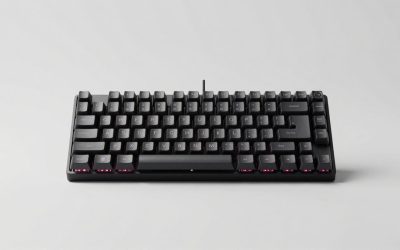
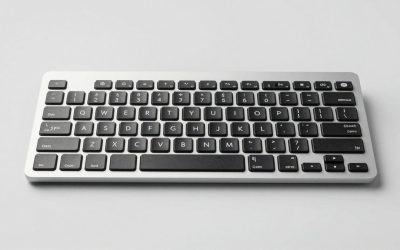
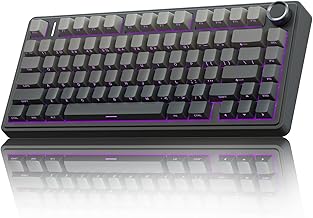
The Air75 V3 keeps the slim, ultra-portable 75% footprint that made the line famous, now with a rotary knob, PBT keycaps, and a refined case that feels more rigid than the V2. Hot-swap sockets remain, so switch experimentation is trivial. Compared to the chunkier Node75 and full-sized Node100, the Air75 V3 is the travel-friendly choice, thin enough to slide into a laptop sleeve. The Kick75 shares much of the same DNA with its own knob and Blush Nano switches, while the V2 remains a slightly thicker, well-loved predecessor. Every board here uses quality PBT caps that resist shine over time.
Performance
Typing on the White-Brown Nano switches is the V3’s highlight: a gentle tactile bump with a quiet, cushioned bottom-out that suits both offices and late-night sessions. Triple connectivity across Bluetooth, 2.4GHz, and USB-C is reliable, with the 2.4GHz dongle delivering low enough latency for casual gaming. Mac and Windows layouts are both supported natively, a genuine convenience for people who switch platforms. If competitive gaming is your priority, the Air75 HE with Hall-effect magnetic switches and rapid trigger is the specialist tool, offering adjustable actuation the standard V3 cannot match. RGB backlighting is crisp and configurable across the range.
Pros & Cons
- Slim, genuinely portable 75% design that travels beautifully.
- Hot-swappable switches and quality PBT keycaps for easy personalization.
- Triple connectivity with dependable 2.4GHz and Bluetooth plus wired USB-C.
- Native Mac and Windows support with a satisfying, quiet tactile feel.
- Not built for competitive gaming the way the Air75 HE’s Hall-effect switches are.
- Low-profile keycap selection is narrower than standard-profile boards.
- 75% layout drops the dedicated function row some users still prefer.
Alternatives to Consider
Gamers chasing the lowest latency and adjustable actuation should look hard at the Air75 HE. If you want a fuller keyboard for a stationary desk, the Node100’s 103-key layout adds a number pad and arrow cluster. Budget-minded buyers can still find the Air75 V2 for less, and it remains an excellent typing board despite the V3’s refinements. The Kick75 is a strong pick if its Blush Nano switches and colorway appeal to you.
Frequently Asked Questions
How is the Air75 V3 different from the V2?
The V3 adds a rotary knob, improves case rigidity, and refines the switches and stabilizers. The V2 remains a great value if you can find it discounted.
Can I use it for gaming?
For casual gaming, yes, especially over the low-latency 2.4GHz dongle. For competitive play, the Air75 HE’s Hall-effect switches are the better tool.
Does it work well with a Mac?
Yes. NuPhy designs these boards with native Mac support, including the correct modifier layout and dedicated keycaps in the box.
Are the switches replaceable?
They are. The hot-swap sockets let you pull and install low-profile switches without any soldering.
Verdict
The Air75 V3 is the low-profile keyboard most people should buy: portable, quiet, endlessly customizable, and equally at home on macOS or Windows. Competitive gamers are better served by the Air75 HE, and desktop users wanting a number pad should eye the Node100, but for everyday typing that travels, the V3 is NuPhy at its best.