Key takeaways
- Drainage hole count and position: Avoid keyboards with only two small rear holes. Good drainage uses 4+ large holes (8-10mm) positioned under the main key clusters (WASD, enter, spacebar) so liquid does not pool under the PCB.
- PCB coating: Look for mentions of “water-repellent coating,” “nano-coating,” or “conformal coating” in the specs. Uncoated PCBs will corrode within 24-48 hours after a sugary spill even if they work at first.
- Switch removability: Hot-swappable mechanical keyboards are easier to deep-clean — you can pull switches and rinse the plate. Fixed switches trap sugar under the slider.
- Keycap type: Double-shot ABS or PBT with high walls helps funnel liquid away. Low-profile floating keycaps drain faster than recessed, enclosed designs.
- Warranty language: Most brands exclude liquid damage even on “spill-resistant” models. Spill resistance is about saving your hardware, not getting a warranty replacement.
What's inside
- Spill-Resistant vs. Waterproof vs. Water-Resistant: What the Labels Actually Mean
- How Gaming Keyboards Handle Spills: 3 Designs Compared
- What to Look For Before You Buy
- Decision Matrix: Which Spill Protection Fits Your Setup
- How Much Spill Can a Gaming Keyboard Actually Handle?
- What to Do When You Spill: Steps That Save the Board
- What to Avoid
- Bottom Line For 2026
- FAQ
A spill-proof keyboard for gaming is spill-resistant, not waterproof — it is designed to survive a typical 150-250ml drink spill via drainage channels, nano-coating, or sealed membranes, but it will not survive submersion.
- Spill-Resistant vs. Waterproof vs. Water-Resistant: What the Labels Actually Mean
- How Gaming Keyboards Handle Spills: 3 Designs Compared
- What to Look For Before You Buy
- Decision Matrix: Which Spill Protection Fits Your Setup
- How Much Spill Can a Gaming Keyboard Actually Handle?
- What to Do When You Spill: Steps That Save the Board
- What to Avoid
- Bottom Line For 2026
- FAQ
For gamers, the difference matters because true IPX7 or IPX8 waterproof keyboards are rare, expensive, and usually use sealed rubber-dome membranes that feel mushy for gaming. Most gaming keyboards marketed as spill-proof use an IP32 rating and a drainage system that gives you 20-30 seconds to unplug and drain before liquid reaches the PCB. Buy for drainage and switch protection, not for the marketing term.
Spill-Resistant vs. Waterproof vs. Water-Resistant: What the Labels Actually Mean
There is no single industry standard for “spill-proof,” so brands use it loosely. Look for the IP rating and the construction method instead.
| Marketing Term | Typical IP Rating | What It Actually Protects Against | Gaming Impact |
|---|---|---|---|
| Spill-Resistant / Spill-Proof | IP32 to IP42 | Light splashes and spills up to ~300ml if drained within seconds; tested with dripping water at 15 degrees | Drainage holes in the bottom; mechanical switches remain exposed but PCB has coating |
| Water-Resistant | IP54 to IP55 | Dust protected + splashing from any angle; can handle sweat and larger splashes | Often sealed membrane or low-profile switches; better protection but can feel less tactile |
| Waterproof | IP67 / IP68 | Submersion in 1m water for 30 minutes; fully sealed electronics | Fully sealed silicone membrane or optical switches in sealed housing; rare for gaming, limits key feel and RGB diffusion |
If a product page says “spill-proof” but lists no IP rating, check the manual for “drainage channel design” or “water drainage holes.” That usually means it is IP32 spill-resistant — you must let it drain, you cannot wash it under a tap.
How Gaming Keyboards Handle Spills: 3 Designs Compared
Not all spill protection is equal for gamers. The switch type and housing determine whether a spill kills the keyboard or is just an annoyance.
1. Drainage Channel + Bare PCB (Most Common)
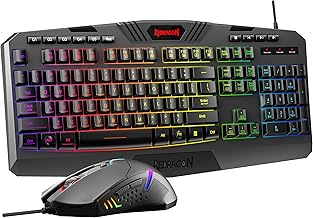
Found on models like the Corsair K68 RGB and Logitech G213 Prodigy. The top plate has channels that route liquid between the switches and out through four to six holes on the bottom. The PCB may have a thin repellent coating, but the mechanical switches themselves are open.
Pros: Keeps true mechanical feel (usually Cherry MX, GX, or Logitech Mech-Dome hybrid), easy to clean if you act fast.
Cons: Sugary drinks will leave residue on switch sliders and stabilizers even after draining, leading to sticky keys within days if not flushed.
2. Sealed Membrane or Mecha-Membrane
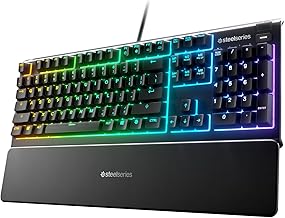
Uses a single rubber membrane sheet sealing the entire PCB, with mechanical click bars on top for feel. Examples include the SteelSeries Apex 3 and Razer Ornata V3. Liquid sits on top of the membrane and never touches electronics.
Pros: Best protection for the price; can often be wiped clean and survive larger spills up to 350ml without unplugging immediately.
Cons: Softer, less precise keystroke than true mechanical switches; not ideal if you want hot-swappable switches or linear mechanical response for competitive FPS.
3. Sealed Optical / Hall Effect Switch Housing
High-end designs where each switch is individually sealed, often with IP54+ optical switches. Found in classes like the SteelSeries Apex Pro series with Hall effect switches and some Wooting models with Lekker switches. Liquid cannot enter the switch housing, but the PCB still needs drainage.
Pros: Most durable long-term; no switch corrosion, no double-typing after drying.
Cons: Usually $150–$230, and still not submersible unless the whole case is gasket-sealed.
What to Look For Before You Buy
- Drainage hole count and position: Avoid keyboards with only two small rear holes. Good drainage uses 4+ large holes (8-10mm) positioned under the main key clusters (WASD, enter, spacebar) so liquid does not pool under the PCB.
- PCB coating: Look for mentions of “water-repellent coating,” “nano-coating,” or “conformal coating” in the specs. Uncoated PCBs will corrode within 24-48 hours after a sugary spill even if they work at first.
- Switch removability: Hot-swappable mechanical keyboards are easier to deep-clean — you can pull switches and rinse the plate. Fixed switches trap sugar under the slider.
- Keycap type: Double-shot ABS or PBT with high walls helps funnel liquid away. Low-profile floating keycaps drain faster than recessed, enclosed designs.
- Warranty language: Most brands exclude liquid damage even on “spill-resistant” models. Spill resistance is about saving your hardware, not getting a warranty replacement.
Decision Matrix: Which Spill Protection Fits Your Setup
Use your drink habits and switch preference to choose, not just the IP rating.
| Your Situation | Best Design to Buy | What to Avoid |
|---|---|---|
| Competitive FPS/MOBA, want true mechanical feel, usually water only on desk | Drainage channel mechanical like Corsair K68 RGB or Logitech G413 with added coating | Fully sealed membrane — you will lose switch responsiveness |
| Long sessions with coffee, soda, energy drinks near keyboard | Sealed mecha-membrane like SteelSeries Apex 3 / Apex 5 or Razer Ornata series | Open mechanical with no coating — sugar will destroy switches after 2-3 spills |
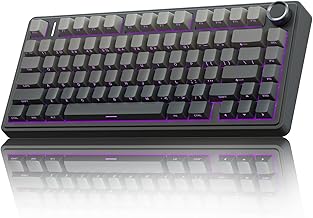
| You want custom switches and deep cleaning | Hot-swappable IP54 optical/Hall effect class (Wooting, SteelSeries Apex Pro class) | Non-hot-swappable clicky mechanical with no drainage |
| Kids, pets, or LAN parties where large spills are likely | Sealed membrane with high drainage + PBT keycaps; consider a silicone keyboard cover as backup | Any floating-key mechanical with exposed LEDs and no bottom holes |
How Much Spill Can a Gaming Keyboard Actually Handle?
Here is a practical calculation most spec sheets skip. A standard drainage-channel keyboard is tested with about 60ml of water dripped over 10 minutes for IP32. A real spill is much faster.
A typical gaming mug spill is 200ml dumped in under 2 seconds over the center of the board. A good drainage design has 4 holes of ~8mm diameter each. Gravity drainage flow through those holes is roughly 15-25ml per second once liquid reaches the channels.
That means:
200ml spill / 20ml per second drainage = ~10 seconds to fully drain if the keyboard is tilted slightly forward. If the keyboard is flat on a desk, surface tension and keycap walls slow this to 20-30 seconds. In that window, liquid is in contact with switch pins and stabilizers.
If you leave the keyboard flat and powered, capillary action pulls 5-10ml into each affected switch housing. Plain water evaporates in 12-24 hours without corrosion if power is off. Water with sugar (soda is ~10% sugar) leaves ~20 grams of residue per 200ml spill — enough to coat 15-20 switches and cause binding even after drying. This is why immediate power-off and flushing with distilled water matters more than the IP rating itself.
What to Do When You Spill: Steps That Save the Board
Do this immediately. Every second powered on increases the chance of a short between the 5V USB line and the matrix.
- 1. Unplug instantly, do not press keys: Holding a key down while wet can push liquid deeper into the switch. Unplug from the PC or hold the power button if it is a wireless model.
- 2. Flip and drain, do not shake: Turn the keyboard upside down at a 45-degree angle over a sink, let it drain for 30-60 seconds. Shaking spreads liquid to dry areas.
- 3. Blot, then flush if it was sugary: For water, blot with microfiber and air dry 24-48 hours. For soda, juice, or coffee with sugar, after draining, flush the affected area lightly with 100-150ml of distilled water or 99% isopropyl alcohol to dissolve sugar before it crystallizes. Then drain again.
- 4. Remove keycaps and dry: Pull keycaps with a puller, dab switch tops with a cotton swab, and leave the board upside down in a warm, dry place with airflow for at least 24 hours. Do not use a hair dryer on high heat — it warps ABS keycaps and can push moisture under the PCB.
- 5. Test one row at a time: After drying, plug in and test each key. If a single switch sticks or chatters, remove that switch if hot-swappable and clean with contact cleaner, or replace it. If multiple keys in a row fail, the PCB trace has corroded.
Never put a gaming keyboard in rice. Rice dust gets into switches and creates more problems than moisture.
What to Avoid
- “Waterproof” claims with no IP rating and no drainage holes: This is usually just a hydrophobic coating that wears off after 3-6 months of finger oils and cleaning.
- Enclosed, tray-mounted designs with no bottom drainage: Popular for minimalist aesthetics, but they trap liquid inside the case and kill the PCB faster than an open floating-key design.
- Clicky blue switches for spill-prone desks: Click bars and tactile leaves corrode faster than linear switches and are harder to clean without disassembly.
- Washing a mechanical keyboard under a tap: Unless the manual explicitly states IP68 and shows sealed USB port covers, tap pressure forces water past gaskets and into the microcontroller.
- Keyboard covers as a permanent fix: Silicone covers protect against spills but reduce cooling, muffle RGB, and make fast key presses less accurate. Use them for risky moments, not 24/7.
Bottom Line For 2026
If you game where drinks are close, a sealed mecha-membrane in the $80–$130 range gives you the best real-world protection with acceptable gaming feel. If you need true mechanical performance, choose a drainage-channel model with conformal coating and hot-swappable switches, and be prepared to unplug and drain in seconds. No gaming keyboard in the usual $60–$230 range is truly waterproof — buy for fast drainage and easy cleaning, not for the promise you can dunk it.
FAQ
Can I make my current mechanical keyboard spill-resistant?
You cannot make it waterproof, but you can reduce risk. Add a conformal silicone coating spray to the PCB only if you are comfortable disassembling it, use PBT keycaps, and keep a small distilled water wash bottle and keycap puller nearby. A $10–$20 silicone cover for eating sessions is more effective than any aftermarket spray.
Does IP32 protect against a full can of soda?
No. IP32 is tested with 3mm per minute dripping water, not a 330ml dump. A soda can will flood drainage channels and leave sugar. The keyboard may survive if you unplug and flush immediately, but it is not guaranteed.
Are wireless spill-resistant keyboards safer?
They reduce risk of a short traveling back to the PC via USB 5V, but the keyboard’s own battery and PCB can still short. With wireless, turn off the switch immediately, drain, and do not charge until fully dry for 48 hours.