Key takeaways
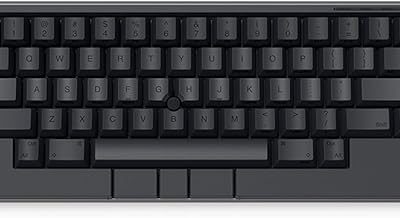
- Wooting 60HE (Standard): Complete keyboard with ABS plastic case, doubleshot PBT keycaps, silicone dampening, and pre-installed Lekker switches. ANSI layout standard, ISO available in select regions. This is the finished, plug-and-play model.
- Wooting 60HE Module: Bare PCB + plate + switches without case or keycaps. Designed to be mounted in a custom 60% case (WK/WKL tray-mount compatible). You choose your own case, keycaps, and switch weight. Identical electronics and firmware to the Standard.
What's inside
- Wooting 60HE Variants Available in 2026
- Head-to-Head Comparison: Specs That Matter
- Lekker L60 vs Lekker L45: Which Switch To Pick
- Case Choice: Plastic Standard vs Aluminum Custom
- Decision Matrix: Which Configuration Fits You
- How Much Time Do You Actually Save With Rapid Trigger?
- Best Settings for Competitive Gaming on the 60HE
- Which Should You Buy?
- FAQ
The best Wooting 60HE model for most competitive gamers in 2026 is the standard Wooting 60HE with Lekker L60 switches, while the Wooting 60HE Module is the best choice if you want a custom aluminum case and Lekker L45 switches for a lighter press.
- Wooting 60HE Variants Available in 2026
- Head-to-Head Comparison: Specs That Matter
- Lekker L60 vs Lekker L45: Which Switch To Pick
- Case Choice: Plastic Standard vs Aluminum Custom
- Decision Matrix: Which Configuration Fits You
- How Much Time Do You Actually Save With Rapid Trigger?
- Best Settings for Competitive Gaming on the 60HE
- Which Should You Buy?
- FAQ
There is no single “60HE Pro” or “MK2” – Wooting’s 60% Hall effect lineup in 2026 is still centered on the Wooting 60HE, sold as a complete keyboard and as a barebones Module. The real decision is not between generations, but between switch weight, case/material, and whether you want a ready-to-use board or a custom build. All variants share the same core analog PCB, 8K polling firmware, and Wootility software, so features like Rapid Trigger, Rappy Snappy, and adjustable actuation work identically.
Wooting 60HE Variants Available in 2026
Wooting only sells two official 60HE configurations. Everything else is a switch or case choice around the same PCB:
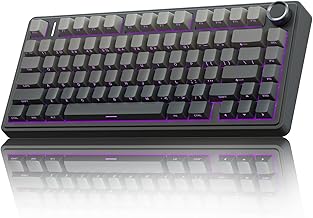
- Wooting 60HE (Standard): Complete keyboard with ABS plastic case, doubleshot PBT keycaps, silicone dampening, and pre-installed Lekker switches. ANSI layout standard, ISO available in select regions. This is the finished, plug-and-play model.
- Wooting 60HE Module: Bare PCB + plate + switches without case or keycaps. Designed to be mounted in a custom 60% case (WK/WKL tray-mount compatible). You choose your own case, keycaps, and switch weight. Identical electronics and firmware to the Standard.
The Wooting 80HE and Wooting Two HE use the same Lekker technology but are different form factors (75% and full 80% / TKL). They are not 60HE models, but they are the direct alternative if you need function keys, arrow keys, or a larger layout without losing Hall effect performance.
Head-to-Head Comparison: Specs That Matter
| Feature | Wooting 60HE Standard | Wooting 60HE Module (in custom case) |
|---|---|---|
| Switch Options (Factory) | Lekker L60 linear (55 cN at 2mm) or Lekker L45 linear (45 cN at 2mm) | Lekker L60 or L45 (sold separately, same specs) |
| Actuation Range | 0.1 – 4.0 mm, adjustable per key in 0.1 mm steps | 0.1 – 4.0 mm, identical |
| Rapid Trigger Range | 0.1 – 4.0 mm up/down sensitivity | 0.1 – 4.0 mm |
| Polling Rate | 1000 Hz default, 8000 Hz configurable in Wootility | 1000 Hz / 8000 Hz |
| Scan Rate / Input Latency | < 0.7 ms scan, total input-to-USB ~1.2 ms at 8000 Hz | Same PCB, same latency |
| Case Material | ABS plastic, integrated plate mount | Depends on custom case: usually aluminum, 900g – 1400g |
| Weight | ~680 g | ~950 g – 1350 g with aluminum case |
| Layout | 60% (61 keys ANSI, 62 keys ISO), hot-swappable Hall switches only | 60% WK/WKL, case dependent |
| General Market Price Range | usually $175 – $200 | usually $155 – $185 for Module + $80 – $180 for case/keycaps |
Both variants support the same firmware features: Rapid Trigger, Rapid Tap (SOCD), Rappy Snappy (dynamic actuation up to 4 active points per key), Tachyon mode, and full per-key RGB. There is no performance difference between Standard and Module when using the same switches and 8000 Hz mode.
Lekker L60 vs Lekker L45: Which Switch To Pick
This is the most important choice for feel and competitive performance. Both are linear Hall effect switches, but the force curve changes fatigue and accidental presses.
- Lekker L60: 60 cN bottom-out, slightly heavier than a Cherry MX Red. More deliberate press, fewer accidental actuations when resting fingers on WASD. Preferred by most Valorant / CS2 players who hover at 0.6-1.0 mm actuation.
- Lekker L45: 45 cN bottom-out, very light. Faster to depress with less finger force, but easier to mis-trigger if your Rapid Trigger down-sensitivity is set too low. Preferred by osu! / fast strafe players or players with lighter hands.
Neither switch is faster electrically – the magnet and sensor are identical. Speed comes from your actuation and Rapid Trigger settings. If you are unsure, L60 is the safer default. You can mix weights (e.g., L60 on WASD, L45 on ability keys) because the board is hot-swappable, but only with Wooting Lekker switches. MX mechanical switches are not compatible.
Case Choice: Plastic Standard vs Aluminum Custom
The Standard plastic case is lighter, better damped for a deep sound, and requires no assembly. It flexes slightly and does not resonate like metal.
A custom aluminum case with the Module improves rigidity and typing sound (higher pitch, more clack) and allows gasket mounting if the case supports it. It adds 300-600g and significantly changes acoustics, but does not change sensor accuracy or polling rate. For competitive gaming, the difference is ergonomics and portability, not input speed. If you travel to LANs, the lighter Standard is easier to carry. If your setup stays on a desk and you want a premium sound and heft, the Module build makes sense.
Decision Matrix: Which Configuration Fits You
| Your Situation | Best Configuration | Why |
|---|---|---|
| Want the lowest total cost and zero building | 60HE Standard + L60 | Complete board, no extra purchases |
| Competitive FPS (Valorant, CS2, Apex) with counter-strafing focus | 60HE Standard or Module + L60 | Heavier spring prevents drift, stable at 0.7-1.0 mm actuation |
| Rhythm / rapid tapping (osu!, Fortnite piece control) | 60HE Module + L45 in aluminum case | Lighter switch reduces fatigue over long sessions |
| Want custom look, sound, and keycaps | 60HE Module | Only way to use custom 60% case and keycap sets |
| Need arrow keys / F-row without losing Hall effect | Not a 60HE – choose Wooting 80HE | Same tech in 75% layout |
How Much Time Do You Actually Save With Rapid Trigger?
The advantage is not theoretical. It can be estimated from finger travel speed.
Average downward finger speed during a gaming press is about 80 – 120 mm/s. Traditional mechanical reset requires the key to travel back past a fixed reset point, often 1.5 – 2.0 mm above the actuation point. With Rapid Trigger set to 0.1 mm, reset starts as soon as you lift 0.1 mm.
Worked calculation: If you use a static actuation of 2.0 mm on a normal mechanical board vs 0.8 mm actuation + 0.1 mm Rapid Trigger on the 60HE, you save about 1.1 mm of unnecessary travel on press and 1.4 mm on release (assuming a 1.5 mm reset gap). At 100 mm/s:
- Press time saved: 1.1 mm / 100 mm/s = 0.011 s = 11 ms
- Release time saved: 1.4 mm / 100 mm/s = 0.014 s = 14 ms
- Round-trip advantage per counter-strafe: ~25 ms
That 20-30 ms window is why counter-strafing and peeker’s advantage mechanics feel more responsive on the 60HE. Going below 0.6 mm actuation saves even more time but increases accidental presses, which is why most pros settle at 0.7 – 1.0 mm.
Polling adds a smaller gain: moving from 1000 Hz (1 ms interval) to 8000 Hz (0.125 ms interval) saves an average of ~0.44 ms of USB polling jitter. The larger latency win comes from the shorter physical travel, not polling alone.
Best Settings for Competitive Gaming on the 60HE
These are concrete starting values in Wootility. Adjust in 0.1 mm steps based on whether you get accidental inputs:
- WASD + Movement keys: Actuation 0.8 mm, Rapid Trigger ON, Trigger Down 0.2 mm, Trigger Up 0.2 mm, Tachyon Mode ON. This gives instant start/stop without drift when you rest fingers.
- Counter-strafe (A/D): Enable Rappy Snappy with two points: Actuation point 1 at 0.7 mm and point 2 at 1.6 mm, or enable Rapid Tap if your game requires strict SOCD handling (last-input priority). Set SOCD to Last Input Wins for Valorant / CS2.
- Ability / utility keys (Q, E, R, Shift, Space): Actuation 1.2 – 1.5 mm, Rapid Trigger Down 0.4 mm, Up 0.5 mm. A slightly deeper actuation prevents throwing utility by mistake.
- Polling: Set to 8000 Hz only if your PC consistently holds >500 FPS and your CPU is not maxed. At 8000 Hz the CPU usage increases slightly; if you experience micro-stutter, return to 1000 Hz – the difference is less than 0.5 ms.
Reasoning: shallow actuation on movement keys minimizes press distance for peeks and jukes, while deeper actuation on one-shot keys prevents misfires. Very low Rapid Trigger values (0.1 mm) feel fastest but amplify hand tremor – 0.2 mm is the sweet spot between speed and stability for most players.
Which Should You Buy?
For pure performance per dollar and tournament portability, the Wooting 60HE Standard with L60 switches is the best overall model. It has the same latency and features as any custom build without the added cost and assembly.
Choose the Wooting 60HE Module with L45 switches and a custom aluminum case only if you specifically want a heavier, custom-feeling board with a lighter press, or you already own a 60% case and keycap set you want to reuse. Performance will be identical, but the total cost usually runs $250 – $350 once the case and caps are included.
If you need arrow keys, a function row, or dedicated media controls, skip the 60HE entirely and get the Wooting 80HE – it offers the same Lekker Hall effect system with a more practical layout for productivity, at a general market range usually $190 – $215.
FAQ
Is the Wooting 60HE worth it if I don’t play competitively?
Yes, if you value adjustable actuation for typing comfort. You can set spacebar and typing keys to 2.0 mm to avoid typos while keeping gaming keys shallow. For casual-only use, the price premium over a good mechanical 60% is mostly for that adjustability and Rapid Trigger, not raw durability.
Can I use other Hall effect switches or MX switches in the 60HE?
No. The 60HE only works with Wooting Lekker switches (L60, L45 and compatible Lekker variants). Standard MX mechanical switches and other brands of magnetic switches are not electrically compatible and will not be detected.
Does 8000 Hz polling make a big difference?
It reduces average USB latency by about 0.4 – 0.5 ms compared to 1000 Hz. It is measurable in benchmarks but much smaller than the 15-25 ms saved by using Rapid Trigger correctly. Only enable it if your system is stable at 8000 Hz.