For most home streamers, podcasters, and remote workers, the choice is not simply “more gain versus less gain.” The real decision is whether your current XLR setup needs a small, nearly invisible boost for one quiet dynamic microphone, or whether your desk would benefit from a proper control center with cleaner gain adjustment, monitoring, routing, and room to grow.
An inline mic preamp sits between a dynamic microphone and an XLR cable. It uses phantom power from an interface, mixer, or recorder to raise the microphone signal before that signal travels down the cable. An XLR USB interface, by contrast, is the main device that connects microphone, headphones, and computer. It supplies gain, analog-to-digital conversion, and often monitoring and streaming controls.
Our top picks
 StudioMan DPM1 XLR Dynamic Microphones Preamp
- 【Essential for Dynamic Mics & Ribbons】 Designed specifically…
- 【Studio-Grade Noise Reduction】 Say goodbye to background hiss
- 【Rugged Metal Build & Interference Shielding】 Built for…
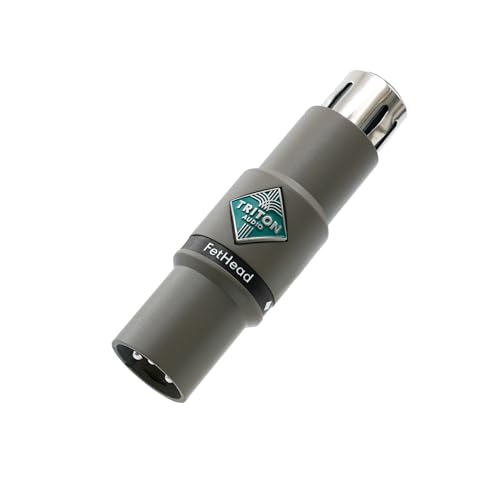 Triton Audio FetHead in-Line Microphone Preamp
- Low-Noise Class-A JEFT Amplifier
- Double Single-Ended Amplifier Topology
- Shielded Enclosure
 MAONO P2 Hybrid USB Audio Interface Dual
- Dual USB ports with MFi-certified connectivity connect your…
- 56dB Dual XLR Audio Interface Compatible with Most…
- Built for podcasters, streamers, and musician creators
| Product | Key specs | |
|---|---|---|
| StudioMan DPM1 XLR Dynamic Microphones Preamp | 【Essential for Dynamic Mics & Ribbons】 Designed specifically… 【Studio-Grade Noise Reduction】 Say goodbye to background hiss 【Rugged Metal Build & Interference Shielding】 Built for… | Check price |
| Triton Audio FetHead in-Line Microphone Preamp | Low-Noise Class-A JEFT Amplifier Double Single-Ended Amplifier Topology Shielded Enclosure | Check price |
| MAONO P2 Hybrid USB Audio Interface Dual | Dual USB ports with MFi-certified connectivity connect your… 56dB Dual XLR Audio Interface Compatible with Most… Built for podcasters, streamers, and musician creators | Check price |
 Elgato Wave XLR MK.2 USB Audio Interface Elgato Wave XLR MK.2 USB Audio Interface | 80dB Gain for Any XLR Mic: Drive any… Ultra-Low-Latency Monitoring: Experience ultra-low-latency monitoring like never before Onboard Effects: Enhance your voice with built-in voice… | Check price |
As an Amazon Associate we earn from qualifying purchases at no extra cost to you.
That distinction matters in a home. An inline preamp can solve a low-output microphone problem for roughly $40 to $150 without adding another desktop box. But if you are building a regular streaming station, sharing a home office, or want simple control over headphones and levels, an interface with ample gain headroom is usually the more complete investment in 2026.
Quick Verdict
Choose an inline mic preamp if you already own an interface or mixer, use one low-output dynamic microphone, and find that you must turn the gain knob close to maximum. It is the compact, economical fix for a focused problem. Models such as the $39.99 StudioMan DPM1 and $74.95 Triton Audio FetHead are examples of the category: small XLR-mounted boosters intended to help compatible dynamic microphones reach a healthier level.
Choose an XLR USB interface with strong gain headroom if you are starting from scratch, stream regularly, want headphone monitoring, need more than one input, or want to avoid stacking separate accessories. The $119.99 MAONO P2 Hybrid USB Audio Interface and $169.99 Elgato Wave XLR MK.2 represent two desk-based directions: a broader multi-input setup versus a streamer-oriented interface and mixer workflow.
One important point: more gain is not automatically better. Gain raises the microphone signal; headroom is the room the circuit has to handle peaks without clipping. A quiet voice may need more gain, while an energetic voice, loud laugh, or child entering the room can create peaks that demand enough headroom. The right setup lets you speak naturally with ordinary peaks below clipping rather than forcing every control to its extreme.
Side by Side
| Buying factor | Inline mic preamp | XLR interface with gain headroom |
|---|---|---|
| Comfort | Nothing new to operate after setup; controls remain on your existing interface. | Convenient front-panel gain and headphone control, but adds another device to learn. |
| Durability | Usually a compact metal XLR barrel with few moving parts; cable strain is the main concern. | More switches, knobs, ports, and USB connections; durable units still need a stable desk location. |
| Price range | About $40–$150, plus an existing phantom-power-capable interface or mixer. | About $100–$300 for many single- or dual-input home-streaming models. |
| Maintenance | Minimal: keep XLR contacts clean and avoid bending the connector under furniture. | Occasional firmware/software updates, dusting, cable management, and USB troubleshooting. |
| Space needed | Typically adds about 3–5 inches in line with the microphone cable and weighs only a few ounces. | Often needs a 5–9 inch by 4–7 inch desk footprint, plus room for cables and headphones. |
| Look | Nearly hidden behind a boom arm, microphone, or desk. | Intentional “creator desk” appearance; visible knobs and lights can be a plus or distraction. |
| Resale | Lower dollar resale, but easy to store or pass along if it suits common XLR gear. | Usually stronger resale value if from a recognized audio brand and kept with its cable and packaging. |
| Best for | A single quiet dynamic mic paired with an otherwise adequate interface. | New streamers, frequent calls, headphone users, multi-device setups, and growing home studios. |
| Upgrade path | Solves gain only; you still depend on the capabilities of the current interface. | Can add better microphones, headphones, software routing, and sometimes additional sources. |
Where Inline Mic Preamp Wins
An inline preamp wins when the rest of your system already works. Perhaps you own a basic interface with one XLR input, like its headphone jack, and have no need for pads, effects, extra inputs, or stream mixing. Your dynamic microphone simply sounds too quiet unless the gain control is nearly all the way up. In that situation, an inline booster can provide a useful amount of clean level before the signal reaches the interface’s preamp.
This is especially practical with broadcast-style dynamic microphones, which often have lower output than condenser microphones. By raising the signal earlier in the chain, an inline device can allow you to run the interface’s own gain control lower. That may reduce audible hiss on interfaces whose preamps become noisy at their highest settings. It also keeps your desk uncluttered: the booster can hang at the microphone end of a boom arm or sit behind the desk.
Budget is another advantage. The StudioMan DPM1 is listed at $39.99 and advertises 29 dB of gain, while the Triton Audio FetHead costs $74.95. For someone who already has a working interface, spending under $100 can be much more sensible than replacing the entire front end of the setup.
Compatibility is the essential caveat. Most inline active preamps require 48V phantom power from the connected interface or mixer, even when the microphone itself is dynamic. Check the specific booster’s instructions before connecting it, especially if your microphone, ribbon mic, mixer, or patching arrangement has unusual phantom-power requirements. Do not assume an inline preamp makes every microphone compatible with every device. It will not add a headphone output, USB connection, mute control, digital mixer, or second input.
Where Xlr Interface Gain Headroom Streaming Wins
An XLR interface wins when convenience and control matter as much as raw gain. A good interface puts microphone gain, headphone volume, direct monitoring, and computer connectivity in one reachable place. That is a better daily experience for streaming, video calls, gaming, voice-over work, and podcast recording than trying to solve each issue with separate adapters.
For streaming, gain headroom is particularly valuable because real homes are unpredictable. You may speak quietly during a late-night session, then laugh, react loudly, or turn toward someone at the door. Set your normal speaking level so it is comfortably strong without living at the top of the meter; leave room for those natural peaks. If a signal clips in the analog stage or converter, turning it down later in software cannot restore the lost detail.
Interfaces also simplify monitoring. Plugging headphones into the interface lets you hear your voice and computer audio with less delay than relying on a computer’s ordinary headphone port. Depending on the model, you may also get a physical mute button, separate mix controls, loopback or routing tools, and inputs for another person or instrument. A dual-XLR option such as the MAONO P2 can make sense for a shared podcast desk, while a creator-focused model such as the Elgato Wave XLR MK.2 can suit a one-microphone streaming station built around software mixing.
Remember that an interface’s published gain range is only one specification. A higher number can help with a low-output mic, but it does not replace sensible mic placement. Keep a dynamic microphone roughly 2–6 inches from your mouth, slightly off to one side to control plosives, and use a windscreen or pop filter as needed. Better placement usually improves clarity more reliably than chasing another 10 dB of gain.
Cost Over 5 Years
For an existing setup, an inline preamp is normally the lowest five-year-cost path. Expect about $40–$150 upfront, plus perhaps $10–$25 for a short XLR cable or cable-management accessories. With no batteries and little routine upkeep, a reasonable five-year total is often $50–$175, assuming your current interface remains functional.
A capable XLR interface generally costs $100–$300 upfront. Add an XLR cable at roughly $15–$35 if you do not have one, and potentially $20–$60 for a basic desk stand, boom arm hardware, or replacement USB cable. A realistic five-year ownership total for a simple one-mic station is around $135–$395. If you later add a second mic, headphones, or a boom arm, that is a system-expansion expense rather than an interface maintenance expense.
Electricity should not drive this decision. Small USB interfaces typically draw power in the low single-digit watt range during normal use, and many are USB bus-powered. Even frequent use adds comparatively little to household energy cost. The bigger financial question is whether buying an inline preamp merely postpones an interface upgrade you already know you need.
Which One for Your Home
Small apartment
Start with an inline preamp if you already own a compact interface and need only more level from one dynamic microphone. It adds virtually no usable desk footprint. Pair it with a boom arm so the microphone can stay close to your mouth; that lets you speak more quietly and can reduce how much room noise enters the recording.
If your desk also handles work calls, gaming, and streaming, a small interface may still be worth the space. Its direct headphone monitoring and easy-access volume control can make a one-room setup less frustrating.
Family with kids or pets
Choose an interface if household interruptions are common. A physical mute control, quick level adjustment, and direct monitoring are useful when a dog barks or a child calls from another room. Leave conservative headroom rather than maximizing the input level. Neither option removes background noise by itself, so prioritize mic proximity, soft furnishings, closed doors, and sensible scheduling.
Rental
An inline preamp is ideal for a rental where you do not want permanent desk changes. It is portable, requires no wall power, and can move with your microphone and cable. An interface is still rental-friendly, but choose one that can sit on a desk or tray rather than requiring drilled mounts. Use removable cable ties or adhesive cable clips rated for painted surfaces.
Long-term home
For a dedicated office, media room, or permanent streaming desk, buy the best interface that fits your actual workflow. Strong available gain, stable monitoring, useful routing, and enough inputs can prevent a cycle of small accessory purchases. An inline preamp remains valuable if you later select a particularly low-output dynamic mic, but it should be an add-on to a well-planned signal chain, not a substitute for needed controls.
FAQ
Do I need an inline preamp if my interface already has 60 dB of gain?
Not necessarily. Test your normal speaking level first. If you can record at a healthy level without turning the gain fully up and without excessive hiss, you likely do not need one. Mic placement and input settings matter as much as the gain specification.
Will an inline mic preamp work with a condenser microphone?
Only use it when the manufacturer explicitly says it supports your microphone type and phantom-power arrangement. Many inline boosters are designed primarily for dynamic microphones. Condenser microphones already need phantom power themselves, so compatibility must be checked carefully.
Does more gain headroom make my stream louder?
It makes it easier to capture a usable microphone signal cleanly and without pushing the gain circuit to its limit. Final stream loudness is still managed through interface levels, streaming software, compression or limiting if used, and platform settings.
Can I use both an inline preamp and an XLR interface?
Yes. That is common when a low-output dynamic mic is paired with an interface that does not provide enough quiet gain. Enable phantom power only as required by the inline preamp’s instructions, set gain conservatively, and watch for clipping at every stage.