Key takeaways
- To stop your phone overheating while gaming, lower the in-game graphics and frame rate, take off the case.
To stop your phone overheating while gaming, lower the in-game graphics and frame rate, take off the case, keep the phone out of sun and off soft surfaces, and avoid charging at full speed while you play. If the phone still gets very hot in short sessions, the cause may be a software fault or a battery problem that needs a professional look.
This guide is for mobile gamers who notice dimmed screens, stuttering frame rates, or a warm back panel after twenty minutes of play. Phones are sealed, passively cooled devices, so every fix below either reduces the heat the phone makes or helps it shed heat faster.
Why Phones Overheat During Games
A game pushes the processor, graphics chip, screen, and wireless radios all at once. The chip’s output turns into heat, and a thin phone body has little room to move it away. When internal sensors read too high a temperature, the system slows the processor down. This is called thermal throttling, and it is the cause of that sudden drop in smoothness during long matches.
Heat comes from several sources at the same time: the screen at high brightness, the processor at full load, the battery while charging, and the sun or a warm room. Reducing any one of them can give you a few more minutes of steady performance, and reducing several makes a noticeable difference.
Fixes You Can Make in Software
Lower graphics and frame rate
The most effective setting is the frame rate. Running a game at a lower cap means the processor does less work per second, and it produces less heat. Drop the graphics preset one step and turn off optional effects such as shadows or motion blur. Many players find that the difference in visual quality is small compared with the improvement in stability.
Reduce screen brightness
The display is one of the biggest sources of heat. Lower the brightness manually instead of using automatic mode in bright places, and consider turning off high-refresh-rate settings if the game does not need them.
Close background apps
Background apps and syncing tasks use processing power and the radios. Close apps you are not using, pause cloud backups during play, and turn off features you do not need, such as location services for apps that do not require them.
Use game or performance modes carefully
Some phones include game modes that prioritize the game and block notifications. Others offer a high-performance mode that raises the clock speeds and adds heat. If your phone runs hot, choose a balanced profile instead of maximum performance.
Fixes You Can Make in the Real World
Remove the case
Many cases trap heat, particularly thick rubber or leather ones. Taking the case off lets the phone release heat through the body. Keep a protective grip on the phone to avoid drops while you play without it.
Choose the right place to play
Avoid playing in direct sunlight, in a hot car, or on a bed or sofa. Soft surfaces block airflow and warm surfaces add heat. A cool, shaded room is the best place to play, and sitting near a fan can help.
Charge smartly
Charging and playing at the same time is a major source of heat, since the battery warms up while the processor is at its peak. If you need to play while charging, use a lower-wattage charger, or charge before the session and play on battery. Avoid wireless charging during gaming, as it is less efficient and generates additional heat.
Cooling Accessories
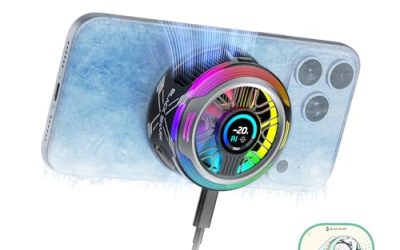
Clip-on cooling fans and heat-sink attachments are made for gaming phones. They draw heat away from the back of the phone, and some use a thermoelectric element that gets cold on one side. They can extend play time on warm days, but they add weight and often need power or a connection, so check that the accessory fits your phone model and does not block the charging port.
Avoid putting the phone in a refrigerator or freezer, or holding it against ice. Rapid temperature change can cause condensation inside the device and damage components. Gentle airflow is safer than sudden cooling.
Quick Reference Table
| Action | Effort | Typical effect | Trade-off |
|---|---|---|---|
| Cap frame rate | Low | Large reduction in heat | Less smooth motion |
| Lower brightness | Low | Moderate | Harder to see outdoors |
| Remove case | Low | Moderate | Less drop protection |
| Stop charging during play | Low | Large | Battery drains faster |
| Cooling fan accessory | Medium | Moderate to large | Adds bulk and cost |
| Close background apps | Low | Small to moderate | Need to reopen apps |
When Overheating Signals a Bigger Problem
A phone that gets hot while idle, during light use, or when it is not charging may have a software fault, a runaway app, or a degraded battery. Check the battery usage screen for an app that uses far more power than it should, and update the operating system and the game, since many updates include performance and heat fixes.
If the back of the phone swells, the screen lifts, or the phone smells of burning, stop using it, unplug it, and take it to a repair service. A swollen battery is a safety hazard, and a qualified technician should handle it. If your phone is under warranty, contact the manufacturer.
Before You Start Playing Checklist
- Remove the case if the phone tends to run warm.
- Set the frame rate cap and graphics preset one step lower.
- Reduce the screen brightness to a comfortable level.
- Close apps you do not need and pause background syncing.
- Unplug the charger or use a low-power one.
- Play in a cool, shaded place with open air around the phone.
Habits That Keep Temperatures Down Over Time
Small routines matter as much as single settings. Give the phone breaks between long matches, since even a five-minute rest with the screen off lets the chassis shed heat. Play in portrait or landscape holding the phone loosely, as covering the back with your whole palm blocks the area that radiates the most warmth.
Keep the software current. Phone makers and game developers often release patches that improve thermal behavior, particularly for newer chips. Install system updates when they appear, and check the game’s own settings for a power-saving or battery-saver option. In 2026 many titles include automatic graphics scaling that adjusts quality when the phone gets warm, which is worth turning on.
Also watch the battery’s health. An older battery works harder and warms up faster than a new one, and most phones list a battery health reading in the settings. If it shows heavy wear and the phone runs hot even with every other fix applied, a battery replacement by an authorized service can bring temperatures back to a normal range. Avoid leaving the phone in a hot car or on a sunny dashboard between sessions, as that starts the next game already warm.
Related guides
- Hall Effect Vs Potentiometer Controller Sticks Explained
- Low Profile Cpu Coolers For Small Form Factor Pcs
- How To Transfer Nintendo Switch Data To A New Console
Frequently Asked Questions
Is it bad for my phone to get hot while gaming?
Warmth is normal under load, but sustained high heat can speed up battery wear and cause throttling. Using the steps above keeps temperatures lower and helps preserve battery health over time.
Does a cooling fan really help?
It can help on long sessions or in warm rooms because it pulls heat from the back of the phone. The effect depends on the accessory and the phone design, so treat it as an addition to, not a replacement for, lower settings.
Can I play while charging?
You can, but it is a common cause of overheating. If you must, use a modest charger and keep the phone in a cool, ventilated place. Charging first and playing on battery is gentler on the device.
Why does my phone slow down after a few minutes?
That is thermal throttling. The phone reduces processor speed to prevent damage when it gets too hot. Lowering graphics settings and cooling the phone helps it hold steady performance for longer.
FAQ
Is it bad for my phone to get hot while gaming?
Does a cooling fan really help?
Can I play while charging?
Why does my phone slow down after a few minutes?
More from Amazon
Programs that pair well with the guide above. Offers and eligibility are set by Amazon and may change.
Free shipping on eligible items, Prime Video and more. Eligible new members can start with a free trial.
Start a Prime free trialAd-free music streaming. Eligible new subscribers can start with a free trial.
Try Music Unlimited freeA Prime membership for ages 18-24 with a trial period. Eligibility is set by Amazon.
See Prime for Young AdultsAudiobooks and podcasts to listen to on the go. Eligible new members can start with a free trial.
Try Audible freeAs an Amazon Associate we earn from qualifying purchases.