Key takeaways
- Table of Contents 5 sections 7 min read 1 The three hard limits that break beginner setups 1.1 1. USB bandwidth, not just port count 1.2 2. Desk depth versus arm reach 1.3 3. Power draw on a single hub…
What's inside
The best streaming setup for beginners in 2026 fits into one of three budgets ($300, $700, or $1,500) and the gear you pick has to respect three hard limits at once: how many USB ports your PC actually has free, how much USB bandwidth your mic/cam/capture card combo pulls at the same time, and how much desk depth your light and arm need to not collide with your monitor. Most beginner setups don’t fail because the gear is bad. They fail because nobody checked whether all the pieces could physically run together, and six weeks in, something gets bottlenecked and the whole thing gets replaced.
This guide builds three complete tiers with the actual numbers, so you buy once.

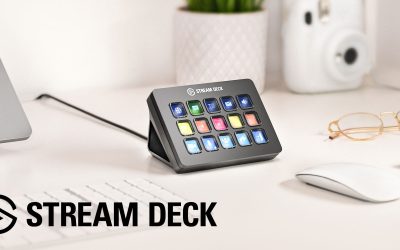
Elgato Stream Deck MK.2 Studio Controller, 15 Macro Keys
Included for 'Best Streaming Setup for Beginners in 2026: Gear That Actually Works Together' because the listing specifies 15 Macro Keys, details this guide uses to compare options.
View on Amazon
Elgato Wave:3 MK.2 USB Condenser Microphone, DSP Effects
Included for 'Best Streaming Setup for Beginners in 2026: Gear That Actually Works Together' because the listing specifies DSP Effects, details this guide uses to compare options.
View on Amazon
Elgato Facecam MK.2, Premium Full HD Webcam, HDR
Included for 'Best Streaming Setup for Beginners in 2026: Gear That Actually Works Together' because the listing specifies Premium Full HD Webcam and HDR, details this guide uses to compare options.
View on AmazonThe three hard limits that break beginner setups
Before the gear lists, know what you’re budgeting against. These are the three things a spec sheet lists individually but never adds up for you.
1. USB bandwidth, not just port count
A USB 3.0 port has roughly 5 Gbps of total bandwidth, but that’s shared across everything on the same controller, not per-port. A 1080p60 webcam using MJPEG compression needs about 150-250 Mbps. An uncompressed HD capture card feed can need 1.5-3 Gbps. Put a capture card and a high-end webcam on the same internal USB hub (common on budget motherboards and all laptops) and you’ll see dropped frames or the webcam downgrading its own resolution with zero error message to explain why.
2. Desk depth versus arm reach
A boom arm mic needs 20-24 inches of desk depth to swing the mic to mouth position without the base clamp fighting your monitor arm’s clamp for the same back edge of the desk. A key light on a stand needs about 15-18 inches of clearance behind your head to avoid lighting your wall instead of your face. Most “gamer desks” are 24-28 inches deep, which is tight but workable if you clamp things in the right order (monitor arm first, mic arm offset to the side, light either overhead or on a separate small stand).
3. Power draw on a single hub or UPS
If you’re running a powered USB hub, a capture card, lights, and a mic interface off one hub, add up the draw: a USB condenser mic pulls 100-200mA, a webcam 250-500mA, a capture card 200-500mA. A standard powered hub supplies 2.5-3A total across all ports. You’re usually fine, but cheap unpowered hubs (0.5A total) will brown out the moment you plug in a third device.
Tier 1: $300 setup — single capture, no card needed
At this budget you skip a capture card entirely and rely on software encoding (OBS/Streamlabs using your CPU/GPU), which is the correct choice, not a compromise, below $700.
| Component | Spec class | Price range | Port used |
|---|---|---|---|
| USB condenser mic | Cardioid, 16-bit/48kHz, built-in headphone jack | $60-$90 | 1x USB-A (low bandwidth, ~1 Mbps) |
| Webcam | 1080p30 USB-UVC, fixed focus | $40-$70 | 1x USB-A (~100 Mbps MJPEG) |
| Ring/panel light | USB-powered, 3000-6500K adjustable | $25-$40 | 1x USB-A (power only, under 1A) |
| Headset | Wired 3.5mm or USB | $30-$50 | Mic’s headphone jack or 1x USB-A |
| Mic desk stand (not boom arm) | Spring-loaded tabletop stand | $10-$15 | n/a |
Total: 3 USB-A ports, all low-bandwidth, so even a 4-port USB 2.0 hub on an old PC handles this fine. Desk depth needed: as little as 18 inches, since there’s no boom arm. This tier works on almost any desk and any PC built in the last eight years.
Tier 2: $700 setup — this is where bandwidth math starts to matter
At $700 you add a boom arm mic, a proper 1080p60 webcam, and a budget key light. This is also the tier where people most often plug a capture-card-level device into the wrong port and wonder why their stream stutters.
| Component | Spec class | Price range | Bandwidth / port need |
|---|---|---|---|
| XLR or USB hybrid mic | Cardioid condenser, 24-bit option | $100-$130 | USB: ~2 Mbps, or XLR into interface |
| USB audio interface (if XLR mic) | 2-input, 1 headphone out | $80-$120 | 1x USB-A, ~5 Mbps |
| Webcam | 1080p60, autofocus, USB 3.0 | $130-$180 | ~250 Mbps uncompressed-ish MJPEG |
| Boom arm | Desk-clamp, spring tension | $30-$45 | Needs 20-24″ desk depth |
| Key light | LED panel, app or dial control | $60-$90 | Wall power, not USB |
| Capture needs | None if streaming from the same gaming PC | $0 | n/a |
Running total of simultaneous USB-A draw: mic/interface (~5 Mbps) plus webcam (~250 Mbps) is well under the 5 Gbps ceiling of a single USB 3.0 controller, so you can put both on the same rear-panel header without issues. The real constraint here is desk depth: a 24-26 inch deep desk fits the boom arm clamped behind the monitor arm, but only if you clamp the monitor arm closer to center and the mic arm to one side, not both fighting for the same corner.
Where this tier breaks if you skip the math
If you later add a console or second PC and buy a capture card to combine feeds, that card alone can need 1.5-3 Gbps depending on resolution and whether it compresses onboard. Put it on the same internal hub as your webcam and interface, and you’ll get dropped frames that look like a bad stream key or bad internet, when it’s actually a local USB contention issue. The fix: check your motherboard manual for which rear ports share an internal controller (often grouped by color or a bracket diagram), and split capture card and webcam across two different controllers.
Tier 3: $1,500 setup — capture card changes everything
At $1,500 you’re commonly adding a dedicated capture card for a console, a second camera angle, or recording a clean uncompressed feed separately from your stream encode. This is the tier where the bandwidth math is no longer optional.
| Component | Spec class | Price range | Bandwidth / port need |
|---|---|---|---|
| XLR condenser or dynamic mic | Broadcast-grade, large diaphragm | $150-$250 | Via interface, negligible USB load |
| USB-C audio interface | 2-4 input, 24-bit/96kHz | $150-$200 | 1x USB-A/C, ~10 Mbps |
| Mirrorless camera (as webcam via capture) | APS-C or full-frame, HDMI out | $600-$900 | HDMI into capture device, not USB directly |
| HDMI capture card | 1080p60 or 4K30 passthrough | $130-$200 | 1x USB 3.0, 1.5-3 Gbps uncompressed-ish |
| Key + fill lights (2x) | Bi-color LED panels | $120-$180 combined | Wall power |
| Dual boom arms (mic + light) | Desk-clamp | $50-$70 | Needs 26-30″ desk depth minimum |
The worked bandwidth check for this tier
A 1080p60 capture card feed at typical consumer compression draws roughly 1.5 Gbps peak. Your audio interface draws about 10 Mbps. That’s about 1.51 Gbps against a single USB 3.0 controller’s 5 Gbps ceiling, so one controller handles both with room to spare. The problem shows up if you add a second capture device (say, a 4K30 capture for a secondary camera) on that same controller: 4K30 can push 2.5-3 Gbps on its own, and now two capture devices alone want 4-4.5 Gbps against a 5 Gbps shared ceiling, leaving almost nothing for the audio interface or anything else sharing that controller. The fix is to confirm in your motherboard’s manual (or via Device Manager’s “USB controller” grouping on Windows) that your two capture devices land on two separate physical controllers, not just two separate ports.
Desk depth at this tier
With two boom arms, a camera on a separate stand or arm, and a monitor arm, you need 28-30 inches of usable depth, measured from the wall-facing edge to where your keyboard sits. Anything less and you’ll be loosening clamps weekly to shuffle gear out of each other’s way.
Which tier matches your situation
| Your situation | Recommended tier | Why |
|---|---|---|
| Streaming from one gaming PC only, no console | $300 or $700 | No capture card needed, software encode is fine on a mid-range GPU |
| Desk is 24 inches deep or less | $300 or $700 with offset boom arm | Not enough depth for a second arm or capture rig comfortably |
| Streaming console + PC together | $1,500 | Capture card is mandatory, and its bandwidth needs planning |
| Want to upgrade webcam to a real camera later | $700, pre-wire for capture | Buy a capture-card-ready USB layout now, add the card later without re-planning ports |
If you’re unsure which tier fits, measure your desk depth and count your free USB ports (not total ports, free ones after your keyboard, mouse, and headset) before adding anything to a cart. Those two numbers rule out one or two tiers immediately, which is more useful than any spec comparison.