Our Top Picks
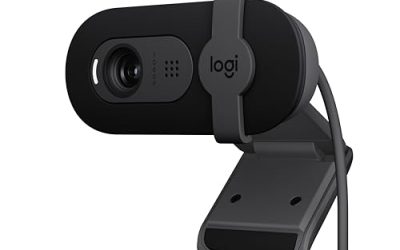
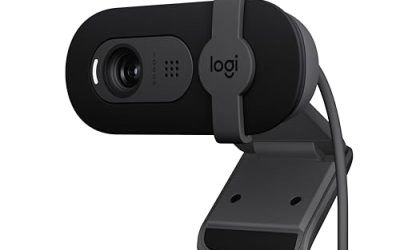
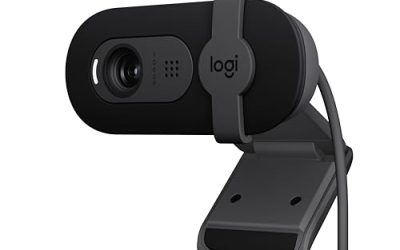
 Logitech StreamCam Premium Webcam for Streaming and ContentFull HD 1080p 60 fps1.89 x 2.28 x 3.35 inches0.6 poundsCheck on Amazon
A webcam for live streaming should hold focus, handle dim room light, and keep your image steady while you talk, and the best choice depends on whether you stream in 4K or 1080p. The Razer Kiyo Pro Ultra leads for low light thanks to its large sensor, the Insta360 Link 2 follows with AI tracking, and the Logitech MX Brio covers the middle ground with sharp 4K and an integrated privacy shutter.
This guide is for streamers who broadcast from a desk, creators who record videos at home, and anyone who wants to look clear on calls without buying a separate camera. We picked five webcams from Amazon listings and maker spec sheets, ranging from a compact 1080p option to full 4K models, and weighed sensor size, autofocus, privacy controls, and microphone quality before ranking them.
Quick Picks
As an Amazon Associate we earn from qualifying purchases
| Product | Best for | Key spec |
|---|---|---|
| Razer Kiyo Pro Ultra | Dim rooms and low-light streams | 1/1.2-inch Sony STARVIS 2 sensor, f/1.7 lens, 4K30 |
| Insta360 Link 2 | Moving around on camera | PTZ 4K webcam with AI tracking and two-axis gimbal |
| Logitech StreamCam | Simple 1080p live streaming | Full HD 1080p at 60 fps with AI autofocus |
| OBSBOT Meet 2 | Small desks and portable setups | 4K at 30 fps, 1/2-inch sensor, 40.5 g |
| Logitech MX Brio | All-round 4K with a shutter | 8.5 MP Sony sensor, 4K30, integrated privacy shutter |
How to Choose
Sensor Size and Low Light
Sensor size decides how a webcam copes when your room light is weak, because a larger sensor gathers more light and produces a cleaner image with less grain. The Razer Kiyo Pro Ultra carries a 1/1.2-inch sensor, the largest in this roundup, while the Insta360 Link 2 and OBSBOT Meet 2 use 1/2-inch sensors, and the Logitech MX Brio relies on an 8.5 MP Sony sensor. A bigger sensor also softens the background behind you, which keeps attention on your face during a stream. Brightness alone is not enough, though, so check whether the camera adjusts exposure on its own and whether it supports HDR before you buy.
Resolution and Frame Rate
Most streaming platforms show your video at 1080p, so a 4K camera earns its keep through sharper downscaled footage and room to crop or zoom without losing detail. Every 4K camera here records 4K at 30 frames per second and 1080p at 60, so do not expect 4K60 from any of them. The Logitech StreamCam skips 4K entirely and records 1080p at 60 frames per second, which is enough if you only stream and never record in higher resolution. Choose 4K if you record videos for later, and choose a strong 1080p camera if live streaming is all you do.
Autofocus and Framing
Autofocus keeps your face sharp when you lean toward the camera or sit back in your chair, and all five cameras in this roundup focus on their own. The Insta360 Link 2 goes further with a two-axis gimbal that follows you around the frame, while the OBSBOT Meet 2 uses AI framing to keep you centred. A fixed-focus camera can work for a desk where you never move, but it is a weaker choice for creators who gesture or shift position. Check the field of view too: a wide angle fits more of your room, while a narrower angle keeps the frame tight on you.
Privacy and Built-in Audio
Every camera in this roundup has a built-in microphone, but treat that mic as convenience audio for streams and calls, not studio-grade sound. A dedicated USB or XLR microphone is the real upgrade when your audience grows, and you can add one later without replacing the camera. Privacy matters just as much: the Razer Kiyo Pro Ultra and Logitech MX Brio have built-in shutters, the OBSBOT Meet 2 includes a magnetic lens cover, the Insta360 Link 2 points its lens down when idle, and the Logitech StreamCam has no shutter at all. Pick the level of cover that matches how you work.
The 5 Best Options
Razer Kiyo Pro Ultra

The Kiyo Pro Ultra is the low-light leader in this roundup, built around a 1/1.2-inch Sony STARVIS 2 sensor and a bright f/1.7 lens that gather more light than any other camera here. It records 4K at 30 frames per second and 1080p at 60, with fast autofocus and HDR that keep your face clear when the room light shifts. An adaptive light sensor adjusts exposure on its own, and the built-in privacy shutter closes the lens when you stop streaming. The wide field of view reaches 103 degrees, so it suits creators who show their desk setup as well as their face.
Specs
- 1/1.2-inch Sony STARVIS 2 sensor, f/1.7 lens
- 4K at 30 fps, 1080p at 60 fps
- Fast autofocus, HDR, adaptive light sensor
- Field of view up to 103 degrees
- Built-in microphone and privacy shutter
- USB-C, works with OBS, XSplit, Zoom and Teams
Best for: creators streaming from dim rooms who want the cleanest low-light image.
Watch out for: check that the listing is the standalone camera, not the bundle with a cleaning kit.
Insta360 Link 2

The Link 2 is the pick for creators who move while they stream, because its two-axis gimbal follows you around the frame and keeps you centred without a tripod. Its 1/2-inch sensor records 4K at 30 frames per second and 1080p at 60, with HDR and AI tracking that adjust framing as you shift position. Gesture control lets you start or stop tracking with a hand signal, and the AI noise-canceling microphone keeps your voice clear. There is no physical privacy shutter, so the camera points its lens down when you switch it to privacy mode.
Specs
- 1/2-inch sensor, PTZ 4K webcam, model CINSABNB
- 4K at 30 fps, 1080p at 60 fps
- AI tracking and auto-framing, two-axis gimbal
- HDR, AI noise-canceling microphone, gesture control
- No physical privacy shutter; lens-down privacy mode
- USB-C, works with Zoom, Teams, Twitch and OBS
Best for: streamers who walk, gesture, or shift around the frame.
Watch out for: do not confuse it with the smaller Link 2C or the newer Link 2 Pro.
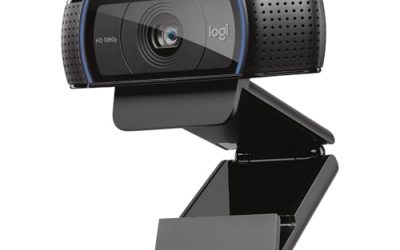
Logitech StreamCam
The StreamCam is the straightforward 1080p choice for creators who stream live and never record in 4K. It captures Full HD at 60 frames per second, with AI-powered autofocus and facial tracking that hold your face sharp through a long session. Smart auto exposure adjusts to changing light, and the dual built-in microphones cover your voice for streams and calls. A vertical-video mode suits short-form clips, and the dual mount fits a monitor or a tripod. It has no privacy shutter, so plan for a separate cover if you want the lens blocked between streams.
Specs
- Full HD 1080p at 60 fps (no 4K)
- AI-powered autofocus and facial tracking
- Smart auto exposure, vertical-video mode
- Dual built-in microphones
- No privacy shutter
- USB-C, works with OBS, YouTube, Twitch, Teams and Zoom
Best for: creators who stream only in 1080p and want a simple setup.
Watch out for: three colour listings exist; confirm the listing is the Premium Graphite model before ordering.
OBSBOT Meet 2

The Meet 2 packs 4K into a tiny body that weighs 40.5 grams, which makes it a strong pick for creators with a small desk or a travel setup. Its 1/2-inch CMOS sensor records 4K at 30 frames per second and 1080p at 60, with AI framing and fast autofocus that keep you centred while you talk. HDR helps when a window sits behind you, and the dual noise-canceling microphones reduce background sound. A magnetic privacy lens cover comes in the box, so you can block the lens between streams without buying anything extra.
Specs
- 1/2-inch CMOS sensor
- 4K at 30 fps, 1080p at 60 fps (“60 FPS” means 1080p60, not 4K60)
- AI framing, fast autofocus, HDR, Beauty Mode
- Gesture control 2.0, dual noise-canceling microphones
- Magnetic privacy lens cover included
- USB-C, works with OBS, Zoom and Teams
Best for: creators with little desk space or a portable streaming setup.
Watch out for: confirm the listing is the standalone Space Grey camera, not a bundle or colour variant.
Logitech MX Brio

The MX Brio is the all-round 4K pick for creators who want sharp video, a clean desk look, and a shutter they can trust. Its 8.5 MP Sony sensor records 4K at 30 frames per second and 1080p at 60, with autofocus and AI image enhancement that keep detail steady in mixed light. Dual beamforming microphones pick up your voice while reducing room noise, and the integrated privacy shutter closes with a twist. Show Mode tilts the camera down to show your desk, which suits creators who demo products or sketch on camera.
Specs
- 8.5 MP Sony sensor
- 4K at 30 fps, 1080p at 60 fps
- Autofocus, AI image enhancement
- Dual beamforming microphones, integrated privacy shutter
- Show Mode for desk demos
- USB-C, works with OBS, Zoom and Teams
Best for: creators who want a dependable 4K camera with a built-in shutter.
Watch out for: check that the listing is the consumer graphite MX Brio, not the business variant.
Which One Fits Your Situation
Streaming from a Dim Room
Pick the Razer Kiyo Pro Ultra when your room light is weak and you cannot add lamps. Its large sensor and bright lens gather more light than the other cameras here, so your image stays clean instead of grainy. The adaptive light sensor handles shifts in brightness on its own, and the built-in shutter closes the lens when you finish. Add a simple ring light later if you want more control, but this camera copes best without one.
Moving Around While You Stream
Pick the Insta360 Link 2 when you move, gesture, or stand during a stream. Its two-axis gimbal follows you around the frame, so you stay centred without adjusting the camera by hand. AI tracking handles the framing while you focus on your audience, and gesture control starts or stops tracking with a wave. Keep in mind it has no physical shutter, so switch it to privacy mode when you step away.
A Small Desk or Travel Setup
Pick the OBSBOT Meet 2 when desk space is tight or you stream from different places. At 40.5 grams it fits in a bag and sits on any monitor without a heavy mount, yet it still records 4K at 30 frames per second. AI framing keeps you centred, and the magnetic cover blocks the lens between sessions. It is the lightest camera in this roundup, so it suits creators who value a tidy, portable setup over a large sensor.
You Only Stream in 1080p
Pick the Logitech StreamCam when your streams go out at 1080p and you want a simple, proven camera. It records Full HD at 60 frames per second with autofocus and facial tracking, which is all most live platforms show. The dual microphones cover your voice, and the vertical-video mode suits short clips. You give up 4K recording and a privacy shutter, so add a separate lens cover and a better mic later if your channel grows.
Common Mistakes
- Buying a 4K camera for a stream that only goes out at 1080p, then wondering why the picture looks the same.
- Assuming “60 FPS” in a listing means 4K60 — on these cameras it means 1080p at 60 frames per second.
- Expecting a built-in microphone to sound like a studio mic; it is convenience audio, and a dedicated mic is the real upgrade.
- Ignoring privacy controls and leaving a camera uncovered between streams when a shutter or cover would do the job.
- Choosing a camera by sensor megapixels alone, when sensor size and lens brightness matter more in low light.
Frequently Asked Questions
Do I Need a 4K Webcam for Live Streaming?
Most live platforms show your stream at 1080p, so a 4K camera is not required. Its value is sharper downscaled footage, room to crop or zoom, and better recordings for videos you publish later. If you only stream live, a strong 1080p camera such as the Logitech StreamCam covers your needs. Buy 4K when you record content as well as stream.
Does a Bigger Sensor Help in Low Light?
Yes, a larger sensor gathers more light, which gives a cleaner image with less grain in a dim room. The Razer Kiyo Pro Ultra has the largest sensor here at 1/1.2 inches, paired with a bright f/1.7 lens. No webcam performs perfectly in the dark, so add a lamp or ring light when your room is dim. Sensor size helps; it does not replace light.
Is the Built-in Microphone Good Enough for Streaming?
For starting out, yes. The built-in microphones on these cameras cover your voice clearly for live streams and calls. They are convenience audio, not studio-grade sound, so they pick up room noise and lack the warmth of a dedicated mic. When your audience grows, a USB or XLR microphone is the single best upgrade you can make, and it works with any camera in this roundup.
How Do I Keep My Webcam Private When I Am Not Streaming?
Use the camera’s own privacy control first. The Kiyo Pro Ultra and MX Brio have built-in shutters, the Meet 2 includes a magnetic cover, and the Link 2 points its lens down in privacy mode. The StreamCam has no shutter, so add a slide cover or unplug it between sessions. Closing the app is not enough; a physical cover is the sure way to block the lens.
FAQ
Do I Need a 4K Webcam for Live Streaming?
Does a Bigger Sensor Help in Low Light?
Is the Built-in Microphone Good Enough for Streaming?
How Do I Keep My Webcam Private When I Am Not Streaming?
More from Amazon
Programs that pair well with the guide above. Offers and eligibility are set by Amazon and may change.
Free shipping on eligible items, Prime Video and more. Eligible new members can start with a free trial.
Start a Prime free trialAd-free music streaming. Eligible new subscribers can start with a free trial.
Try Music Unlimited freeA Prime membership for ages 18-24 with a trial period. Eligibility is set by Amazon.
See Prime for Young AdultsAudiobooks and podcasts to listen to on the go. Eligible new members can start with a free trial.
Try Audible freeAs an Amazon Associate we earn from qualifying purchases.