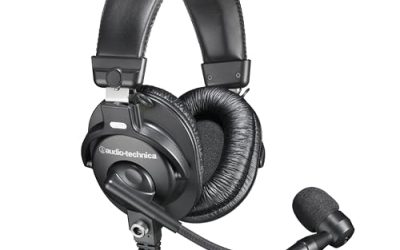
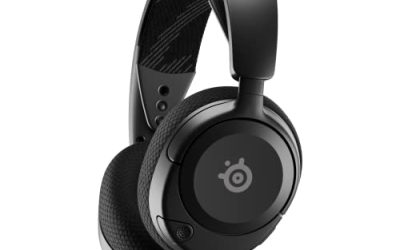
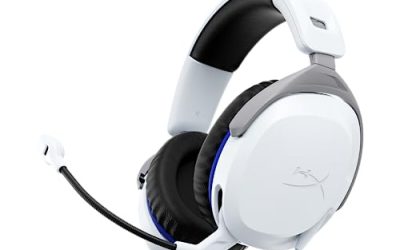
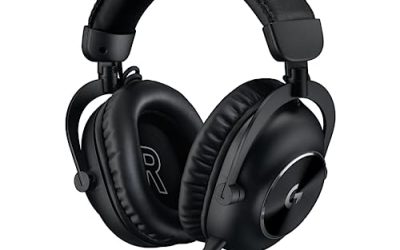
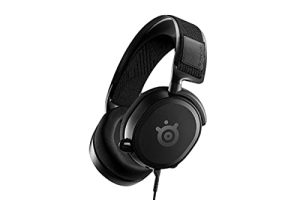
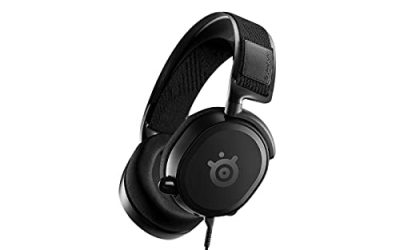
Our Top Picks
 Razer BlackShark V2 Gaming Headset: THX 7.1 SpatialHeadset7.6 x 6.76 x 3.86 inches1.3 poundsCheck on Amazon
 HyperX Cloud III Wired Gaming Headset for PCRegular3.41 x 6.1 x 7.48 inches0.7 poundsCheck on Amazon
 Logitech H390 Wired USB-A Headset with Noise Cancelling1 Pack3.23 x 8.35 x 10.24 inches0.44 poundsCheck on Amazon
As an Amazon Associate, we earn from qualifying purchases made through links on this page.
A USB headset moves the sound card out of your computer and into the cable. Instead of relying on a laptop’s built-in audio jack, which often adds hiss and weak microphone gain, a wired USB headset carries its own digital-to-analog converter (DAC), so the audio and your voice travel as a digital signal until the last possible moment. That is why the same microphone usually sounds cleaner over USB than it does plugged into a tired front-panel jack.
This roundup only covers headsets where USB is the main audio path on a PC: native USB-A or USB-C models, and gaming headsets that ship with a USB sound card or USB dongle in the box and are designed to be used through it. Pure 3.5 mm headsets and wireless models are excluded on purpose, even when they are excellent, because they solve a different problem. The five picks below split into two camps: three gaming headsets built around USB sound cards, and two call-focused headsets built for meetings, classes and support work.
What to look for in a USB headset with a microphone
Where the DAC lives. On a native USB headset such as the Logitech H390 or Jabra Evolve2 40 SE, the conversion happens inside the headset’s plug or earcup electronics, and there is nothing extra to lose. On gaming models such as the Razer BlackShark V2 and Logitech G Pro X, the DAC is a separate USB sound card on the cable. That design unlocks surround processing and microphone effects, but the dongle becomes a part you cannot misplace if you want those features.
Microphone design. A detachable boom, as on the BlackShark V2, G Pro X and HyperX Cloud III, puts a larger capsule closer to your mouth and can be removed for listening-only use. Fixed booms on call headsets are less flexible but always in position. Look at the published microphone frequency range and any noise-cancelling wording in the manufacturer’s spec sheet, and note whether microphone processing such as Blue VO!CE or noise reduction only works through the USB path on a Windows PC.
Connector and platform fit. USB-A is still the safest match for desktops, while newer laptops may only have USB-C ports, which means choosing a USB-C variant or keeping an adapter in the bag. Console support is uneven: many USB headsets work on PlayStation, while Xbox consoles generally route headsets through the controller’s 3.5 mm port instead, so a USB-first headset is primarily a PC purchase.
Software unlocks. Plug-and-play audio works everywhere, but the headline features often do not. THX Spatial Audio on the BlackShark V2, DTS Headphone:X on the G Pro X and Cloud III, and EQ profiles in each brand’s app are Windows software features layered on top of the USB connection. If you play on a Mac or a work laptop where you cannot install software, judge these headsets on their hardware alone.
Comfort hardware. Weight, clamp and earcup material decide whether a headset survives a full day. Memory foam and fabric cushions breathe better in warm rooms; leatherette seals harder and isolates more outside sound. On-ear call headsets stay light and let you hear the room, while over-ear gaming cups isolate you from it.
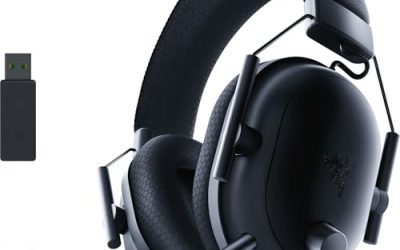
Razer BlackShark V2
The BlackShark V2 is built around its included USB sound card. Plug the headset’s 3.5 mm cable into that card and then into a PC, and you get THX Spatial Audio plus Razer’s microphone processing; the same headset can also run as a plain analog headset on other devices. Its TriForce Titanium 50 mm drivers use a three-part design that tunes highs, mids and lows separately, and the detachable HyperClear cardioid microphone is rated for a 100 Hz to 10 kHz frequency response with a sensitivity of minus 42 dB V/Pa at 1 kHz, figures Razer publishes for the model (RZ04-03230100-R3U1).
At 262 g with memory foam cushions and strong passive noise cancellation from the closed earcups, it is the lightest of the three gaming picks here and an easy headset to wear through a long ranked session.
Who it’s for: PC players who want spatial audio and a clear, broadcast-leaning microphone without moving to a separate USB mic.
Limitations: The USB sound card and THX features are for PC use; on Xbox the headset falls back to plain 3.5 mm with no spatial processing. The sound card is USB-A, so USB-C-only laptops need an adapter, and the microphone detaches rather than retracting, which means one more loose part on the desk.
Logitech G Pro X
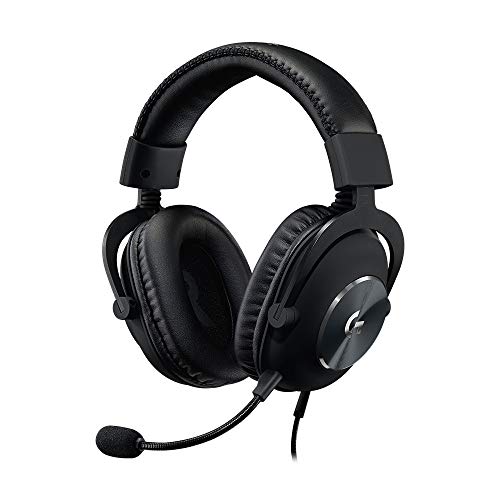
The G Pro X (model 981-000817) ships with a premium USB external sound card that does two jobs: it feeds the PRO-G 50 mm drivers with DTS Headphone:X 2.0 surround, and it powers Blue VO!CE microphone technology, a set of real-time filters that includes a noise reducer, compressor and limiter. Logitech is explicit that Blue VO!CE requires the included USB sound card, a Windows PC and the G HUB software, which is worth knowing before you buy it for any other platform.
The detachable 6 mm boom microphone, two sets of memory foam ear pads (leatherette and cloth) in the box, a 2 m PC cable with inline volume and mute, and a carrying bag make this the most complete package in the roundup. At 320 g it is also the heaviest pick here.
Who it’s for: Competitive players and streamers who want their voice cleaned up in hardware and software before it reaches teammates or an audience.
Limitations: Nearly every headline feature sits behind the USB DAC and G HUB on Windows; used over its mobile 3.5 mm cable it is a much simpler headset. The weight tells over very long sessions, and EQ profiles only save to the sound card through the software.
HyperX Cloud III
The Cloud III (model 727A8AA, Black) takes the dongle route: its USB-C control dongle, with a USB-C to USB-A adapter in the box, delivers DTS Headphone:X spatial audio and mute and volume controls on PC, while a detachable 3.5 mm cable covers consoles and controllers. The angled 53 mm drivers are the largest in this roundup, and the detachable 10 mm microphone is noise-cancelling with an LED mute indicator on the mic itself, a small detail that prevents a lot of talking-while-muted accidents.
HyperX keeps the line’s comfort formula: an aluminum frame, memory foam earcups and headband, and a 308 g weight spread over a wide headband. The headset is rated by HyperX for PC, PlayStation, Xbox, Switch, Mac and mobile use across its three connection types.
Who it’s for: Players who split time between a PC and a console and want one comfortable headset whose USB path handles surround and controls at the desk.
Limitations: DTS spatial audio and the NGENUITY software run on Windows, so Mac and console use is plain stereo. Because USB arrives through a dongle rather than a fixed USB cable, misplacing the dongle drops the headset back to analog-only until it is found.
Jabra Evolve2 40 SE

The Evolve2 40 SE is the work-call specialist of the group. Jabra builds it around a three-microphone call system and 40 mm speakers, adds a busylight that signals to the people around you that you are on a call, and sells it in USB-A and USB-C versions, in Microsoft Teams and unified communications variants. It is an on-ear design, and the stereo version weighs about 188 g, which makes it the lightest headset in this roundup by a wide margin.
Passive noise isolation in the earcups, a boom arm that moves out of the way when you are not speaking, and Jabra Direct software for settings and updates round out a package aimed squarely at desks rather than game stations.
Who it’s for: Remote workers, support staff and students whose day is back-to-back calls and who still want stereo sound for music between meetings.
Limitations: The on-ear fit and call-first tuning are not built for game immersion or deep bass, and the boom is fixed rather than detachable. Jabra’s variant grid is genuinely confusing, so check that the listing in front of you matches the connector and platform version you actually need.
Logitech H390
The H390 is the definition of a native USB headset: one USB-A plug, a built-in sound path, and nothing to configure. Its noise-cancelling microphone rotates up out of the way when you are not talking, in-line controls on the 2.33 m cable handle volume and mute without touching the keyboard, and Logitech rates it for Windows, macOS and ChromeOS computers.
There is no software layer, no surround mode and no detachable anything, which is exactly the point. It is the headset IT departments hand out because it works the moment it is plugged in, and it has stayed in Logitech’s line for years on the strength of that simplicity.
Who it’s for: Anyone who needs a dependable USB headset for classes, meetings and calls, especially on a Chromebook or a shared family PC.
Limitations: Audio hardware is basic next to the gaming picks, with no surround processing or EQ app, and the on-ear pads and fixed USB-A plug give you no flexibility for USB-C-only laptops without an adapter. The microphone is fine for speech and nothing more ambitious.
Comparison table
| Model | USB path | Microphone | Extra processing over USB | Weight |
|---|---|---|---|---|
| Razer BlackShark V2 | Included USB sound card (USB-A) | Detachable HyperClear cardioid boom | THX Spatial Audio on PC | 262 g |
| Logitech G Pro X | Included USB external sound card | Detachable 6 mm boom | Blue VO!CE mic filters, DTS Headphone:X 2.0, EQ profiles | 320 g |
| HyperX Cloud III | USB-C dongle with USB-A adapter | Detachable 10 mm noise-cancelling boom, LED mute indicator | DTS Headphone:X on Windows | 308 g |
| Jabra Evolve2 40 SE | Native USB-A or USB-C variant | Fixed boom, three-microphone call system | Busylight, Jabra Direct settings | About 188 g |
| Logitech H390 | Native USB-A | Rotating noise-cancelling mic | None, plug and play only | Not the deciding spec; lightweight on-ear |
FAQ
Does a USB headset sound better than a 3.5 mm headset?
For the microphone, usually yes on a typical laptop or front-panel jack, because the headset’s own DAC replaces the computer’s noisier analog input path. For game audio the difference depends on the model; the bigger practical gain is consistency, since a USB headset sounds the same on every machine you plug it into.
Will these USB headsets work on PlayStation and Xbox?
PlayStation consoles accept many USB headsets directly, and the Cloud III and BlackShark V2 also keep a 3.5 mm fallback for controllers. Xbox consoles generally do not take USB headset audio and route chat through the controller’s 3.5 mm port instead, so treat every pick here as PC-first and check the manufacturer’s console notes for your exact setup.
What does the USB sound card or dongle actually do?
It converts the digital USB signal to analog audio, sets microphone gain, and hosts the processing features such as surround sound, EQ and microphone filters. Lose the dongle on the G Pro X, BlackShark V2 or Cloud III and the headset still works over 3.5 mm, but those USB features go with it.
My laptop only has USB-C. Which picks work?
The Cloud III includes a USB-C dongle plus a USB-A adapter, and the Evolve2 40 SE is sold in a USB-C version. The BlackShark V2, G Pro X and H390 are USB-A designs, so they need a simple USB-C adapter on a port-limited laptop.
Do USB headsets need drivers or software?
Basic audio and microphone input are plug and play on Windows, macOS and ChromeOS. The optional software from Razer, Logitech G, HyperX and Jabra is only required for surround modes, EQ, microphone processing and firmware updates.
Conclusion
Pick the USB path first and the brand second. If your voice matters most, the G Pro X and its Blue VO!CE processing lead this group, with the BlackShark V2 close behind in a lighter frame. The Cloud III is the flexible all-rounder for mixed PC and console desks. For a working day of calls, the Evolve2 40 SE is the purposeful tool, and the H390 remains the simplest answer when you just need a USB headset with a microphone that works every single time.
More from Amazon
Programs that pair well with the guide above. Offers and eligibility are set by Amazon and may change.
Free shipping on eligible items, Prime Video and more. Eligible new members can start with a free trial.
Start a Prime free trialAd-free music streaming. Eligible new subscribers can start with a free trial.
Try Music Unlimited freeA Prime membership for ages 18-24 with a trial period. Eligibility is set by Amazon.
See Prime for Young AdultsAudiobooks and podcasts to listen to on the go. Eligible new members can start with a free trial.
Try Audible freeAs an Amazon Associate we earn from qualifying purchases.