Our Top Picks
 KINESIS Gaming Freestyle Edge RGB Split Mechanical Keyboard15.5 x 10.3 x 1.3 inches2.8 poundsCheck on Amazon


As an Amazon Associate we earn from qualifying purchases.
A split keyboard does two jobs that a normal board cannot. For work, it lets your hands sit at shoulder width with your wrists straight instead of angled inward, which is the posture change that matters most across an eight-hour day. For gaming, it offers a trick no conventional keyboard can match: push the right half out of the way and play on the left half alone, and your mouse suddenly gets the entire right side of the desk to move in. That extra mouse room is the main reason split boards have moved from ergonomic niche to gaming desks.
Not every split keyboard splits the same way, and the distinction matters. Four of the picks below are true two-piece boards whose halves separate and connect with a cable. One, the Logitech Ergo K860, is a unibody design: the split and the angle are built into a single curved frame that cannot be pulled apart. Two-piece boards give you placement freedom and the left-half-only gaming setup. A unibody board gives up that freedom but needs no adjustment and never drifts out of position. The picks below also span mechanical and non-mechanical switches, wired and wireless connections, and deep programmability down to none at all, so the right choice depends on which of those trade-offs fits your desk.
Affiliate Disclosure: This article contains affiliate links. If you buy through a link on this page, we may earn a commission at no additional cost to you. This helps support our work and allows us to continue providing content like this.
1. Kinesis Freestyle Edge RGB — The True Gaming Split
The Freestyle Edge RGB is the split keyboard that was designed for gamers first. It is a genuine two-piece board: the halves connect with a linking cable and can be positioned up to 20 inches apart, rotated, or splayed to match your shoulders, and for gaming you can move the right half off the desk entirely and play on the left half with a full desk of mouse space beside it. This listing ships with Cherry MX Red linear switches, the light, smooth switch type most gaming boards use, and Kinesis also sells the same board with other Cherry MX switch types if you order a different variant.
Programming is handled by the SmartSet engine, which stores remaps and macros on the board itself and can be edited with an onboard app, so your bindings travel with the keyboard rather than living in background software. Per-key RGB backlighting is built in, and the detachable cushioned palm supports are included in the box. One honest gap: tenting is not included. Raising the inner edges of the halves requires the Lift Kit or V3 Pro accessory, bought separately, and anyone who knows they want tenting from day one should factor that in. The connection is wired USB, which keeps input consistent and means there is no battery to manage.
Specs
- Layout: Tenkeyless two-piece split, no number pad
- Switches: Cherry MX Red linear mechanical
- Separation: Halves adjust up to 20 inches apart on the linking cable
- Backlighting: Per-key RGB
- Programmability: SmartSet onboard engine with remapping and macros
- Palm supports: Detachable cushioned supports included
- Tenting: Not included; Lift Kit or V3 Pro accessory sold separately
- Connection: Wired USB
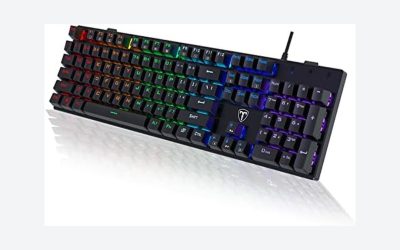
2. Cloud Nine C989 ErgoFS — Full-Size Split With a Number Pad
The Cloud Nine C989 is the pick for players and workers who refuse to give up a full-size layout. It keeps everything a conventional board has, including a dedicated number pad and a standard key arrangement, then splits the frame down the middle so the halves can be pulled apart to shoulder width. Because the layout itself is familiar, this is the easiest two-piece board to adapt to: your fingers already know where everything is, only the angle changes.
This listing uses Kailh Linear Red mechanical switches with RGB backlighting, and the board connects over wired USB. Macros can be programmed for game bindings or work shortcuts, padded wrist rests are included, and the tenting adjustment is built into the frame rather than sold as an add-on, which makes the C989 the most complete package here out of the box. The trade-offs are desk footprint and flexibility of a different kind: the switches are soldered rather than hot-swappable, so changing switch feel later is not an option, and a full-size split board takes up a lot of room even before you separate the halves.
Specs
- Layout: Full-size two-piece split with number pad
- Switches: Kailh Linear Red mechanical, soldered
- Backlighting: RGB
- Programmability: Macro programming supported
- Wrist rests: Padded wrist rests included
- Tenting: Built-in adjustable tenting
- Connection: Wired USB
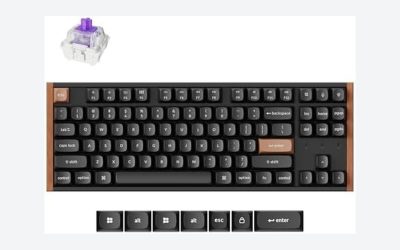
3. Keychron Q11 — The Programmable Aluminium Split
The Q11 is what happens when a custom mechanical keyboard splits in half. Both pieces are CNC-machined aluminium joined by a bridge cable, and the left half can be used entirely on its own, which makes it the most compact way here to run a left-half gaming setup with a small keyboard footprint. This listing comes with Keychron Super Red linear switches in hot-swappable sockets, so any standard mechanical switch can be fitted later without soldering.
Programmability is the deepest in this guide. The Q11 runs QMK firmware with VIA support, meaning every key, layer and macro can be remapped, and the two rotary knobs can be assigned to volume, zoom, scrolling or game functions. Keychron documents a 1000Hz polling rate in wired mode, which puts its input reporting in line with mainstream gaming boards. South-facing RGB, double-shot PBT keycaps and a Mac/Windows toggle round out the package. The honest downsides are that it is wired only, and no tenting hardware or wrist rest is included, so ergonomic accessories are an extra purchase on top of an already premium board.
Specs
- Layout: 75% two-piece split, 91 keys
- Switches: Keychron Super Red linear mechanical, hot-swappable
- Case: CNC-machined aluminium frame
- Polling rate: 1000Hz in wired mode, per Keychron
- Programmability: QMK/VIA full remapping, layers and macros, two programmable knobs
- Keycaps: OSA PBT double-shot
- Tenting: Not included
- Connection: Wired USB-C, cable can plug into either half
4. Mistel Barocco MD770 RGB BT — The Compact Wireless Split
The Mistel Barocco MD770 packs a split layout into the smallest footprint here: an 85-key design that keeps a function row and arrow keys while trimming everything else. The two halves link with a cable and can be used independently, so the left-half gaming arrangement still works, and this RGB BT version adds Bluetooth 5.0 on top of the wired USB-C connection. That dual mode is genuinely useful for a mixed desk: wired for gaming sessions, wireless for a laptop or a cleaner work setup.
This listing is the Glaze Blue variant with Cherry MX Silent Red switches, which are linear switches with built-in dampening that quiets the bottom-out and return noise — a real consideration if the desk is shared or near a microphone. Keycaps are PBT double-shot, the board supports macro functions, and tenting comes from adjustable rubber feet included with the board rather than a separate kit. It runs on a built-in rechargeable battery in Bluetooth mode. The compromises are the compact layout itself, which moves some keys behind the function layer, and Bluetooth, which is the connection to use for work rather than for play.
Specs
- Layout: 75% two-piece split, 85 keys
- Switches: Cherry MX Silent Red linear mechanical
- Connectivity: Bluetooth 5.0 and wired USB-C
- Battery: Built-in rechargeable lithium polymer battery
- Keycaps: PBT double-shot
- Programmability: Macro functions supported
- Tenting: Adjustable rubber feet included
- Compatibility: Windows and Mac
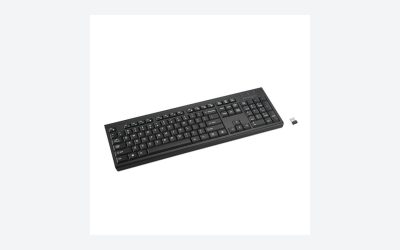
5. Logitech Ergo K860 — The Unibody Split for Work-First Desks
The K860 is the different kind of split, and it is included deliberately so the distinction is clear. It is a single curved frame: the two key clusters are angled apart inside one solid body with a fixed split, a built-in slope and an integrated pillowed wrist rest. You cannot separate the halves, tent them independently, or play on the left half alone. What you get instead is a board that needs no setup, never slides out of alignment, and is certified by United States Ergonomics for its posture design.
Be clear about the switches before choosing it: the K860 is not mechanical. It uses low-profile scissor switches, which feel like a good laptop keyboard — quiet and short-travel, and perfectly serviceable for strategy, MMO and casual play, but not the mechanical feel the other four picks deliver, and there is no backlighting or meaningful remapping. Its strengths are elsewhere: Bluetooth and USB receiver connections with switching between three devices, a full-size layout with a number pad, adjustable palm lift legs that tilt the board to 0, -4 or -7 degrees, and a battery life Logitech puts at up to 24 months from two AAA batteries. For a work-first desk that games in the evening, that package makes sense.
Specs
- Layout: Full-size unibody split, fixed curved keyframe, number pad included
- Switches: Scissor switches, not mechanical
- Connectivity: Bluetooth 5.0 LE and Logitech Unifying USB receiver, up to 3 devices
- Battery: 2 AAA batteries, up to 24 months per Logitech
- Wrist rest: Integrated pillowed wrist rest with memory foam
- Palm lift: Adjustable tilt legs at 0, -4 and -7 degrees
- Model: 920-009166
- Compatibility: Windows and Mac
How to Choose a Split Keyboard
Start with the split type. A two-piece board is the only kind that allows the left-half-only gaming layout and shoulder-width placement, so gamers and anyone with shoulder or wrist complaints should start there. A unibody split like the K860 trades that freedom for zero-fuss stability, which suits a work-first desk.
Next, check tenting. Tenting raises the inner edge of each half so your forearms rest closer to their natural angle, and it is one of the main ergonomic reasons to buy a split board at all. The Cloud Nine includes it, the Mistel approximates it with adjustable feet, the K860 substitutes negative palm lift, and the Kinesis and Keychron leave it to accessories. If tenting matters to you, a board that needs a separate kit is a two-part purchase.
Switch type comes third. Four picks here are mechanical, with linear switches in these listings because they suit gaming; tactile and clicky variants exist for most of them under different listings. The K860’s scissor switches are quieter and thinner but cannot be swapped or repaired key by key. On programmability, the Q11’s QMK/VIA support is in a class of its own, the Kinesis and Cloud Nine cover remaps and macros well, the Mistel handles macros, and the K860 largely stays as it ships.
Finally, be honest about the learning curve. On most split boards the B key sits on the left half, along with 6, T, G and V. Touch typists, who already strike those keys with the correct hand, usually adapt within days to a couple of weeks. Hunt-and-peck typists who cross hands will mistype constantly at first and need to budget real adjustment time. Layout size matters too: full-size splits keep the number pad, while the compact Mistel and Keychron free more desk space but push some functions onto layers.
FAQ
Can you actually game on a split keyboard?
Yes, and the strongest setup is one a normal board cannot do: slide the right half aside, keep the left half under your movement hand, and give the mouse the whole right side of the desk. Wired models avoid battery and connection concerns entirely, and the Keychron Q11 documents a 1000Hz polling rate in wired mode. For fast-paced play, use the wired connection even on boards that also offer Bluetooth.
How long does a split keyboard take to get used to?
Touch typists usually feel normal within a few days to two weeks, because correct fingers already match the split. The common stumbling block is the B key, which lives on the left half of most splits; if you habitually strike it with your right index finger, expect a frustrating first week while that habit rewires.
What is tenting, and do I need it?
Tenting tilts each half so the thumb side sits lower than the pinky side, reducing forearm pronation. It is one of the main ergonomic benefits of splitting a keyboard, but it is not always in the box: check whether the board includes tenting, approximates it with feet, or needs a separate accessory kit before you buy.
What is the difference between a split keyboard and an Alice or unibody ergonomic board?
A true split keyboard has two physically separate halves you can position independently. A unibody ergonomic board like the Logitech Ergo K860, and Alice-style boards, bake a fixed angle and gap into a single frame. Unibody designs are simpler and stay put, but they cannot match your exact shoulder width or free half the desk for your mouse.
Do split keyboards work on both Windows and Mac?
Mostly yes. The Keychron Q11 and Mistel MD770 both include Mac/Windows support and keycap or toggle provisions, the Kinesis ships with Mac keycaps available for its boards, and the K860 is fully cross-platform. Check the specific listing if you rely on OS-specific keys.
Conclusion
For gaming first, the Kinesis Freestyle Edge RGB and the Keychron Q11 are the two natural picks: both are true splits built to be played on, with the Kinesis offering the wider separation and included palm supports, and the Q11 answering with an aluminium build, hot-swappable switches and the deepest programming available. The Cloud Nine C989 is the comfortable middle ground for mixed work and play at full size, the Mistel MD770 is the compact and quiet option that can also cut the cable for work, and the Logitech Ergo K860 serves the work-first desk that wants certified ergonomics with no setup at all. Decide first whether you need the halves to separate; almost every other choice follows from that one.
More from Amazon
Programs that pair well with the guide above. Offers and eligibility are set by Amazon and may change.
Free shipping on eligible items, Prime Video and more. Eligible new members can start with a free trial.
Start a Prime free trialAd-free music streaming. Eligible new subscribers can start with a free trial.
Try Music Unlimited freeA Prime membership for ages 18-24 with a trial period. Eligibility is set by Amazon.
See Prime for Young AdultsAudiobooks and podcasts to listen to on the go. Eligible new members can start with a free trial.
Try Audible freeAs an Amazon Associate we earn from qualifying purchases.