Our Top Picks
 Razer Audio Mixer: All-in-One Streaming/Broadcasting Mixer8.5 x 6.5 x 2.5 Inches1.8 poundsCheck on Amazon
If you want a headset and a hardware mixer in one purchase, the FIFINE USB PC Headset and Audio Mixer is the only item in this group that actually includes the headset: a wired over-ear headset with a detachable microphone and a mixer with slider controls. The other five picks are standalone mixers or mixer bundles that you pair with a headset you already own. A “GameDAC”-style setup means an external DAC and amplifier that sits between your PC and your headphones and lets you balance game, chat and music with physical dials. Read each section below with that split in mind.
Quick List
- MAILANGSHI Gaming Audio Mixer – best for a plain XLR mixer with noise reduction (headset not included)
- FIFINE Gaming Mixer Bundle with Microphone – best for streamers who need a mixer and an XLR mic together (headset not included)
- FIFINE USB PC Headset and Audio Mixer – best overall for getting headset and mixer in one box
- PUPGSIS Gaming Audio Mixer – best for streamers who want voice effects and a soundboard (headset not included)
- BEACN Dark Series Bundle – best for creators building a USB microphone and mixer desk setup (headset not included)
- Razer Audio Mixer – best for a compact four-channel analog mixer with an XLR preamp (headset not included)
Which One Is Right for You?
| If you… | Choose |
|---|---|
| Want a headset and a mixer from a single box | FIFINE USB PC Headset and Audio Mixer |
| Already own a headset and want a compact four-channel XLR mixer | Razer Audio Mixer |
| Need a mixer and a microphone together for streaming | FIFINE Gaming Mixer Bundle |
| Want a screen-and-knob controller with a USB microphone | BEACN Dark Series Bundle |
| Care about voice changing and sound effects | PUPGSIS Gaming Audio Mixer |
| Want an XLR mixer with a noise-reduction feature and little else | MAILANGSHI Gaming Audio Mixer |
Only the FIFINE headset kit answers the “headset” half of this topic directly. If you already have a headset you like, the mixers become the real decision, and the main questions are which input type your microphone uses (XLR, USB or 3.5mm), how many channels you need, and whether you will use effects.

MAILANGSHI Gaming Audio Mixer for Streaming, XLR Mixer with Noise Reduction
Chosen because it specifies XLR Mixer with Noise Reduction.
View on Amazon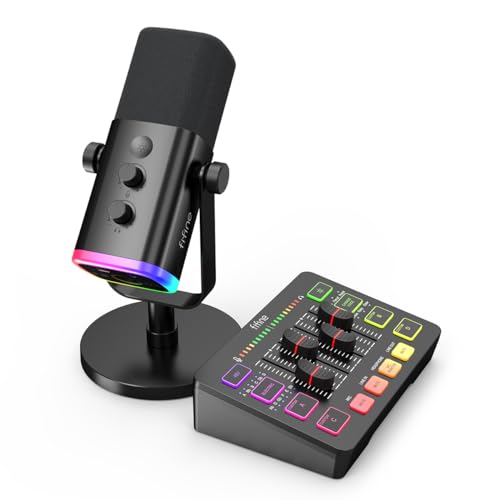
FIFINE Gaming Audio Mixer Bundle with Computer Streaming Microphone, 4-Channel RGB Mixer Set with XLR Interface, 48V Phantom Power, Dynamic Mic with Mute Button for Game Voice Podcast YouTube(SC3+AM8)
Chosen because it specifies 4-Channel RGB Mixer Set with XLR Interface and 48V Phantom Power.
View on Amazon
FIFINE USB PC Headset and Audio Mixer,Streaming Over-Ear Wired Headphones with 3.5mm Audio Jack,Detachable Microphone,Gaming Mixer with Slider Fader,XLR Microphone Interface,for Podcast(H9W+SC3W)
Chosen because it specifies Streaming Over-Ear Wired Headphones with 3.5mm Audio Jack and Detachable Microphone.
View on Amazon
PUPGSIS Gaming Audio Mixer for PC Streaming, Soundboard with Voice Changer | PC/PHONE,1/4" TRS Dynamic Mic interface,Reverb,Denoise,Mute,4 Custom Sounds, 2 interactive sound effects, RGB, Bluetooth
Chosen because it specifies Soundboard with Voice Changer and PC/PHONE.
View on Amazon
BEACN Dark Series Bundle – Dynamic USB Mic, Low Profile Mic Stand, Mix Create Audio Mixer & Studio USB XLR Interface for Streaming, Gaming & Podcasting
Chosen because it specifies Dynamic USB Mic and Low Profile Mic Stand.
View on AmazonRazer Audio Mixer: All-in-One Streaming/Broadcasting Mixer - 4-Channel Design - XLR Preamp - Built-in Voice Settings & Audio Processing - USB Connectivity - Plug & Play - Chroma RGB
Chosen because it specifies 4-Channel Design and XLR Preamp.
View on AmazonAll 6 Picks in Detail
1. MAILANGSHI Gaming Audio Mixer – Runner-Up Mixer for XLR Streaming (Headset Not Included)
As an Amazon Associate we earn from qualifying purchases at no extra cost to you.

The listing describes this as a gaming audio mixer for streaming with an XLR input and noise reduction. It is a mixer only, so it belongs in this guide as an accessory that you pair with your own headset rather than as a headset itself.
It suits a streamer who has an XLR microphone, a headset with a 3.5mm plug, and wants a simple desk box between them and the PC. The title gives few details, so the connection types, phantom power and channel count need to be checked on the product page.
If you choose a mixer this lightly documented, do a quick check of the connection list before you place an order: a lot of the usefulness of a box like this depends on whether it uses USB, a 3.5 mm cable or both, and on whether the headphone output is separate from the microphone output. A mixer that cannot talk to your PC the way you expect becomes a desk ornament.
- Type: gaming audio mixer for streaming
- Microphone input: XLR (listing name)
- Noise reduction: yes, per listing name; method, confirm on listing
- Channel count: confirm on listing
- Phantom power: confirm on listing
Pros:
- XLR input lets you use a proper broadcast microphone
- Noise reduction feature named in the title
Cons:
- Sparse specification in the listing name
- No headset included
Compared with the Razer Audio Mixer later in the list, it promises a similar role with far less published detail.
2. FIFINE Gaming Mixer Bundle with Microphone – Runner-Up Bundle for Mixer and XLR Mic (Headset Not Included)
This bundle pairs a four-channel RGB mixer with a computer streaming microphone. The listing names an XLR interface, 48V phantom power and a dynamic microphone. For someone starting from nothing on the audio side, it covers the microphone and the mixer in one order.
It is not a headset kit, so you still need headphones with a 3.5mm connector for monitoring. The advantage is that the bundled microphone and mixer are designed to work together.
For a first streaming desk this is a tidy way to get started, because the microphone arrives matched to the mixer. The dynamic microphone is a forgiving type for untreated rooms since it picks up less background noise than a condenser. If you later upgrade to a condenser microphone, the listed phantom power means the mixer can grow with you.
- Channels: 4 (listing name)
- Lighting: RGB (listing name)
- Microphone input: XLR interface (listing name)
- Phantom power: 48V (listing name)
- Bundled microphone: dynamic type; the exact model and its connection, confirm on listing
Pros:
- Mixer and microphone arrive together
- Phantom power allows for condenser mics later
Cons:
- No headset in the box
- RGB lighting adds nothing to sound
It is a better value-for-parts choice than the MAILANGSHI mixer if you also need the microphone, and it shares a brand with the headset kit that follows.
3. FIFINE USB PC Headset and Audio Mixer – Best Overall for Headset and Mixer in One

This is the one listing that matches the headline topic directly. The name describes a USB PC headset and audio mixer pair: over-ear wired headphones with a 3.5mm audio jack, a detachable microphone, and a gaming mixer with sliders. The part of the title that follows the sliders is cut off, so the full channel list and any effects need to be confirmed.
It suits a streamer who wants to plug in one kit, use sliders to balance game sound against voice, and skip the work of choosing a headset and a mixer separately.
This is the simplest route for a beginner or a gifter: plug in, set the sliders, and stream. Expect a lighter-weight build and driver class than premium standalone headsets, and confirm whether the mixer sliders cover game, chat and microphone separately. If the page includes surround or virtual 7.1 claims, remember that those are processing features and not a replacement for good stereo imaging.
- Headset: over-ear, wired, detachable microphone (listing name)
- Headphone connection: 3.5mm audio jack (listing name)
- PC connection to the mixer: USB (listing name)
- Controls: slider-style mixer (listing name)
- Microphone type, driver size, impedance and surround claims: confirm on listing
Pros:
- Headset and mixer included together
- Detachable microphone for off-stream listening
Cons:
- Bundled headsets rarely match standalone premium models in comfort or drivers
- Fewer upgrade paths than a mixer you pair with your own headphones
Next to the Razer Audio Mixer, you give up XLR flexibility in exchange for a ready-to-use headset.
4. PUPGSIS Gaming Audio Mixer – Runner-Up Mixer for Voice Effects (Headset Not Included)

The listing calls this a gaming audio mixer for PC streaming with a soundboard and voice changer. It mentions PC and phone use, a 1/4-inch TRS dynamic microphone interface, reverb, noise reduction, mute and four channels. It is another mixer-only product.
It suits an entertainment-focused streamer who wants to play sound effects and alter their voice with physical buttons rather than software hotkeys.
Voice changers and sound pads can be fun, but they work best when you configure a few presets in advance. Because the interface is 1/4-inch TRS and described for dynamic microphones, check that your current mic matches before you buy; a USB or condenser microphone will not connect the same way. The phone compatibility is a bonus for mobile streamers who switch between devices.
- Channels: 4 (listing name, partly cut off)
- Microphone input: 1/4-inch TRS for a dynamic mic (listing name)
- Effects: voice changer, reverb, denoise (listing name)
- Platforms: PC and phone (listing name)
- Phantom power and XLR support: confirm on listing
Pros:
- Voice changer and soundboard on the hardware
- Supports a phone as well as a PC
Cons:
- A 1/4-inch dynamic input excludes many condenser microphones
- No headset included
Where the Razer mixer aims for clean voice processing, this one leans toward effects.
5. BEACN Dark Series Bundle – Runner-Up Bundle for a USB Microphone Desk (Headset Not Included)

This bundle packs a dynamic USB microphone, a low-profile microphone stand, the Mix Create audio mixer and a studio USB XLR interface, per the listing name. Manufacturer information describes the Mix Create as a USB-C controller with a five-inch color display and four knobs; the company states that the standalone unit has no audio inputs or outputs of its own, so check precisely which component in the bundle handles XLR input.
It is the most desk-setup-oriented option here and suits a creator who wants software-defined channels on a screen instead of a row of sliders. A headset still has to be supplied separately.
The software-centered design means setup takes longer than with a slider box, but it also lets you build custom channel layouts and apply processing per channel. If you run a dual-PC stream or like to route different applications to different outputs, a screen-based controller is easier to read at a glance. Read the bundle contents carefully so that you know which parts you are receiving.
- Components: dynamic USB microphone, stand, Mix Create mixer, studio USB XLR interface (listing name)
- Mix Create display: five-inch color screen with four knobs, per manufacturer information
- Connection: USB-C, per manufacturer information
- Operating system support: confirm on listing, since earlier models listed Windows and macOS
- Bundle contents and cables: confirm on listing
Pros:
- Complete microphone-plus-mixer desk setup
- On-screen channel control with knobs
Cons:
- Heaviest on setup and software
- Headset not part of the package
Compared with the FIFINE microphone bundle, it is a software-driven design, while the FIFINE one is a traditional analog box.
6. Razer Audio Mixer – Runner-Up Mixer for Compact Analog Control (Headset Not Included)

The Razer mixer is a four-channel analog mixer with an XLR preamp, built-in voice settings and USB connectivity. According to Razer’s published specifications, it has a hybrid XLR and 6.35 mm input, 48V phantom power with a hardware switch, a 3.5 mm line in, line out and headphone out, a USB Type-C connection and an optical input. The converters are 24-bit at 48 kHz and the preamp gain runs from roughly minus 12 dB to about 40 dB.
It suits a streamer who already owns a headset and wants physical faders for game, chat and music channels. Razer’s own support information points to Windows only, so Mac users need to check before buying.
Because Razer published detailed specifications, you can plan around them: the optical input suits a console or soundbar feed, the line in and out connect extra gear, and the mute buttons give quick control mid-stream. Its hardware design predates the newest budget alternatives, so compare the feature list with what you actually need before paying for extras.
- Channels: four volume faders with mute buttons
- Microphone input: hybrid XLR / 6.35 mm with 48V phantom power
- Headphone output: 3.5 mm
- Digital connection: USB Type-C and an optical input
- Effects: noise gate, compressor, EQ, reverb and voice changer, per manufacturer information
Pros:
- Well-documented specification
- Tactile faders and phantom power switch
Cons:
- No headset included
- Setup tied to Razer software and Windows
It is the most fully documented mixer in this group and the clearest step up from the MAILANGSHI box.
Specs Compared
| Product | Includes headset? | Product type | Mic input | Channels | Connection to PC |
|---|---|---|---|---|---|
| MAILANGSHI mixer | No | XLR mixer | XLR | Confirm on listing | Confirm on listing |
| FIFINE mixer bundle | No | Mixer plus dynamic mic | XLR interface, 48V phantom | 4 | Confirm on listing |
| FIFINE headset and mixer | Yes | Headset plus slider mixer | Detachable headset mic | Confirm on listing | USB |
| PUPGSIS mixer | No | Mixer and soundboard | 1/4-inch TRS dynamic | 4 | PC and phone |
| BEACN Dark bundle | No | USB mic, stand, mixer, XLR interface | USB mic, XLR interface | Confirm on listing | USB-C |
| Razer Audio Mixer | No | Analog mixer | Hybrid XLR / 6.35 mm, 48V | 4 | USB Type-C |
How We Chose These
We compared each product by reading its listing title and specification fields, then checking manufacturer pages for the brands that publish them, including Razer and BEACN. We weighed whether the item includes a headset, what kind of microphone input it accepts, how many channels it offers, the connection to the PC, and whether the listing names effects such as noise reduction. Where the listing was truncated or silent, we marked the value “confirm on listing”. Because only one of the six products is a headset kit, we label the rest plainly as mixers to pair with your own headphones so no one expects a headset in the box. This is a research-based comparison of published information.
What to Look For
What a GameDAC-Style Setup Actually Does
A dedicated external DAC and headphone amplifier takes digital audio from the PC, converts it with its own chip and drives the headphones from a separate output stage. Beyond cleaner conversion than many motherboard outputs, the real benefit for streaming is the control surface: separate dials or faders for game, chat, music and system sounds. That lets you turn down a loud game without lowering your friends’ voices, and it can send a different mix to the stream than the one in your ears. Mixers in this group do the routing and balance; only the FIFINE kit adds the headset.
Microphone Connection: XLR, USB or 3.5 mm
XLR microphones need a preamp, and many condenser models also need 48 volts of phantom power. Dynamic microphones usually do not, and some ribbon microphones can be damaged by phantom power, so always switch it off before connecting or disconnecting a microphone. A 1/4-inch TRS dynamic input, as on the PUPGSIS mixer, suits dynamic microphones but not condensers. USB microphones bring their own converter and bypass the mixer’s preamp, which suits the BEACN approach. A headset’s attached 3.5 mm microphone is the simplest option but is generally not a match for a dedicated broadcast mic.
Channels and Routing
A practical streaming mix needs at least four lanes: game, voice chat, music and system or alerts. Four physical faders cover those with no software. If you want a separate mix for your stream that differs from your headphone mix, look for a product that supports virtual channels or a second output. A rule of thumb is to keep stream music about 10 to 15 dB below your voice, and to set microphone gain so your normal speaking voice peaks in the upper-middle of the meter without hitting the red.
Sample Rate, Latency and Headphone Power
For streaming, 24-bit conversion at 48 kHz is the practical standard, since broadcast software and most video platforms work at 48 kHz. Higher sample rates add little for a voice stream. Latency matters when you monitor your own voice: a hardware monitor path that does not pass through the PC avoids lag. Check the headphone output impedance rating and the headphone’s own impedance; most gaming headsets between 32 and 64 ohms are comfortable on a mixer’s output, while high-impedance studio headphones need an amplifier with more drive.
Compatibility and Software
Several mixers in this category rely on Windows-only companion software, and some do not support macOS or consoles at all. Check the operating systems on the product page before buying, and check whether you must install a driver. If you stream from a console, a mixer with an optical or line input is more useful than a USB-only controller.
A Sample Streaming Setup
Imagine a streamer with a pair of 3.5 mm headphones, an XLR dynamic microphone and a PC. With a four-channel mixer, the microphone takes channel one, the game audio takes a second channel, voice chat the third and music the fourth. Set the game faders low enough that voices stay clear, then check your stream recording to confirm that your voice sits comfortably above the music. Save the settings in the companion software if the mixer offers presets, so the next session starts from a known good point. If you instead pick the FIFINE headset kit, the headset microphone takes the place of the XLR mic and you give up the upgrade path but keep a simpler desk.
Questions
Is a GameDAC the same as an audio mixer?
Not exactly. A GameDAC-style device is an external DAC and amplifier that often includes mixing controls, while an audio mixer may not include a headphone DAC of the same quality. The products here are mixers or bundles; check the specifications for conversion details.
Do I need a mixer for streaming?
No, you can balance everything in software. A hardware mixer makes quick adjustments easier during a live stream and keeps your hands on faders rather than in menus. It is a convenience that many streamers find worthwhile.
Do these mixers work with any headset?
Most accept headphones through a 3.5 mm output, but headset microphones may need a separate input. Check whether the mixer has a combined headset jack or separate headphone and microphone jacks.
What does 48V phantom power do?
It sends power down an XLR cable to condenser microphones that need it. Dynamic microphones do not require it, so leave it off unless your microphone’s manual says otherwise.
Is the FIFINE headset kit good enough for streaming?
It is a convenient all-in-one choice for beginners, but the headset is a budget-class design. If audio quality is a priority, pairing a mixer with a separately chosen headset gives more control.
Will these work on a console?
Some may, if they have line or optical inputs, but many are PC-focused. Confirm console support on the product page before buying.
Can I use my existing headset with these mixers?
For the mixer-only products, usually yes, as long as the headset has a 3.5 mm plug and you do not need its microphone to connect through the mixer. A USB-only headset bypasses the mixer entirely.
Update History
- October 20, 2026 – Initial publication; product set drawn from current catalog listings.
- Check the product page for current specifications and availability before buying.
Sources
- Manufacturer product and specification pages for Razer and BEACN
- Retailer listing titles and specification fields for each product named above