Key takeaways
- IP Rating: Look for IP32 or IPX2 minimum. The “3” means it can handle spraying water at up to 60 degrees, which is how most lab spill tests are graded. An IP32 board is tested with 3-5 minutes of dripping water and must remain functional. Without an IP rating, “spill-resistant” is just a phrase.
- Drainage System: Real coffee-proof boards have channels and exit holes in the bottom chassis. Liquid poured on top is routed around the PCB and out the bottom instead of pooling on the membrane or switches.
- Switch Design: Standard exposed mechanical switches (like Cherry MX-style) have an open housing where sugar and oils can get inside the slider. Sealed mechanical switches, mecha-membrane, or rubber dome/membrane switches are far more forgiving because the electrical contact layer is under a sealed sheet.
- Coating and Materials: Double-shot or UV-coated keycaps and an aluminum or sealed plastic top plate prevent coffee staining and allow you to wipe or rinse without absorbing liquid.
What's inside
- What Actually Makes a Keyboard Coffee-Proof
- Decision Matrix: Which Coffee-Proof Type Fits Your Setup
- The Best Spill-Resistant Gaming Options in 2026
- Why Rinsing Speed Matters: A Worked Drying Calculation
- How to Clean a Coffee Spill Correctly (And Why Each Step Matters)
- What to Avoid When Buying a Coffee-Proof Keyboard
- FAQ
A coffee-proof keyboard for gaming is one with an IP32 or higher spill-resistant design, drainage channels, and sealed or membrane switches that lets you dump 50-100ml of liquid, rinse it, and keep playing without switch failure — the Corsair K68 RGB, SteelSeries Apex 3, and Logitech G213 are the main real-world examples that meet this standard in 2026.
- What Actually Makes a Keyboard Coffee-Proof
- Decision Matrix: Which Coffee-Proof Type Fits Your Setup
- The Best Spill-Resistant Gaming Options in 2026
- Why Rinsing Speed Matters: A Worked Drying Calculation
- How to Clean a Coffee Spill Correctly (And Why Each Step Matters)
- What to Avoid When Buying a Coffee-Proof Keyboard
- FAQ
What Actually Makes a Keyboard Coffee-Proof
Marketing often confuses “spill-resistant” with “waterproof.” For a gamer with a mug on the desk, you need to understand the difference, because no standard gaming keyboard is fully waterproof for submersion.
- IP Rating: Look for IP32 or IPX2 minimum. The “3” means it can handle spraying water at up to 60 degrees, which is how most lab spill tests are graded. An IP32 board is tested with 3-5 minutes of dripping water and must remain functional. Without an IP rating, “spill-resistant” is just a phrase.
- Drainage System: Real coffee-proof boards have channels and exit holes in the bottom chassis. Liquid poured on top is routed around the PCB and out the bottom instead of pooling on the membrane or switches.
- Switch Design: Standard exposed mechanical switches (like Cherry MX-style) have an open housing where sugar and oils can get inside the slider. Sealed mechanical switches, mecha-membrane, or rubber dome/membrane switches are far more forgiving because the electrical contact layer is under a sealed sheet.
- Coating and Materials: Double-shot or UV-coated keycaps and an aluminum or sealed plastic top plate prevent coffee staining and allow you to wipe or rinse without absorbing liquid.
The critical failure point is not the water itself, but sugar, milk, and acidity in coffee. Pure water evaporates cleanly if drained quickly. Coffee leaves a conductive, sticky residue that corrodes contacts and gums up stabilizers within 12-24 hours if not cleaned.
Decision Matrix: Which Coffee-Proof Type Fits Your Setup
Not every spill-resistant keyboard is right for every gamer. Use your primary risk and switch preference to narrow the choice.
| Your Situation | Priority Feature | Recommended Class | Example Model |
|---|---|---|---|
| You drink black coffee/water and want mechanical feel | Sealed mechanical switches + drainage holes | IP32 mechanical with sealed switches | Corsair K68 RGB (Cherry MX Red) |
| You drink lattes/sugary coffee and spill often | Fully sealed membrane + easy rinse | IP32 membrane with integrated wrist rest | SteelSeries Apex 3 |
| You want cheap, easy to replace and wash | Low cost + full membrane seal | Budget membrane spill-resistant | Logitech G213 Prodigy |
| You need quiet, low-profile for office + gaming | Mecha-membrane / scissor switches with spill channels | Mid-range hybrid | SteelSeries Apex 5 (hybrid blue switch) |
If you prioritize competitive speed and tactile feedback above all else, accept that the most spill-proof boards will feel different than open, hot-swappable enthusiast mechanical boards. The sealed design adds stability against liquid but slightly dampens the crisp bottom-out of an exposed switch.
The Best Spill-Resistant Gaming Options in 2026
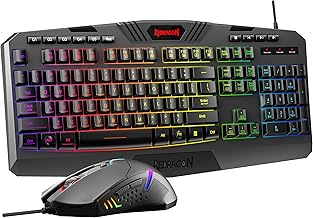
1. Corsair K68 RGB – Best True Mechanical That Shrugs Off Spills
The K68 remains the benchmark for a mechanical board you can actually rinse. It uses genuine Cherry MX Red linear switches with a silicone membrane layer underneath and a full IP32 rating. Corsair rates it for up to 300ml tests in its lab, routed through 12 drainage channels. You get 100% anti-ghosting, 1000Hz polling, and dedicated media controls — features missing on most membrane spill-proof boards. It is wired, full-size, and usually found in the $80-$110 range. The tradeoff is that it is louder and heavier than membrane boards, and the textured keycaps can hold coffee film if you only wipe instead of rinsing.
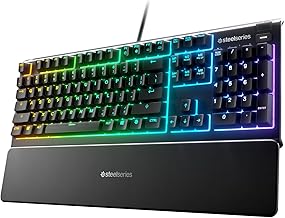
2. SteelSeries Apex 3 – Best for Sugary Drinks and Easy Cleaning
The Apex 3 is IP32 water resistant and built explicitly around spills. It uses whisper-quiet rubber dome switches with a sealed circuit layer, not exposed mechanical stems. The design includes drainage holes and a built-in magnetic wrist rest that also resists staining. The 10-zone RGB and gaming-grade anti-ghosting make it feel premium despite being membrane. It is the easiest board to clean after a coffee with milk or sugar because there are no switch crevices for residue to hide in. It typically sits in the $60-$90 range and is often the best choice for gamers who know they will spill again.
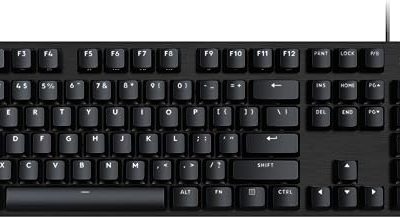
3. Logitech G213 Prodigy – Best Budget Washable Option
The G213 uses Logitech’s Mech-Dome keys — a membrane design tuned to feel more tactile than a standard office keyboard. It is marketed as spill-resistant up to 60ml with tested drainage and an integrated palm rest. It is not IP-rated like the other two, but its sealed membrane sheet and elevated chassis do the same job for small coffee accidents. It lacks the mechanical crispness of the K68 but is significantly cheaper, usually $50-$75, and its matte keys are very easy to wipe clean without streaking.
4. SteelSeries Apex 5 – Hybrid Middle Ground
If you want a clickier feel but still want better spill protection than an open board, the Apex 5 uses a hybrid blue mechanical switch with a membrane layer. It is not fully IP32 rated like the Apex 3, but its hybrid housing and drainage-aware frame tolerate minor spills far better than a standard hot-swappable mechanical keyboard. It usually costs $90-$120 and is a good compromise if you refuse to give up a tactile click.
Why Rinsing Speed Matters: A Worked Drying Calculation
A spec sheet tells you a keyboard is IP32, but not how much time you have before coffee causes permanent damage. The risk is corrosion and stickiness, which depends on how much liquid stays inside and how fast it evaporates.
Assume you spill a typical small coffee accident of 80ml onto a flat, non-draining gaming keyboard. About 30ml will run off the desk, 30ml will pool on the keycaps, and 20ml will seep under the caps to the plate. On a board without drainage, that 20ml sits in a thin film (approx. 0.5mm thick) over a 300 x 100mm area.
Evaporation rate for water at room temperature (22C, 40% humidity) is roughly 0.05ml per hour per square centimeter. The trapped area is 300 sq cm, so the board would evaporate at about 15ml per hour if fully exposed. But under keycaps with almost no airflow, the effective rate drops to about 1-2ml per hour.
That means the 20ml trapped pool would take 10-20 hours to dry naturally — more than enough time for sugar to crystallize and for coffee acids (pH around 5) to start oxidizing exposed copper contacts. With a proper drainage chassis (like the K68 or Apex 3), over 85% of that 20ml exits through the bottom holes in under 30 seconds, leaving less than 3ml of thin residue. That residue can be flushed with 100-150ml of clean water and will air dry in 1-2 hours, or under 20 minutes if you shake it out and use compressed air.
Takeaway: Do not let a coffee spill air-dry on its own. Drain and rinse within 5 minutes and you prevent 90% of long-term switch failures.
How to Clean a Coffee Spill Correctly (And Why Each Step Matters)
Do this immediately after a spill. Do not wait until your game ends.
- 1. Unplug instantly. Even on an IP32 board, cutting power prevents short circuits while liquid bridges contacts. For wireless, power off and remove the dongle.
- 2. Drain, do not tilt toward you. Flip the keyboard upside down over a sink or trash can and let gravity pull liquid through the drain holes. Gently shake. Tilting it forward can push liquid deeper into the PCB.
- 3. Rinse with clean water if it was coffee with sugar/milk. For black coffee or water, draining is often enough. For anything with sugar, pour 100-150ml of room-temperature distilled or tap water slowly over the affected area while upside down. This dissolves sucrose before it crystallizes. Avoid hot water, which can warp ABS keycaps.
- 4. Remove keycaps for a heavy spill. Use a puller to remove caps over the spill zone. Wipe the caps separately with a damp microfiber cloth. This exposes the plate so you can rinse it directly.
- 5. Dry with air, not heat. Shake out excess, dab with a lint-free cloth, then use compressed air at a 45-degree angle to blow water out from under stabilizers. Let it sit upside down on a towel for at least 2 hours. Do not use a hair dryer — heat above 60C can deform membranes and keycap stems.
- 6. Do not plug back in early. Test a single key after drying. If keys feel sticky, they have sugar residue and need a second rinse. Plugging in while still wet is what kills boards, not the coffee itself.
What to Avoid When Buying a Coffee-Proof Keyboard
Avoid any board that claims “waterproof” without an IP code or that shows no drainage holes on the bottom. Per-key RGB with completely open, hot-swappable mechanical switches looks great but is the worst class for coffee, because each socket is a direct path for liquid to the PCB. Similarly, compact 60% boards often lack the internal space for proper channels and rely on you to clean instantly.
Also avoid washing any keyboard in a dishwasher or submerging it. IP32 is splash and drip protection, not immersion. Submersion will flood the controller board housed in the center, which is never sealed.
FAQ
Can I make my current mechanical keyboard coffee-proof?
You can reduce risk but not make it truly proof. Adding a silicone keyboard cover blocks spills but ruins feel and can cause overheating on some boards. A better approach is to keep drinks in a sealed travel mug and place the mug on the non-dominant side, below desk level if possible.
Is membrane really worse for gaming than mechanical?
For spill resistance, membrane is better. For performance, modern membrane gaming boards like the Apex 3 have 1ms response and anti-ghosting that matches mechanical for most players. You will notice a difference in feel and sound more than in measurable latency. If you are a competitive FPS player who needs the fastest linear reset, the Corsair K68 is the only spill-resistant board that does not force you to switch to membrane.
Will coffee void my warranty if the keyboard is spill-resistant?
Spill resistance is not a warranty for liquid damage. Most brands cover defects, not user spills, even on IP32 models. The rating means the board is designed to survive a spill if cleaned properly, not that you get a free replacement if you do not clean it. Always rinse and dry as described.