Key takeaways
- Intake and exhaust balance: aim for slightly more intake than exhaust so fresh air is pushed through the case as gentle positive pressure, which also cuts dust buildup.
- Front-to-back, bottom-to-top: cool air enters low and front, hot air leaves high and rear, following the natural rise of heat.
- Clear the path: tidy cables and blank off unused drive bays so air is not obstructed.
- Radiator placement: mount an AIO like the CORSAIR Nautilus 360 RS ARGB as front intake or top exhaust, whichever your case supports best.
What's inside
Heat is the quiet enemy of gaming performance. When a CPU or GPU gets too hot it throttles, quietly dropping clock speeds to protect itself, and your frame rates sag right when the action heats up. Good cooling is not about chasing the lowest possible temperature for bragging rights; it is about keeping components comfortably within their limits so they run at full speed, stay quiet, and last for years.
This guide explains how PC cooling actually works, how to choose between air and liquid coolers, why case airflow matters as much as the cooler itself, and how to keep your system running cool over the long term. Whether you are building fresh or fixing a machine that spikes into the 90s, you will come away knowing exactly what to change and why.
As an Amazon Associate we earn from qualifying purchases at no extra cost to you. Product prices and availability are accurate as of the date shown and are subject to change.






⚡ Save on Your Next PC — Amazon Prime
Prime members get fast free shipping on the systems above, plus early access to Prime Day & Black Friday PC deals. New members get a 30-day free trial.
Watch: How to Cool Your Gaming PC (2026 Guide) — Video Review
Air Versus Liquid Cooling
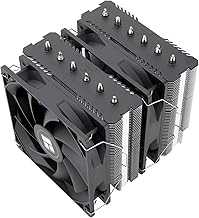
Both approaches move heat away from the CPU; they just do it differently. A quality air cooler uses heat pipes and a fin stack with one or two fans, and modern towers are astonishingly capable. The Thermalright Peerless Assassin 120 SE and Cooler Master Hyper 212 PRO ARGB handle mainstream and even many high-end chips while costing little and lasting indefinitely. All-in-one (AIO) liquid coolers like the ARCTIC Liquid Freezer III Pro 360 or CORSAIR Nautilus 360 RS move heat to a radiator via a pump, offering more headroom for hot, high-core-count CPUs and a cleaner look, at a higher price and with a pump that can eventually wear out.
Match the Cooler to Your CPU
Pick your cooler by the CPU’s thermal output, not by how it looks. A mid-range processor is perfectly happy on a compact air cooler such as the Thermalright Assassin X120 Refined SE. A high-wattage flagship that you plan to push hard benefits from a large dual-tower air cooler or a 360 mm AIO like the ARCTIC Liquid Freezer III Pro 360 A-RGB. Also confirm two practical things before buying: that the cooler physically fits your case (tower height or radiator length) and that it clears your RAM and top-mounted components.
Case Airflow Is Half the Battle
- Intake and exhaust balance: aim for slightly more intake than exhaust so fresh air is pushed through the case as gentle positive pressure, which also cuts dust buildup.
- Front-to-back, bottom-to-top: cool air enters low and front, hot air leaves high and rear, following the natural rise of heat.
- Clear the path: tidy cables and blank off unused drive bays so air is not obstructed.
- Radiator placement: mount an AIO like the CORSAIR Nautilus 360 RS ARGB as front intake or top exhaust, whichever your case supports best.
Fan Setup and Noise
More airflow does not have to mean more noise. Larger, slower-spinning fans move the same air as small screamers while staying quiet, which is why 120 mm and 140 mm fans dominate. Set a sensible fan curve in your BIOS or software so fans stay calm at idle and ramp only under load. Coolers bundled with good PWM fans, such as the Peerless Assassin 120 SE ARGB with its TL-series fans, let you tune this balance precisely. The goal is a machine you cannot hear at the desktop but that spins up smoothly when a game demands it.
Maintain Cooling Over Time
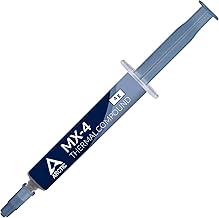
Cooling degrades quietly. Dust clogs fins and filters, restricting airflow month by month, and thermal paste dries out over several years. Clean dust filters every couple of months with compressed air, and reapply thermal paste if temperatures creep up after two or three years of heavy use. For AIO owners, keep an ear out for pump noise, which can signal air in the loop or a pump nearing the end of its life. A few minutes of upkeep keeps a good cooler performing like new.
Tips
- Apply a pea-sized dot of thermal paste; more is not better and can insulate rather than conduct.
- Set a fan curve that keeps fans quiet under 50 C and ramps gradually, avoiding sudden noisy spikes.
- Run a stress test after any cooling change and watch temperatures, aiming to stay under about 85 C on the CPU.
- Clean intake dust filters every one to two months, more often if you have pets or a carpeted room.
Frequently Asked Questions
Is liquid cooling better than air cooling?
Not automatically. A good 360 mm AIO offers more headroom for very hot CPUs and a sleeker look, but a top-tier air cooler matches many liquid coolers, costs less, and has no pump to fail. Choose based on your CPU’s heat output and your case, not on prestige.
What temperature is too hot for a gaming PC?
Brief spikes into the high 80s Celsius under load are normal, but sustained temperatures above roughly 90 C mean the component is throttling. If you see that, improve case airflow, upgrade the cooler, or reapply thermal paste.
How many case fans do I need?
Two intake and one exhaust is a solid baseline for most mid-tower builds. Add more only if temperatures stay high, and prioritize balanced airflow and clear paths over simply cramming in fans.
How often should I reapply thermal paste?
For most users every two to three years is plenty, or whenever you remove the cooler. If idle and load temperatures slowly climb over time despite clean fans, dried paste is a likely culprit.
Conclusion
Cooling a gaming PC well is a system, not a single part: the right cooler for your CPU, balanced case airflow, a quiet and sensible fan curve, and a little routine maintenance. Get those working together and your components hold their clocks, run quietly, and stay reliable for years. Whether you go with a proven air tower or a 360 mm AIO, match it to your hardware and let good airflow do the rest.